Geekzone: technology news, blogs, forums
Guest
Welcome Guest.
You haven't logged in yet. If you don't have an account you can register now.


View this topic in a long page with up to 500 replies per page Create new topic
1 | 2 
godber
75 posts

Master Geek
+1 received by user: 46

ID Verified
Trusted
Lifetime subscriber

  #3157727 9-Nov-2023 17:29
Send private message

Also on Quic I have the same issue about 2gbps down, depending in the Speedtest server, Chorus Fibre Lab being the most reliable.  While upload is around 450mbps.


Router is a Mikrotik CCR2116-12G-4S+ with a Mikrotik RJ45 SFP+ 10/100/1000M 2.5G/5G/10G copper module installed  It has 16 cores and 16 GiB of memory so resources are not an issue.  However PPPOE only uses one core, that hits about 83% on download when at 2gbps but on upload never goes above 15%.


Server is a dual Xeon HP DL380 G9 with 192 GiB memory.  It is running ubuntu Linux on the hardware not as a VM and am using the Speedtest CLI from https://www.speedtest.net/apps/cli.


So hardware at my end should not be an issue even with PPPOE, I once hit just over 1gbps upload so likely all setting at the ISP/Chorus end are correct.


Will have to wait for PoE (DHCP) to see if that solves.  But even on good hardware PPPOE seems to be an issue.


Godfrey
Auckland/Coroglen, New Zealand
Quic Broadband - 4G Hyperfibre


Referral Link:
Quic (use R71004E9PVBJ on checkout for free setup)


RunningMan
9185 posts

Uber Geek
+1 received by user: 4838


  #3157730 9-Nov-2023 17:42
Send private message

@godber 1500 MTU on the PPP connection?


godber
75 posts

Master Geek
+1 received by user: 46

ID Verified
Trusted
Lifetime subscriber

  #3157731 9-Nov-2023 17:49
Send private message

RunningMan:


@godber 1500 MTU on the PPP connection?


@RunningMan 1492 MTU on the PPP connection.  It autodetects.


Godfrey
Auckland/Coroglen, New Zealand
Quic Broadband - 4G Hyperfibre


Referral Link:
Quic (use R71004E9PVBJ on checkout for free setup)


RunningMan
9185 posts

Uber Geek
+1 received by user: 4838


  #3157736 9-Nov-2023 19:11
Send private message

@godber set max MTU & MRU to 1500 for the PPPoE connection. Assuming untagged then set the MTU of the physical ethernet interface to 1508. Quic supports full 1500 on PPPoE.


BMarquis
465 posts

Ultimate Geek
+1 received by user: 577

Trusted
Chorus
Lifetime subscriber

  #3157738 9-Nov-2023 19:50
Send private message

That 8Bytes of inefficiency by not using 1500B PPP MTU only translates to 0.53%.
So on a 2gbps service, you only loose 10mbps.

While it’s good to use optimal settings…
I don’t think MTU is contributing in any meaningful way to the issues that users are reporting here.

godber
75 posts

Master Geek
+1 received by user: 46

ID Verified
Trusted
Lifetime subscriber

  #3157823 9-Nov-2023 23:25
Send private message

RunningMan:


@godber set max MTU & MRU to 1500 for the PPPoE connection. Assuming untagged then set the MTU of the physical ethernet interface to 1508. Quic supports full 1500 on PPPoE.


@RunningMan Many thanks that made a substantial difference.  Download is still at 2Gbps but upload is now about 1.6Gbps


Interesting on upload PPPoE seems to use multiple cores as about 6 cores hit about 35%  While download with the new MTU & MTR hit 93%.


The change happened automatically to PPPoE when I changed the physical ethernet interface to 1508.  But I have made the change to max MTU & MRU to 1500 for the PPPoE connection as well.


Godfrey
Auckland/Coroglen, New Zealand
Quic Broadband - 4G Hyperfibre


Referral Link:
Quic (use R71004E9PVBJ on checkout for free setup)


Shop on-line at New World now for your groceries (affiliate link).
kennedybaird

63 posts

Master Geek
+1 received by user: 50

ID Verified

  #3157836 10-Nov-2023 06:52
Send private message

RunningMan:


Easy to check - look at the CPU usage when uploading and see if 1 core is saturated.


They aren't getting anywhere near saturated. Max 25%, shared across the 4 cores.

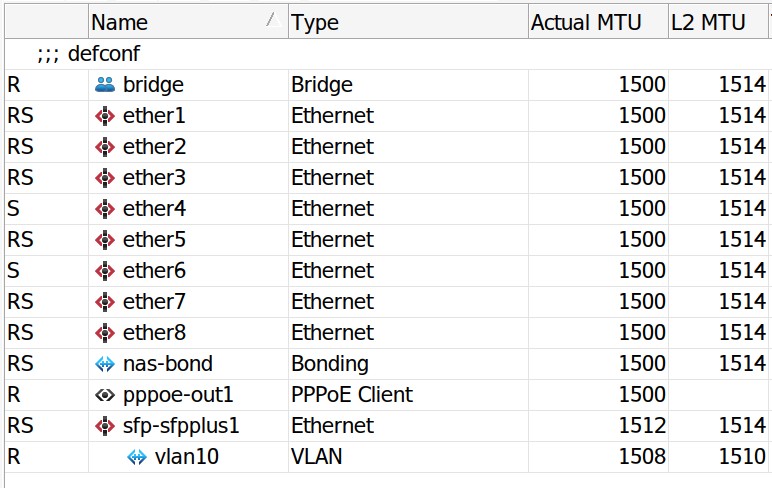
This is what I updated my MTU values to a while back (you gave me this advice when I was trying ZeroNet):


Is that correct, or should sfp be 1508? SFP port is incoming from ONT


nzkc
1634 posts

Uber Geek
+1 received by user: 1041


  #3157939 10-Nov-2023 10:12
Send private message

I think it should be 1508. I'd definitely try it! Easy to switch back if it makes zero difference.


RunningMan
9185 posts

Uber Geek
+1 received by user: 4838


  #3158073 10-Nov-2023 15:13
Send private message

@kennedybaird that's fine, assuming you're running a tagged connection. In fact it'll work OK on untagged as well. You wouldn't get the full 1500 byte PPPoE frame size otherwise. In System/Resources are you looking at the individual CPU core loads or the combined because 25% could be one core saturated.


RunningMan
9185 posts

Uber Geek
+1 received by user: 4838


  #3158074 10-Nov-2023 15:16
Send private message

BMarquis: That 8Bytes of inefficiency by not using 1500B PPP MTU only translates to 0.53%.
So on a 2gbps service, you only loose 10mbps.


Totally agree with that, assuming you can saturate the link, but that doesn't seem to be happening in this case. It was more if the router was hitting a CPU limit or something due to having to fragment packets.


BMarquis
465 posts

Ultimate Geek
+1 received by user: 577

Trusted
Chorus
Lifetime subscriber

  #3158077 10-Nov-2023 15:27
Send private message

Fair call, I hadn't considered that.
Or worse, just simply not fragmenting and ditching frames over 1492 :D


Stream your favourite shows now on Apple TV (affiliate link).
kennedybaird

63 posts

Master Geek
+1 received by user: 50

ID Verified

  #3158095 10-Nov-2023 16:32
Send private message

RunningMan:


@kennedybaird that's fine, assuming you're running a tagged connection. In fact it'll work OK on untagged as well. You wouldn't get the full 1500 byte PPPoE frame size otherwise. In System/Resources are you looking at the individual CPU core loads or the combined because 25% could be one core saturated.


Tagged - I set VLAN ID 10 when setting up. This is what you mean?

As for the CPU - it's max approx 20% across all four cores when downloading speedtest, max a single core went to was 31%.

For uploading, it's doing the same but the figures are lower all round. No single core is saturated.


RunningMan
9185 posts

Uber Geek
+1 received by user: 4838


  #3158100 10-Nov-2023 16:53
Send private message

Yes re the tagging - you obviously requested a tagged connection with Quic as default is untagged.


That's interesting when compared to what @godber is seeing on different Mikrotik hardware. @godber is close to saturating a single core on the CCR2116 with 2GHz ARM processor whereas the RB5009 (1400MHz) is nowhere near that. Haven't checked if the RB5009 switch chip will do the VLAN tagging in hardware, but that could explain the extra load across other cores if it doesn't (or not using fasttrack or more complex firewall rules too). I wonder if the CCR2116 reduces the clock speed unless multiple cores are getting loaded up?


Be interesting to look at tools/profile to see what's eating the CPU time.


1 | 2 
View this topic in a long page with up to 500 replies per page Create new topic


Geekzone Live »

Try automatic live updates from Geekzone directly in your browser, without refreshing the page, with Geekzone Live now.


Are you subscribed to our RSS feed? You can download the latest headlines and summaries from our stories directly to your computer or smartphone by using a feed reader.