Geekzone: technology news, blogs, forums
Guest
Welcome Guest.
You haven't logged in yet. If you don't have an account you can register now.


kennedybaird

63 posts

Master Geek
+1 received by user: 50

ID Verified

#310643 8-Nov-2023 16:09
Send private message

Curious whether or not others are noticing a consistent issue with speeds on hyperfibre, or if it's possible that I'm doing something wrong.

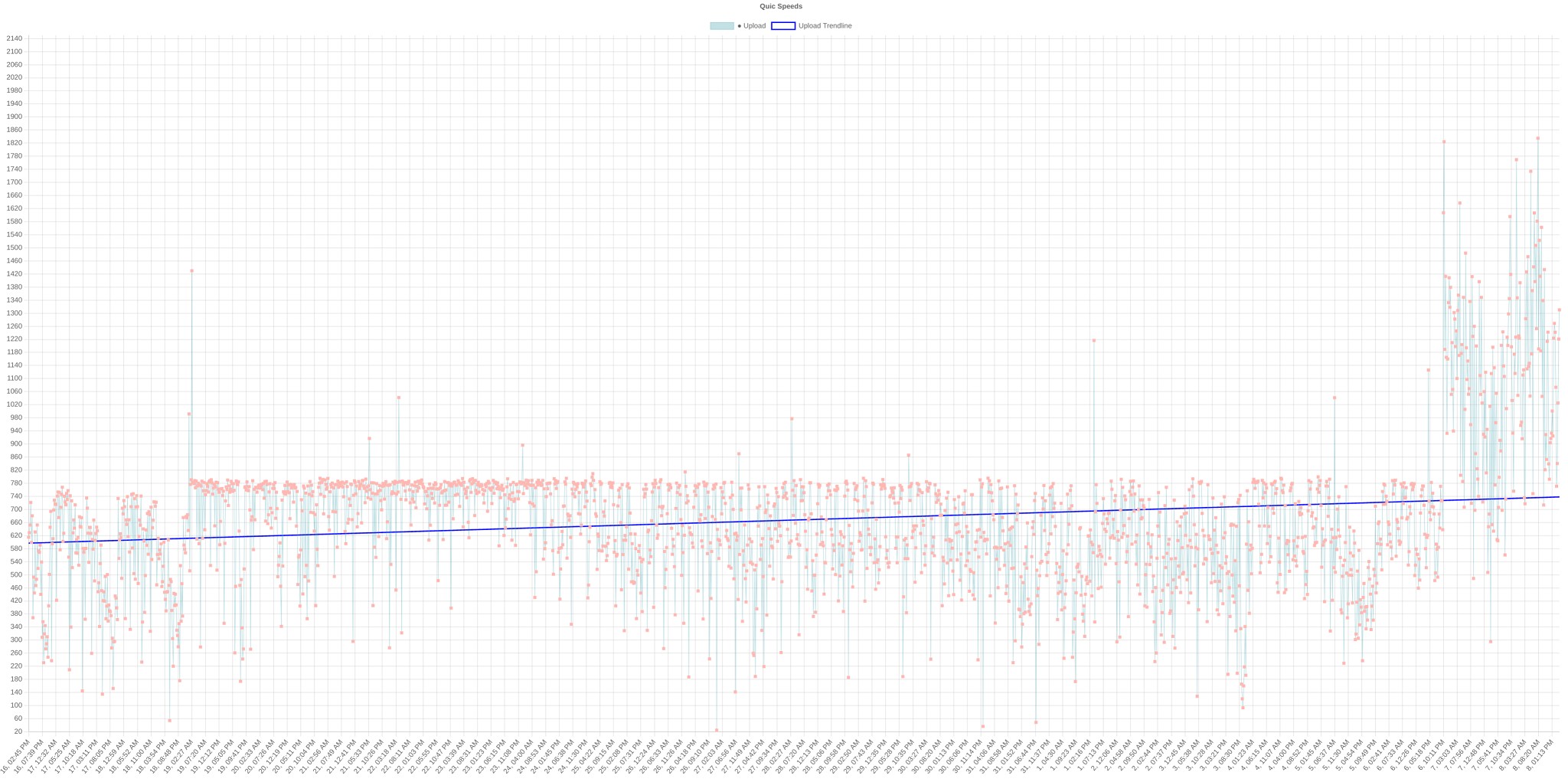
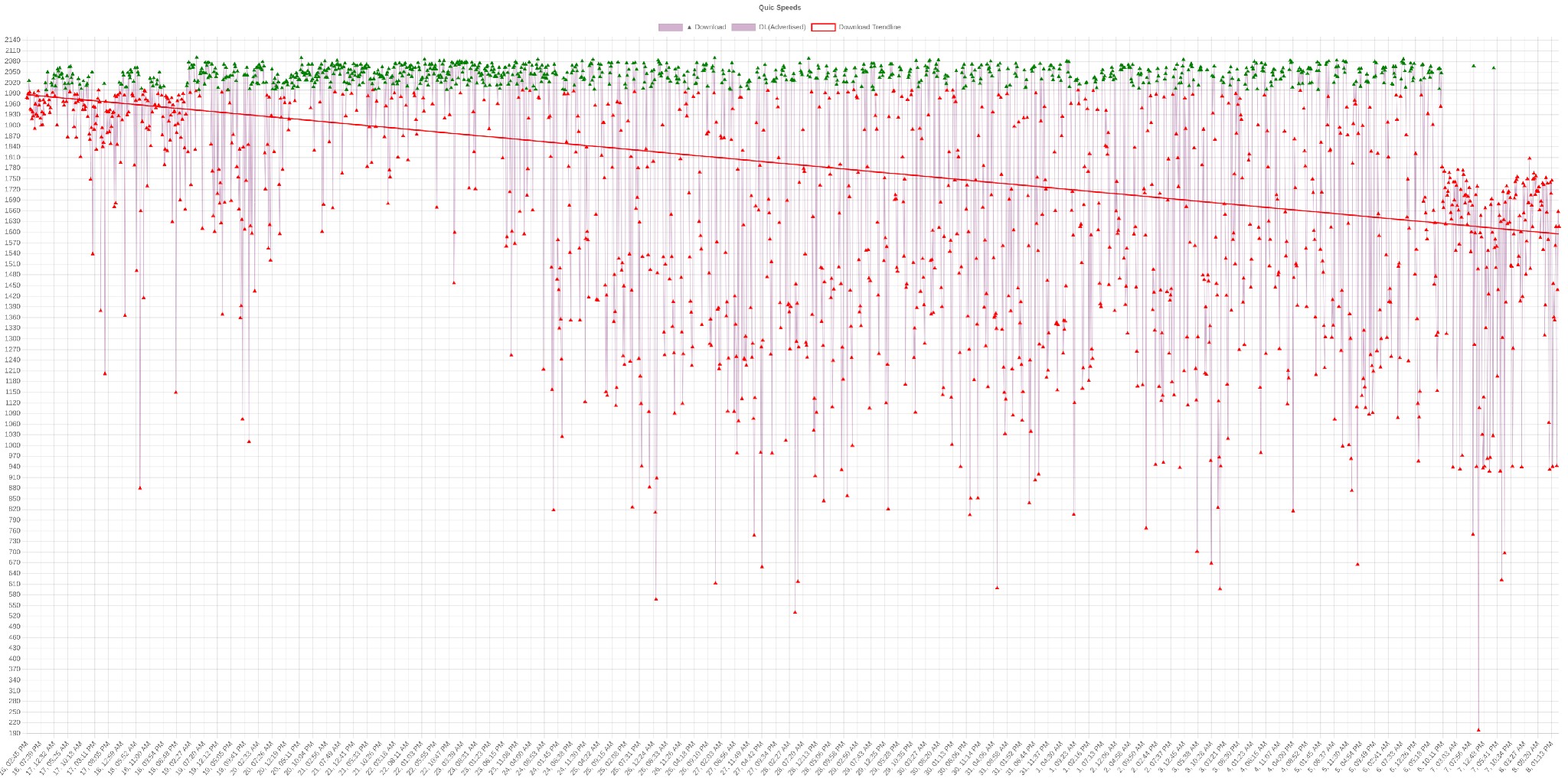
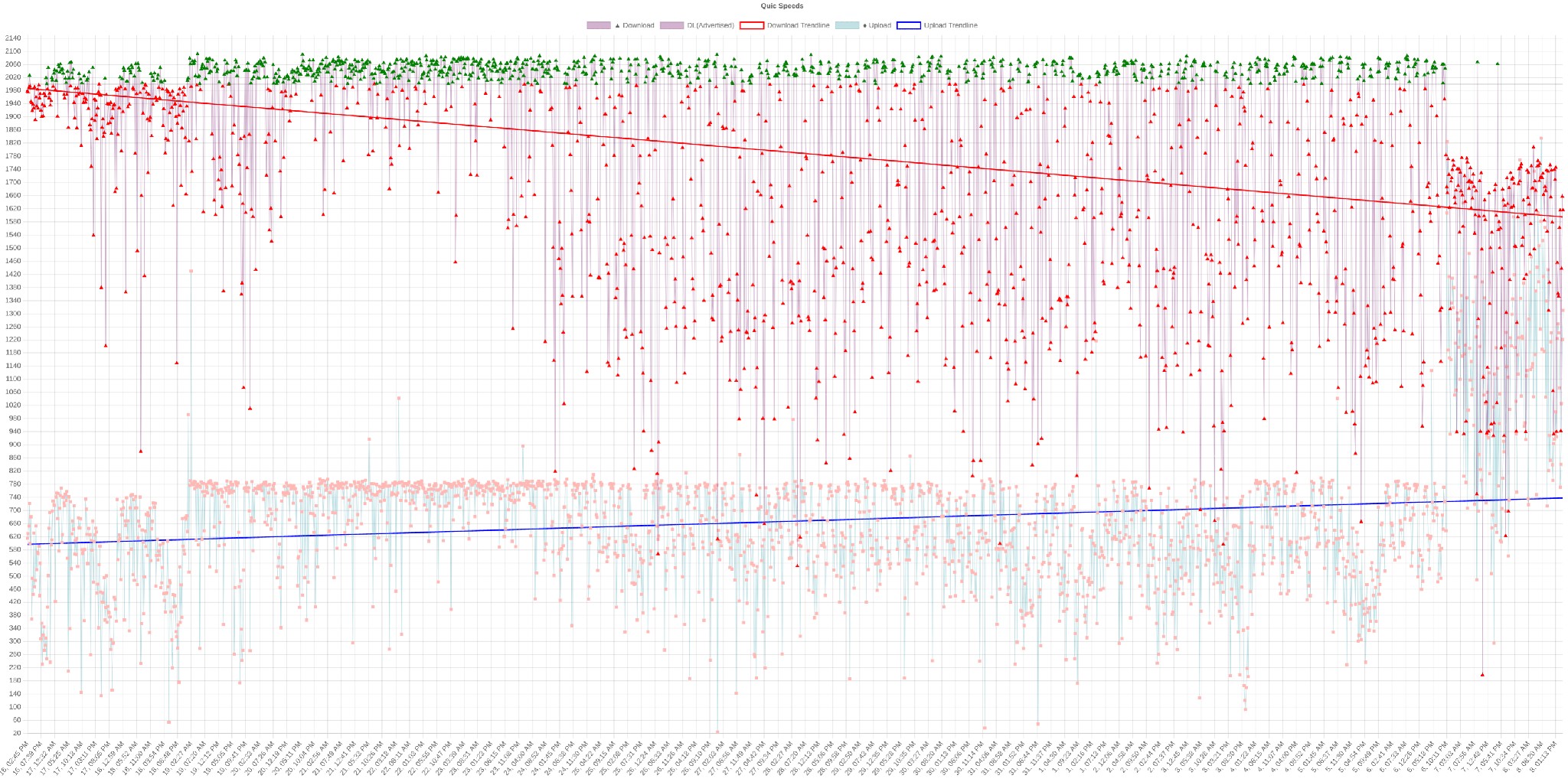
Have been running these speedtests every 15 minutes on average for ~22 days now.

There was an interesting stabilisation around the 19th, then some slight degradation over the month.

But the main concern is upload - have never been remotely near 2G upload until something changed a couple of days ago, which has also resulted in the first consistent significant change to download speeds.

If I am able to get above 2gbps down - yet the average down has only been ~670mbps, does that mean the problem is outside my setup? I'm still new to some of this, so any thoughts are appreciated.

Upload


Download


Both


Stats



View this topic in a long page with up to 500 replies per page Create new topic
 1 | 2
michaelmurfy
meow
13579 posts

Uber Geek
+1 received by user: 10910

Moderator
ID Verified
Trusted
Lifetime subscriber

  #3157318 8-Nov-2023 16:16
Send private message

Please run Speedtests at most every hour. Every 15mins and you’re just causing unnecessary load on both your connection, your ISP’s network as well as the Speedtest server. It is pointless at best to do any more than one per hour. Especially on a Hyperfibre connection this can be seen as somewhat rude to speedtest server operators.

That aside. There is a huge amount of work on Quic’s network also introducing IPoE (DHCP) which will improve things vastly for you. That’s coming soon and a few of us (myself included) have been beta testing it too.

Without knowing more about your setup I’m not sure if it is your setup or what causing it. But PPPoE on Hyperfibre is the problem with most setups out there.


Michael Murphy | https://murfy.nz
Referral Links: Quic Broadband (use R122101E7CV7Q for free setup)

Are you happy with what you get from Geekzone? Please consider supporting us by subscribing.
Opinions are my own and not the views of my employer.


kennedybaird

63 posts

Master Geek
+1 received by user: 50

ID Verified

  #3157323 8-Nov-2023 16:29
Send private message

Noted @michaelmurfy. Have adjusted to every 2 hours to be a little more respectful.

I'm running a Mikrotik RB5009. WAN is 10G SFP module, internally everything is running on Cat6A with minimal length runs. PC that I'm testing from is 10m away from router, and is plugged into the 2.5g.

The thing that is most confusing to me is that I've never seen upload reaching anywhere near the line limit, yet the download is reasonably consistently at the advertised speed. I don't understand why there's such a huge difference, it uses the same cabling for both directions.

The only other thing I can think of is my pihole, but with the recent occurrences of higher speeds on upload, it seems to remove that as a culprit.

I did sign up to beta test as well, didn't get a response in the end but I know the quic team are busy.


MattEast
277 posts

Ultimate Geek
+1 received by user: 95

Trusted

  #3157404 8-Nov-2023 18:38
Send private message

My speeds were similar to yours, switching from PPPoE to IPoE on my 2G Hyper-fibre sorted my Hyper-fibre connection speeds (I also thought this was going to be a thread on the old 2G GPRS network…mind you there ain’t much 2G around these days😂).


Matt East


genegeney
66 posts

Master Geek
+1 received by user: 15


  #3157499 9-Nov-2023 08:59
Send private message

kennedybaird:The thing that is most confusing to me is that I've never seen upload reaching anywhere near the line limit, yet the download is reasonably consistently at the advertised speed. I don't understand why there's such a huge difference, it uses the same cabling for both directions.


Yes that strongly points to PPPoE being the issue.  When you download, the PPPoE encapsulation is done at the ISP end.  When you upload, it's done by your router and at 2Gbps some routers are simply unable to cope.


kennedybaird

63 posts

Master Geek
+1 received by user: 50

ID Verified

  #3157503 9-Nov-2023 09:04
Send private message

genegeney:


Yes that strongly points to PPPoE being the issue.  When you download, the PPPoE encapsulation is done at the ISP end.  When you upload, it's done by your router and at 2Gbps some routers are simply unable to cope.


And you think the RB5009 might be having issues with that?


The confusing thing again is seeing changes in the trend when nothing is changing on my end


genegeney
66 posts

Master Geek
+1 received by user: 15


  #3157506 9-Nov-2023 09:16
Send private message

kennedybaird:


And you think the RB5009 might be having issues with that?


Yup - seems to be that many are experiencing upload speed issues with PPPoE on hyperfibre, hence why QUIC are implementing IPoE instead.  Suspect, when my connection goes live in just over a week, that I'll have the same issue with my Unifi UDM Pro SE.


Shop now on AliExpress (affiliate link).
kennedybaird

63 posts

Master Geek
+1 received by user: 50

ID Verified

  #3157508 9-Nov-2023 09:25
Send private message

genegeney:


Yup - seems to be that many are experiencing upload speed issues with PPPoE on hyperfibre, hence why QUIC are implementing IPoE instead.  Suspect, when my connection goes live in just over a week, that I'll have the same issue with my Unifi UDM Pro SE.


Copy that, thanks.


michaelmurfy
meow
13579 posts

Uber Geek
+1 received by user: 10910

Moderator
ID Verified
Trusted
Lifetime subscriber

  #3157538 9-Nov-2023 11:55
Send private message

I don't think they're far from giving IPoE to the wider audience but this will help heaps.


Also on the Mikrotik ensure you're using baby jumbo packets (MTU of 1508) on the base interface and a MTU of 1500 on the PPPoE interface as this may help.


Michael Murphy | https://murfy.nz
Referral Links: Quic Broadband (use R122101E7CV7Q for free setup)

Are you happy with what you get from Geekzone? Please consider supporting us by subscribing.
Opinions are my own and not the views of my employer.


CYaBro
4708 posts

Uber Geek
+1 received by user: 1182

ID Verified
Trusted

  #3157573 9-Nov-2023 13:08
Send private message

genegeney:


kennedybaird:


And you think the RB5009 might be having issues with that?


Yup - seems to be that many are experiencing upload speed issues with PPPoE on hyperfibre, hence why QUIC are implementing IPoE instead.  Suspect, when my connection goes live in just over a week, that I'll have the same issue with my Unifi UDM Pro SE.


Be good to know how you get on with Hyperfibre and the UDM SE as that's what I have here but waiting for the new ONTs to start rolling out before upgrading.


Opinions are my own and not the views of my employer.


genegeney
66 posts

Master Geek
+1 received by user: 15


  #3157575 9-Nov-2023 13:09
Send private message

CYaBro:


Be good to know how you get on with Hyperfibre and the UDM SE as that's what I have here but waiting for the new ONTs to start rolling out before upgrading.


Sure.  Why are you waiting on the new ONTs?  The current version is supposedly better, if not bulkier.  The newer version is a cut down model as I understand it.


CYaBro
4708 posts

Uber Geek
+1 received by user: 1182

ID Verified
Trusted

  #3157576 9-Nov-2023 13:11
Send private message

genegeney:


CYaBro:


Be good to know how you get on with Hyperfibre and the UDM SE as that's what I have here but waiting for the new ONTs to start rolling out before upgrading.


Sure.  Why are you waiting on the new ONTs?  The current version is supposedly better, if not bulkier.  The newer version is a cut down model as I understand it.


Won't fit inside my small wall mounted network cabinet where the current ONT is.


Nowhere to sit on a desk nearby and won't fit on top due as cabinet is too close to the ceiling.


Opinions are my own and not the views of my employer.


Move to New Zealand's best fibre broadband service (affiliate link). Free setup code: R587125ERQ6VE. Note that to use Quic Broadband you must be comfortable with configuring your own router.
genegeney
66 posts

Master Geek
+1 received by user: 15


  #3157577 9-Nov-2023 13:12
Send private message

CYaBro:


Won't fit inside my small wall mounted network cabinet where the current ONT is.


Nowhere to sit on a desk nearby and won't fit on top due as cabinet is too close to the ceiling.


Fair enough 🙂


CYaBro
4708 posts

Uber Geek
+1 received by user: 1182

ID Verified
Trusted

  #3157578 9-Nov-2023 13:21
Send private message

genegeney:


CYaBro:


Won't fit inside my small wall mounted network cabinet where the current ONT is.


Nowhere to sit on a desk nearby and won't fit on top due as cabinet is too close to the ceiling.


Fair enough 🙂


Oh and I think the current hyperfibre ONT the 10Gb LAN port is 10Gb only so would require a purchase of a SFP+ module for the UDM SE.
The new ONT can be 10/5/2.5/1gb as far as I can tell so should be able to plug directly into the 2.5Gb RJ45 WAN port on the UDM SE, which would suffice for 2Gb Hyperfibre.


Opinions are my own and not the views of my employer.


BMarquis
465 posts

Ultimate Geek
+1 received by user: 577

Trusted
Chorus
Lifetime subscriber

  #3157580 9-Nov-2023 13:34
Send private message

CYaBro:


Oh and I think the current hyperfibre ONT the 10Gb LAN port is 10Gb only so would require a purchase of a SFP+ module for the UDM SE.
The new ONT can be 10/5/2.5/1gb as far as I can tell so should be able to plug directly into the 2.5Gb RJ45 WAN port on the UDM SE, which would suffice for 2Gb Hyperfibre.


Assuming you are in a Chorus area - the current Hyperfibre ONT is 10/5/2.5/1 auto negotiation.


RunningMan
9184 posts

Uber Geek
+1 received by user: 4834


  #3157705 9-Nov-2023 16:05
Send private message

kennedybaird:


And you think the RB5009 might be having issues with that?


Easy to check - look at the CPU usage when uploading and see if 1 core is saturated.


 1 | 2
View this topic in a long page with up to 500 replies per page Create new topic


Geekzone Live »

Try automatic live updates from Geekzone directly in your browser, without refreshing the page, with Geekzone Live now.


Are you subscribed to our RSS feed? You can download the latest headlines and summaries from our stories directly to your computer or smartphone by using a feed reader.
