Geekzone: technology news, blogs, forums
Guest
Welcome Guest.
You haven't logged in yet. If you don't have an account you can register now.


View this topic in a long page with up to 500 replies per page Create new topic
1 | 2 | 3
CYaBro

4708 posts

Uber Geek
+1 received by user: 1182

ID Verified
Trusted

  #3211661 27-Mar-2024 18:37
Send private message

Hmm looks like it could be a combination of things with Unifi.
Couldn’t get IPv6 working at all with a DHCP wan connection.
With pppoe it works for less than a minute when the device is on the default vlan1 network.
I’ve connected my iPhone to the guest network and IPv6 seems to be working well.
I did try that with the Quic DHCP connection but that didn’t work at all.


Opinions are my own and not the views of my employer.


SanchoNZ
15 posts

Geek
+1 received by user: 13

Trusted

  #3211712 27-Mar-2024 21:53
Send private message

mentalinc:


Do you have the latest firmware version? 


UniFi Next-Generation Gateway Pro 3.1.16 - https://ui.com/download/software/uxg-pro 


Yeah I do,


I'm going to submit a ticket as well, but the fresh set of eyes on my config has been helpful for anything I may have missed before submitting.


CYaBro

4708 posts

Uber Geek
+1 received by user: 1182

ID Verified
Trusted

  #3211729 28-Mar-2024 00:55
Send private message

SanchoNZ:

mentalinc:


Do you have the latest firmware version? 


UniFi Next-Generation Gateway Pro 3.1.16 - https://ui.com/download/software/uxg-pro 


Yeah I do,


I'm going to submit a ticket as well, but the fresh set of eyes on my config has been helpful for anything I may have missed before submitting.


You won’t get an ipv6 address on the router itself it seems.
Have you got any vlans?
Do you also find that it’s only the default vlan 1 that ipv6 doesn’t work?


Opinions are my own and not the views of my employer.


SanchoNZ
15 posts

Geek
+1 received by user: 13

Trusted

  #3211909 28-Mar-2024 16:28
Send private message

CYaBro:
You won’t get an ipv6 address on the router itself it seems.
Have you got any vlans?
Do you also find that it’s only the default vlan 1 that ipv6 doesn’t work?


I have no VLAN's sorry. ipv6 worked instantly on my USG-Pro, but not since I changed to the UXG-Pro. 


CYaBro

4708 posts

Uber Geek
+1 received by user: 1182

ID Verified
Trusted

  #3211974 29-Mar-2024 01:00
Send private message

SanchoNZ:

CYaBro:
You won’t get an ipv6 address on the router itself it seems.
Have you got any vlans?
Do you also find that it’s only the default vlan 1 that ipv6 doesn’t work?


I have no VLAN's sorry. ipv6 worked instantly on my USG-Pro, but not since I changed to the UXG-Pro. 


Did you try pppoe as well?


Opinions are my own and not the views of my employer.


SanchoNZ
15 posts

Geek
+1 received by user: 13

Trusted

  #3211976 29-Mar-2024 02:02
Send private message

CYaBro:

Did you try pppoe as well?


I'm going to try pppoe now, I installed the release candidate firmware for the UXG and it's given me the SLAAC option that I didn't have before which was mentioned as working earlier in the thread, so I'll try that.


Move to New Zealand's best fibre broadband service (affiliate link). Free setup code: R587125ERQ6VE. Note that to use Quic Broadband you must be comfortable with configuring your own router.
SanchoNZ
15 posts

Geek
+1 received by user: 13

Trusted

  #3211977 29-Mar-2024 02:28
Send private message

switched back to PPPoE and yeah worked for a minute then stopped.


UPDATE-


setup a VLAN, put it just on one port of my switch, and after a couple of reboots it's been going for 10 minutes. devices on the default vlan also seem to have ipv6 as well. I'll check again when I wake up. 


CYaBro

4708 posts

Uber Geek
+1 received by user: 1182

ID Verified
Trusted

  #3212005 29-Mar-2024 08:53
Send private message

Seems ubiquiti need to fix this.
I’ve logged a ticket with them now.

Otherwise I’ll need to move all devices off the default network.


Opinions are my own and not the views of my employer.


SanchoNZ
15 posts

Geek
+1 received by user: 13

Trusted

  #3212048 29-Mar-2024 12:52
Send private message

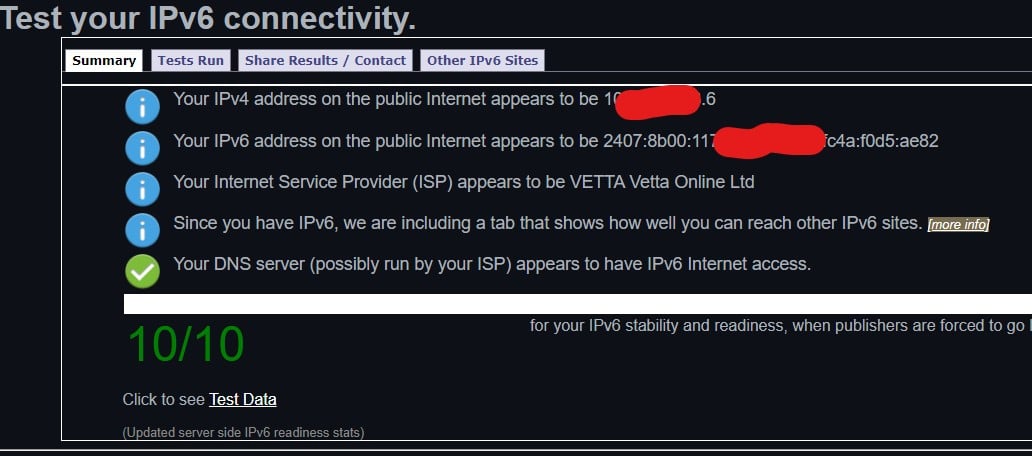
Checking again now, and devices on both networks will pass the ipv6 test. 


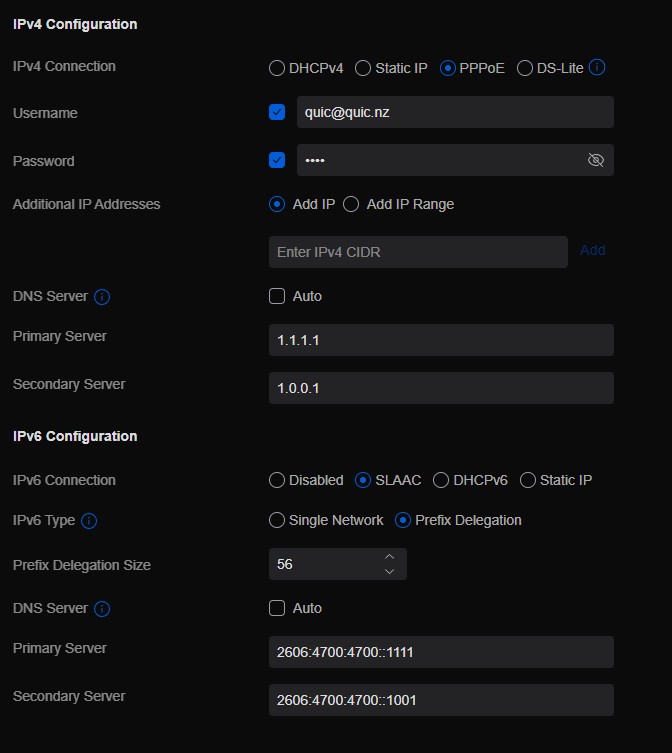
just if anyone reads this later and wonders


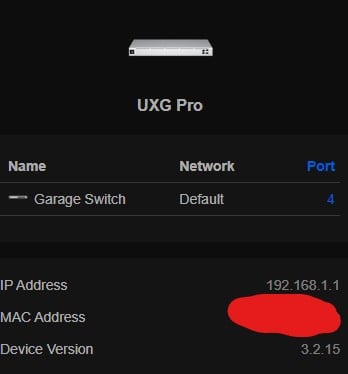
Router running the release candidate firmware, which enables SLAAC.


some vlans


and the settings that seem to work, PPPoE etc


and despite ipv6 working fine on both networks it never says the address here


I have no more ideas now but it does appear to be issues with ubiquiti not quic perhaps.


hairy1
3352 posts

Uber Geek
+1 received by user: 644

ID Verified
Trusted
Lifetime subscriber

  #3212058 29-Mar-2024 13:25
Send private message

No problems here on my SE with Vodafone:


My views (except when I am looking out their windows) are not those of my employer.


CYaBro

4708 posts

Uber Geek
+1 received by user: 1182

ID Verified
Trusted

  #3214122 4-Apr-2024 11:49
Send private message

Update:


Unifi support did find an issue and had to manually assign the IPv6 default gateway, which won't survive IPv6 config changes or a reboot.


They took some wire captures from my SE and are going to analyse the SE -- ISP communication to see if the issue is the SE, Quic or both.


Currently I'm working on IPv6 on the default network/VLAN. 


Opinions are my own and not the views of my employer.


Shop now for Lenovo laptops and other devices (affiliate link).
michaelmurfy
meow
13580 posts

Uber Geek
+1 received by user: 10911

Moderator
ID Verified
Trusted
Lifetime subscriber

  #3214146 4-Apr-2024 12:36
Send private message

@CYaBro Question for you - as from last night, is configuration working now normally?


Quic have quietly made some IPv6 improvements overnight last night and I'm personally seeing a whole lot of improvement. Presuming you're following my configuration you shouldn't have any problems.


Also, out of interest what BNG are you on? You can find this out via the Quic portal if you look at the JSON payload. Feel free to PM me.


Michael Murphy | https://murfy.nz
Referral Links: Quic Broadband (use R122101E7CV7Q for free setup)

Are you happy with what you get from Geekzone? Please consider supporting us by subscribing.
Opinions are my own and not the views of my employer.


CYaBro

4708 posts

Uber Geek
+1 received by user: 1182

ID Verified
Trusted

  #3214156 4-Apr-2024 13:38
Send private message

michaelmurfy:


@CYaBro Question for you - as from last night, is configuration working now normally?


Quic have quietly made some IPv6 improvements overnight last night and I'm personally seeing a whole lot of improvement. Presuming you're following my configuration you shouldn't have any problems.


Also, out of interest what BNG are you on? You can find this out via the Quic portal if you look at the JSON payload. Feel free to PM me.


Hey, I and Unifi support have made changes on the UDM SE today but it wasn't working this morning before we started.


Still not 100%, it seems browsing has long delays sometimes and browser windows just sit there trying to connect and eventually do.
I assume this is an IPv6 issue as it only started after the changes were made by us today. 🙃


Looks like we're connected to: bng1-chc2


Opinions are my own and not the views of my employer.


Fuzzi9986
52 posts

Master Geek
+1 received by user: 26

ID Verified
Trusted

  #3214323 4-Apr-2024 20:56

michaelmurfy:


Quic have quietly made some IPv6 improvements overnight last night


I may give it a try again when home tonight to see if it starts behaving and giving me a gateway on my connection


MichaelNZ
1594 posts

Uber Geek
+1 received by user: 485

Trusted
Net Trust Ltd

  #3215167 6-Apr-2024 21:04
Send private message

If you can get access to a Mikrotik router I am happy to offer you some guidance with that.


I work at an ISP and through we offer IPv6, it does have mixed results. This is because some CPE is not as mature as it should be. FWIW Mikrotik works effectively with IPv6, at least client side. If you can get ahold of a Mikrotik unit I suggest you try this and see how it goes.


WFH Linux Systems and Networks Engineer in the Internet industry | Specialising in Mikrotik | APNIC member | Open to job offers | ZL2NET


1 | 2 | 3
View this topic in a long page with up to 500 replies per page Create new topic


Geekzone Live »

Try automatic live updates from Geekzone directly in your browser, without refreshing the page, with Geekzone Live now.


Are you subscribed to our RSS feed? You can download the latest headlines and summaries from our stories directly to your computer or smartphone by using a feed reader.