Geekzone: technology news, blogs, forums
Guest
Welcome Guest.
You haven't logged in yet. If you don't have an account you can register now.


CYaBro

4708 posts

Uber Geek
+1 received by user: 1182

ID Verified
Trusted

#312138 20-Mar-2024 11:57
Send private message

Having trouble getting IPv6 working here and not sure what else I need to do??


UDM SE is configured under Networks for IPv6 Support.
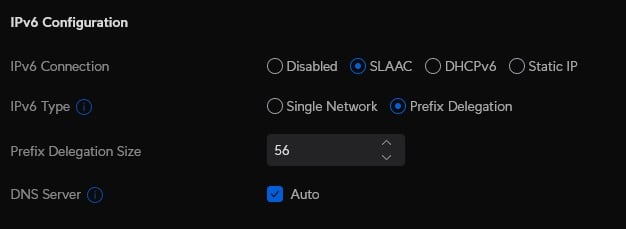
Under the Quic Internet connection settings I've enabled IPv6 with DCHPv6 and a prefix delegation size of 56.
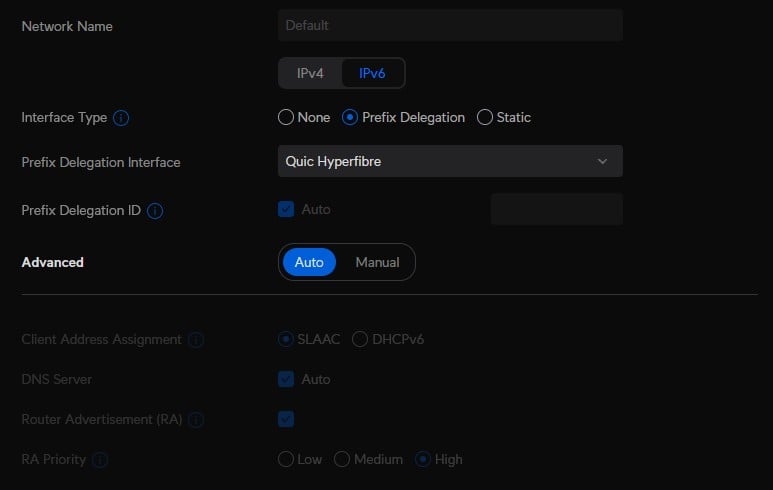
Then back under Networks for my main network VLAN I've set the Interface type to Prefix delegation and selected the Quic connection for the interface.


Then on my laptop I've renewed the DHCP lease and appear to have an IPv6 address and gateway but when I do a test it fails all IPv6 tests from here: Test your IPv6. (test-ipv6.com)


What else do I need to do?


Opinions are my own and not the views of my employer.


View this topic in a long page with up to 500 replies per page Create new topic
 1 | 2 | 3
michaelmurfy
meow
13579 posts

Uber Geek
+1 received by user: 10910

Moderator
ID Verified
Trusted
Lifetime subscriber

  #3208501 20-Mar-2024 12:11
Send private message

Under your internet connection:


Under your Network settings (hit IPv6):


Should do it :)


Michael Murphy | https://murfy.nz
Referral Links: Quic Broadband (use R122101E7CV7Q for free setup)

Are you happy with what you get from Geekzone? Please consider supporting us by subscribing.
Opinions are my own and not the views of my employer.


CYaBro

4708 posts

Uber Geek
+1 received by user: 1182

ID Verified
Trusted

  #3208509 20-Mar-2024 12:28
Send private message

Thanks, I had to change the setting for the internet connection to SLAAC however still not working. :(


0/10 on that IPv6 test site from my laptop and iPhone even though I can see they have IPv6 addresses.


Opinions are my own and not the views of my employer.


michaelmurfy
meow
13579 posts

Uber Geek
+1 received by user: 10910

Moderator
ID Verified
Trusted
Lifetime subscriber

  #3208523 20-Mar-2024 12:45
Send private message

Given your Dream Machine the reboot? If it doesn't work with those settings it could be worth logging a fault to get Quic to check it out (especially if you've never got IPv6 to work).


Michael Murphy | https://murfy.nz
Referral Links: Quic Broadband (use R122101E7CV7Q for free setup)

Are you happy with what you get from Geekzone? Please consider supporting us by subscribing.
Opinions are my own and not the views of my employer.


mentalinc
3384 posts

Uber Geek
+1 received by user: 1023

Trusted

  #3208528 20-Mar-2024 12:51
Send private message

try reboot of the laptop as well after the Dream machine is rebooted.


CPU: AMD 5900x | RAM: GSKILL Trident Z Neo RGB F4-3600C16D-32GTZNC-32-GB | MB:  Asus X570-E | GFX: EVGA FTW3 Ultra RTX 3080Ti| Monitor: LG 27GL850-B 2560x1440


Quic: https://account.quic.nz/refer/473833 R473833EQKIBX 


CYaBro

4708 posts

Uber Geek
+1 received by user: 1182

ID Verified
Trusted

  #3208590 20-Mar-2024 13:52
Send private message

Stiil no go. :(


Will log a fault with Quic to check their side.


Just for interest I assume @michaelmurfy if you do the tests on that site I linked to you get 10/10?


Or is there a better site you recommend for testing IPv6?


Opinions are my own and not the views of my employer.


mentalinc
3384 posts

Uber Geek
+1 received by user: 1023

Trusted

  #3208601 20-Mar-2024 14:02
Send private message

Geekzone will give you an IPV6 logo in top left.


CPU: AMD 5900x | RAM: GSKILL Trident Z Neo RGB F4-3600C16D-32GTZNC-32-GB | MB:  Asus X570-E | GFX: EVGA FTW3 Ultra RTX 3080Ti| Monitor: LG 27GL850-B 2560x1440


Quic: https://account.quic.nz/refer/473833 R473833EQKIBX 


Stream your favourite shows now on Apple TV (affiliate link).
michaelmurfy
meow
13579 posts

Uber Geek
+1 received by user: 10910

Moderator
ID Verified
Trusted
Lifetime subscriber

  #3208610 20-Mar-2024 14:25
Send private message

@CYaBro Yep I get 10/10. Just note I am pretty sure the Vetta DNS servers currently don't have IPv6 access so if you use those you may not get a perfect score (not that this matters).


Geekzone also shows an IPv6 logo up in the top left.


Michael Murphy | https://murfy.nz
Referral Links: Quic Broadband (use R122101E7CV7Q for free setup)

Are you happy with what you get from Geekzone? Please consider supporting us by subscribing.
Opinions are my own and not the views of my employer.


CYaBro

4708 posts

Uber Geek
+1 received by user: 1182

ID Verified
Trusted

  #3208613 20-Mar-2024 14:28
Send private message

Not seeing any IPv6 Logo on Geekzone. :(


The DNS is actually the one thing that does get a green tick in the tests and says: Your DNS server (possibly run by your ISP) appears to have IPv6 Internet access.


The UDM SE is set to use 1.1.1.1 & 9.9.9.9 for the DNS servers, for IPv4 and on auto for IPv6 but I have also manually added the IPv6 DNS servers for cloudflare and Quad 9.


Edit: Just noticed on that test site, under the 'For the Help Desk' tab it says my internet connection is IPv4 only and shows IPv4: Good - VETTA Online & IPv6: no.


If I look in my Quic portal it shows a subnet under Session IPv6.
Also just noticed it says the session uptime is over 27 days even though I've restart the UDM SE a couple of times today. 🤔
Will restart the ONT now as well.


Edit: still no go after rebooting the ONT. :(


Have logged a fault with Quic.


Opinions are my own and not the views of my employer.


CYaBro

4708 posts

Uber Geek
+1 received by user: 1182

ID Verified
Trusted

  #3208681 20-Mar-2024 18:00
Send private message

This is what the UDM SE shows for the Quic connection, so it seems it's not getting an IPv6 address.


Opinions are my own and not the views of my employer.


CYaBro

4708 posts

Uber Geek
+1 received by user: 1182

ID Verified
Trusted

  #3209002 21-Mar-2024 08:10
Send private message

@quic any help would be greatly appreciated.


Opinions are my own and not the views of my employer.


michaelmurfy
meow
13579 posts

Uber Geek
+1 received by user: 10910

Moderator
ID Verified
Trusted
Lifetime subscriber

  #3209011 21-Mar-2024 09:04
Send private message

CYaBro: @quic any help would be greatly appreciated.


If you've got a fault logged they'll check it out. Your configuration looks right so just wait to hear back from them.


Michael Murphy | https://murfy.nz
Referral Links: Quic Broadband (use R122101E7CV7Q for free setup)

Are you happy with what you get from Geekzone? Please consider supporting us by subscribing.
Opinions are my own and not the views of my employer.


Shop now for Dyson appliances (affiliate link).
SanchoNZ
15 posts

Geek
+1 received by user: 13

Trusted

  #3211483 26-Mar-2024 22:21
Send private message

I have the exact same issue, but I'm using a UXG-Pro Interestingly I don't have the option for SLAAC - probably ubiquiti's way of making me buy a CloudKey. This seems to have started when I got HyperFiber but I didn't notice for a bit as I had a USG-Pro before this and I had to wait a few months to get Hyper and ipv6 did work in the past. I have also tried DHCP and PPPoE. 


mentalinc
3384 posts

Uber Geek
+1 received by user: 1023

Trusted

  #3211502 27-Mar-2024 05:59
Send private message

Do you have the latest firmware version? 


UniFi Next-Generation Gateway Pro 3.1.16 - https://ui.com/download/software/uxg-pro 


CPU: AMD 5900x | RAM: GSKILL Trident Z Neo RGB F4-3600C16D-32GTZNC-32-GB | MB:  Asus X570-E | GFX: EVGA FTW3 Ultra RTX 3080Ti| Monitor: LG 27GL850-B 2560x1440


Quic: https://account.quic.nz/refer/473833 R473833EQKIBX 


CYaBro

4708 posts

Uber Geek
+1 received by user: 1182

ID Verified
Trusted

  #3211562 27-Mar-2024 12:16
Send private message

I managed to test another router today (TP-Link) and it just got stuck on 'Connecting' for IPv6.


Opinions are my own and not the views of my employer.


CYaBro

4708 posts

Uber Geek
+1 received by user: 1182

ID Verified
Trusted

  #3211650 27-Mar-2024 17:57
Send private message

So I switched my Quic connection back to PPPoE and IPv6 worked!


BUT only for about a minute. :(


Was able to ping google.com -6 and I got 10/10 on that test site.
But stopped working again. :(


Opinions are my own and not the views of my employer.


 1 | 2 | 3
View this topic in a long page with up to 500 replies per page Create new topic


Geekzone Live »

Try automatic live updates from Geekzone directly in your browser, without refreshing the page, with Geekzone Live now.


Are you subscribed to our RSS feed? You can download the latest headlines and summaries from our stories directly to your computer or smartphone by using a feed reader.