|
|
|
To each their own 🤷♂️
Dunedin, NZ
Quic Broadband | Rocket 1G/1G Hyperfibre (Yes, you read that right!)
Dunedin Live Webcam (4K) | Quic Smokepings
Referral Links:
Quic (use R282731EPGJMG on checkout for free setup, and to help me pay for my fast internet addiction)
Contact Energy (use FRTDD2R for $100 credit)
michaelmurfy:
You should however investigate why IPv6 is now taking a scenic route (also from the history on your Smokeping IPv6 appeared to be working fine before?):
The IPv6 issue I had seemed to somehow resolve itself at some point.
Smokeping wasn't up and running until after the that.
The issue was that IPv6 would work for about a minute then stop. Then it would start working again at random times for about a minute again then stop again.
Everyone kept saying that the issue was my UDM SE.
I logged a ticket with Ubiquiti support who took copies of my logs and I also gave them access to the UDM SE.
Over the period of about 2 weeks they worked on it, made changes to their software and got me to put an early access version on the UDM SE which made no difference.
Their conclusion was that the issue was my ISP.
How it then fixed itself I don't know.
Opinions are my own and not the views of my employer.
3l3m3nt:
To each their own 🤷♂️
That's a weird and pretty unhelpful response. Are you advocating him putting up with issues just so he can stay with Quic? Would you have continued to put up with issues, not apparent with another ISP (for whatever reason)? I doubt it.
Do you understand what that saying means? Effectively it means that other people will have different preferences depending on their circumstances. Exactly what you said in your previous post. I was agreeing with you, but whatever.
Dunedin, NZ
Quic Broadband | Rocket 1G/1G Hyperfibre (Yes, you read that right!)
Dunedin Live Webcam (4K) | Quic Smokepings
Referral Links:
Quic (use R282731EPGJMG on checkout for free setup, and to help me pay for my fast internet addiction)
Contact Energy (use FRTDD2R for $100 credit)
I think the biggest thing when deciding on joining Quic or not is going to be where you are located around the country.
That's the only thing I can put it down to with all the issues I had yet others are fine.
And everyone now keeps saying the issue is with the Chorus fibre from Dunedin to Christchurch.
I'm in Oamaru so would our traffic be going to Dunedin first then up to Christchurch?
That's certainly not the case now as I get lower latency to speed test servers in Chch than I do in Dunedin.
Opinions are my own and not the views of my employer.
CYaBro: I think the biggest thing when deciding on joining Quic or not is going to be where you are located around the country.
I'm in Oamaru so would our traffic be going to Dunedin first then up to Christchurch?
That's certainly not the case now as I get lower latency to speed test servers in Chch than I do in Dunedin.
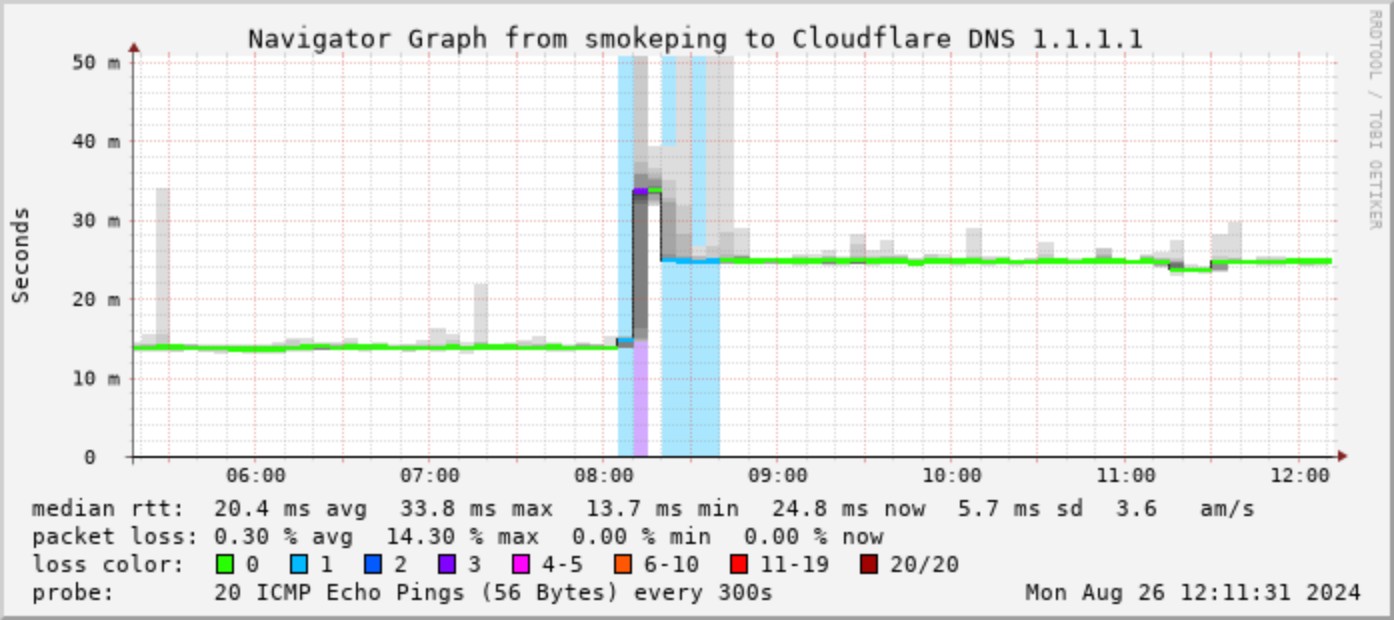
Location applies for any ISP and Dunedin is a little bit more of a special case seeing it is at the bottom of the South, looking at your own Smokeping it appears it was only around 2ms difference per my previous post, IPv6 was working fine (this is now looking pretty funky on 2degrees to several locations) and now you've got increased latency to several destinations even across NZ like for example Cloudflare:

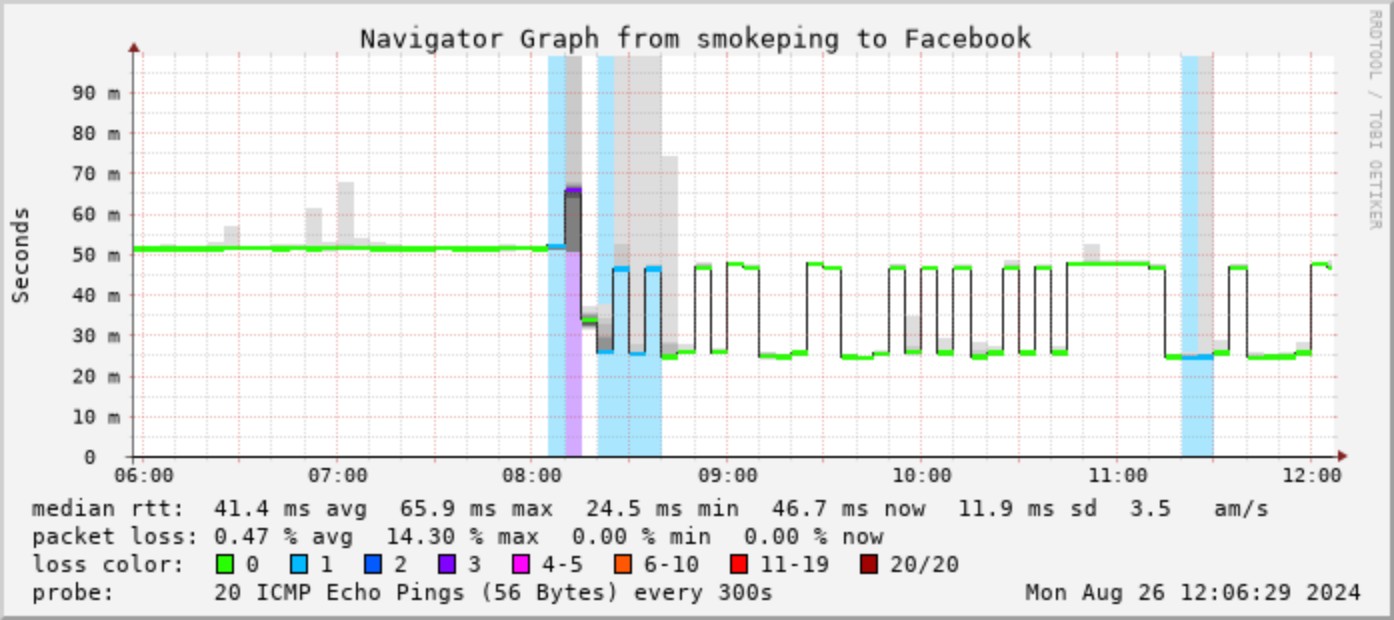
Or even Facebook that seems to have gone a little strange:

Sure, some destinations may have dropped by a couple of ms but that's not going to make any noticeable difference. It's actually been somewhat interesting looking at your monitoring as it really shows that many of Quic's routes are pretty darn good. I think now your traffic will go down to Dunedin then back up to Christchurch but looks like that was actually the case before when using Chorus TES it took a similar route.
As I've said earlier, and you would know from once running a MSP it is important when there is a fault to provide as much information as you can and not stonewall requests for information. It may have been Quic, it may have been your setup but the thing is we will never really know the true answer here. Nobody was specifically blaming your setup and nobody was blaming Quic too but with very little information to go by and the nature of the problems you were having it did make it appear the core of your issues may have been related to DNS. But I am just going by what I've seen both on here and on Discord.
I don't believe there is any issue for Dunedin and your move actually has made that much more clear. 2ms difference to Christchurch is literally nothing. If there were an issue with TES then you'll have many other people on other providers complain also but I also think TES is provided on a best effort basis for providers too so routes can change at any time as we've seen - this doesn't specifically mean there is any issue at all as this is just the nature of the Internet. Thanks for having your Smokeping up during your move! It's been interesting.
Michael Murphy | https://murfy.nz
Referral Links: Quic Broadband (use R122101E7CV7Q for free setup)
Are you happy with what you get from Geekzone? Please consider supporting us by subscribing.
Opinions are my own and not the views of my employer.
can confirm its chrous tail extension fault unfortunately It is not quic's fault im with 2d and on on the Lower South Island and i am connected to the 2d dunedin bng i have tested the 4gig hyperfibre on mine and i cant get any speeds better than a 2g as of tail extension paths and the 2d bng runs at 30% at peak hours .. how ever to test this theory i did try try another isp who has the ability to provision a tail extension from any of there BNGs directly to anywhere in nz so i got them to provision one directly from Dunedin as im close to it speeds are the same as 2d and i got it changed to Auckland and all the speed issues were gone ...something is going on the lower south island paths. i have raised a ticket with them anyway.
Exclusive for Geekzone Members!
Dynamic IP & Bring Your Own Device Hyperfibre & Fibre plans & NO Contracts with Hyperline.co.nz powered by ASN 9790 Network
Chrous areas only HYPERLINE.co.nz
CYaBro: Not really fussed about IPv6 anymore as I don’t need it now.
Was just another thing that I had issues with on Quic.
Might just turn that off on my connection at some stage.
Makes sense to turn this off seeing it appears to be pretty unstable right now on 2degrees looking at your monitoring.
Latency to chch was 12-14 ms on Quic and now it’s 8.
That’s more than a couple.
I did see 8ms on my Quic connection one night a week or so ago but it only lasted an hour or two.
Why was it not like that all the time?
This isn't what your Smokeping says. But TES also is fully outside of an ISP's control.
On another note the website delays I was seeing at random times, that was being blamed on my dns or equipment as well, didn’t happen today at all.
It was happening 3-4 times a day.
It's a shame we'll never know what the problem here was. From what I see though, nobody blamed it on your DNS but DNS in general. Nobody blamed your equipment either. The fact is nobody knows where the issue lies as there was very little information actually provided so people were only guessing what it may be.
Michael Murphy | https://murfy.nz
Referral Links: Quic Broadband (use R122101E7CV7Q for free setup)
Are you happy with what you get from Geekzone? Please consider supporting us by subscribing.
Opinions are my own and not the views of my employer.
>It's a shame we'll never know what the problem here was. From what I see though, nobody blamed it on your DNS but DNS in general. Nobody blamed your equipment either. The fact is nobody knows where the issue lies as there was very little information actually provided so people were only guessing what it may be.
Opinions are my own and not the views of my employer.
CYaBro:>
It's a shame we'll never know what the problem here was. From what I see though, nobody blamed it on your DNS but DNS in general. Nobody blamed your equipment either. The fact is nobody knows where the issue lies as there was very little information actually provided so people were only guessing what it may be.
I know what the problem was now, it was Quic.
Issue is gone after switching ISPs and everything else exactly the same.
Whether that can be blamed on chorus isn’t really my problem, I was paying Quic for my connection.
Mmmkay. Dunno what to tell you bro, but I'm on the same BNG that you were, on the same Chorus TES and I've had zero issues. If you think I'm a shill, just take a look at my smokepings. Hard to make that up...
https://smokeping.dalleyfamily.net/
Pretty sure this thread is descending into nowhere, so i wish you all the best! I'm out 😃
Dunedin, NZ
Quic Broadband | Rocket 1G/1G Hyperfibre (Yes, you read that right!)
Dunedin Live Webcam (4K) | Quic Smokepings
Referral Links:
Quic (use R282731EPGJMG on checkout for free setup, and to help me pay for my fast internet addiction)
Contact Energy (use FRTDD2R for $100 credit)
I know what the problem was now, it was Quic.
Issue is gone after switching ISPs and everything else exactly the same.
Opinions are my own and not the views of my employer.
Let me start by stating that I'm a beta tester for Quic and assist with the customer community on Discord. I receive no compensation from Quic and pay full retail for their connectivity. To be clear, I’m a Quic customer out of enthusiasm for connectivity, not for the brand itself. I won’t speak for everyone, but I am in touch with our other beta testers and moderators, and I can confirm that your comments about Quic supporters being a cult are both inaccurate and unwelcome.
Your first indication of issues was when you reported 0.4% packet loss and slow download speeds in a thread discussing South Island packet loss. Most customers in that thread were experiencing ≥1% loss, which is where issues start to become observable in certain applications.
---
The troubleshooting on August 20th reached its peak during these comments:
Quic — 20/08/2024 12:24
...that's Chorus tail extension, latency will fluctuate. In all honesty, 0.1% loss while not perfect and we'll always work on stamping out (and have plans), it's not something that's going to be screaming a P1 to our NOC.
What day-to-day issues are you facing with the ~14ms latency to BNG and 0.1% loss?
-
CYaBro — 20/08/2024 14:22
Often get delays when browsing websites. Can sometimes be 10 seconds or more after clicking a link.
-
tccki — 20/08/2024 18:28
little to no chance this related to 0.1% loss. TCP handles this no problem as part of the design and UDP will happily handle 2% on major applications (video, voice) before it is even noticeable
web browsing is even more abstract and at 0.1% loss a page with hundreds of requests might see one retry, worst case perhaps up to 400ms on initial page or a javascript, stylesheet or image request if the server is located in london/ams
your observation points more likely towards configuration (dns, mtu), the service you’re visiting, or a suboptimal route between
-
CYaBro — 20/08/2024 20:35
Can be any website and when it happens it affects them all.
If I try refresh a tab I already had open it gets the delay as well.
I did test by manually putting in some dns servers on my machine and it didn’t help.
Tested with multiple browsers too.
-
CYaBro — 21/08/2024 13:38
FYI I changed my udm se to use [redacted] for the packet loss and latency testing and so far in the last 24 hours it’s at <0.1% with only 4 blips of packet loss. Last one about 8 hours ago. Latency is at 12ms. If only it could stay at 8ms like it did for about an hour the other night!
---
Throughout the discussion, you indicated that your UniFi ICMP graphs fluctuated between 0.1% and 0.8% loss, with most of your reported loss around 0.1%. While you also raised concerns about your download speed, we never moved beyond the conversation about packet loss. You also reported higher latency to the BNG at times, with a 4ms delta. On most systems, 0.1% loss is the minimum reported level, so over 10,000 ICMP requests, you might actually be at 0.08% or less, but the system rounds to the nearest tenth.
Is 0.1% loss and a 4ms delta within spec? Yes, it’s actually well within spec (<2%). Is it frustrating to see this over a UFB connection? Sure, especially if you’re closely monitoring the graphs.
However, two components here concern me. One is the mismatch between your metrics and your observations. The other is the lack of detail on the exact nature of the problem.
Regarding the first concern, I’ll clarify for others in this forum: 0.1% packet loss and a 4ms delta RTT is so imperceptibly small that, unless you’re running a specific application over UDP that requires virtually no latency/jitter, you’re unlikely to notice it at all. To provide an analogy, it’s like playing a PC game at a solid 261-263 FPS and worrying about the 2 FPS fluctuation. The issues you were experiencing with certain applications are almost certainly unrelated to that level of loss or jitter. Web browsing, for example, is a robust application over TCP that can tolerate far more than the metrics you provided.
My second concern is more subjective. You joined the community in June and mentioned that you’ve been with Quic for 18 months (almost 2 years, as you noted). In June, you commented on issues with BBC.com and a DNS service causing problems with your IPv6. Your first comment about latency/loss/speed issues was on 13/08/2024, and you provided MTRs to Quic on 18/08/2024. Your last comment was yesterday at 20:22: "No issues for me here in [redacted] at all this weekend or Friday."
So, after almost 2 years with Quic, you gave them 2 weeks—or just over 1 week if we count from the MTRs you provided on August 18th—to resolve your observed issues. This timeframe is actually even shorter when you consider the churn timelines for LFCs. I find this timeline challenging to understand. Even enterprise SLAs might struggle to meet such a timeframe, let alone a residential ISP.
In summary, I don’t believe Quic was given a fair and reasonable amount of time to respond to your issues. I also don’t think the metrics you provided had much to do with the issues you were observing at the application level. While it’s very likely that your configuration played a role in this, it’s not something we’ll be able to assist with further.
Quic's goal is to provide connectivity to technically literate individuals, and our community aims to be transparent and helpful to those who are willing to get their hands dirty and help improve the service for everyone. If that doesn’t align with your approach, that’s understandable. However, I think you and others in this thread should consider this when commenting on Quic’s suitability for you, and whether we fit the definition of a cult simply because we're less than enthusiastic about your troubleshooting methods and timelines.
Referral Link: | Quic Broadband (use R142206E0L2CR for free setup)
|
|
|