Geekzone: technology news, blogs, forums
Guest
Welcome Guest.
You haven't logged in yet. If you don't have an account you can register now.


View this topic in a long page with up to 500 replies per page Create new topic
1 | 2 | 3 | 4
michaelmurfy
meow
13579 posts

Uber Geek
+1 received by user: 10910

Moderator
ID Verified
Trusted
Lifetime subscriber

  #3183347 18-Jan-2024 09:11
Send private message

@cods4 IPoE will be very soon as in they're almost ready to release the floodgates with other improvements they've been making.


Michael Murphy | https://murfy.nz
Referral Links: Quic Broadband (use R122101E7CV7Q for free setup)

Are you happy with what you get from Geekzone? Please consider supporting us by subscribing.
Opinions are my own and not the views of my employer.


michaelmurfy
meow
13579 posts

Uber Geek
+1 received by user: 10910

Moderator
ID Verified
Trusted
Lifetime subscriber

  #3183475 18-Jan-2024 11:08
Send private message

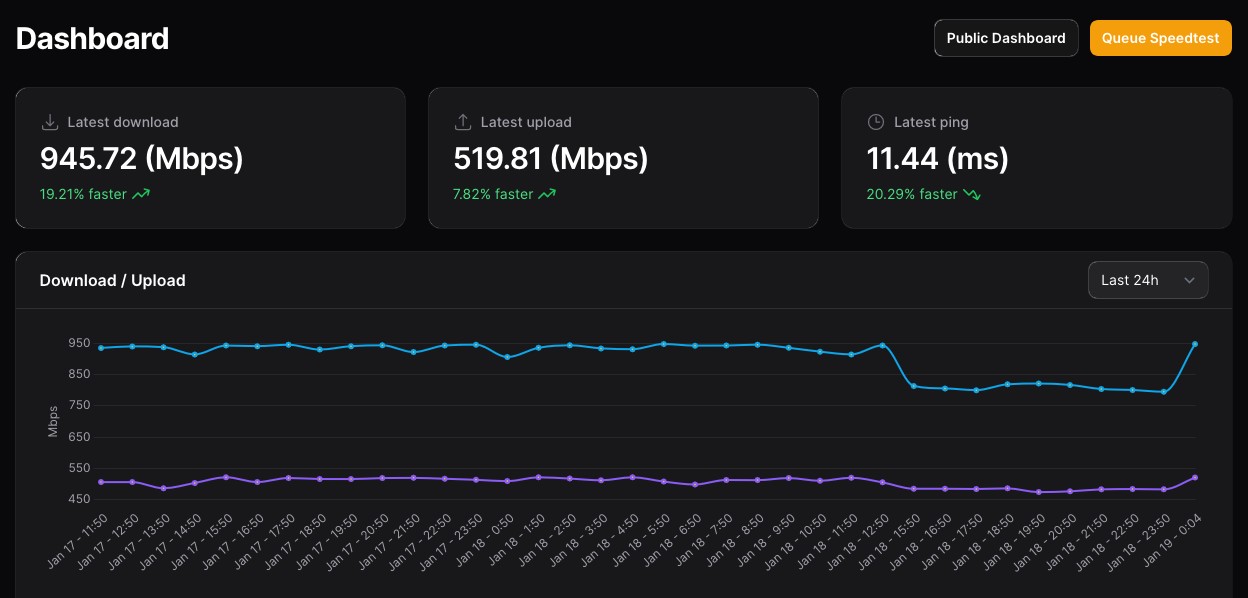
michaelmurfy: @CYaBro Also noticed the speed drop. Have raised this and they'll check it out tomorrow. They're just dealing with the vitally important stuff today and will sort the smaller niggles over the next few days.


Improved for me now! Funny fact is it was fixed in literally a minute after asking a network engineer there about it. Other changes will happen over the next few days.


Michael Murphy | https://murfy.nz
Referral Links: Quic Broadband (use R122101E7CV7Q for free setup)

Are you happy with what you get from Geekzone? Please consider supporting us by subscribing.
Opinions are my own and not the views of my employer.


evilonenz
/dev/urandom
291 posts

Ultimate Geek
+1 received by user: 152

ID Verified
Trusted
Lifetime subscriber

  #3183477 18-Jan-2024 11:11
Send private message

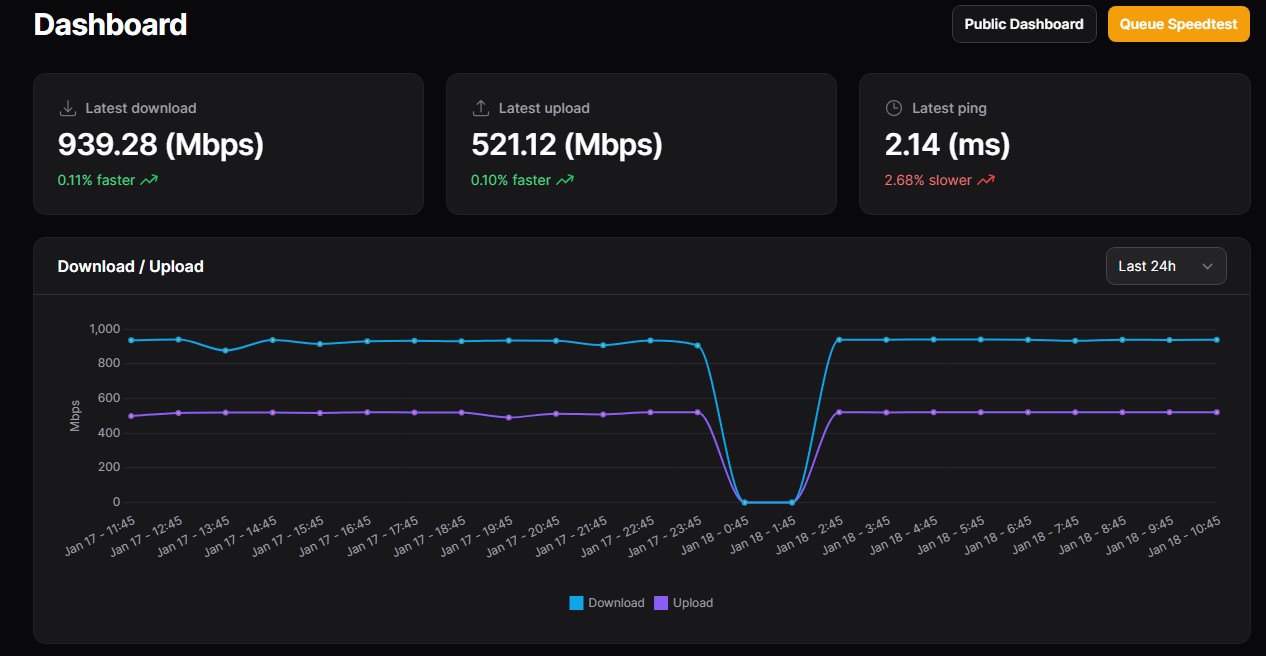
Interestingly mine has been solid all day:


I do like the fact that both upload and download graph lines now appear virtually dead straight!


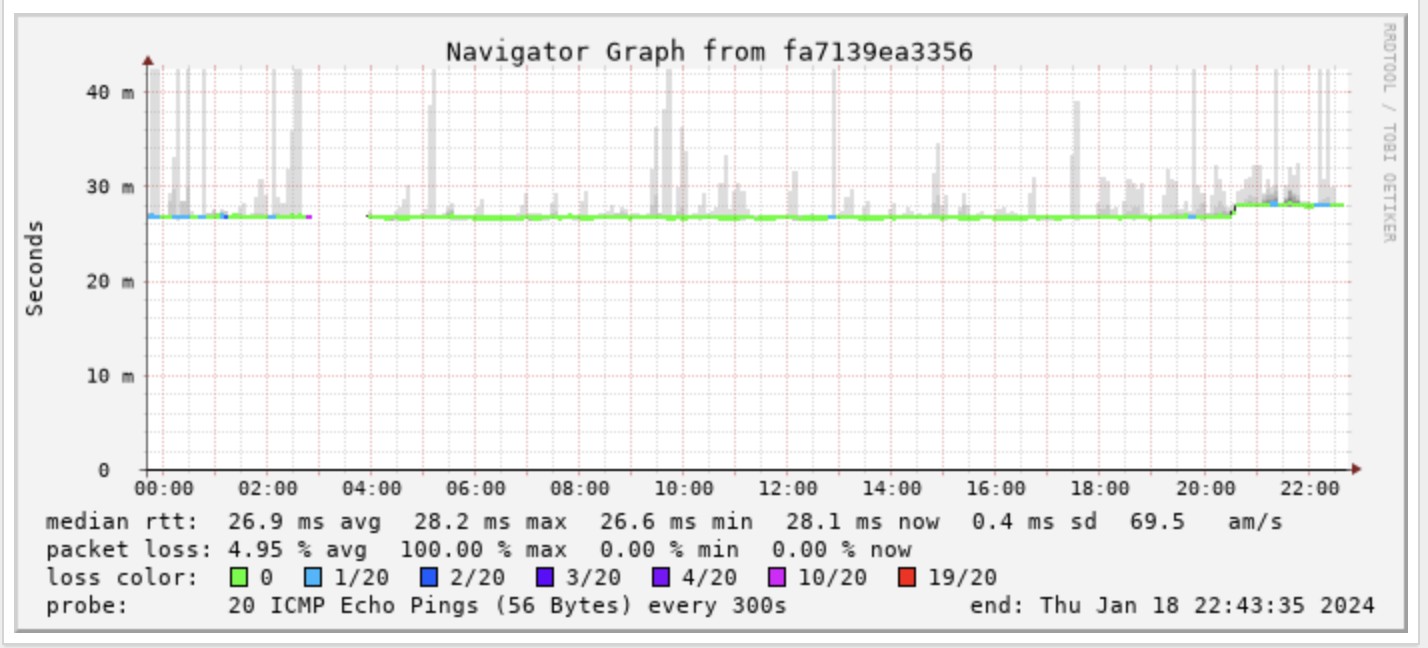
Smokeping


Referral Links:


Quic - Use code R536299EPGOCN at checkout for free setup
Contact Energy - Use code FRTQDXB for $100 credit


cods4
45 posts

Geek
+1 received by user: 7

Trusted

  #3183496 18-Jan-2024 11:56
Send private message

@elivonenz


@michaelmurphy


Can I ask what speedtest server you are using to get that sort of consistency? Or is there more to it?


Mine results are generally all over the place.


KiwiSurfer
1722 posts

Uber Geek
+1 received by user: 993

ID Verified
Lifetime subscriber

  #3183508 18-Jan-2024 12:37
Send private message

evilonenz:


Interestingly mine has been solid all day:


I do like the fact that both upload and download graph lines now appear virtually dead straight!


What software do you use to make the above?


evilonenz
/dev/urandom
291 posts

Ultimate Geek
+1 received by user: 152

ID Verified
Trusted
Lifetime subscriber

  #3183509 18-Jan-2024 12:39
Send private message

cods4:


@elivonenz


@michaelmurphy


Can I ask what speedtest server you are using to get that sort of consistency? Or is there more to it?


Mine results are generally all over the place.


I'm using Chorus Fibre Lab, as I'm sure @michaelmurfy is, too.


KiwiSurfer:


What software do you use to make the above?


I'm using Speedtest Tracker 😃.


Smokeping


Referral Links:


Quic - Use code R536299EPGOCN at checkout for free setup
Contact Energy - Use code FRTQDXB for $100 credit


Shop now for Dell laptops and other devices (affiliate link).
mentalinc
3384 posts

Uber Geek
+1 received by user: 1023

Trusted

  #3183521 18-Jan-2024 13:15
Send private message

Much better experience browsing now, smokeping showing very minimal packet loss now.

Changed dns for ipv4 back to quic. Does anyone know if they have ipv6 dns or is that part of the next release of goodness?


CPU: AMD 5900x | RAM: GSKILL Trident Z Neo RGB F4-3600C16D-32GTZNC-32-GB | MB:  Asus X570-E | GFX: EVGA FTW3 Ultra RTX 3080Ti| Monitor: LG 27GL850-B 2560x1440


Quic: https://account.quic.nz/refer/473833 R473833EQKIBX 


Sinuation
151 posts

Master Geek
+1 received by user: 73

ID Verified

  #3183525 18-Jan-2024 13:35
Send private message

Maybe it's placebo but my videos don't get stuck now and I have to force reload lol.

Latency feels alot more consistent too.

godber
75 posts

Master Geek
+1 received by user: 46

ID Verified
Trusted
Lifetime subscriber

  #3183530 18-Jan-2024 13:54
Send private message

evilonenz:


I'm using Chorus Fibre Lab, as I'm sure @michaelmurfy is, too.


I have Quic 2gbps Hyperfiber and I get more consistent results using the 2Degrees Auckland Speedtest Server.


Traffic from Quic to 2Degrees and to the Chorus Fibre Lab go through ix.nz  Based on https://www.peeringdb.com/ix/977


It appears 2Degrees have two 100G connections at ix while Chorus only has one 10G.


However in neither case can I get 2Gbps up. I get 2Gbps down but between 0.8 and 1.8Gbps up.


My hardware is not likely the issue as router is Mikrotik CCR2116-12G-4S+.  PPPOE only uses one core down that hits about 55% on download when at 2gbps. On upload no core goes above 15%. MTU for the WAN interface is set to 1520 and testing using a linux server I have never see above 5% on any core while running Speedtest.


Have just spun up Speedtest Tracker (testing Chorus Fibre Lab once an hour) so will see how that looks after 24 hours.


Godfrey
Auckland/Coroglen, New Zealand
Quic Broadband - 4G Hyperfibre


Referral Link:
Quic (use R71004E9PVBJ on checkout for free setup)


cods4
45 posts

Geek
+1 received by user: 7

Trusted

  #3183536 18-Jan-2024 14:12
Send private message

I'm also on Hyperfibre 2G, except that I'm in Tauranga on the UFF network.


I've never seen more than 1Gbps up or down, but I am going to wait until I have tried IPoE before I raise a ticket with Quic.


I'm running pfsense on an R86S mini PC (Intel N305 cpu) so it shouldn't be hardware. I have also tried another computer with a direct 10G connection to the ONT and a decent AMD cpu with the same results.


Using the 2degrees server I get ~600Mbps down and 900 up.


and using the Chorus Fibre Lab server I get 800-900 up and down.


michaelmurfy
meow
13579 posts

Uber Geek
+1 received by user: 10910

Moderator
ID Verified
Trusted
Lifetime subscriber

  #3183541 18-Jan-2024 14:21
Send private message

cods4:


Can I ask what speedtest server you are using to get that sort of consistency? Or is there more to it?


Mine results are generally all over the place.


Chorus Fibre Lab for me - but,


Everyone: Limit your automated Speedtests to 1 per hour at most!


I've seen some comments from Speedtest server owners of people who have set up tests to run every 5 minutes etc and it is their biggest pet peeve. Each Speedtest uses around 1.5gb of traffic and it is essentially a stress test for a short time so running this all the time is additional load on the speedtest servers themselves.


Also for those on Hyperfibre when IPoE/DHCP is released this should improve things considerably for you.


Michael Murphy | https://murfy.nz
Referral Links: Quic Broadband (use R122101E7CV7Q for free setup)

Are you happy with what you get from Geekzone? Please consider supporting us by subscribing.
Opinions are my own and not the views of my employer.


HP


Shop now for HP laptops and other devices (affiliate link).
CYaBro
4708 posts

Uber Geek
+1 received by user: 1182

ID Verified
Trusted

  #3183582 18-Jan-2024 16:11
Send private message

michaelmurfy:

michaelmurfy: @CYaBro Also noticed the speed drop. Have raised this and they'll check it out tomorrow. They're just dealing with the vitally important stuff today and will sort the smaller niggles over the next few days.


Improved for me now! Funny fact is it was fixed in literally a minute after asking a network engineer there about it. Other changes will happen over the next few days.


Yup speeds are better now :)
But latency still about double what it was.
Will keep an eye on that.


Opinions are my own and not the views of my employer.


mentalinc
3384 posts

Uber Geek
+1 received by user: 1023

Trusted

  #3183733 18-Jan-2024 22:18
Send private message

I seem to be unable to ping the quic dns servers, but can see they are pingable by @michaelmurfy


I assume this is blocked and only beta testers are able to ping?


CPU: AMD 5900x | RAM: GSKILL Trident Z Neo RGB F4-3600C16D-32GTZNC-32-GB | MB:  Asus X570-E | GFX: EVGA FTW3 Ultra RTX 3080Ti| Monitor: LG 27GL850-B 2560x1440


Quic: https://account.quic.nz/refer/473833 R473833EQKIBX 


prat33k
182 posts

Master Geek
+1 received by user: 31


  #3183734 18-Jan-2024 22:26
Send private message

mentalinc:


I seem to be unable to ping the quic dns servers, but can see they are pingable by @michaelmurfy


I assume this is blocked and only beta testers are able to ping?


Can confirm, I am not the beta tester either and can't ping too. They respond to dns requests fine though.


myfullflavour
896 posts

Ultimate Geek
+1 received by user: 382

Trusted
Full Flavour

  #3183735 18-Jan-2024 22:45
Send private message

Have they run into more problems again?

Everything was sweet after the maintenance this morning, as of a few hours ago the packet loss is back.


1 | 2 | 3 | 4
View this topic in a long page with up to 500 replies per page Create new topic


Geekzone Live »

Try automatic live updates from Geekzone directly in your browser, without refreshing the page, with Geekzone Live now.


Are you subscribed to our RSS feed? You can download the latest headlines and summaries from our stories directly to your computer or smartphone by using a feed reader.