|
|
|
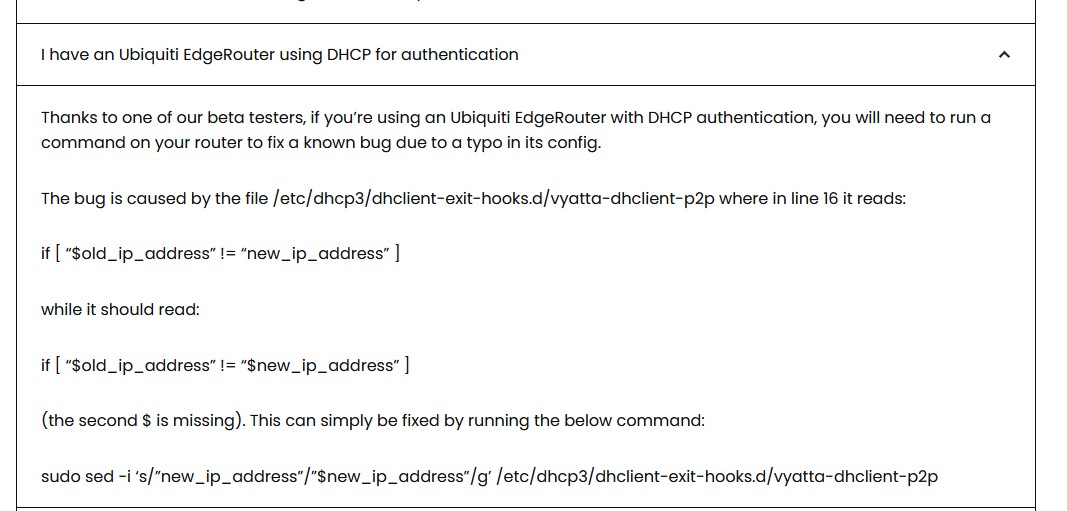
The edgerouter has specific additional steps required to make it work...

CPU: AMD 5900x | RAM: GSKILL Trident Z Neo RGB F4-3600C16D-32GTZNC-32-GB | MB: Asus X570-E | GFX: EVGA FTW3 Ultra RTX 3080Ti| Monitor: LG 27GL850-B 2560x1440
Quic: https://account.quic.nz/refer/473833 R473833EQKIBX
deadlyllama:
Ironically in your case, the only router models mentioned on their support page are ASUS routers, and the EdgeRouter... yet you've had advice from other customers that the Edgerouter doesn't work properly with Quic v6!
Yep I retired my edgerouter to get a Mikrotik only to find even that doesn't work either.
zespri: Yeah, same here with Mikrotik. DHCP lease seems to expire and not able to renew until router restart.
I have had the same symtoms with:-
michaelmurfy:
This is off-topic but I've got 2x Mikrotik's on Quic connections and they both have zero issues.
However, I'm statically assigning my pools and are not reliant on DHCPv6. I think this more affects people who do not have a static /56.
I'm not having issues with pool. The DHCP lease between Router<->BNG is the one causing the issues in my observaiton. While the pool does depend on the lease (as I prefer to configure the pool automatically from the DHCPv6 lease) the pool itself isn't the issue as far as I can see.
I've had chats with others on Quic experiencing it and can't find a common denominator. People with different LFCs, different BNGs, different routers, DHCP or PPPoE, static or dynamic, you name it, etc. The only common denominator is a four letter word starting with Q. What makes it even odder is several people with the same LFC same BNG same router, same access type, same static/dynamic but one has problems and the other fine.
Must be something going on the Quic end IMHO but have run out of patience. My 2degrees connection went live today (very impressed with them BTW) and my Quic connection will be retired at the end of billing period. I went with a 12-month contract with 2degrees so not likely I'll go back to Quic during that.
mentalinc:
The edgerouter has specific additional steps required to make it work...
Not sure if this is still current advice. They came out with a new version a while after that was posted which may have fixed that.
Well this threads a disaster, I am in belief OP may not be waiting long enough for their session to drain.
For OP.
Please do the following:
Stop using DHCPv4 by unplugging and waiting for the session to completely drain and I mean it. Ensure the portal actually says you're offline.
Configure your router for PPPoE for V4 and you can enter anything for user and pass. I think we missed that you're not being assigned a V6, hell you may not even be seeing the default route.

This should have a link local.
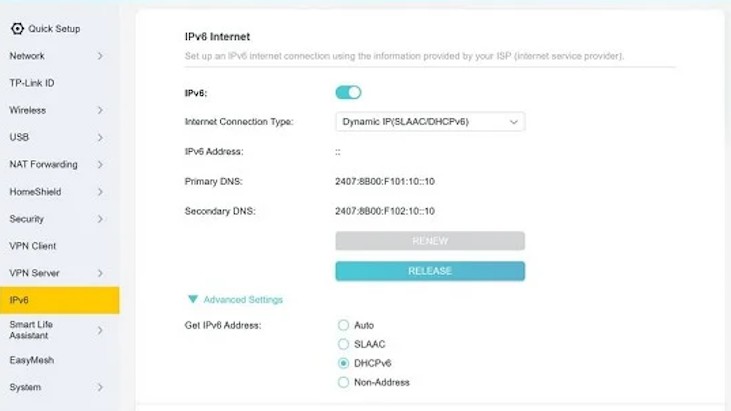
Use DHCPv6 for your WAN. Keep Prefix Delegation and get your DNS servers automatically(unless you're running your own).
LAN should be SLAAC+Stateless DHCP so you at least hand out the DNS servers received by the BNG.
Now plug the router in and see if there's a difference.
KiwiSurfer:
I'm not having issues with pool. The DHCP lease between Router<->BNG is the one causing the issues in my observaiton. While the pool does depend on the lease (as I prefer to configure the pool automatically from the DHCPv6 lease) the pool itself isn't the issue as far as I can see.
I've had chats with others on Quic experiencing it and can't find a common denominator. People with different LFCs, different BNGs, different routers, DHCP or PPPoE, static or dynamic, you name it, etc. The only common denominator is a four letter word starting with Q. What makes it even odder is several people with the same LFC same BNG same router, same access type, same static/dynamic but one has problems and the other fine.
Must be something going on the Quic end IMHO but have run out of patience. My 2degrees connection went live today (very impressed with them BTW) and my Quic connection will be retired at the end of billing period. I went with a 12-month contract with 2degrees so not likely I'll go back to Quic during that.
The good thing about IPv6 is that there are a number of ways to deliver it and many more ways the router is able to handle it.
The bad thing about IPv6 is that there are a number of ways to deliver it and many more ways the router is unable to handle it.
I have had my fair share of V6 issues, I even made a bit of a smart ass remark about v6 and it being a problem child in welly(although I am in CHC). Half being a broken OPNSense config before I moved to RouterOS. The other half my v6 lease just expiring and never coming back until I redial'd my PPPoE connection with Quic. Lots of people don't have problems and I can acknowledge that and go "yup."
Not to add fuel to the fire but the same config on Mercury just worked 🤷 and I have yet to lose V6. There is also the fact that the new Vetta network(when it was rebuilt) isn't that old if you compare ISPs such as 2degrees(they still have a lot of Juniper despite rolling out Arista) or One NZ (also Juniper) or even Mercury (also very much Juniper).
deadlyllama:
[One awkward thing about Quic is the lack of an official compatibility list of routers & configuration instructions. There's no "this router model + configuration is guaranteed to work."
Ironically in your case, the only router models mentioned on their support page are ASUS routers, and the EdgeRouter... yet you've had advice from other customers that the Edgerouter doesn't work properly with Quic v6!
That's the schtick with Quic. It is not meant for the faint hearted. No ISP can battle harden test hundreds of thousands of CPEs and they would only validate their own(which is why they do sell a Grandstream jobby and it is a compelling product). It is a self service ISP. If OP wants a lot more hand holding then Vetta is more appropriate where it is a fully serviced ISP.
Ramblings from a mysterious lady who's into tech. Warning I may often create zingers.
MaxineN:
Stop using DHCPv4 by unplugging and waiting for the session to completely drain and I mean it. Ensure the portal actually says you're offline.
For the OP, this is about 25 minutes.
Referral links: Quic Broadband (free setup code: R587125ERQ6VE) | Samsung | AliExpress | Wise | Sharesies
Support Geekzone by subscribing (browse ads-free), or making a one-off or recurring donation through PressPatron.
freitasm:
MaxineN:
Stop using DHCPv4 by unplugging and waiting for the session to completely drain and I mean it. Ensure the portal actually says you're offline.
For the OP, this is about 25 minutes.
Actually longer if your CPE checked in half way through its lease. Which is why I'm really stressing the point of "please ensure the portal says you're offline."
I would not give it any time or metrics, really wait for the portal to say you're offline.
Ramblings from a mysterious lady who's into tech. Warning I may often create zingers.
MaxineN:
Actually longer if your CPE checked in half way through its lease. Which is why I'm really stressing the point of "please ensure the portal says you're offline."
I'd actually recommend disabling DHCP in the portal and configuring PPPoE on the router instead.
Michael Murphy | https://murfy.nz
Referral Links: Quic Broadband (use R122101E7CV7Q for free setup)
Are you happy with what you get from Geekzone? Please consider supporting us by subscribing.
Opinions are my own and not the views of my employer.
I do wonder if Quic need to update their "setup your router" page to say "only use PPPoE unless you are using $x blessed CPE." I couldn't get DHCP working reliably with Quic on a Fritzbox (for my in-laws) or my OpenWRT box. The Discord advice seems to be "just switch to PPPoE."
The only way I can get ipv6 working is if I reboot the router, it will then show up in test-ipv6 as working. Even when I first start my system it does not work without a router reboot.
Was this sorted OP?
Ramblings from a mysterious lady who's into tech. Warning I may often create zingers.
|
|
|