Geekzone: technology news, blogs, forums
Guest
Welcome Guest.
You haven't logged in yet. If you don't have an account you can register now.


Ironsfan

26 posts

Geek
+1 received by user: 8


#324149 6-Mar-2026 14:58
Send private message quote this post

IPv6 was running fine but then I notice it had stopped. Checked with cp ipconf/all and it was not working. The only way I could get it to work was set WAN Connection Type to Tunnel 6to4 on Archer C54 router. Is this the normal way to do this to connect to Quic via ipv6??


View this topic in a long page with up to 500 replies per page Create new topic
 1 | 2 | 3
KiwiSurfer
1722 posts

Uber Geek
+1 received by user: 993

ID Verified
Lifetime subscriber

  #3467299 6-Mar-2026 15:20
Send private message quote this post

I believe Quic is having issues with IPv6 currently. My observations with two separate routers is that it the router will lose IPv6 after a few days.


freitasm
BDFL - Memuneh
80646 posts

Uber Geek
+1 received by user: 41030

Administrator
ID Verified
Trusted
Geekzone
Lifetime subscriber

  #3467320 6-Mar-2026 16:27
Send private message quote this post

You should post more details. For example


  • Which router are you using?
  • Do you have static IP addresses?
  • What BNG are you connected to?

This is the minimum for some people to give meaningful feedback. 


Referral links: Quic Broadband (free setup code: R587125ERQ6VE) | Samsung | AliExpress | Wise | Sharesies 


Support Geekzone by subscribing (browse ads-free), or making a one-off or recurring donation through PressPatron.


Ironsfan

26 posts

Geek
+1 received by user: 8


  #3467492 7-Mar-2026 11:40
Send private message quote this post

Router is TP link Archer C54. I am on a Fibre 920 plan with dynamic IP. I have no idea how to get BNG info.I have very limited knowledge with all of this.


freitasm
BDFL - Memuneh
80646 posts

Uber Geek
+1 received by user: 41030

Administrator
ID Verified
Trusted
Geekzone
Lifetime subscriber

  #3467494 7-Mar-2026 12:16
Send private message quote this post

If you login to your Quic account and go to the connection information, there's a list of sessions. Next to active, scroll to the right and there's a button "View payload". You will find your BNG there.


Referral links: Quic Broadband (free setup code: R587125ERQ6VE) | Samsung | AliExpress | Wise | Sharesies 


Support Geekzone by subscribing (browse ads-free), or making a one-off or recurring donation through PressPatron.


jamesrt
1663 posts

Uber Geek
+1 received by user: 941

ID Verified
Trusted
Lifetime subscriber

  #3467509 7-Mar-2026 12:23
Send private message quote this post

Ironsfan:


Router is TP link Archer C54. I am on a Fibre 920 plan with dynamic IP. I have no idea how to get BNG info.I have very limited knowledge with all of this.


That's ok; we all needed to learn!


If you're able to login to the Quic Customer Portal (https://account.quic.nz/clientarea.php), and click on your active connection, it should give you a page with more detail.


Scrolling down again, you should see something like this:


Scroll right, and you should see a "payload" column with a "view" button - clicking that will show more detail again, including this:


"nasIdentifier": "bng2-wlg1.vetta.net",


That's the "BNG" detail.


Ironsfan

26 posts

Geek
+1 received by user: 8


  #3467510 7-Mar-2026 12:28
Send private message quote this post

Thank you. bng2-wlg1.vetta.net. Is there any other info on that page that would be helpful?


Shop on-line at New World now for your groceries (affiliate link).
Ironsfan

26 posts

Geek
+1 received by user: 8


  #3467996 9-Mar-2026 07:56
Send private message quote this post

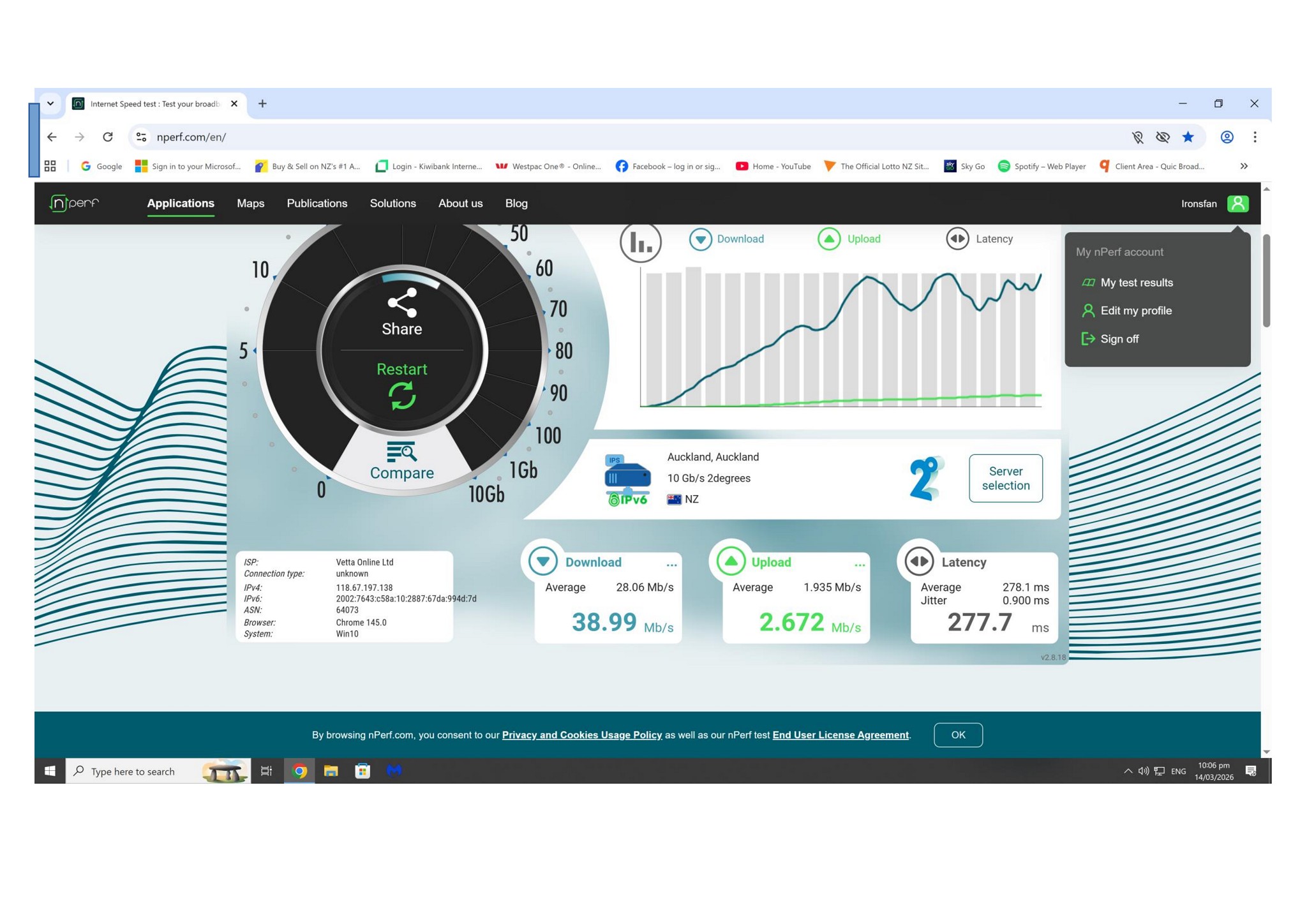
Maybe this will help to see what is happening. Tests to ipv4 and then ipv6 sites.


https://www.nperf.com/en/r/3631094347089482-xG1lMIRN


https://www.nperf.com/en/r/3631094550308457-LYTIPeUQ


KiwiSurfer
1722 posts

Uber Geek
+1 received by user: 993

ID Verified
Lifetime subscriber

  #3468394 10-Mar-2026 11:13
Send private message quote this post

Ironsfan:


Maybe this will help to see what is happening. Tests to ipv4 and then ipv6 sites.


https://www.nperf.com/en/r/3631094347089482-xG1lMIRN


https://www.nperf.com/en/r/3631094550308457-LYTIPeUQ


The issue is nothing to do with speeds. My routers also loses its IPv6 connection every few days on Quic. Same Edgerouter worked fine for years on Vocus and for several months on Quic. Started playing up in ~Jan and was recommended by Quic Discord to invest into a better router -- Mikrotik -- as the consensus was that the Edgerouter was the cluprit. Got that and still seeing the same IPvb6 drops after a few says so am now more confident it is not a router issue given the config I'm using on the Mikrotik is the same as what other Quic customers are using.


Someone in the Quic Discord kindly let me know of a Mikrotik script that can automatically bonce my IPv6 connection. Not a great solution and no help to the OP of this thread. Quic really need to own up to whatever issues they are having and give us a timeframe for when it'll be fixed.


Ironsfan

26 posts

Geek
+1 received by user: 8


  #3470352 14-Mar-2026 22:54
Send private message quote this post

So sick of this. Seems it may be time to change to another provider


freitasm
BDFL - Memuneh
80646 posts

Uber Geek
+1 received by user: 41030

Administrator
ID Verified
Trusted
Geekzone
Lifetime subscriber

  #3470357 15-Mar-2026 01:39
Send private message quote this post

Ironsfan:


Router is TP link Archer C54. I am on a Fibre 920 plan with dynamic IP. I have no idea how to get BNG info.I have very limited knowledge with all of this.


The specs for this router shows it has 100 Mbps ports. Are you sure this is the correct model? It would be underpowered and inadequate for any gigabit connection. And you are on a 920 Mbps plan?


Referral links: Quic Broadband (free setup code: R587125ERQ6VE) | Samsung | AliExpress | Wise | Sharesies 


Support Geekzone by subscribing (browse ads-free), or making a one-off or recurring donation through PressPatron.


michaelmurfy
meow
13579 posts

Uber Geek
+1 received by user: 10910

Moderator
ID Verified
Trusted
Lifetime subscriber

  #3470407 15-Mar-2026 13:27
Send private message quote this post

That router will only be suitable for 100/20…


Michael Murphy | https://murfy.nz
Referral Links: Quic Broadband (use R122101E7CV7Q for free setup)

Are you happy with what you get from Geekzone? Please consider supporting us by subscribing.
Opinions are my own and not the views of my employer.


Shop now on AliExpress (affiliate link).
Ironsfan

26 posts

Geek
+1 received by user: 8


  #3470729 16-Mar-2026 09:25
Send private message quote this post

michaelmurfy:


That router will only be suitable for 100/20…


I have replaced it with tplink ax55 (ax3000) router but no matter what settings I try, ipv6 will not work. 


Any idea what those settings should be?


freitasm
BDFL - Memuneh
80646 posts

Uber Geek
+1 received by user: 41030

Administrator
ID Verified
Trusted
Geekzone
Lifetime subscriber

  #3470731 16-Mar-2026 09:35
Send private message quote this post

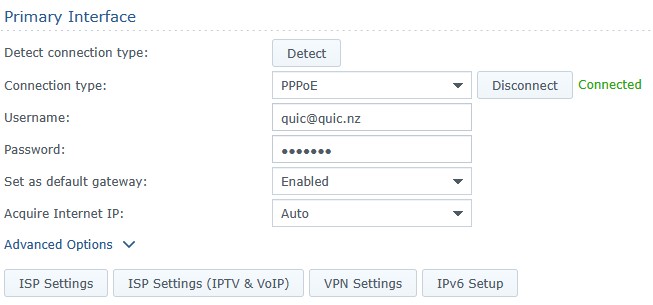
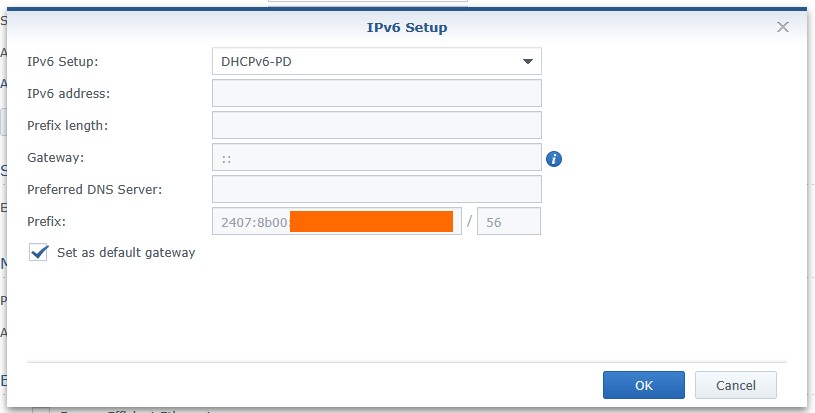
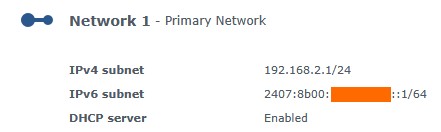
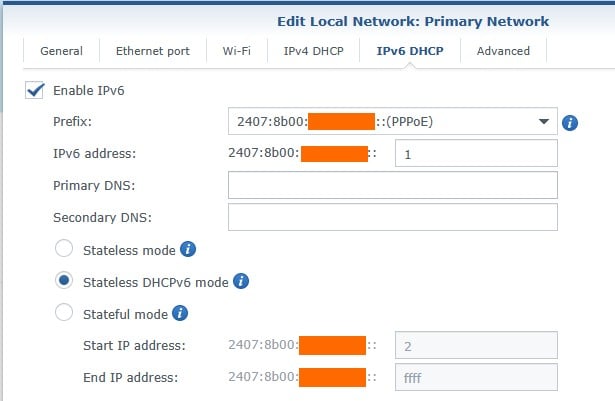
Can you post a screenshot of your router page showing the IPv6 config?


For example, this is mine on a Synology router. The interface will be different, but the settings should be similar (and mostly automatic). Also, if you are using DHCP instead of PPPoE, don't go changing without understanding it will take time for new settings to work (22 minutes), and you will need to disable DHCP on your Quic portal.


The IPv6 Setup button:


The LAN configuration (for my devices):


Referral links: Quic Broadband (free setup code: R587125ERQ6VE) | Samsung | AliExpress | Wise | Sharesies 


Support Geekzone by subscribing (browse ads-free), or making a one-off or recurring donation through PressPatron.


freitasm
BDFL - Memuneh
80646 posts

Uber Geek
+1 received by user: 41030

Administrator
ID Verified
Trusted
Geekzone
Lifetime subscriber

  #3470732 16-Mar-2026 09:40
Send private message quote this post

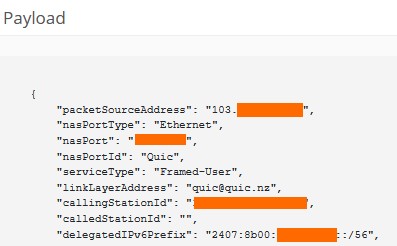
Also, go back to your Quic portal and check on that popup where you can see your active connection for the delegatedIPv6Prefix. This will tell you if it's setup on Quic's side:


Referral links: Quic Broadband (free setup code: R587125ERQ6VE) | Samsung | AliExpress | Wise | Sharesies 


Support Geekzone by subscribing (browse ads-free), or making a one-off or recurring donation through PressPatron.


michaelmurfy
meow
13579 posts

Uber Geek
+1 received by user: 10910

Moderator
ID Verified
Trusted
Lifetime subscriber

  #3470745 16-Mar-2026 09:58
Send private message quote this post

Ironsfan: I have replaced it with tplink ax55 (ax3000) router


And guessing that solved your speed issues...?


Michael Murphy | https://murfy.nz
Referral Links: Quic Broadband (use R122101E7CV7Q for free setup)

Are you happy with what you get from Geekzone? Please consider supporting us by subscribing.
Opinions are my own and not the views of my employer.


 1 | 2 | 3
View this topic in a long page with up to 500 replies per page Create new topic


Geekzone Live »

Try automatic live updates from Geekzone directly in your browser, without refreshing the page, with Geekzone Live now.


Are you subscribed to our RSS feed? You can download the latest headlines and summaries from our stories directly to your computer or smartphone by using a feed reader.