Geekzone: technology news, blogs, forums
Guest
Welcome Guest.
You haven't logged in yet. If you don't have an account you can register now.


kennedybaird

63 posts

Master Geek
+1 received by user: 50

ID Verified

#307075 16-Sep-2023 14:46
Send private message

Hi everyone, wondering if I can have any seasoned geeks (or quic) weigh in on something strange that was happening.

I'm on quic's new 2G/2G and the connection speeds are pretty good. Doing the mikrotik btest to a guy in USA i can see that i'm getting 2G / close to it. On my 2.5GBe connection to my desktop, i'm only seeing 1700mbps down, 1200 up on average (not really related to this issue, but adding in case it helps diagnose).

I'm running the Mikrotik rb5009, cat6a from ONT to 10g copper SPF+ module, and was trying to (in a hurry for work), download about 850GB of files average 115mb each using IBM Aspera. These were in separate folders, so I was running multiple in parallel.

Something really strange kept happening however - whenever I had more than 3 downloads running in parallel (which I've always done with aspera) my Rx throughput went crazy, and would maintain really high speeds ~1700mbs, but the sfpplus port (vlan) would peak around 2.9-3gbps - way above my line limit.

Then after a short period of time doing this, it would just stop, and i would be receiving no data coming down (just a few packets). I would be locked out for anywhere from 60sec to 3 minutes. Initially I thought rebooting the router solved it, but then later I realised it was just a timeout issue.

During the peak data transfer, my router CPU was always below 20% max, so I don't think it was that.

Now, to clarify, I tested this multiple times and had the exact same behaviour. I turned off all other traffic from my desktop, disconnected the wireless AP, and then ran this scenario 5 times. Exact same behaviour, it only stopped when i limited aspera to 2 active transfers, and then it ran fine.

My question is, why would this be happening, and if anyone has any thoughts on what I could investigate that would be much appreciated, because to me it doesn't really make any sense that the downloads would be running fine, then all of a sudden just completely stop? Also, what were the random spikes to up to 3gbps on the spf port?

https://youtu.be/ppEVRcKdcPU


 (edit: made the link a link)


View this topic in a long page with up to 500 replies per page Create new topic
 1 | 2
RunningMan
9184 posts

Uber Geek
+1 received by user: 4834


  #3128588 16-Sep-2023 14:57
Send private message

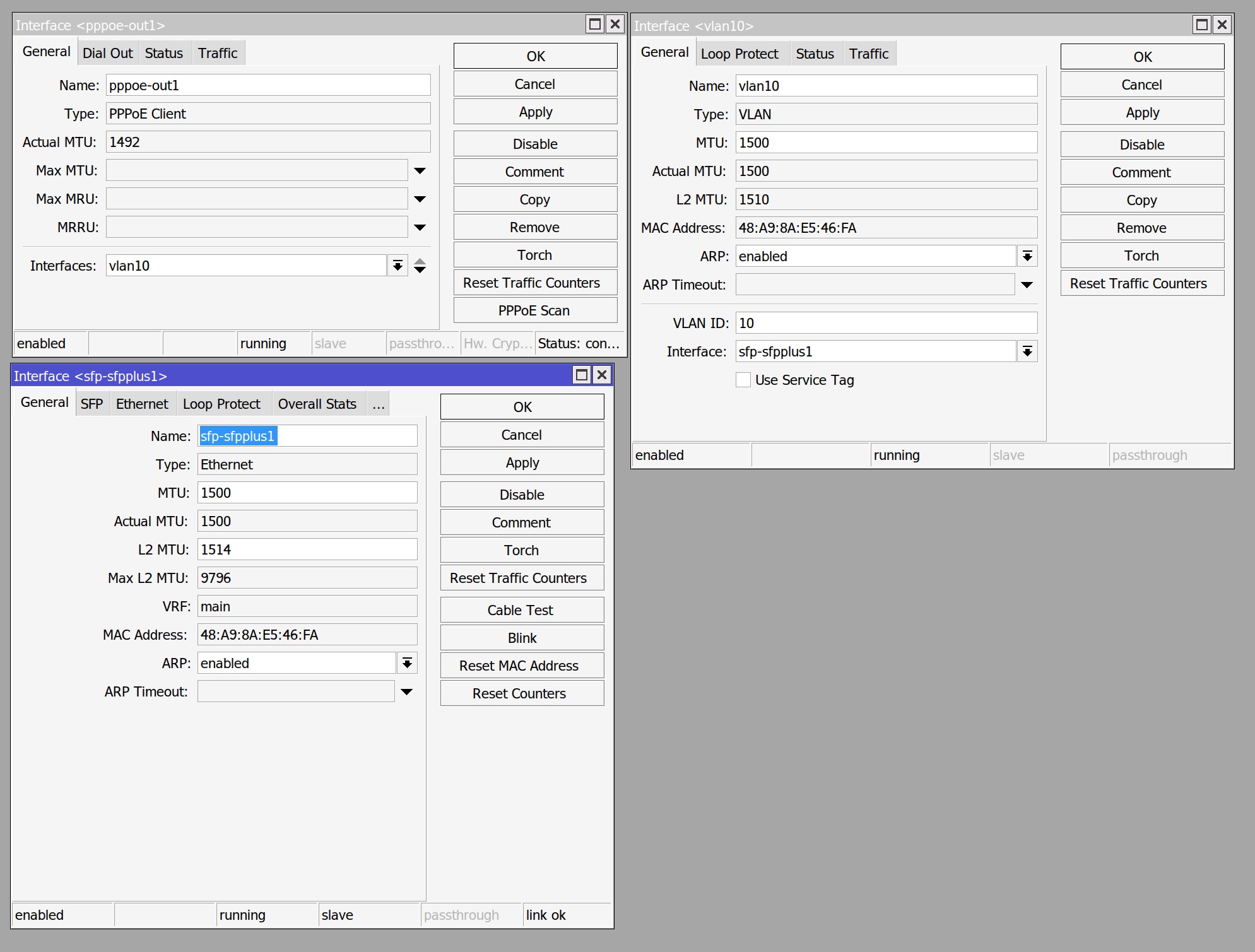
Quic can run 1500 MTU on the PPPoE connection, so if you sort that out it will help with packet fragmentation.


IS the VLAN 10 tagging the WAN or do you have the default untagged with Quic?


RunningMan
9184 posts

Uber Geek
+1 received by user: 4834


  #3128589 16-Sep-2023 15:02
Send private message

Those RX spikes on the SFP are showing as TX on ether1, so whatever it is is going that way. Not some sort of local bridge/VLAN misconfiguration causing a loop or something? Anything show in the router log?


EDIT: and you may want to update to ROS 7.11.2 - there's a few bridge & VLAN issues fixed from 7.11.1


kennedybaird

63 posts

Master Geek
+1 received by user: 50

ID Verified

  #3128591 16-Sep-2023 15:10
Send private message

@RunningMan - thanks.

My VLAN is tagged to 10, I went with that rather than default.


What do you mean is it tagging the WAN?

Ty on the update, I'll do that later tonight


michaelmurfy
meow
13579 posts

Uber Geek
+1 received by user: 10910

Moderator
ID Verified
Trusted
Lifetime subscriber

  #3128592 16-Sep-2023 15:15
Send private message

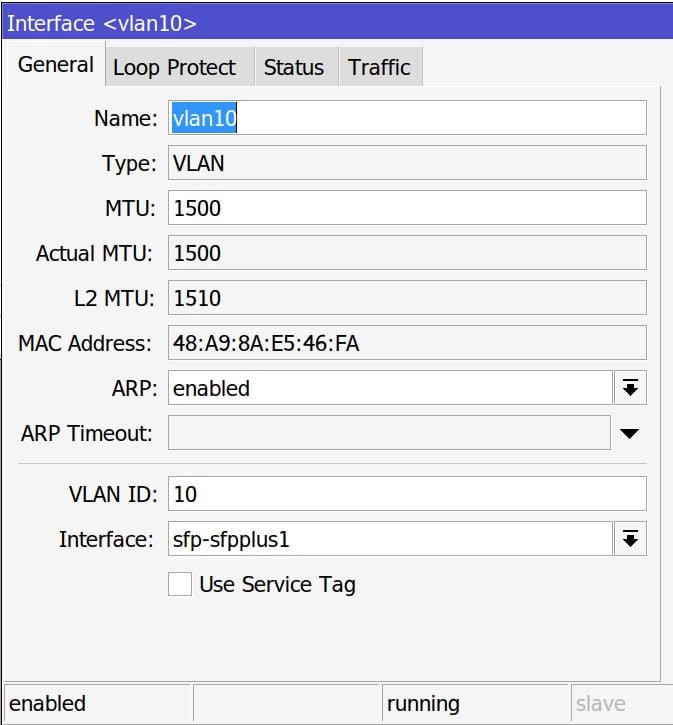
VLAN should be set to 1508, your PPPoE interface should be 1500.

Possibility your SFP+ module is overheating?


Michael Murphy | https://murfy.nz
Referral Links: Quic Broadband (use R122101E7CV7Q for free setup)

Are you happy with what you get from Geekzone? Please consider supporting us by subscribing.
Opinions are my own and not the views of my employer.


RunningMan
9184 posts

Uber Geek
+1 received by user: 4834


  #3128593 16-Sep-2023 15:15
Send private message

Quic's default is an untagged connection - wasn't sure if your VLAN 10 was because you'd requested a tagged connection or if it was an internal VLAN.


If you bump the PPPoE MTU up to 1500 and make sure the VLAN 10 & SFP ones are high enough then you'll get the full 1500 byte packets through.


RunningMan
9184 posts

Uber Geek
+1 received by user: 4834


  #3128594 16-Sep-2023 15:17
Send private message

michaelmurfy: VLAN should be set to 1508, your PPPoE interface should be 1500.


SFP MTU needs to go up to 1512 or higher too as that's the unerlying interface to the VLAN.


HP


Shop now for HP laptops and other devices (affiliate link).
RunningMan
9184 posts

Uber Geek
+1 received by user: 4834


  #3128596 16-Sep-2023 15:34
Send private message

Looking at those spikes more closely, they're happening from about 5 seconds into your video, just not to 3 Gb/s. The first is about 1.6 Gb/s when the VLAN & PPP interfaces are running at 1.1 Gb/s. It's then spiking pretty much exactly every 10 seconds from there, with the spike increasing higher as the baseline throughput increases. I'd update ROS & correct the MTU issue then retest.


EDIT: The spike is probably going to the line rate of the slowest interface - i.e. ether1 2.5 Gb/s but being reported as a bit higher due to how it's measured and reported.


kennedybaird

63 posts

Master Geek
+1 received by user: 50

ID Verified

  #3128598 16-Sep-2023 15:48
Send private message

@michaelmurfy - it's a brand new SFP+ module, it's 10G, and it's a mikrotik branded one.

How would i tell if it's overheating? Would there be logs somewhere?


kennedybaird

63 posts

Master Geek
+1 received by user: 50

ID Verified

  #3128599 16-Sep-2023 15:51
Send private message

@RunningMan, i'm not quite following, can you clarify which fields I should update?


SFP+ MTU I can* set to 1512

PPoE MTU I can't seem to update.

And you think that this could be the cause for it completely stopping and dropping the connection?

Really appreciate your guys help


RunningMan
9184 posts

Uber Geek
+1 received by user: 4834


  #3128647 16-Sep-2023 16:12
Send private message

On the PPP set max MTU & MRU to 1500


On VLAN 10 set MTU to 1508


On SFP+ set MTU to 1512.


PPP should then negotiate a 1500 MTU - you'll see this from the interface list instead of 1492


kennedybaird

63 posts

Master Geek
+1 received by user: 50

ID Verified

  #3128657 16-Sep-2023 17:03
Send private message

Ok, @RunningMan, thanks heaps.

Updated MTUs and updated ROS as well, and then tried doing the multiple Aspera downloads to saturate the line.

The values sat at 2-2.1gbps max which makes a lot more sense - however, I still end up with the same issue, down to 0bps, no packets. Anecdotally, it seems like it is lasting longer before the drop happens?

Resetting the router doesn't immediately resolve the situation - it simply seems to be a timeout situation.

The really strange thing is the timeout. I can sit here, do nothing, and after 60-240seconds, then i see data running through pppoe/vlan/sfp+ interfaces. Sometimes that will happen immediately if I apply "dial on demand" on the pppoe interface.


Stream your favourite shows now on Apple TV (affiliate link).
RunningMan
9184 posts

Uber Geek
+1 received by user: 4834


  #3128658 16-Sep-2023 17:07
Send private message

What happens to other traffic when you get the pause? Web browsing work? Other downloads OK?


kennedybaird

63 posts

Master Geek
+1 received by user: 50

ID Verified

  #3128660 16-Sep-2023 17:17
Send private message

@RunningMan

Zip / Nada.

Once it goes down to 0bps, then NOTHING will work until it picks up again

quic
236 posts

Master Geek
+1 received by user: 754

Trusted
Quic Broadband
Lifetime subscriber

  #3128664 16-Sep-2023 17:25
Send private message

Hey @kennedybaird!


I'm super curious on this one, and would say so would be our friends at Chorus (assuming you're on a Chorus circuit that is).


Can you please PM me your account details (name on account and connection address)?


Can't say I can provide answers, but do want to take a peek.


kennedybaird:


Doing the mikrotik btest to a guy in USA i can see that i'm getting 2G / close to it.


Love this test result too by the way! Makes me want to frame this quote and put it on my desk 😅


Quic Broadband
quic.nz - The telco who puts you in charge!


kennedybaird

63 posts

Master Geek
+1 received by user: 50

ID Verified

  #3128666 16-Sep-2023 17:31
Send private message

@quic, will do, thanks

 1 | 2
View this topic in a long page with up to 500 replies per page Create new topic


Geekzone Live »

Try automatic live updates from Geekzone directly in your browser, without refreshing the page, with Geekzone Live now.


Are you subscribed to our RSS feed? You can download the latest headlines and summaries from our stories directly to your computer or smartphone by using a feed reader.