Geekzone: technology news, blogs, forums
Guest
Welcome Guest.
You haven't logged in yet. If you don't have an account you can register now.


macaulja

7 posts

Wannabe Geek


#310913 29-Nov-2023 22:18
Send private message

Hi,

Bit of a novice here so apologies for any misuse of terminology etc.

I have UniFi kit at home (USG 3, USW-Lite-16 and a couple of AP’s) and ISP is Quic. I had recently read update about IPv6 launching and decided to try and set it up. Here is where things get weird. I enabled IPv6 on the routers WAN settings and was surprised to find that I was receiving IPv6 addresses on wireless clients. Wired clients were still only receiving IPv4 addresses.

I continued to read on to find that in order for IPv6 to work, it would need to be set up on the LAN too (weird that it was already enabled for wireless clients?!?). I set it up on the LAN but instantly saw network speeds tank. I am on a 300Mbps connection and download speeds were capping at ~ 107Mbps, upload speeds seem to be largely unaffected (~ 100Mbps).

I also noticed when doing a speed test via speed.cloudflare.com when when IPv6 was disabled, my location and distance to the cloudflare server was accurate (Tauranga), when IPv6 was enabled, my location was showing in Auckland’s North Shore.

Again, pretty new and really hoping I have explained my self properly. Was just wanting to know if anyone else had experienced this and was able to assist. It’s certain to be user error, I am sure.

Thanks, Jamie

Create new topic
michaelmurfy
meow
13664 posts

Uber Geek
+1 received by user: 11069

Moderator
ID Verified
Trusted
Lifetime subscriber

  #3166072 29-Nov-2023 22:23
Send private message

There are some current issues and there was a migration to their new network that would have fixed speed and packet loss issues that was supposed to go through last night but had to be rolled back due to a bug with the hardware they use. 


Read more here: https://www.geekzone.co.nz/forums.asp?forumid=194&topicid=307025 


Follow their status page (https://status.quic.nz ) and you should see another emergency change in the coming days which should fix this for you and others. Basically their network is rather overloaded right now due to popularity which is both a blessing and a curse for a small provider like Vetta/Quic. 


Michael Murphy | https://murfy.nz
Referral Links: Quic Broadband (use R122101E7CV7Q for free setup)

Are you happy with what you get from Geekzone? Please consider supporting us by subscribing.
Opinions are my own and not the views of my employer.


macaulja

7 posts

Wannabe Geek


  #3166074 29-Nov-2023 22:38
Send private message

Thanks!

I had been following the upgrades and maintenance windows with a close eye. I was not convinced it was an ISP issue and more of a config issue at home. I found it weird that as well as speeds tanking, I was never able to ping and IPv6 address eg ipv6.google.com. I would for certain receive a “host unknown” error.

Same issue?

AndrewTG
30 posts

Geek
+1 received by user: 7


  #3166093 30-Nov-2023 06:38
Send private message

IPv6 for me has always been good, but I remember having issues when I didn't set it up quite right, I am using an OpenWrt router and AP. I get my full speed and correct location on speed.cloudflare.com over IPv6.

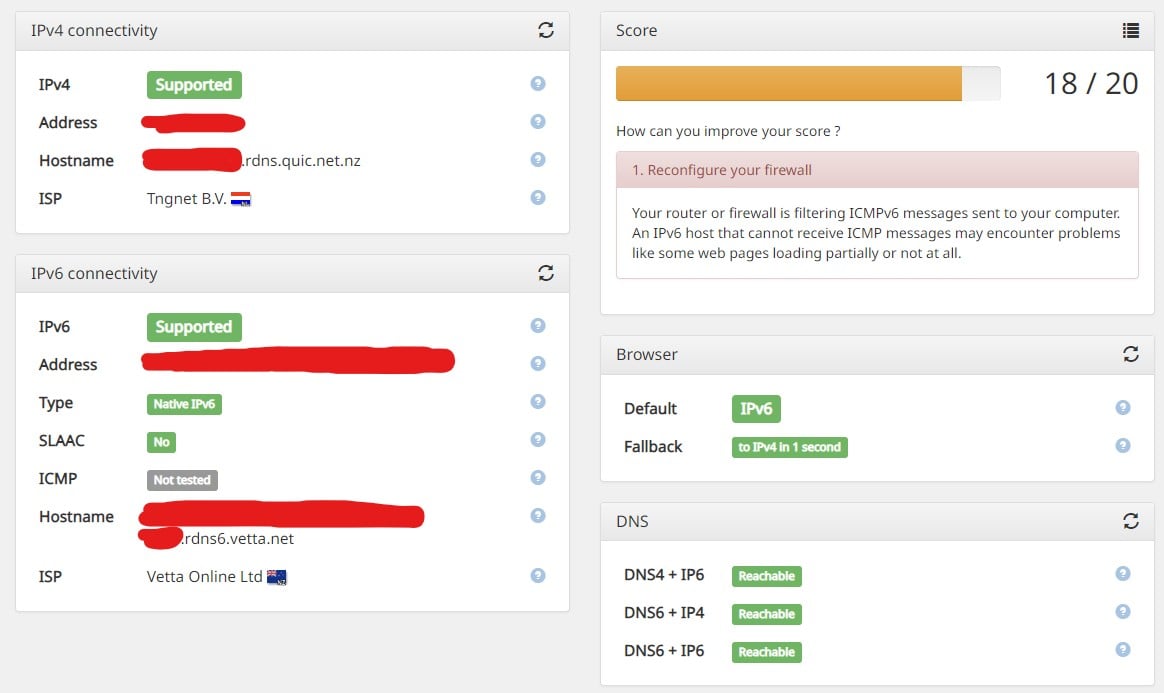
Would you mind checking ipv6-test.com and sharing the results? Mine are as follows:

You might want to run this test on both your LAN and wireless clients.


macaulja

7 posts

Wannabe Geek


  #3166357 30-Nov-2023 11:48
Send private message

Hi! 


Not a problem, more than happy to share. Please see below. This is on LAN on from a Windows PC


This was completed on a wireless client (MacOS)


They don't seem to differ too much from yours above by the looks. 


AndrewTG
30 posts

Geek
+1 received by user: 7


  #3166379 30-Nov-2023 12:34
Send private message

Yeah that looks good, I'm not familiar with UniFi routers so I'm not sure how much help I can give. You mentioned not being able to ping ipv6.google.com, I can, do your clients have an IPv6 DNS server? I set up the DHCP server on my router to dish out IPv4 and IPv6 variants of cloudflare's DNS servers.


Crayphish
13 posts

Geek
+1 received by user: 2


  #3166412 30-Nov-2023 14:02
Send private message

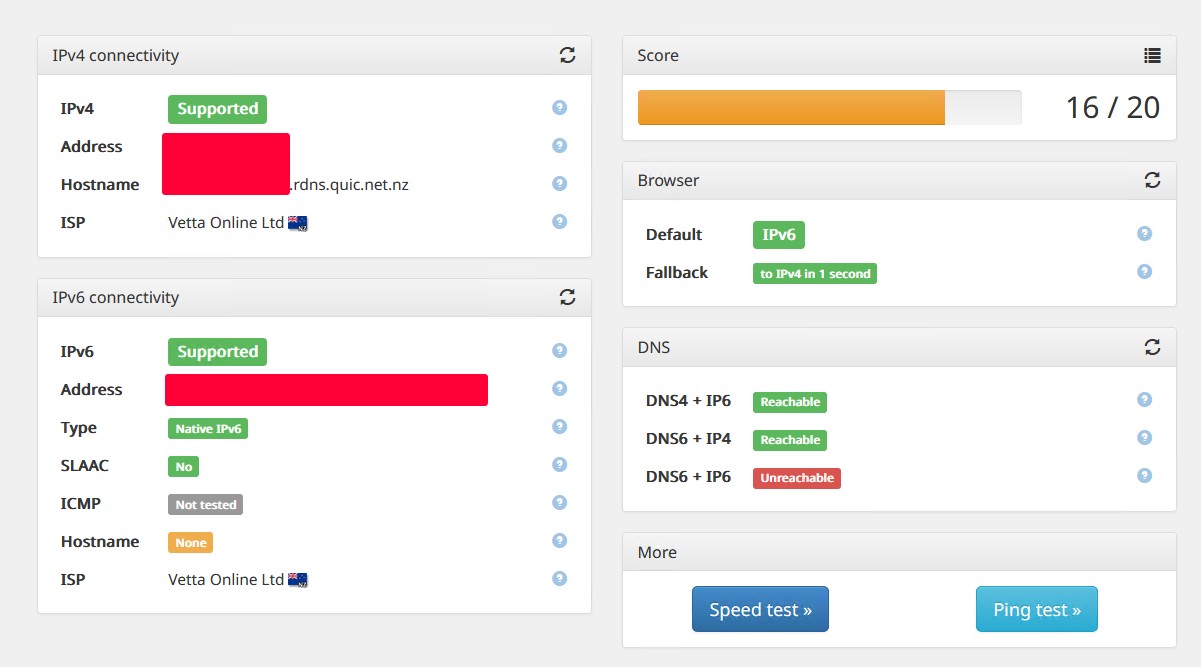
IPv6 appears to be working OK for me, but I get extremely low valid/preferred (60/55 second) lifetimes from prefix delegation upstream... which causes my OpenWRT gateway (set to handle v6 automatically) to adopt these for DHCPv6 leases resulting in all my clients renegotiating their leases every 15-30 seconds. According to my server logs this has been happening since we switched from 2d in September, but I only noticed it now while debugging a new server's DHCPv6 log spam... Anyone else getting Prefix Delegation over PPPoE with short valid lifetimes of 60 seconds? I might be able to stabilize the local net DHCPv6 behavior, but I don't think Quic should be handing out 60 sec lease lifetimes... right?


Here's ipv6-test from a client behind this link (DNS6 results vary based on when tested, probably due to the DNS being intermittent due to repeated renegotiation so this score ranges from 15-17):


FWIW my router is an APU3 device running OpenWRT using Prefix Delegation to auto-configure IPv6 over PPPoE and DHCPv6 for the local net. This has persisted across multiple restarts and a hardware swap to a newer OpenWRT version another one of the same boxes.


Create new topic


Geekzone Live »

Try automatic live updates from Geekzone directly in your browser, without refreshing the page, with Geekzone Live now.


Are you subscribed to our RSS feed? You can download the latest headlines and summaries from our stories directly to your computer or smartphone by using a feed reader.