Geekzone: technology news, blogs, forums
Guest
Welcome Guest.
You haven't logged in yet. If you don't have an account you can register now.


cods4

45 posts

Geek
+1 received by user: 7

Trusted

#311091 13-Dec-2023 09:55
Send private message

I have had hyperfibre for a couple of months now, but I only just upgraded my Router to one that is 10Gbps capable.


I went for one of these and I am running pfsense https://www.reddit.com/r/R86SNetworking/comments/14vlk0v/the_datasheet_of_r86sn_series/


  • 2 x SFP+ Ports (1 is populated with a 10GBaseT module to connect to the ONT, and the other connects to my switch with a DAC cable)
  • Intel i3-N305 CPU
  • 16GB RAM

My local network seems to be working correctly, the two PCs that are connected via 10G can both communicate with the router at about 6G (proven via iperf)


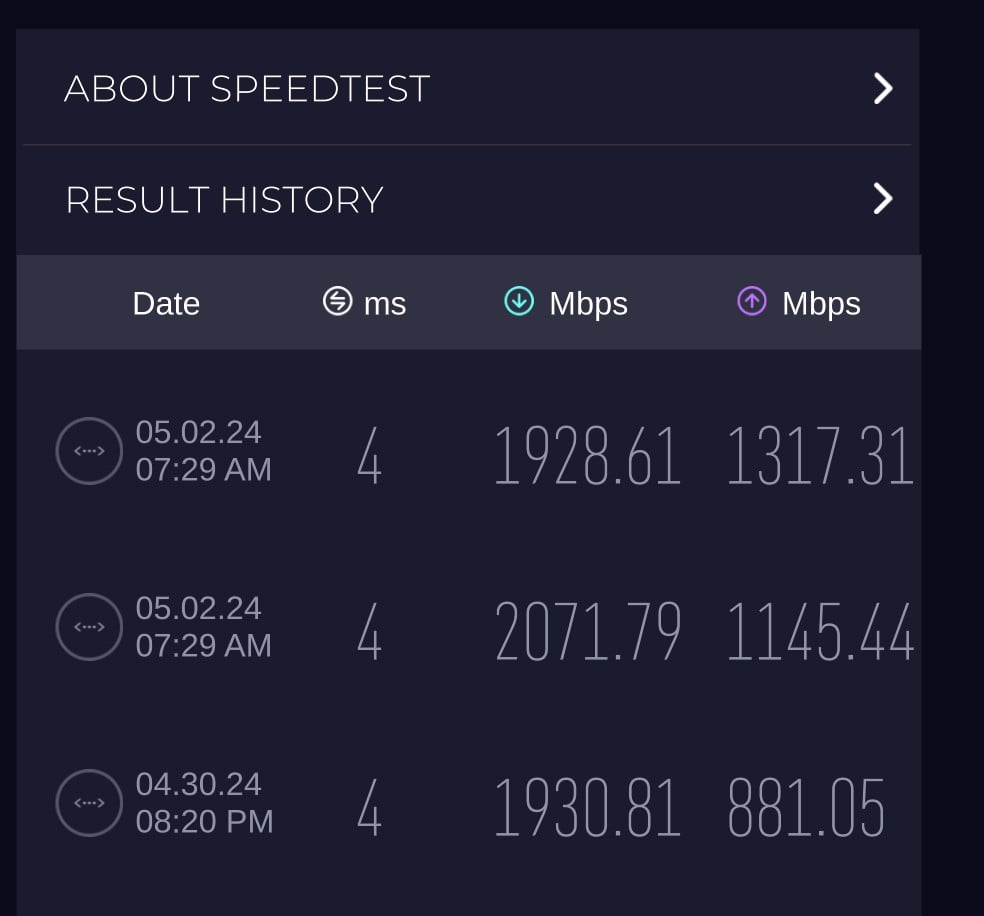
But any speedtest I do to the internet does not exceed ~920Mbps Up or Down.


I think I have narrowed down the issue to one of the following.


  • My 10GBaseT SFP+ transceiver is only connecting to that ONT at 1G. (Pfsense shows it as a 10G connection, but not sure if I can trust this).
  • The cpu is bottlenecking the connection (seems very unlikely to be at pretty much exactly 1G, and my old pfsense box which was much older and slower was able to consistently do ~7-800Mbps)
  • Quic or UFF have misconfigured the ONT, or maybe it is faulty.


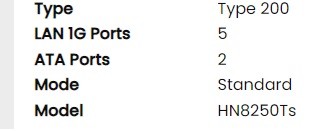
One clue I have noticed on the Quic ONT status page, is that it shows 5 1G LAN ports (there are only 4) and doesn't mention anything about the 10G LAN port that I'm connected to.


Any idea if this might be the problem?


Or any other suggestions?


Filter this topic showing only the reply marked as answer Create new topic
darylblake
1172 posts

Uber Geek
+1 received by user: 410

Trusted

  #3171354 13-Dec-2023 10:59
Send private message

From the pfsense you can probably perform an iperf3 test to test the hyperfibre link. 

I suspect there is a 1gig link somewhere in your network which is the congestion point. 


Talkiet
4819 posts

Uber Geek
+1 received by user: 3934

Trusted

  #3171357 13-Dec-2023 11:09
Send private message

I've got a couple of those R86S units for 10G testing and they have no problems routing 10G of traffic. As above - find out how to run a test from the pfsense unit.


given 920 up and down, there's certainly a 1G link somewhere. Have you tried other speed tests to make sure it's not the speedtest server? Try fast.com.


Cheers - N


Please note all comments are from my own brain and don't necessarily represent the position or opinions of my employer, previous employers, colleagues, friends or pets.


cods4

45 posts

Geek
+1 received by user: 7

Trusted

  #3171369 13-Dec-2023 12:09
Send private message

So when I do an iperf test to an external server from inside my network, I get ~900Mb/s (i.e 'iperf3 -P 8 -c iperf.stealth.net -p 5201')


But when I do the same test from pfsense I get <100Mb/s - Which according to this https://docs.netgate.com/pfsense/en/latest/packages/iperf.html , is expected.


I can also do an iperf test from pfsense to one of my local machines and I get 6.8Gb/s


So unfortunately that is inconclusive, other than to confirm the bottleneck must either be pfsense or something up-stream of that.


cods4

45 posts

Geek
+1 received by user: 7

Trusted

  #3171370 13-Dec-2023 12:11
Send private message

Talkiet:


I've got a couple of those R86S units for 10G testing and they have no problems routing 10G of traffic. As above - find out how to run a test from the pfsense unit.


given 920 up and down, there's certainly a 1G link somewhere. Have you tried other speed tests to make sure it's not the speedtest server? Try fast.com.


Cheers - N


I have tried fast.com and multiple speedtest.net servers, and as above I managed to find an external iperf server that was pretty quick, but still not getting more than 920M


Lorenceo
904 posts

Ultimate Geek
+1 received by user: 336

Trusted

  #3171449 13-Dec-2023 14:36
Send private message

Have you tried a different Ethernet cable between the ONT and SFP+ transceiver?


Do you have another device with a 10GBASE-T port? If so, what happens when you connect it to both the ONT and your SFP+ transceiver? Does it connect at 10Gbps or 1?


Can you try iperf on the router from another OS?


darylblake
1172 posts

Uber Geek
+1 received by user: 410

Trusted

  #3171468 13-Dec-2023 15:37
Send private message

I doubt it will be Tuatahi fibre. I suspect you will be getting greater than 1Gbit. You are using an Ethernet cable between the ONT and the router, ensure its CAT6. Are you using a 10Gbit to ethernet transceiver? 

I am not sure what ONT UFF/Tuatahi provide, but I assume its similar to the chorus nokia one I have? 


Shop now on Samsung phones, tablets, TVs and more (affiliate link).
cods4

45 posts

Geek
+1 received by user: 7

Trusted

  #3171469 13-Dec-2023 15:40
Send private message

Those are some good suggestions thanks, unfortunately they will have to wait until the weekend as I was pushing my luck having a 10minute outage yesterday evening while I did the router swap 😬😂.


Windows can connect via PPPoE can't it? I might just install windows on the new router and see if I can get >1G on that.


And yes I have confirmed that the SFP+ 10GBaseT module can connect at 10G to an identical SFP+ module connected to my switch.


cods4

45 posts

Geek
+1 received by user: 7

Trusted

  #3171472 13-Dec-2023 15:47
Send private message

darylblake:


I doubt it will be Tuatahi fibre. I suspect you will be getting greater than 1Gbit. You are using an Ethernet cable between the ONT and the router, ensure its CAT6. Are you using a 10Gbit to ethernet transceiver? 

I am not sure what ONT UFF/Tuatahi provide, but I assume its similar to the chorus nokia one I have? 


Yeh I am using one of those Dynamix super skinny CAT6A patch leads, but I can try another one.


I am using a 10GTek SFP+ to ethernet transceiver.


UFF provides a Huawei ONT, but the 10G port can't to multi-gig (2.5 or 5g) unfortunately, only 1G or 10G, so thats why I had to go with a router that has SFP+ cages, rather than one of the much cheaper 2.5g options.


https://prismic-io.s3.amazonaws.com/tuatahi/92c2ebd3-145f-41f6-bb25-30cf2a368384_TFF_ONT_Tech_Specs_Hyperfibre.pdf


Lorenceo
904 posts

Ultimate Geek
+1 received by user: 336

Trusted

  #3171510 13-Dec-2023 16:53
Send private message

cods4:


Windows can connect via PPPoE can't it? I might just install windows on the new router and see if I can get >1G on that.


I'd use some flavour of Linux over Windows. Perhaps "Ubantu"? 😅


cods4:


And yes I have confirmed that the SFP+ 10GBaseT module can connect at 10G to an identical SFP+ module connected to my switch.


Is the same true when you connect the 10G port of the ONT to your switch?


cods4:


Yeh I am using one of those Dynamix super skinny CAT6A patch leads, but I can try another one.


I'd be swapping this out if I were you. I've had trouble with a flat cable in the past - the link between my ONT and router started flapping between 1000 and 100Mbps when it was connected via the Chorus supplied flat cable. After swapping that the issue disappeared, never to return.


timwelch
93 posts

Master Geek
+1 received by user: 14


  #3172219 16-Dec-2023 07:03
Send private message

cods4:


Windows can connect via PPPoE can't it? I might just install windows on the new router and see if I can get >1G on that.


I documented my process in testing it on a Linux liveCD here if this helps...


https://www.geekzone.co.nz/forums.asp?forumid=49&topicid=305996&page_no=3#3093775


cods4

45 posts

Geek
+1 received by user: 7

Trusted

  #3174643 22-Dec-2023 16:58
Send private message

timwelch:

cods4:


Windows can connect via PPPoE can't it? I might just install windows on the new router and see if I can get >1G on that.


I documented my process in testing it on a Linux liveCD here if this helps...


https://www.geekzone.co.nz/forums.asp?forumid=49&topicid=305996&page_no=3#3093775


Thanks for this suggestion.
I have followed your instructions and I get the same result.

Sudo cat /sys/class/net/ens16f1/speed
10000

I have also tried MTUs if 1492, 1500, 1508 and 1518
(I think 1508 is right as the pppoe then has 1500)

And I have tried a bunch of different speedtest servers.
The max download I got was 877Mbps
And max upload was 925Mbps

I did all the testing on a Debian VM with the SFP+ NIC passed through and I allocated it 4GB of ram and all 8 cores just to ensure it wasn't a hardware limitation.

I think I will send an email to Quic and hopefully I can get it sorted once everyone's back from leave.


Shop on-line at New World now for your groceries (affiliate link).
RunningMan
9189 posts

Uber Geek
+1 received by user: 4842


  #3174654 22-Dec-2023 17:11
Send private message

cods4:


One clue I have noticed on the Quic ONT status page, is that it shows 5 1G LAN ports (there are only 4) and doesn't mention anything about the 10G LAN port that I'm connected to.


Any idea if this might be the problem?


The HN8250Ts is the ONT UFF use for Hyperfibre, so that looks fine. The 5 x 1G LAN ports is probably just a UI error from the Quic website, as that ONT has 1 x 10G & 4 x 1G ports.


I'd log a fault with @quic to confirm that the correct plan has been provisioned, if you can't already see it obviously in the portal.


cods4

45 posts

Geek
+1 received by user: 7

Trusted

  #3174663 22-Dec-2023 18:13
Send private message

Yeh will do


I just tried one more thing while I had the chance.


I connected my desktop pc directly to the router and tried connecting with windows.


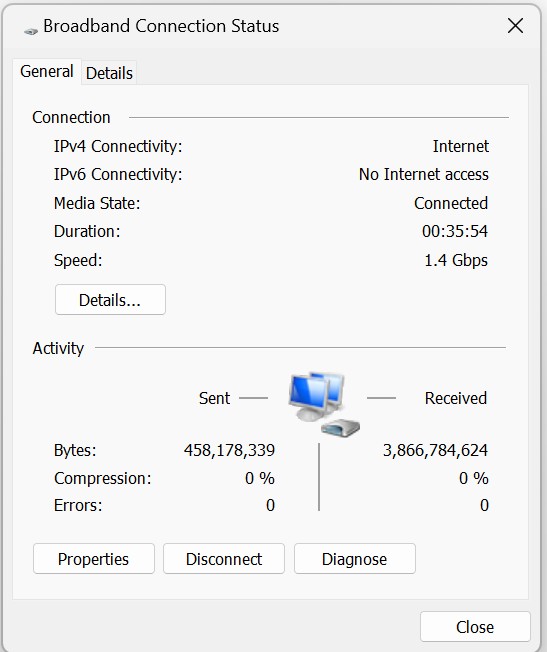
This ended up being slower, but I did notice on the status page for the pppoe connection it said it was connected at 1.4Gbps 🤔


cods4

45 posts

Geek
+1 received by user: 7

Trusted

  #3203665 6-Mar-2024 09:56
Send private message

Quick update:


Quic believe there is something in the Tuatahi/UFF network that is limiting my connection to 1G/1G. Tuatahi are investigating.


cods4

45 posts

Geek
+1 received by user: 7

Trusted

  #3225513 2-May-2024 14:45
Send private message

This has now been sorted. There was a bottleneck in the UFF network which they fixed a couple of days ago


Filter this topic showing only the reply marked as answer Create new topic


Geekzone Live »

Try automatic live updates from Geekzone directly in your browser, without refreshing the page, with Geekzone Live now.


Are you subscribed to our RSS feed? You can download the latest headlines and summaries from our stories directly to your computer or smartphone by using a feed reader.