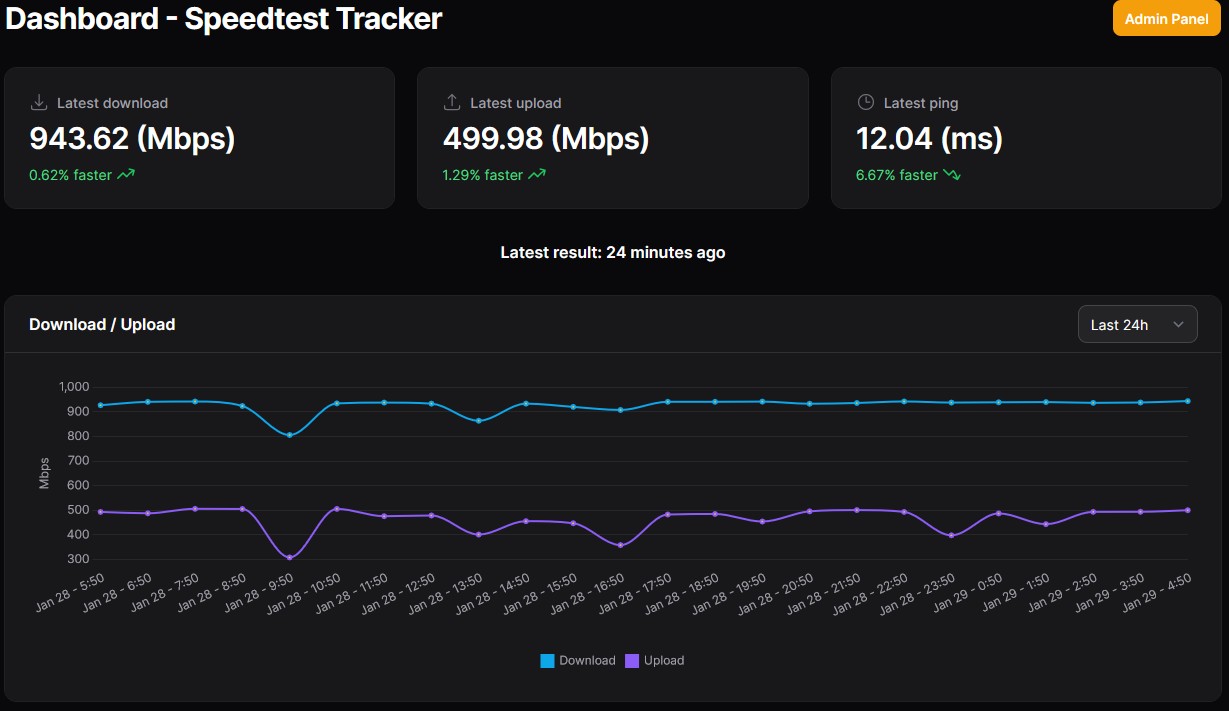
New Customer - 900/400 Plan
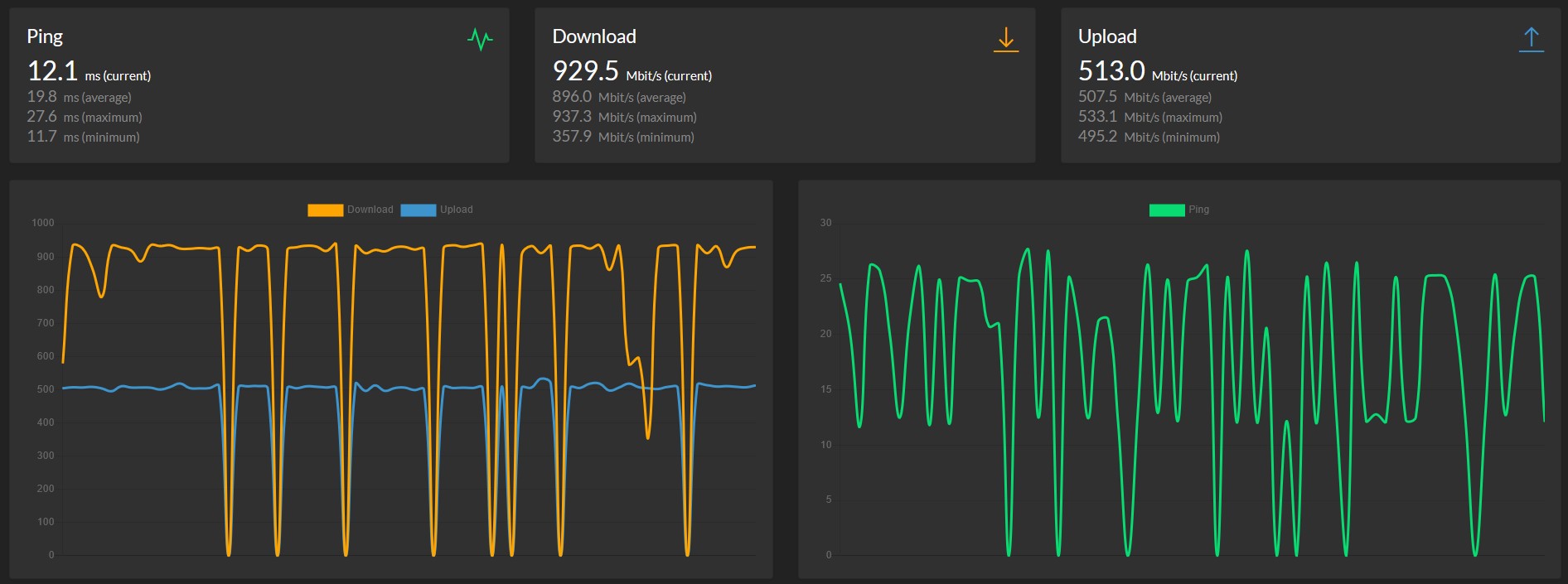
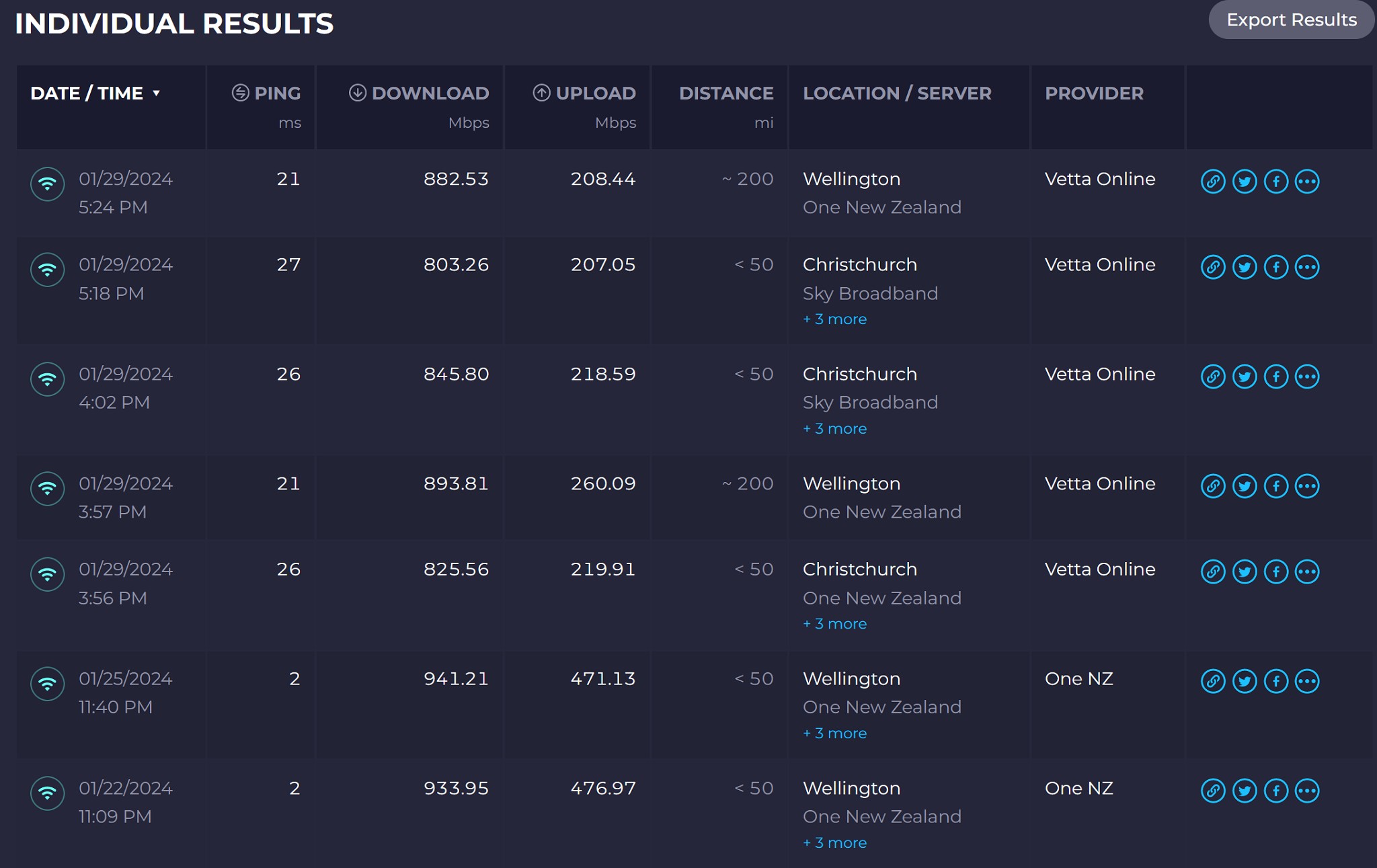
Speedtests for comparisons. old plan vs new plan
Notely the latency and speeds.
I know there will be growing pains etc but will this be improved and whats your thoughts/opinions.
New Customer - 900/400 Plan
Speedtests for comparisons. old plan vs new plan
Notely the latency and speeds.
I know there will be growing pains etc but will this be improved and whats your thoughts/opinions.
Quic Broadband Referal Code: https://account.quic.nz/refer/8901
Use the link above if you want to help me out.
Use this unique promo code at checkout for free setup ($29 value): R8901EZZNPI
Thank you!

|
|
Some of the difference will be the difference between on and off network speedtest server. Both of the One tests are to a server within their network, so that should always show a lower latency and higher throughput as it isn't dependent on external network's peering/link capacity etc. The peering links from Quic to One/Sky come in to play.
Try a couple of other tests to Chorus Fibre Lab / 2degrees and see what you get.
Also, what router are you using? The low upload can be the router struggling with PPPoE which you wouldn't have had with One.
Pretty good with me:

The dips in my case were network activity and not caused by Quic. There is still ongoing work with their new network ongoing as per the post here: https://www.geekzone.co.nz/forums.asp?forumid=194&topicid=311505
Michael Murphy | https://murfy.nz
Referral Links: Quic Broadband (use R122101E7CV7Q for free setup)
Are you happy with what you get from Geekzone? Please consider supporting us by subscribing.
Opinions are my own and not the views of my employer.
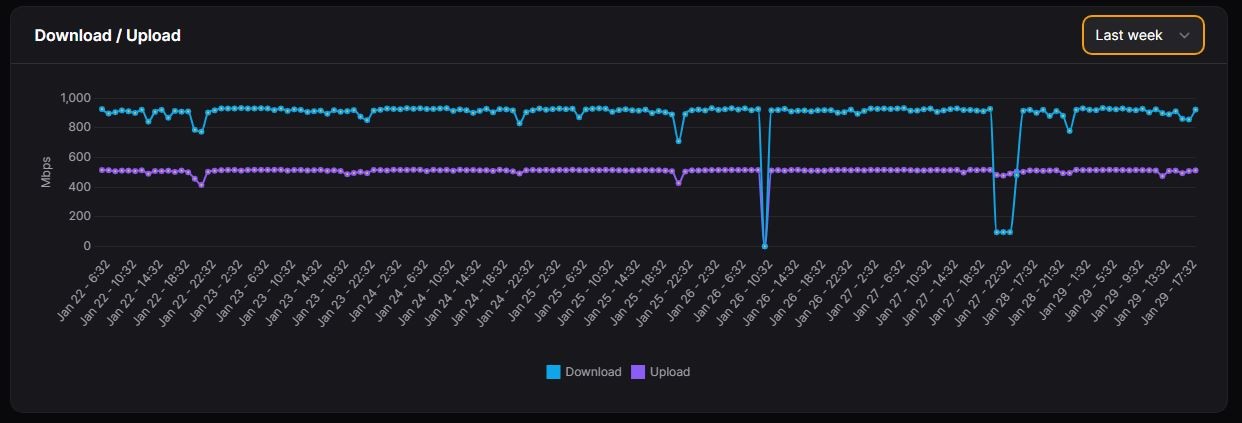
Here is mine for the last week...
Note the dip to zero was my doing, not Quic (ONT was unplugged)

@SavageNZL Actually something I noticed is you're testing to Wellington and Christchurch. Just a few things to note:
- Christchurch currently doesn't have a route reflector or peering in place on their new network. This is coming in their next maintenance according to Quic. See here: https://status.quic.nz/issues/65b03790a8772408ca08fc9f
- Wellington doesn't currently have a PoP but this is also coming (I've been begging them) meaning traffic goes up to Auckland and back down again.
If you wanted to test your speed one of the best servers to test to is Chorus Fibre Lab (Auckland). IPoE (DHCP) is also coming very soon which will improve speeds for you if you choose to use it when it is released.
Michael Murphy | https://murfy.nz
Referral Links: Quic Broadband (use R122101E7CV7Q for free setup)
Are you happy with what you get from Geekzone? Please consider supporting us by subscribing.
Opinions are my own and not the views of my employer.
@SavageNZL are you actually noticing the reduced speed in your day to day? or only when looking at your speedtest graph?
yes you're paying for "900/400" but you are testing suboptimally, and also their network appears to be in an expansion phase so from all i have seen you cant expect it to be perfect till thats finished.
RunningMan:
Some of the difference will be the difference between on and off network speedtest server. Both of the One tests are to a server within their network, so that should always show a lower latency and higher throughput as it isn't dependent on external network's peering/link capacity etc. The peering links from Quic to One/Sky come in to play.
Try a couple of other tests to Chorus Fibre Lab / 2degrees and see what you get.
Also, what router are you using? The low upload can be the router struggling with PPPoE which you wouldn't have had with One.
Quic Broadband Referal Code: https://account.quic.nz/refer/8901
Use the link above if you want to help me out.
Use this unique promo code at checkout for free setup ($29 value): R8901EZZNPI
Thank you!
Try a different router. pfSense not always that great with PPPoE on higher througput connections. https://www.geekzone.co.nz/forums.asp?forumid=194&topicid=299332&page_no=21#3080733
SavageNZL:
using a thinclient with pfsns uses about 30% cpu usage at during speedtest. i set up speedtest trackcer on a docket as well so will get some data over the next few weeks.
also dont test more frequently than hourly
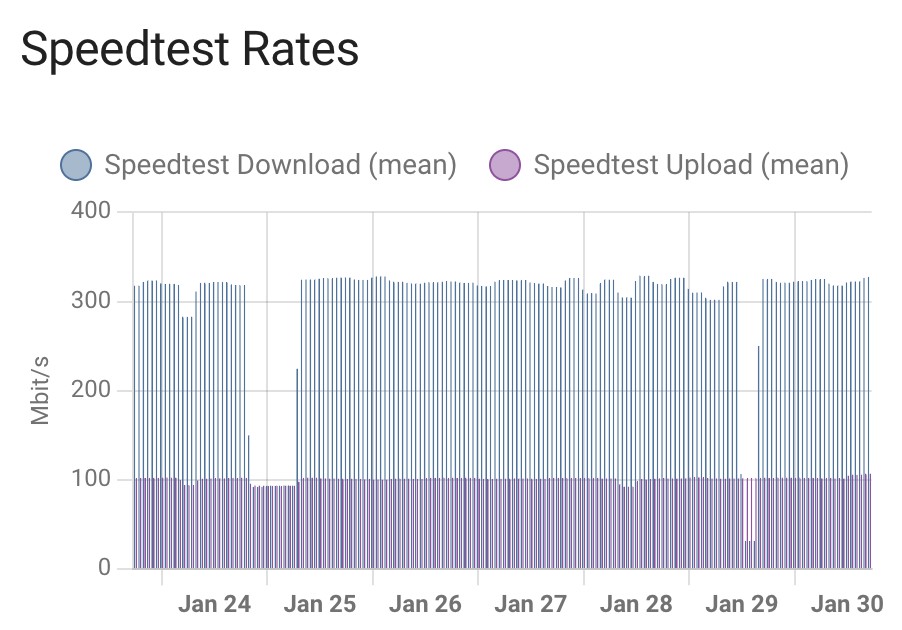
My 300/100 Quic speedtest results for last 7 days - 4 hourly test, dips not due to local changes (in our house), from a linux host, hard wired.

Ignore the failed speedtests, but randomly pinging between one chch/wellington(20ping) and chorus fl.(12ping)
Speeds seem to be improved with the averages being good. just the random speed drop offs.
The wife reports youtube on her phone will hang when opening the app, same with the tv and netflix, takes 5-20s to start the video and when it does play its all pixelated, one movie didnt come right after 5 mins but the other movie was fine after a minute, ive also seen a few 'warning connection issue' while playing a online strategy game but only intermittent and only for a few seconds.
Anyone have ideas on cause or potential fix's?
Quic Broadband Referal Code: https://account.quic.nz/refer/8901
Use the link above if you want to help me out.
Use this unique promo code at checkout for free setup ($29 value): R8901EZZNPI
Thank you!
First off - use this Speedtest Tracker instead: https://github.com/alexjustesen/speedtest-tracker and ensure you're not testing any more than hourly. You may want to fix a Speedtest server in Auckland or Christchurch to stop the graphs from spiking around when testing to a more loaded / less peered Speedtest server.
Second - I honestly don't think anything is wrong here. You're getting 900Mbit but as @RunningMan mentioned above, PPPoE is single threaded on PFSense and a thin client is not all that powerful in CPU performance. Try another router.
Michael Murphy | https://murfy.nz
Referral Links: Quic Broadband (use R122101E7CV7Q for free setup)
Are you happy with what you get from Geekzone? Please consider supporting us by subscribing.
Opinions are my own and not the views of my employer.
michaelmurfy:
First off - use this Speedtest Tracker instead: https://github.com/alexjustesen/speedtest-tracker and ensure you're not testing any more than hourly. You may want to fix a Speedtest server in Auckland or Christchurch to stop the graphs from spiking around when testing to a more loaded / less peered Speedtest server.
Second - I honestly don't think anything is wrong here. You're getting 900Mbit but as @RunningMan mentioned above, PPPoE is single threaded on PFSense and a thin client is not all that powerful in CPU performance. Try another router.
Quic Broadband Referal Code: https://account.quic.nz/refer/8901
Use the link above if you want to help me out.
Use this unique promo code at checkout for free setup ($29 value): R8901EZZNPI
Thank you!
Yeah I can't replicate this personally. Performance, for me at-least is great. Never experienced Netflix issues even on Quic's old network.
You'll need to provide more examples and run MTR tests etc to fully confirm if there is an issue and where the issue lies. I'd still honestly start with your router and test with a router that is known to do Gigabit fine on PPPoE. Else, IPoE should be coming soon to Quic. Check what cache server your Netflix is using, try over Ethernet to confirm there isn't a WiFi issue etc etc.
Michael Murphy | https://murfy.nz
Referral Links: Quic Broadband (use R122101E7CV7Q for free setup)
Are you happy with what you get from Geekzone? Please consider supporting us by subscribing.
Opinions are my own and not the views of my employer.
michaelmurfy:
Yeah I can't replicate this personally. Performance, for me at-least is great. Never experienced Netflix issues even on Quic's old network.
You'll need to provide more examples and run MTR tests etc to fully confirm if there is an issue and where the issue lies. I'd still honestly start with your router and test with a router that is known to do Gigabit fine on PPPoE. Else, IPoE should be coming soon to Quic. Check what cache server your Netflix is using, try over Ethernet to confirm there isn't a WiFi issue etc etc.
Quic Broadband Referal Code: https://account.quic.nz/refer/8901
Use the link above if you want to help me out.
Use this unique promo code at checkout for free setup ($29 value): R8901EZZNPI
Thank you!
|
|