Geekzone: technology news, blogs, forums
Guest
Welcome Guest.
You haven't logged in yet. If you don't have an account you can register now.


aj6828

177 posts

Master Geek
+1 received by user: 47

ID Verified
Trusted

#311666 5-Feb-2024 14:59
Send private message

Hey fellow Quic members 


so here it goes i purchased a IPv4 Subnet - /31 (2 IPs) on my current plan 


would anyone know how to configure this on OpenWrt or Mikrotik 


this is so confusing to me 


Thanks in advance..


Exclusive for Geekzone Members!
Dynamic IP & Bring Your Own Device Hyperfibre & Fibre plans & NO Contracts with Hyperline.co.nz powered by ASN 9790 Network


Chrous areas only HYPERLINE.co.nz  


Filter this topic showing only the reply marked as answer Create new topic
michaelmurfy
meow
13579 posts

Uber Geek
+1 received by user: 10910

Moderator
ID Verified
Trusted
Lifetime subscriber

  #3191156 5-Feb-2024 15:24
Send private message

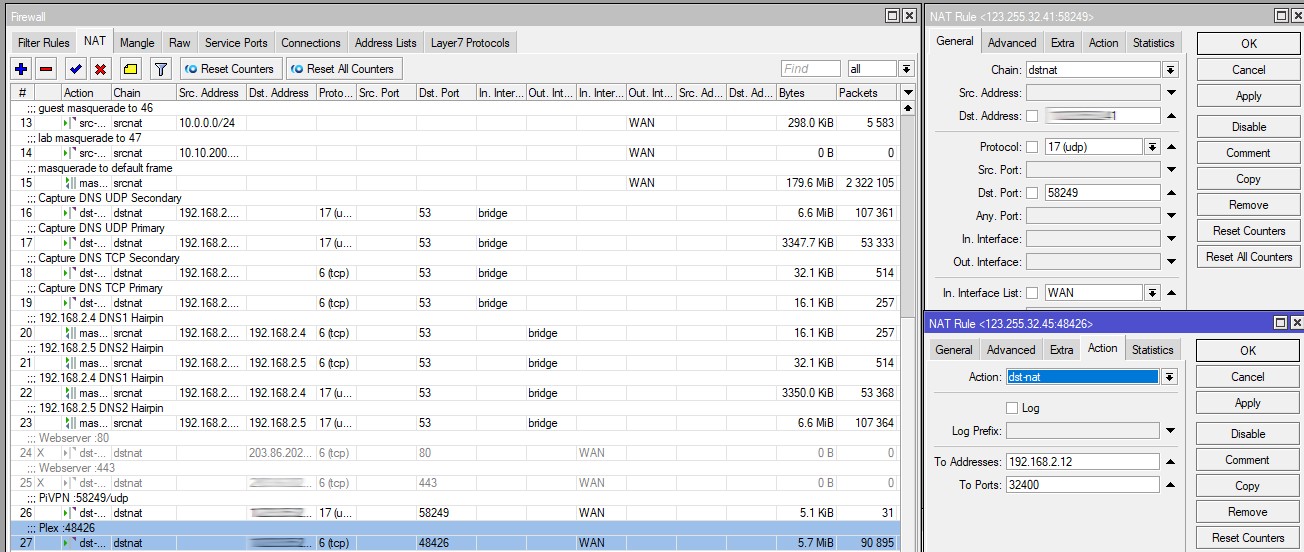
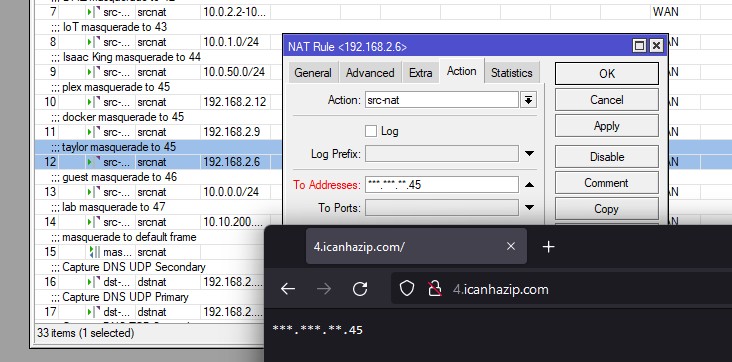
Easy ;) you just use SRC-NAT and DST-NAT rules under the Firewall NAT configuration. Basically the subnet won't get assigned, but will be automatically routed. You can from there have traffic go out one of the IP addresses, or forward in to one of the IP addresses. You use a combo of Filter Rules along with NAT.


These are some of my old screenshots. I don't have a Mikrotik anymore, but here are examples of my old configuration when I was running a Mikrotik:


Michael Murphy | https://murfy.nz
Referral Links: Quic Broadband (use R122101E7CV7Q for free setup)

Are you happy with what you get from Geekzone? Please consider supporting us by subscribing.
Opinions are my own and not the views of my employer.


aj6828

177 posts

Master Geek
+1 received by user: 47

ID Verified
Trusted

  #3191331 5-Feb-2024 22:45
Send private message

michaelmurfy:


Easy ;) you just use SRC-NAT and DST-NAT rules under the Firewall NAT configuration. Basically the subnet won't get assigned, but will be automatically routed. You can from there have traffic go out one of the IP addresses, or forward in to one of the IP addresses. You use a combo of Filter Rules along with NAT.


Thanks so much for the post its still confusing to me tried tinkering around for few hours but failed.. 


where do i put the 31 subnet they gave me ?


thanks mate really appreciate the help


Exclusive for Geekzone Members!
Dynamic IP & Bring Your Own Device Hyperfibre & Fibre plans & NO Contracts with Hyperline.co.nz powered by ASN 9790 Network


Chrous areas only HYPERLINE.co.nz  


michaelmurfy
meow
13579 posts

Uber Geek
+1 received by user: 10910

Moderator
ID Verified
Trusted
Lifetime subscriber

  #3191334 5-Feb-2024 23:02
Send private message

No need to put their /31 anywhere as it is just routed to you.


So essentially, SRC-NAT is from the inside of your network out. The rule can consist of an IP address on your network, VLAN, range of IP's etc. But this essentially means your device will go out of that IP to the internet. Handy for Guest Networks as a single example. The third screenshot shows that working. You should always have a "default frame masquerade rule" at the bottom where anything unspecified routes out from your standard IP.


DST-NAT is essentially a port forward in. Under the general tab dst address is the IP address on your /31 you're wanting to use then you specify ports etc - action is dst-nat to your internal IP and port. You still treat your standard IP as per normal.


You can also do 1:1 NAT too if you just wanted to forward an entire public IP to an internal device. Remember though, there is no firewall if you do this:


Michael Murphy | https://murfy.nz
Referral Links: Quic Broadband (use R122101E7CV7Q for free setup)

Are you happy with what you get from Geekzone? Please consider supporting us by subscribing.
Opinions are my own and not the views of my employer.


aj6828

177 posts

Master Geek
+1 received by user: 47

ID Verified
Trusted

  #3191418 6-Feb-2024 14:19
Send private message

michaelmurfy:


No need to put their /31 anywhere as it is just routed to you.


So essentially, SRC-NAT is from the inside of your network out. The rule can consist of an IP address on your network, VLAN, range of IP's etc. But this essentially means your device will go out of that IP to the internet. Handy for Guest Networks as a single example. The third screenshot shows that working. You should always have a "default frame masquerade rule" at the bottom where anything unspecified routes out from your standard IP.


DST-NAT is essentially a port forward in. Under the general tab dst address is the IP address on your /31 you're wanting to use then you specify ports etc - action is dst-nat to your internal IP and port. You still treat your standard IP as per normal.


You can also do 1:1 NAT too if you just wanted to forward an entire public IP to an internal device. Remember though, there is no firewall if you do this:


legend Thanks, i did 1:1 forwarding since its so complicated for me..


i still cannot get any incoming pings i wonder if there is a provisioning error 


thanks mate


Exclusive for Geekzone Members!
Dynamic IP & Bring Your Own Device Hyperfibre & Fibre plans & NO Contracts with Hyperline.co.nz powered by ASN 9790 Network


Chrous areas only HYPERLINE.co.nz  


Filter this topic showing only the reply marked as answer Create new topic


Geekzone Live »

Try automatic live updates from Geekzone directly in your browser, without refreshing the page, with Geekzone Live now.


Are you subscribed to our RSS feed? You can download the latest headlines and summaries from our stories directly to your computer or smartphone by using a feed reader.