Geekzone: technology news, blogs, forums
Guest
Welcome Guest.
You haven't logged in yet. If you don't have an account you can register now.


jamesrt

1663 posts

Uber Geek
+1 received by user: 941

ID Verified
Trusted
Lifetime subscriber

#311676 6-Feb-2024 21:29
Send private message

After being away for a few days, we've come home to discover that our smart TV now won't load Disney+; it gives a code 73 error [which indicates Disney+ thinks I'm in a geographic location that's not allowed service, apparently].

This was also happening on my phone until I switched off the WiFi and went onto mobile data; then it was ok. It's still ok back on the WiFi; but assume there may be some cached location going on.

Can't cast from phone to Chromecast in the house either; the Disney+ app loads but then gives a 'load_error' message.

Anyone else seeing this? Wondering if it's a IP Geolocation issue, given I saw the same issue on phone; but not on mobile data.

View this topic in a long page with up to 500 replies per page Create new topic
 1 | 2 | 3 | 4 | 5
aj6828
177 posts

Master Geek
+1 received by user: 47

ID Verified
Trusted

  #3191566 6-Feb-2024 21:48
Send private message

Open a ticket with your ip they recently purchased some ip blocks may be it's not yet geolocated .. also check what shows up on ip info on Google..


Exclusive for Geekzone Members!
Dynamic IP & Bring Your Own Device Hyperfibre & Fibre plans & NO Contracts with Hyperline.co.nz powered by ASN 9790 Network


Chrous areas only HYPERLINE.co.nz  


jamesrt

1663 posts

Uber Geek
+1 received by user: 941

ID Verified
Trusted
Lifetime subscriber

  #3191714 7-Feb-2024 10:35
Send private message

Thanks; I was going to leave it 24 hours to see if it self-resolves. 


When I googled "my ip address", the first page that came up (I don't recall what that was exactly now) did locate me as being North of Auckland, which is a good start - at least it's the right country!


(I'm actually Wellington-ish; but I also understand there is no Wellington 'pop' so Chorus probably does send my traffic to Auckland to get onto the Quic network, as I understand things)


jamesrt

1663 posts

Uber Geek
+1 received by user: 941

ID Verified
Trusted
Lifetime subscriber

  #3192113 7-Feb-2024 20:25
Send private message

Update:


Disney+ still not working on SmartTV.


Website also won't load on my MacBook when on house WiFi; but does when I share my mobile data.


No changes to the house network, I don't have any form of VPN running; I do have a piHole, bypassing it makes no difference.


Have rebooted ONT, Router, Pi, and TV/Macbook; no difference.


For the record, here are some traceroutes:


Via Quic:


❯ traceroute disneyplus.com
traceroute: Warning: disneyplus.com has multiple addresses; using 34.218.145.143
traceroute to disneyplus.com (34.218.145.143), 64 hops max, 52 byte packets
 1  router (192.168.20.1)  4.115 ms  4.013 ms  3.598 ms
 2  bng3.quic.net.nz (103.139.184.34)  18.805 ms  16.115 ms  15.943 ms
 3  pe1-akl2.quic.net.nz (103.139.184.120)  17.044 ms  16.298 ms  21.221 ms
 4  et1-8.core1-akl1.vetta.net (103.243.102.128)  19.423 ms  16.585 ms  14.853 ms
 5  * * *
 6  et-0-2-8.atc-p-3.as55850.net (116.251.184.43)  146.413 ms  145.373 ms  144.083 ms
 7  amazon1.nwax.net (198.32.195.101)  143.483 ms  144.853 ms  144.472 ms
 8  52.95.40.201 (52.95.40.201)  143.815 ms
    52.95.40.205 (52.95.40.205)  144.402 ms
    52.95.40.189 (52.95.40.189)  147.809 ms
 9  52.95.40.39 (52.95.40.39)  144.488 ms
    52.95.40.131 (52.95.40.131)  145.332 ms
    52.95.40.113 (52.95.40.113)  145.098 ms
10  * * *
11  * * *
12  * * *
13  *


Via tethered mobile:


❯ traceroute disneyplus.com
traceroute: Warning: disneyplus.com has multiple addresses; using 54.71.61.241
traceroute to disneyplus.com (54.71.61.241), 64 hops max, 52 byte packets
 1  192.168.105.104 (192.168.105.104)  5.891 ms  4.411 ms  4.717 ms
 2  192.168.127.42 (192.168.127.42)  264.888 ms  155.649 ms  222.237 ms
 3  192.168.127.41 (192.168.127.41)  49.537 ms  68.913 ms  48.637 ms
 4  198.18.10.210 (198.18.10.210)  46.267 ms  58.727 ms  73.094 ms
 5  198.18.10.209 (198.18.10.209)  58.813 ms  42.258 ms  37.281 ms
 6  169.10.69.111.static.snap.net.nz (111.69.10.169)  59.321 ms  37.282 ms  50.106 ms
 7  default-rdns.vocus.co.nz (101.98.5.222)  90.244 ms  76.261 ms  78.764 ms
 8  10.101.20.167 (10.101.20.167)  36.896 ms  61.289 ms  60.771 ms
 9  10.101.20.246 (10.101.20.246)  43.118 ms  57.908 ms  85.377 ms
10  as9790.bdr01.akl03.akl.nz.vocus.network (175.45.102.238)  59.272 ms  41.638 ms  41.953 ms
11  be1000.bdr01.akl03.akl.nz.vocus.network (175.45.102.237)  38.872 ms  51.651 ms  58.158 ms
12  be100.bdr01.akl05.akl.nz.vocus.network (114.31.202.38)  365.606 ms
    be200.bdr04.lax01.ca.us.vocus.network (114.31.199.72)  333.468 ms
    be100.bdr01.akl05.akl.nz.vocus.network (114.31.202.38)  488.979 ms
13  be100.bdr03.lax01.ca.us.vocus.network (114.31.199.36)  369.226 ms  200.443 ms
    be200.bdr03.lax01.ca.us.vocus.network (114.31.199.74)  583.972 ms
14  206.72.211.146.any2ix.coresite.com (206.72.211.146)  153.647 ms  381.508 ms  400.264 ms
15  * * *
16  * * *
17  * * *
18  *


Interesting that the name resolution is quite different, and that the Quic version rapidly heads offshore, by hop #6 it's in the US (based on ping time and nwax.net address).  TBH, I'm also surprised that Mobile data hops #12/#13 are > 300ms response; but I'm sure there are reasons involving the multiple IPs that reply....


Will raise a case next, I guess.


michaelmurfy
meow
13579 posts

Uber Geek
+1 received by user: 10910

Moderator
ID Verified
Trusted
Lifetime subscriber

  #3192117 7-Feb-2024 20:30
Send private message

You using Quic’s DNS servers? I’m in a similar IP range as you and don’t have problems. 


Also try enabling IPv6 😊


Michael Murphy | https://murfy.nz
Referral Links: Quic Broadband (use R122101E7CV7Q for free setup)

Are you happy with what you get from Geekzone? Please consider supporting us by subscribing.
Opinions are my own and not the views of my employer.


jamesrt

1663 posts

Uber Geek
+1 received by user: 941

ID Verified
Trusted
Lifetime subscriber

  #3192138 7-Feb-2024 21:08
Send private message

michaelmurfy:


You using Quic’s DNS servers? I’m in a similar IP range as you and don’t have problems. 


Also try enabling IPv6 😊


DNS: The Pi points at the router, which I assume is using Quic's DNS (resolves to recdns1.vetta.net & recdns2.vetta.net).


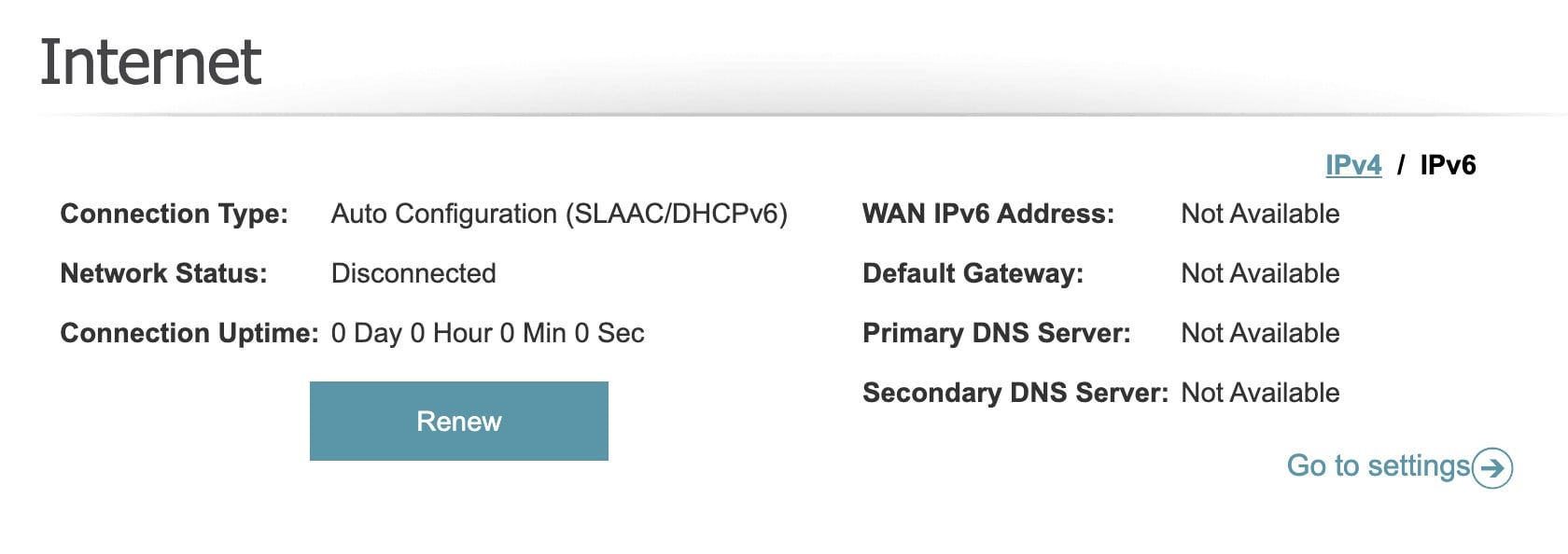
IPv6: Sadly, my current mesh/router won't negotiate an IPv6 connection with Quic (and didn't with my previous provider either) - buggy/incomplete/incompatible IPV6 implementation from D-Link, I presume.  Buying a newer mesh isn't a financial priority at the moment either.


theviper
45 posts

Geek
+1 received by user: 13


  #3192150 7-Feb-2024 21:23
Send private message

I'm having some weird issues as well.


On 4g with one NZ, and spark on neighbours WiFi I can access my Plex server from the internet and a few others.


However on quic they all show offline, this wasn't the way before. 


The only recent change I made based on chatter here was using Quic DNS but I've reverted that and no joy.


Hoping the network maintenance is it this early morning coming helps? 


Support Geekzone with one-off or recurring donations Donate via PressPatron.
michaelmurfy
meow
13579 posts

Uber Geek
+1 received by user: 10910

Moderator
ID Verified
Trusted
Lifetime subscriber

  #3192168 7-Feb-2024 21:34
Send private message

theviper:


I'm having some weird issues as well.


On 4g with one NZ, and spark on neighbours WiFi I can access my Plex server from the internet and a few others.


However on quic they all show offline, this wasn't the way before.


That sounds like to me you've got DNS Rebinding Protection turned on: https://www.geekzone.co.nz/forums.asp?forumid=194&topicid=309388 


Michael Murphy | https://murfy.nz
Referral Links: Quic Broadband (use R122101E7CV7Q for free setup)

Are you happy with what you get from Geekzone? Please consider supporting us by subscribing.
Opinions are my own and not the views of my employer.


theviper
45 posts

Geek
+1 received by user: 13


  #3192178 7-Feb-2024 21:55
Send private message

Thank you. Just double checking I can see how that affects my router/Plex.


But other people's stop working as well?


I had a quick look and I can't see where to disable DNS rebind on my fortigate (have a NFR unit with expired lics but it's still good for VPN and basics).


michaelmurfy
meow
13579 posts

Uber Geek
+1 received by user: 10910

Moderator
ID Verified
Trusted
Lifetime subscriber

  #3192201 8-Feb-2024 00:15
Send private message

@theviper Well, Fortigate user myself and my Plex works completely fine :)


Michael Murphy | https://murfy.nz
Referral Links: Quic Broadband (use R122101E7CV7Q for free setup)

Are you happy with what you get from Geekzone? Please consider supporting us by subscribing.
Opinions are my own and not the views of my employer.


michaelmurfy
meow
13579 posts

Uber Geek
+1 received by user: 10910

Moderator
ID Verified
Trusted
Lifetime subscriber

  #3192359 8-Feb-2024 11:38
Send private message

@jamesrt Give IPv6 another shot when you get a chance.


Michael Murphy | https://murfy.nz
Referral Links: Quic Broadband (use R122101E7CV7Q for free setup)

Are you happy with what you get from Geekzone? Please consider supporting us by subscribing.
Opinions are my own and not the views of my employer.


theviper
45 posts

Geek
+1 received by user: 13


  #3192367 8-Feb-2024 12:19
Send private message

Update : fixed for me by changing to use 1.1.1.1 and 8.8.8.8 as DNS for the fgate and also the DHCP DNS given to clients.


Will repeat DNS set to quic DNS and test as it could have been other things as well.


Shop now for Dell laptops and other devices (affiliate link).
jamesrt

1663 posts

Uber Geek
+1 received by user: 941

ID Verified
Trusted
Lifetime subscriber

  #3192912 9-Feb-2024 16:29
Send private message

Huh, interesting.  If I go into an incognito window, then reddit.com blocks me:


There's definitely something weird about this IP subnet....  Could this be an "IP reputation" sort of issue?


Still waiting to hear anything from the ticket I raised...


michaelmurfy
meow
13579 posts

Uber Geek
+1 received by user: 10910

Moderator
ID Verified
Trusted
Lifetime subscriber

  #3192916 9-Feb-2024 16:43
Send private message

The Reddit one is something they're aware of with one of their new ranges. Reddit are just super slack with updating their IP GeoIP data.


There have been some changes with how they handle IPv6 and I think enabling IPv6 on your network should solve the majority of your problems - you should give this another shot. On the Dlink set IPv6 to Auto Configuration (SLAAC/DHCPv6). Else buying a static IP (which is fully automatic) will give you a new IP and also comes with other benefits such as being included on their geofeeds and a V6 Subnet.


These IP ranges are not new, I've got a static on the same subnet as yours and don't have a problem with anything however I do use IPv6. Testing Disney+ in my case without IPv6 works.


Michael Murphy | https://murfy.nz
Referral Links: Quic Broadband (use R122101E7CV7Q for free setup)

Are you happy with what you get from Geekzone? Please consider supporting us by subscribing.
Opinions are my own and not the views of my employer.


jamesrt

1663 posts

Uber Geek
+1 received by user: 941

ID Verified
Trusted
Lifetime subscriber

  #3192927 9-Feb-2024 17:39
Send private message

michaelmurfy: On the Dlink set IPv6 to Auto Configuration (SLAAC/DHCPv6).


Sadly, nope.


I'll dig out the previous ISP supplied router and try setting that up; it probably has better IPv6 support (as in "I'm pretty sure it works!").


jamesrt

1663 posts

Uber Geek
+1 received by user: 941

ID Verified
Trusted
Lifetime subscriber

  #3192936 9-Feb-2024 18:27
Send private message

OK, old router does negotiate IPv6, but the SmartTV doesn't support IPv6, so end-result no effective difference.


Did make the laptop work, but that's not really the issue - don't normally watch on the laptop.  Phone, yes (commuting), and TV.


--


Another GZer PM'd me and said a static fixed the identical issue for him, btw; so I guess that's where I'm going for a fix.


 1 | 2 | 3 | 4 | 5
View this topic in a long page with up to 500 replies per page Create new topic


Geekzone Live »

Try automatic live updates from Geekzone directly in your browser, without refreshing the page, with Geekzone Live now.


Are you subscribed to our RSS feed? You can download the latest headlines and summaries from our stories directly to your computer or smartphone by using a feed reader.