Geekzone: technology news, blogs, forums
Guest
Welcome Guest.
You haven't logged in yet. If you don't have an account you can register now.


godber

75 posts

Master Geek
+1 received by user: 46

ID Verified
Trusted
Lifetime subscriber

#311906 25-Feb-2024 12:14
Send private message

I thought I would show the improvement in Hyperfibre when moving from PPPOE to DHCP.  I have a CCR2116-12G-4S+ so my router is unlikely the issue.  Using PPPOE the max individual core usage when running a Speedtest is about 40%.  Using DHCP the max individual core usage when running a Speedtest is about 4%. 


On PPPOE the best I ever recorded is below 2085 Mbps Down and 2067 Mbps Up.


On DHCP/IPOE the best I have recorded is 2094 Mbps Down and 2071 Mbps Up as seen below
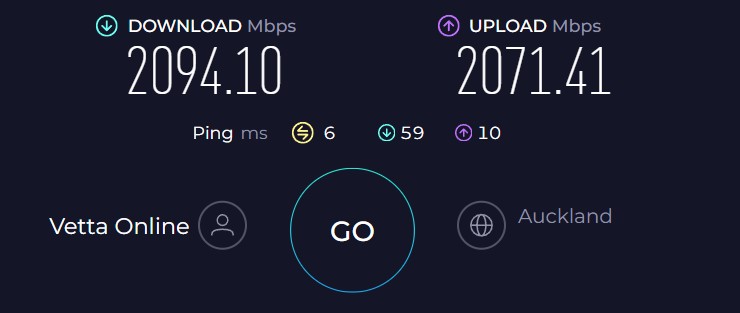


The difference is likely that PPOE has a little extra overhead.  To confirm on PPPOE I was using an MTU of 1520 


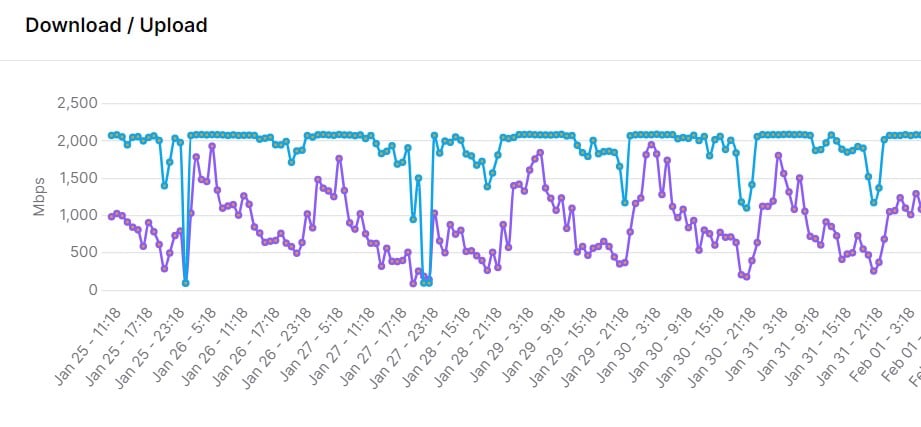
The average speed is more interesting.


PPPOE


DHCP
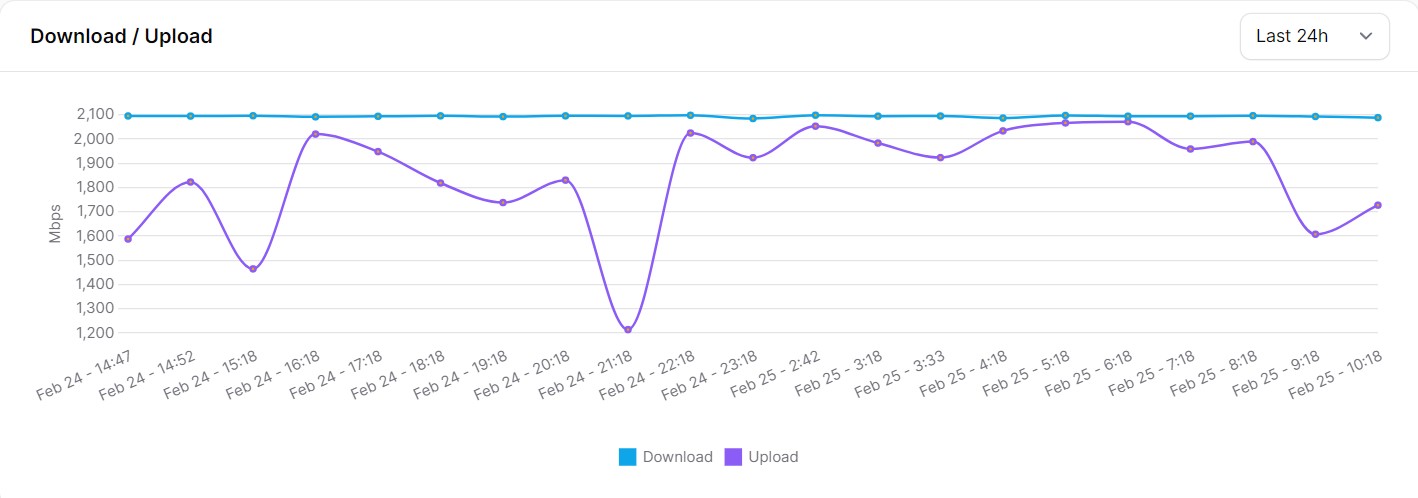


PPPOE is more variable while DHCP seems a bit more consistent, with approximately 2050 Mbps Down during the test.  I suspect the issue is DHCP has lower overhead on the Quic Broadband Network Gateways and so is more consistent.


Overall happier on DHCP, thanks Quic for the improvement.  I hope it stays this way as the last 4-5 months have been trying.  If Spark or One had performed as badly as Quic has I would have had no hesitation in moving.  Like many here I stayed because I wanted Quic to succeed. 


Godfrey
Auckland/Coroglen, New Zealand
Quic Broadband - 4G Hyperfibre


Referral Link:
Quic (use R71004E9PVBJ on checkout for free setup)


Create new topic
aj6828
177 posts

Master Geek
+1 received by user: 47

ID Verified
Trusted

  #3199829 25-Feb-2024 12:59
Send private message

Nice ..that's awesome dhcp is the way to go.. what software are you using to log speed tests ?
Yep dhcp has way lower overheads ..


Exclusive for Geekzone Members!
Dynamic IP & Bring Your Own Device Hyperfibre & Fibre plans & NO Contracts with Hyperline.co.nz powered by ASN 9790 Network


Chrous areas only HYPERLINE.co.nz  


godber

75 posts

Master Geek
+1 received by user: 46

ID Verified
Trusted
Lifetime subscriber

  #3199834 25-Feb-2024 13:16
Send private message

aj6828: Nice ..that's awesome dhcp is the way to go.. what software are you using to log speed tests ?
Yep dhcp has way lower overheads ..


https://github.com/alexjustesen/speedtest-tracker as a docker container on an HP ProLiant DL380 Gen9 with dual CPU (Xeon(R) CPU E5-2667)  and 96GB ram.  So not hardware limited.


My router has lots of CPU cycles available and have added a NVME M2 1TB drive to it so am going to create a Mikrotik container to run on the router along with Smokeping.


Godfrey
Auckland/Coroglen, New Zealand
Quic Broadband - 4G Hyperfibre


Referral Link:
Quic (use R71004E9PVBJ on checkout for free setup)


aj6828
177 posts

Master Geek
+1 received by user: 47

ID Verified
Trusted

  #3199835 25-Feb-2024 13:28
Send private message

godber:

aj6828: Nice ..that's awesome dhcp is the way to go.. what software are you using to log speed tests ?
Yep dhcp has way lower overheads ..


https://github.com/alexjustesen/speedtest-tracker as a docker container on an HP ProLiant DL380 Gen9 with dual CPU (Xeon(R) CPU E5-2667)  and 96GB ram.  So not hardware limited.


My router has lots of CPU cycles available and have added a NVME M2 1TB drive to it so am going to create a Mikrotik container to run on the router along with Smokeping.


Thanks mate appreciate it..also with dhcp is there any packet loss for me I get 0 and pppoe about 0.5 packet loss


Exclusive for Geekzone Members!
Dynamic IP & Bring Your Own Device Hyperfibre & Fibre plans & NO Contracts with Hyperline.co.nz powered by ASN 9790 Network


Chrous areas only HYPERLINE.co.nz  


michaelmurfy
meow
13579 posts

Uber Geek
+1 received by user: 10910

Moderator
ID Verified
Trusted
Lifetime subscriber

  #3199837 25-Feb-2024 13:38
Send private message

Just remember to pick a timeslot not bang on to the hour and limit your tests to at most one per hour out of respect for the ones hosting the speedtest server if you’re firing up automated tests. 


Michael Murphy | https://murfy.nz
Referral Links: Quic Broadband (use R122101E7CV7Q for free setup)

Are you happy with what you get from Geekzone? Please consider supporting us by subscribing.
Opinions are my own and not the views of my employer.


RunningMan
9185 posts

Uber Geek
+1 received by user: 4838


  #3199838 25-Feb-2024 13:42
Send private message

Unless you have a static IP, I'd be careful comparing those results. There's been massive amounts of network changes and optimisation going on with Quic over the past 6-8 weeks or so, and it's likely that plays a pretty big part in the improvements seen, particularly since your router doesn't seem to be CPU limited on the PPPoE process.


Also, Quic support a PPPoE MTU of 1500, not 1520 so doubt you had an MTU of 1520 on the PPP connection.


EDIT: Subnet changes included, but if you had a static, you wouldn't be seeing that.


godber

75 posts

Master Geek
+1 received by user: 46

ID Verified
Trusted
Lifetime subscriber

  #3199859 25-Feb-2024 14:39
Send private message

RunningMan:


Unless you have a static IP, I'd be careful comparing those results. There's been massive amounts of network changes and optimisation going on with Quic over the past 6-8 weeks or so, and it's likely that plays a pretty big part in the improvements seen, particularly since your router doesn't seem to be CPU limited on the PPPoE process.


Also, Quic support a PPPoE MTU of 1500, not 1520 so doubt you had an MTU of 1520 on the PPP connection.


EDIT: Subnet changes included, but if you had a static, you wouldn't be seeing that.


Static IP Address all test shown to Chorus Fibre Lab have had a Quic Hyperfibre connection for about 5 months and have two other locations I control which also have Quic connections.  I had to add a second Prodigi connection two those two locations during the worst period.


MTU on PPPOE Connection was 1500


MTU on the WAN ethernet interface when using PPPOE was 1520 (This a a Mikrotik issue) and most people would use 1508 MTU or 1512 MTU if using VLAN.


Finally for clarity when using DHCP am using an MTU on the WAN ethernet interface of 1500 


The network changes Quic made did not make as much of a difference for consistency as the change from PPPOE to DHCP. Even after the network changes PPPOE speed was very variable and DHCP seems consistent.


Godfrey
Auckland/Coroglen, New Zealand
Quic Broadband - 4G Hyperfibre


Referral Link:
Quic (use R71004E9PVBJ on checkout for free setup)


Shop now for Lenovo laptops and other devices (affiliate link).
RunningMan
9185 posts

Uber Geek
+1 received by user: 4838


  #3199860 25-Feb-2024 14:44
Send private message

godber:


MTU on the WAN ethernet interface when using PPPOE was 1520 (This a a Mikrotik issue) and most people would use 1508 MTU or 1512 MTU if using VLAN.


MikroTik will be fine with 1508, no need to go to 1520. It won't break anything, just doesn't need to be as high as you've set it.


godber

75 posts

Master Geek
+1 received by user: 46

ID Verified
Trusted
Lifetime subscriber

  #3199952 25-Feb-2024 22:07
Send private message

RunningMan:


MikroTik will be fine with 1508, no need to go to 1520. It won't break anything, just doesn't need to be as high as you've set it.


There is a thread on the Mikrotik forums that disagrees with your comment that 1508 would be fine see https://forum.mikrotik.com/viewtopic.php?t=171390 and in particular https://forum.mikrotik.com/viewtopic.php?t=171390#p838713


Mikrotik support confirmed that "RouterOS simply allocates 20 bytes headers" thus I used 1520 rather than 1508 on the ethernet interface running PPPOE.


Godfrey
Auckland/Coroglen, New Zealand
Quic Broadband - 4G Hyperfibre


Referral Link:
Quic (use R71004E9PVBJ on checkout for free setup)


Create new topic


Geekzone Live »

Try automatic live updates from Geekzone directly in your browser, without refreshing the page, with Geekzone Live now.


Are you subscribed to our RSS feed? You can download the latest headlines and summaries from our stories directly to your computer or smartphone by using a feed reader.
