Geekzone: technology news, blogs, forums
Guest
Welcome Guest.
You haven't logged in yet. If you don't have an account you can register now.


chrisallen

17 posts

Geek
+1 received by user: 3


#311928 27-Feb-2024 20:56
Send private message

This post is a bit of a timeline of my journey so far with HyperFibre and Quic, and what I should do on my side to improve the stability.


30th Jan
HyperFibre connected and switched over from DHCP (Slingshot) to PPPoE (Quic). The install was a bit odd with the tech taking my Type 100 ONT off the wall mount bracket in my network cabinet and then unwinding some of the fibre cable out of the bracket so the tail was long enough to plug into the new black ONT 110. There was no cover or extension cable (he came back later and proved a cover for bracket, but still the tiny fibre was all I have hanging out of the wall bracket and into the ONT.)


30th Jan to 12th Feb
It connected and worked well for a bit (getting ~1800 up/down to Chorus Fibre Lab), then I noticed PPPoE dropouts under load, that would require me to power cycle the ONT to fix things.


12th Feb to 14th Feb
I raised a ticket with QUIC who were super helpful and transparent, leading to it being something on my end and perhaps DHCP would help once available. I found this Ubiquiti forum thread https://www.reddit.com/r/Ubiquiti/comments/y8nd2a/internet_connection_drops_during_heavy_downloads/ that basically confirmed my issue.


15th Feb to 22nd Feb
I wrote a script to toggle my UDM-SE WAN port down/up if a ping to Cloudflare failed more than 10 times in a row. This seemed to "patch" my issue so far.


22nd Feb
I switched to DHCP, and things seemed to be more stable, but speed results were now ~1300 down / ~2020 up (Chorus Fibre Lab). I reached out to QUIC with this as well as a question about my ONT status being "reduced". and said that given I can see wirespeed upload, that it might be firewall rules. I still see internet disconnections, with the most recent outage being at 8:41pm on the 24th Feb, and then today at 7:14pm.


At this point I wanted to reach out to this community to see what I should be doing?


  • Is it possible my fibre or ONT is damaged/faulty? Should I log an issue with Chorus through the portal?
  • Are there known issues with UDM-SE and getting wirespeed hyperfibre with DHCP?
  • Does anyone else see odd disconnects where the ONT is online but there is no internet?? 
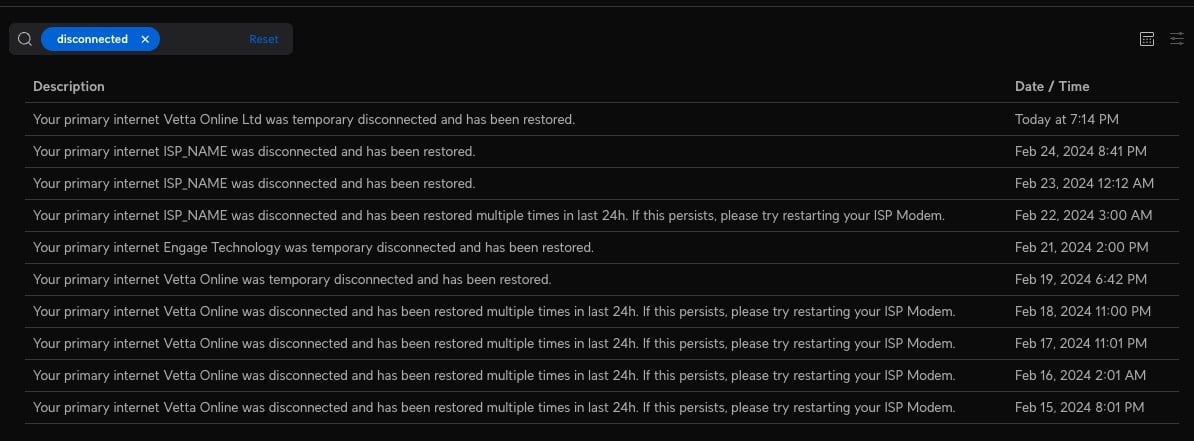


PastedGraphic-1.png


View this topic in a long page with up to 500 replies per page Create new topic
 1 | 2
aj6828
177 posts

Master Geek
+1 received by user: 47

ID Verified
Trusted

  #3200636 27-Feb-2024 21:45
Send private message

Your ont isn't seeing much light by the looks of .. it could be a error too far away to the cabinet? Fibers not sliced properly..? The chorous tech usually checks the dB on the fiber before he leaves .. open a ticket on quic and see what they say..I have the 110 too mine is green all day long..


Exclusive for Geekzone Members!
Dynamic IP & Bring Your Own Device Hyperfibre & Fibre plans & NO Contracts with Hyperline.co.nz powered by ASN 9790 Network


Chrous areas only HYPERLINE.co.nz  


squareeyes123
83 posts

Master Geek
+1 received by user: 30


  #3200921 28-Feb-2024 16:08
Send private message

I am on UDM Pro (2K hyperfibre), and have also recently switched to DHCP, about a week ago now. I experienced two bouts of packet loss today, which resulted in dropouts of several minutes killing a video call I was on. Wasn't doing any material download though.


Still rarely approaching 2K DL, while UL seems better, which is disappointing. I have a overnight speed test on the router I'll dig up the logs for.


michaelmurfy
meow
13579 posts

Uber Geek
+1 received by user: 10910

Moderator
ID Verified
Trusted
Lifetime subscriber

  #3200924 28-Feb-2024 16:14
Send private message

squareeyes123:


I experienced two bouts of packet loss today.


There was a published change overnight.


Still rarely approaching 2K DL, while UL seems better, which is disappointing.


That's the on-board Speedtest which doesn't allow you to specify server or anything so can be slightly inaccurate. This is the first generation Dream Machine and as you can see it's routing 2Gbit just fine: https://www.geekzone.co.nz/forums.asp?forumid=194&topicid=311756&page_no=1#3194449


Michael Murphy | https://murfy.nz
Referral Links: Quic Broadband (use R122101E7CV7Q for free setup)

Are you happy with what you get from Geekzone? Please consider supporting us by subscribing.
Opinions are my own and not the views of my employer.


squareeyes123
83 posts

Master Geek
+1 received by user: 30


  #3200925 28-Feb-2024 16:26
Send private message

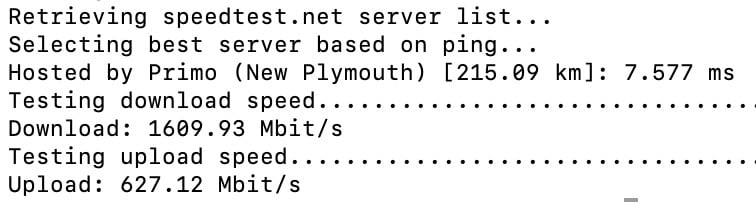
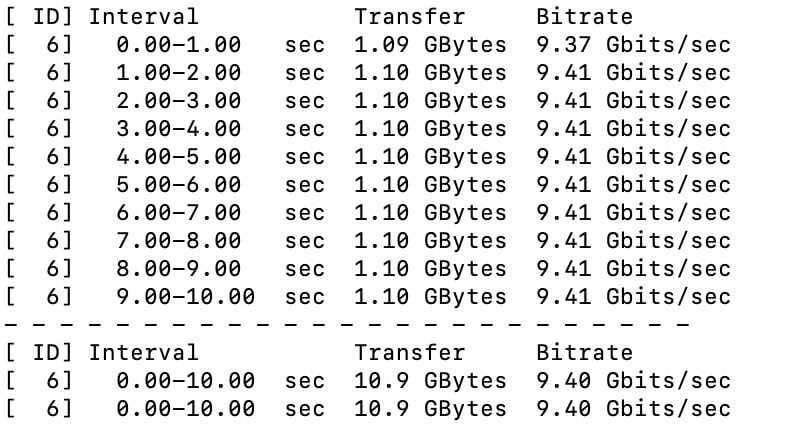
You look like you are displaying a CLI speed test which is also known to be inaccurate (by Oakla). I stopped using it because of issues.


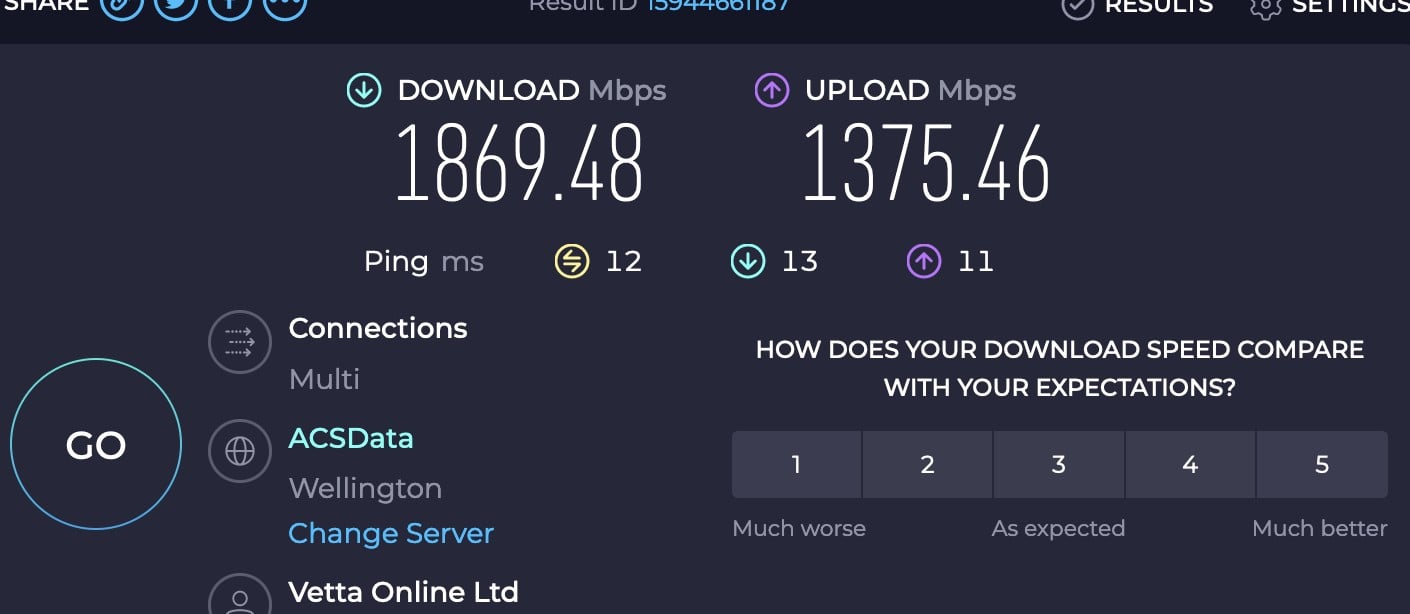
I don't know why but the web based speed test usually selects Wellington nodes for me. I'm in Auckland.


CLI FWIW


Client is on 10GbE before anyone comments.


squareeyes123
83 posts

Master Geek
+1 received by user: 30


  #3200926 28-Feb-2024 16:34
Send private message

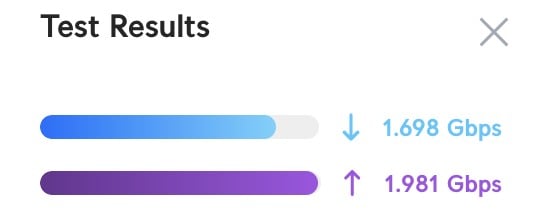
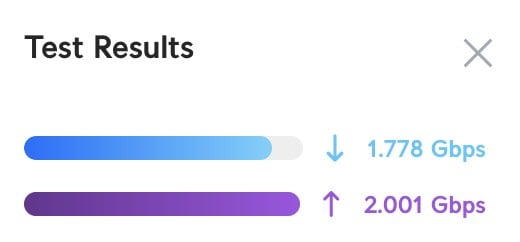
Last ~week of speed tests overnight on the UDM Pro


2024-02-20T05:36:29+13:00(): : Downlink 1458.135 Mbps, Uplink 509.651 Mbps
2024-02-21T05:36:29+13:00(): : Downlink 1518.591 Mbps, Uplink 417.851 Mbps
2024-02-22T05:36:29+13:00(): : Downlink 1582.674 Mbps, Uplink 2064.858 Mbps
2024-02-23T05:36:29+13:00(): : Downlink 1644.028 Mbps, Uplink 1949.657 Mbps
2024-02-24T05:36:29+13:00(): : Downlink 1598.337 Mbps, Uplink 1985.907 Mbps
2024-02-25T05:36:29+13:00(): : Downlink 1601.390 Mbps, Uplink 2030.399 Mbps
2024-02-26T05:36:29+13:00(): : Downlink 1551.726 Mbps, Uplink 1938.491 Mbps
2024-02-27T05:36:29+13:00(): : Downlink 1542.292 Mbps, Uplink 2062.513 Mbps
2024-02-28T05:36:29+13:00(): : Downlink 1544.074 Mbps, Uplink 2035.597 Mbps
2024-02-28T16:05:56+13:00(): : Downlink 1697.351 Mbps, Uplink 1980.759 Mbps
2024-02-28T16:12:47+13:00(): : Downlink 1777.349 Mbps, Uplink 2000.271 Mbps


squareeyes123
83 posts

Master Geek
+1 received by user: 30


  #3200928 28-Feb-2024 16:41
Send private message

Gah no code blocks here?


Shop now for Lenovo laptops and other devices (affiliate link).
godber
75 posts

Master Geek
+1 received by user: 46

ID Verified
Trusted
Lifetime subscriber

  #3200932 28-Feb-2024 16:52
Send private message

squareeyes123:


You look like you are displaying a CLI speed test which is also known to be inaccurate (by Oakla). I stopped using it because of issues.


I don't know why but the web based speed test usually selects Wellington nodes for me. I'm in Auckland.


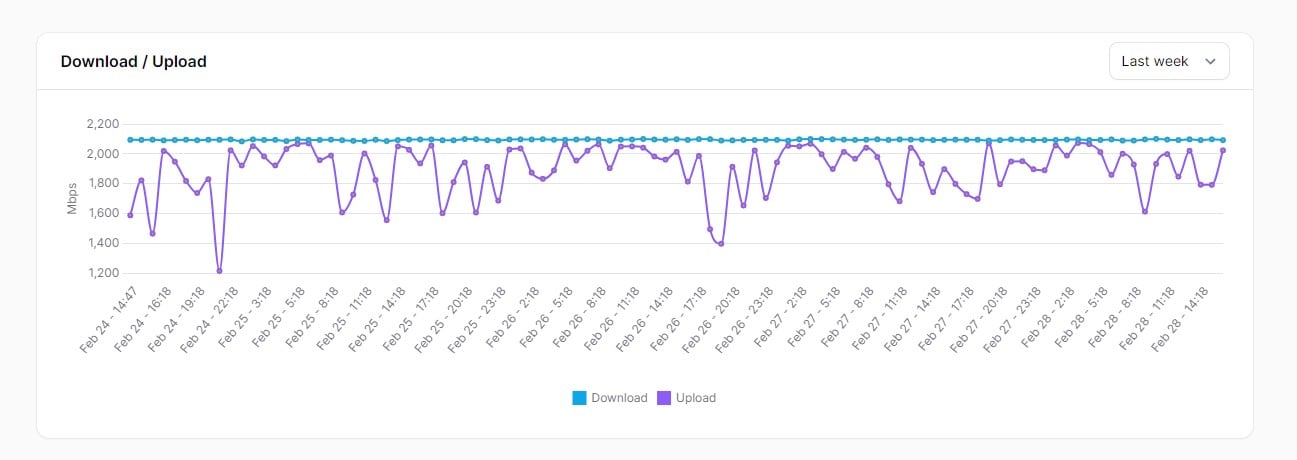
I always manually override the Web based speed test, what are the results like if you try "Chorus Fibre Lab" from the Web Interface which is in Auckland?


These are my results on 2G Hyperfibre from a Mikrotik Router (located near Whitianga) but are an example of Quic's speed.  Download is very consistent while upload is a bit variable.


While speedtest-cli (https://github.com/sivel/speedtest-cli) may be broken the Oakla command line interface speedtest (https://www.speedtest.net/apps/cli) is not as far as I am aware broken.


Godfrey
Auckland/Coroglen, New Zealand
Quic Broadband - 4G Hyperfibre


Referral Link:
Quic (use R71004E9PVBJ on checkout for free setup)


michaelmurfy
meow
13579 posts

Uber Geek
+1 received by user: 10910

Moderator
ID Verified
Trusted
Lifetime subscriber

  #3200934 28-Feb-2024 17:02
Send private message

@squareeyes123 yep nothing wrong with your speeds. Just also be careful please with potentially derailing other peoples threads - if in doubt, create a new post.


Edit: Sorry, I overstepped a bit here with my statement and made it sound worse than what it was. Have edited this post.


Michael Murphy | https://murfy.nz
Referral Links: Quic Broadband (use R122101E7CV7Q for free setup)

Are you happy with what you get from Geekzone? Please consider supporting us by subscribing.
Opinions are my own and not the views of my employer.


chrisallen

17 posts

Geek
+1 received by user: 3


  #3200936 28-Feb-2024 17:05
Send private message

@michaelmurfy should I raise a ticket to get Chorus to look at my reduced ONT state?


michaelmurfy
meow
13579 posts

Uber Geek
+1 received by user: 10910

Moderator
ID Verified
Trusted
Lifetime subscriber

  #3200944 28-Feb-2024 17:26
Send private message

@chrisallen I’m only a customer and GZ is not official support. If you feel something is wrong then log a ticket with them to investigate. Seems like in your case though there is a problem. 


Michael Murphy | https://murfy.nz
Referral Links: Quic Broadband (use R122101E7CV7Q for free setup)

Are you happy with what you get from Geekzone? Please consider supporting us by subscribing.
Opinions are my own and not the views of my employer.


chrisallen

17 posts

Geek
+1 received by user: 3


  #3201025 28-Feb-2024 19:50
Send private message

michaelmurfy:


@chrisallen I’m only a customer and GZ is not official support. If you feel something is wrong then log a ticket with them to investigate. Seems like in your case though there is a problem. 


Sorry if I sounded like I thought you were official support. I guess I was asking for your opinion as you are rather knowledgeable on these forums.


Shop now at Mighty Ape (affiliate link).
michaelmurfy
meow
13579 posts

Uber Geek
+1 received by user: 10910

Moderator
ID Verified
Trusted
Lifetime subscriber

  #3201026 28-Feb-2024 19:53
Send private message

Yeah totally understand! I don’t want to get the blame for the no fault found fee though haha. It does look like you’ve done your due diligence and won’t hurt Quic to have a look through things so I say raise it with them. Also test under Linux too and if you’re in Auckland then one of the best Speedtest servers is Chorus Fibre Lab, or for the south 2degrees. 


Also I totally saw just before I used a bit of grumpy language unintentionally before - sorry about that!


Michael Murphy | https://murfy.nz
Referral Links: Quic Broadband (use R122101E7CV7Q for free setup)

Are you happy with what you get from Geekzone? Please consider supporting us by subscribing.
Opinions are my own and not the views of my employer.


eong
100 posts

Master Geek
+1 received by user: 31


  #3206836 15-Mar-2024 19:49
Send private message

I tried 2Gbps, 4Gbps and 8Gbps with the UDM PRO/SE. I never reached the full download speed. I get 3.2Gbps with 4Gbps hyperfibre and I get 6.7Gbps with 8Gbps hyperfibre. If we are on a 2Gbps or 4Gbps plan, the router should be able to handle the speed well but still no full speed. That's all I know.


Please note I am not talking about Quic's hyperfibre plans specificly. I was using MyRepbulic, now on 2D and Quic.


Just a geek/coder.


chrisallen

17 posts

Geek
+1 received by user: 3


  #3206838 15-Mar-2024 19:52
Send private message

I installed the speedtest cli binary on my UDM-Se directly and can get 2G up and down just fine. So the speed issue might be a network switch issue. That said, I am still seeing odd drop outs that need the ONT rebooted.


eong
100 posts

Master Geek
+1 received by user: 31


  #3206844 15-Mar-2024 20:13
Send private message

chrisallen:


I installed the speedtest cli binary on my UDM-Se directly and can get 2G up and down just fine. So the speed issue might be a network switch issue. That said, I am still seeing odd drop outs that need the ONT rebooted.


I used to have the drop out issues when the hyperfibre was released and UDM PRO was fresh new. UDM SE had simliar issues when it was released. But both are working fine now. 


Your ONT is connected to your router directly, right? I don't think your switch behind router has something to do with the drop outs.


Just a geek/coder.


 1 | 2
View this topic in a long page with up to 500 replies per page Create new topic


Geekzone Live »

Try automatic live updates from Geekzone directly in your browser, without refreshing the page, with Geekzone Live now.


Are you subscribed to our RSS feed? You can download the latest headlines and summaries from our stories directly to your computer or smartphone by using a feed reader.