Geekzone: technology news, blogs, forums
Guest
Welcome Guest.
You haven't logged in yet. If you don't have an account you can register now.


Fuzzi9986

52 posts

Master Geek
+1 received by user: 26

ID Verified
Trusted

#311929 28-Feb-2024 01:31

I've been having a myraid of issues with IPv6 since it was announced, I decided to wait till DHCP all the things before trying again.


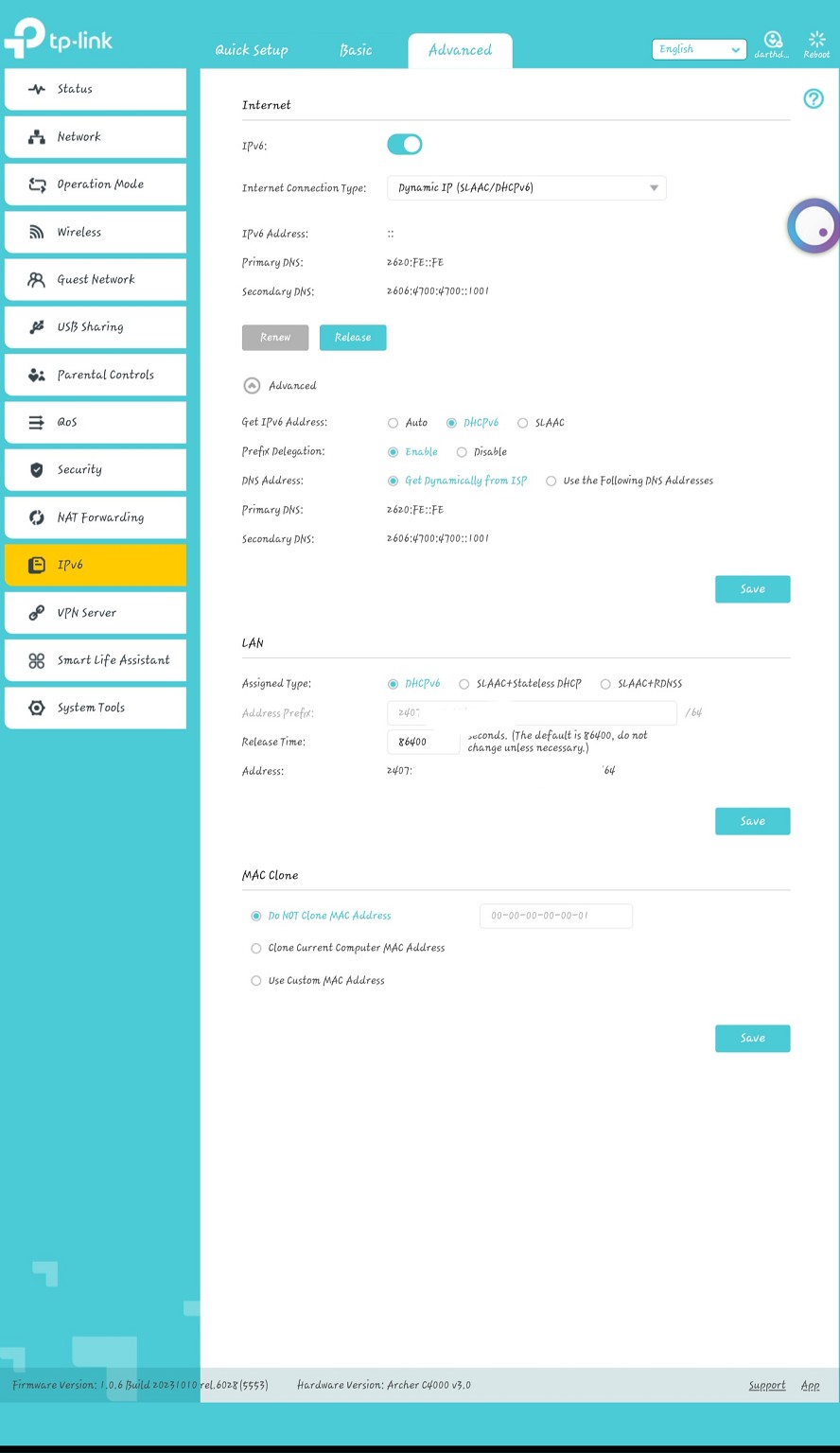
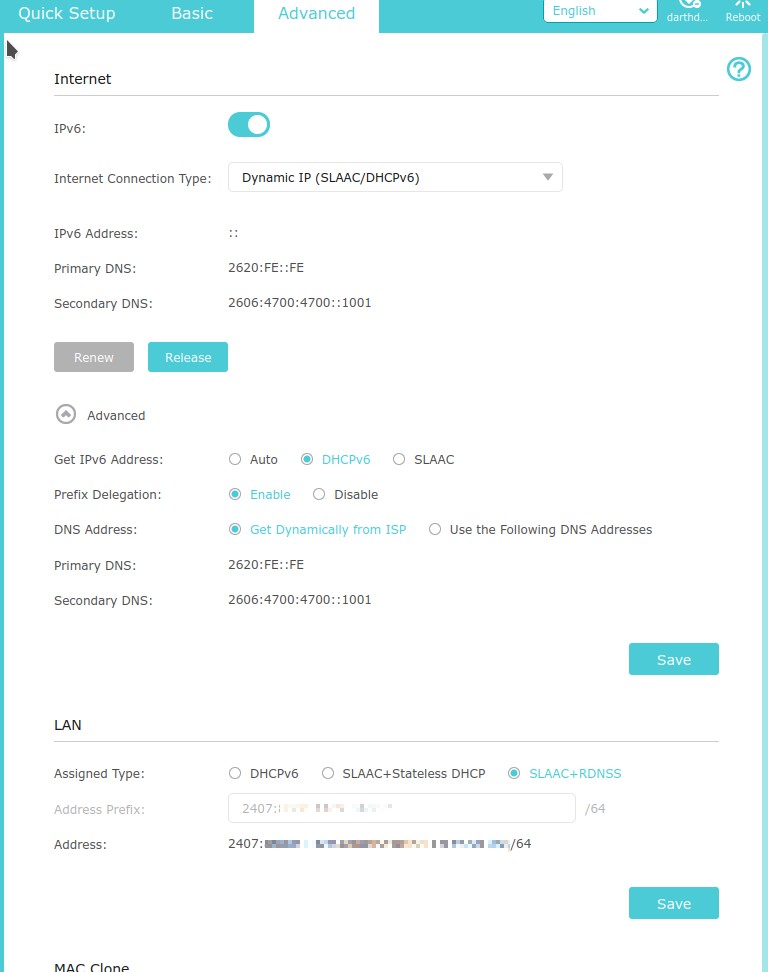
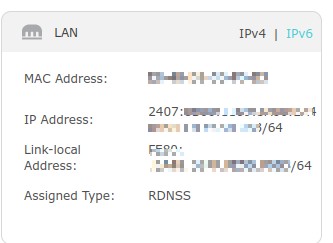
But I've turned it back on now and I believe I have the configuration correct, however this is what's showing up in both my status and config pages...


My config page:


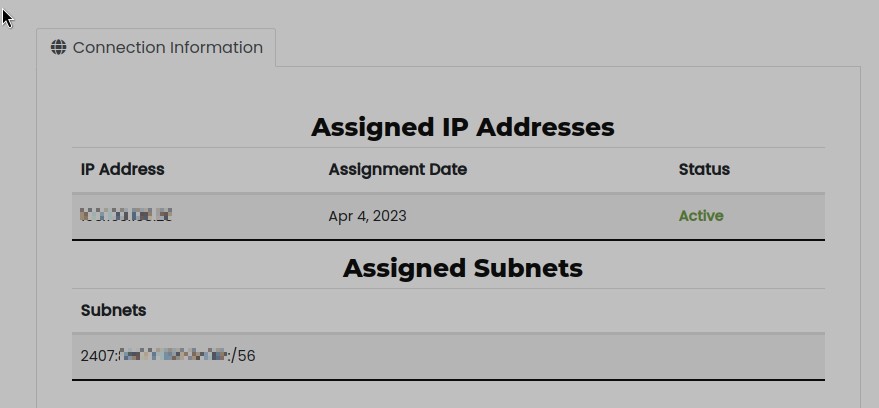
My IP addresses page:


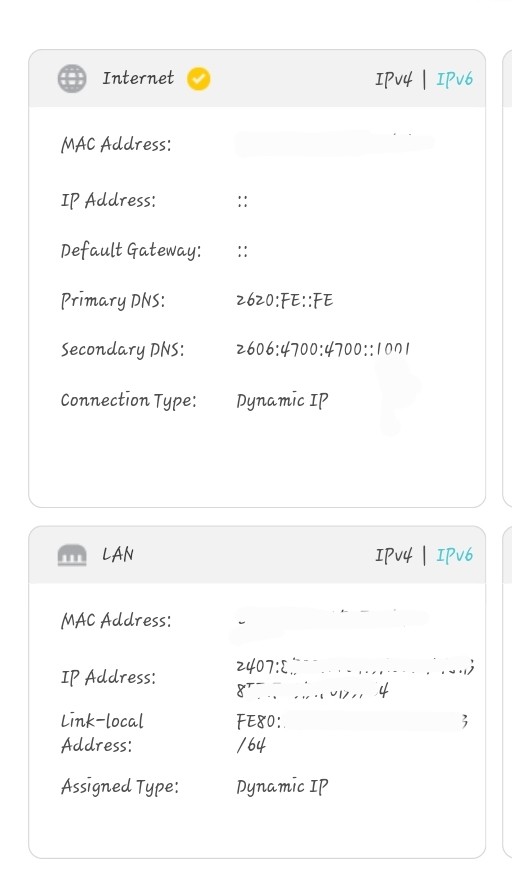
My LAN status for v6 showing the correct subnet prefix:


My Internet status for v6 showing no gateway or address:
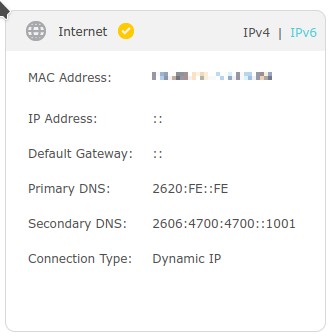


So from this I know the issue is my router isn't picking up the gateway and it's not getting assigned the first v6 address to it's wan port, unsure if that bit is as much of an issue as the lack of gateway.


However I noticed in the IPv6 settings options I can't change the subnet to a /56 it only has /64 listed and no way to change this, DHCPv6, SLAAC+Stateless DHCP, SLAAC+RDNSS are all /64 in the LAN section with no way to change this. Is this what's preventing me from using v6 on this router?


View this topic in a long page with up to 500 replies per page Create new topic
 1 | 2
lukesubuntu
5 posts

Wannabe Geek
+1 received by user: 1

ID Verified

  #3201904 1-Mar-2024 09:49
Send private message

Have you had any luck? I have the AX6000 and have the same issue with ipv6


SimplePotato
31 posts

Geek
+1 received by user: 48

Trusted
Vetta Group
Subscriber

  #3201987 1-Mar-2024 13:15
Send private message

I was curious so I did do a little internal testing this morning. Unfortunately, I plugged in the wrong power adaptor for Archer C7 I had and ended up cooking it... The C7 looks to use the same firmware as OP.

I went out and grabbed a cheapy Archer C54 which appears to run a cut down firmware (different to OP) but worked with v6 out of the box with zero config, other than enabling IPv6. 

Can you try switching to DHCPv6 not SLAAC+RDNSS?


Views and comments are my own unless otherwise stated.


Delorean
673 posts

Ultimate Geek
+1 received by user: 343

ID Verified
Trusted
Lifetime subscriber

  #3202092 1-Mar-2024 15:03
Send private message

SimplePotato:


I was curious so I did do a little internal testing this morning. Unfortunately, I plugged in the wrong power adaptor for Archer C7 I had and ended up cooking it... The C7 looks to use the same firmware as OP.

I went out and grabbed a cheapy Archer C54 which appears to run a cut down firmware (different to OP) but worked with v6 out of the box with zero config, other than enabling IPv6. 

Can you try switching to DHCPv6 not SLAAC+RDNSS?


@simplepotato


I had the exact same issue with my Google Wifi Pro.


On One NZ, it just works, on 2D it works, on Quic, not working at all. There are no configuration settings in Google, its just on or off.


Maybe check out why thats happening too?


Referral Link: | Quic Broadband (use R142206E0L2CR for free setup)


lukesubuntu
5 posts

Wannabe Geek
+1 received by user: 1

ID Verified

  #3202094 1-Mar-2024 15:07
Send private message

SimplePotato:


I was curious so I did do a little internal testing this morning. Unfortunately, I plugged in the wrong power adaptor for Archer C7 I had and ended up cooking it... The C7 looks to use the same firmware as OP.

I went out and grabbed a cheapy Archer C54 which appears to run a cut down firmware (different to OP) but worked with v6 out of the box with zero config, other than enabling IPv6. 

Can you try switching to DHCPv6 not SLAAC+RDNSS?


@simplepotato Thanks for that it worked for me not setting SLAAC :) 


SimplePotato
31 posts

Geek
+1 received by user: 48

Trusted
Vetta Group
Subscriber

  #3202100 1-Mar-2024 15:26
Send private message

Delorean:


I had the exact same issue with my Google Wifi Pro.


On One NZ, it just works, on 2D it works, on Quic, not working at all. There are no configuration settings in Google, its just on or off.


Maybe check out why thats happening too?


If there are no settings to tweak there isn't much point sorry to say. At the end of the day there's a few different ways IPv6 can be implemented, and our method simply may not work on some devices. That is the risk of BYOD and why most ISP's stick to offering support only to approved devices. 


Views and comments are my own unless otherwise stated.


michaelmurfy
meow
13579 posts

Uber Geek
+1 received by user: 10910

Moderator
ID Verified
Trusted
Lifetime subscriber

  #3202107 1-Mar-2024 15:48
Send private message

@Delorean Did you also manage to get this working with another router to confirm IPv6 worked?


Michael Murphy | https://murfy.nz
Referral Links: Quic Broadband (use R122101E7CV7Q for free setup)

Are you happy with what you get from Geekzone? Please consider supporting us by subscribing.
Opinions are my own and not the views of my employer.


Shop on-line at New World now for your groceries (affiliate link).
Delorean
673 posts

Ultimate Geek
+1 received by user: 343

ID Verified
Trusted
Lifetime subscriber

  #3202115 1-Mar-2024 15:56
Send private message

michaelmurfy:


@Delorean Did you also manage to get this working with another router to confirm IPv6 worked?


@michaelmurfy


Not yet, had my older kids back over the last week so haven't been able to test, so i plugged it back into my One NZ until i can get time to sort


Referral Link: | Quic Broadband (use R142206E0L2CR for free setup)


Delorean
673 posts

Ultimate Geek
+1 received by user: 343

ID Verified
Trusted
Lifetime subscriber

  #3202117 1-Mar-2024 15:59
Send private message

@michaelmurfy


I will get out the UDM and see if that works this weekend and let you know


Referral Link: | Quic Broadband (use R142206E0L2CR for free setup)


hio77
'That VDSL Cat'
13036 posts

Uber Geek
+1 received by user: 3896

ID Verified
Trusted
Lizard Networks
Subscriber

  #3202176 1-Mar-2024 17:50
Send private message

Depending on what your provider supports, you might find that an option here is to use DHCPv6 for the prefix and SLACC for the default route to define correctly (WAN ip allocation).


I've noticed on a few devices that they have issues reaching the default gateway. You can see this by the local link of the router being stale.


IPv6 DHCPv6 vs SLACC and the different support in situations is quite mess across device support still, It's why you fairly often see providers offer both for WAN allocation. It's just as much of a nightmare on the internal network too!


#include <std_disclaimer>


Any comments made are personal opinion and do not reflect directly on the position my current or past employers may have. 


cods4
45 posts

Geek
+1 received by user: 7

Trusted

  #3203663 6-Mar-2024 09:52
Send private message

Sorry to hijack a bit, but is anyone aware of a tutorial on how to set up ipv6 on pfsense or opnsense? I have it working, and it passes the https://test-ipv6.com/ perfectly. But when I reboot my router, I initially don't get an IPV4 address until I change the gateway config (doesn't matter what I change) and the router reloads the connection or whatever it does when you apply settings. Then the ipv4 comes up and everything works as it should.


I must have something not set right, but not sure what.


Fuzzi9986

52 posts

Master Geek
+1 received by user: 26

ID Verified
Trusted

  #3203886 6-Mar-2024 19:47

SimplePotato:


I was curious so I did do a little internal testing this morning. Unfortunately, I plugged in the wrong power adaptor for Archer C7 I had and ended up cooking it... The C7 looks to use the same firmware as OP.

I went out and grabbed a cheapy Archer C54 which appears to run a cut down firmware (different to OP) but worked with v6 out of the box with zero config, other than enabling IPv6. 

Can you try switching to DHCPv6 not SLAAC+RDNSS?


On the LAN side?

Shall try when I get home tonight,


sorry for the late reply, I haven't had much energy or time to do anything the last week


Shop now for Lego sets and other gifts (affiliate link).
Fuzzi9986

52 posts

Master Geek
+1 received by user: 26

ID Verified
Trusted

  #3203951 7-Mar-2024 00:46

So my devices are getting an address, same as with SLAAC but I'm not getting a gateway appearing on my router so it doesn't know where to send IPv6 traffic


Behodar
11094 posts

Uber Geek
+1 received by user: 6071

Trusted
Lifetime subscriber

  #3225044 1-May-2024 15:08
Send private message

Sorry to hijack this thread, but can anyone confirm whether the Quic "Connection Information" tab still looks like this? I can't get IPv6 working and there's no "Assigned Subnets" section on the page when I visit it. There is, however, a "Session IPv6" address listed in the table below the green "DHCP authentication Enabled" box. Has the page changed since February or is something messed up with my account?


Delorean
673 posts

Ultimate Geek
+1 received by user: 343

ID Verified
Trusted
Lifetime subscriber

  #3225045 1-May-2024 15:10
Send private message

michaelmurfy:


@Delorean Did you also manage to get this working with another router to confirm IPv6 worked?


@michaelmurfy


I have now sorted the IPv6. Ditched the Google Hardware in the end and the settings are exactly the same as OneNZ - So Google is a no go on Quic


Referral Link: | Quic Broadband (use R142206E0L2CR for free setup)


Delorean
673 posts

Ultimate Geek
+1 received by user: 343

ID Verified
Trusted
Lifetime subscriber

  #3225046 1-May-2024 15:13
Send private message

Now up and running! Speeds are great - took time to sort (from my end) but well worth it.


@quic - can you choose a IPv4 static IP from a specific range?


Referral Link: | Quic Broadband (use R142206E0L2CR for free setup)


 1 | 2
View this topic in a long page with up to 500 replies per page Create new topic


Geekzone Live »

Try automatic live updates from Geekzone directly in your browser, without refreshing the page, with Geekzone Live now.


Are you subscribed to our RSS feed? You can download the latest headlines and summaries from our stories directly to your computer or smartphone by using a feed reader.