Geekzone: technology news, blogs, forums
Guest
Welcome Guest.
You haven't logged in yet. If you don't have an account you can register now.


HyperBlade

48 posts

Geek
+1 received by user: 9


#312054 12-Mar-2024 14:14
Send private message

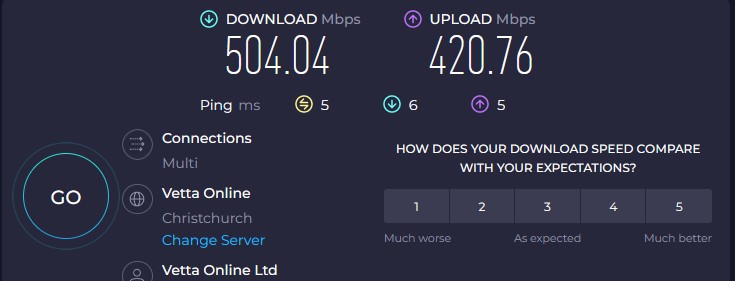
I've just switched over to the 900/400 plan from 2degrees (1000 plan).


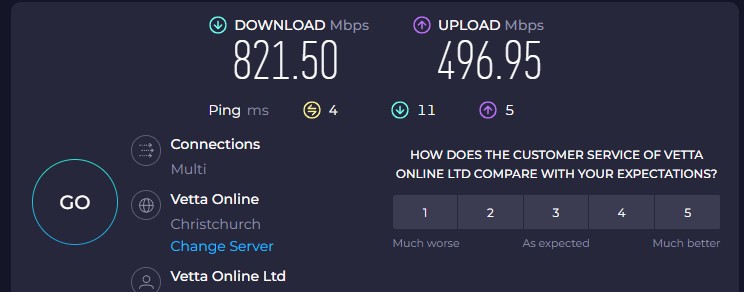
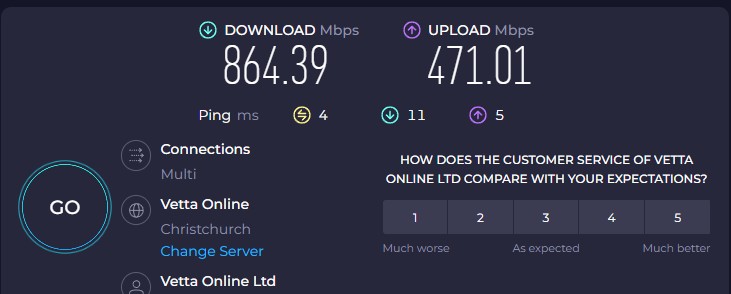
Switchover has gone smoothly and everything is running, but the performance isn't what I would expect.
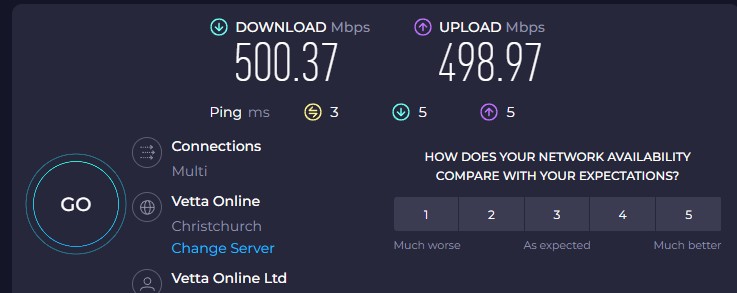


My question is, what performance should I be expectating, and how should i correctly test it to confirm it is an actual issue so i'm not raising a fault unnecessarily.
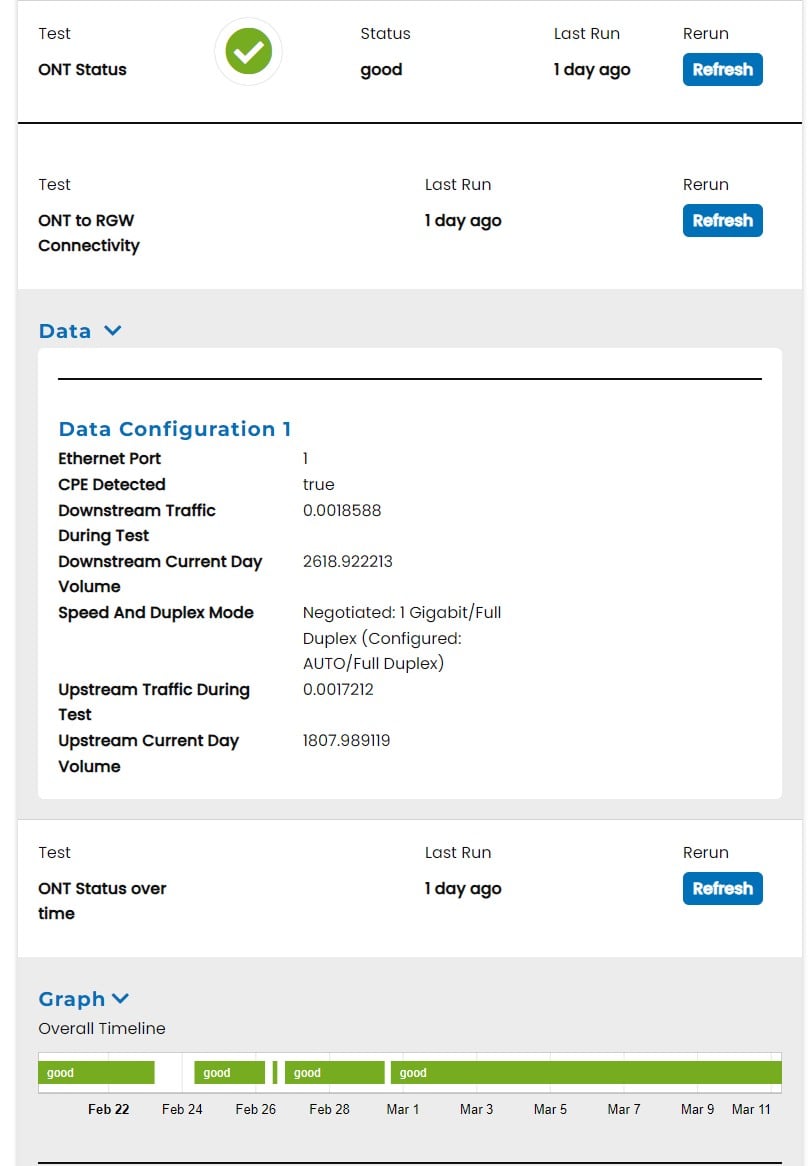


It's worth noting i was getting similar performance on 2 degrees before i moved so I don't think it's anything to do with Quic's service.


It feels like there is a cap on the download speed (I have seen it down to 140 with 2degrees at times during the day, but never higher than 500).



Filter this topic showing only the reply marked as answer View this topic in a long page with up to 500 replies per page Create new topic
 1 | 2
jarledb
Webhead
3319 posts

Uber Geek
+1 received by user: 1983

Moderator
ID Verified
Trusted
Lifetime subscriber

  #3205673 12-Mar-2024 14:17
Send private message

How are you testing? You need to test with Ethernet directly to the router. 


Given you have maxed out at 500 Mbit/s on both 2degrees and Quic, it is probably your network that is limiting you. 


Jarle Dahl Bergersen | Referral Links: Want $50 off when you join Octopus Energy? Use this referral code
Are you happy with what you get from Geekzone? Please consider supporting us by making a donation or subscribing.


RunningMan
9184 posts

Uber Geek
+1 received by user: 4834


  #3205678 12-Mar-2024 14:22
Send private message

What router? PPPoE or DHCP? Ethernet or WIfi? What client? What LFC?


HyperBlade

48 posts

Geek
+1 received by user: 9


  #3205680 12-Mar-2024 14:30
Send private message

jarledb:


How are you testing? You need to test with Ethernet directly to the router. 


Give you have maxed out at 500 Mbit/s on both 2degrees and Quic, it is probably your network that is limiting you. 


That's probably very useful information to provide to anyone trying to help me...


It was:


Desktop (Windows, Chrome Browser SpeedTest site) > Gigabit Lynxnet Switch (house is wired internally) > Fritzbox 7530 (DHCP) > ONT


Just tried the following with no change in speed


Desktop computer >  Fritzbox 7530 > ONT


I can get 105MB/s transfering a large file from NAS to desktop


NAS > Gigabit Lynxnet Switch > Desktop


The thing is i would swear i've had faster when i initially moved to the connection on 2 degrees many years ago and upload often hits 550Mbps when speed testing.


LFC = Chorus


jarledb
Webhead
3319 posts

Uber Geek
+1 received by user: 1983

Moderator
ID Verified
Trusted
Lifetime subscriber

  #3205685 12-Mar-2024 14:36
Send private message

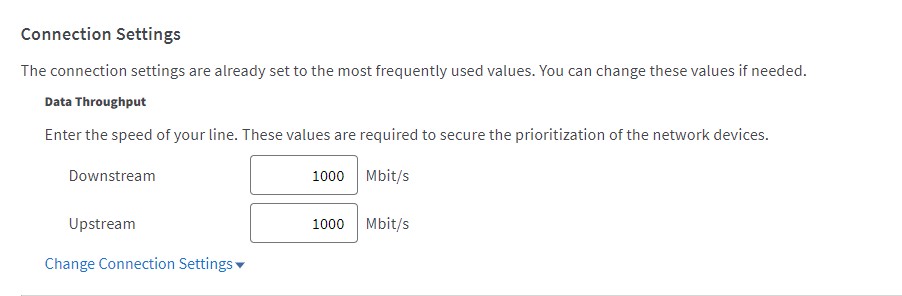
On your Fritzbox: Have a look under Internet -> Account Information -> Connection Settings. What does the values there say for Downstream and Upstream?


Mine is set to 1000 Mbit/s for both.


Jarle Dahl Bergersen | Referral Links: Want $50 off when you join Octopus Energy? Use this referral code
Are you happy with what you get from Geekzone? Please consider supporting us by making a donation or subscribing.


HyperBlade

48 posts

Geek
+1 received by user: 9


  #3205688 12-Mar-2024 14:41
Send private message

jarledb:


On your Fritzbox: Have a look under Internet -> Account Information -> Connection Settings. What does the values there say for Downstream and Upstream?


Mine is set to 1000 Mbit/s for both.


Yep same, was reset when i reconfigured for Quic, and can't go higher than those values.


RunningMan
9184 posts

Uber Geek
+1 received by user: 4834


  #3205690 12-Mar-2024 14:42
Send private message

Have you checked for updated network drivers? Not what Windows offers, but from the hardware manufacturer. Some of the default ones are OK on local network (as your 105MB/s shows) but are not as reliable with higher latency across the internet.


No recent Fritz OS experience - any QoS or similar activated? That can bog the CPU very easily.


Shop on-line at New World now for your groceries (affiliate link).
michaelmurfy
meow
13579 posts

Uber Geek
+1 received by user: 10910

Moderator
ID Verified
Trusted
Lifetime subscriber

  #3205691 12-Mar-2024 14:44
Send private message

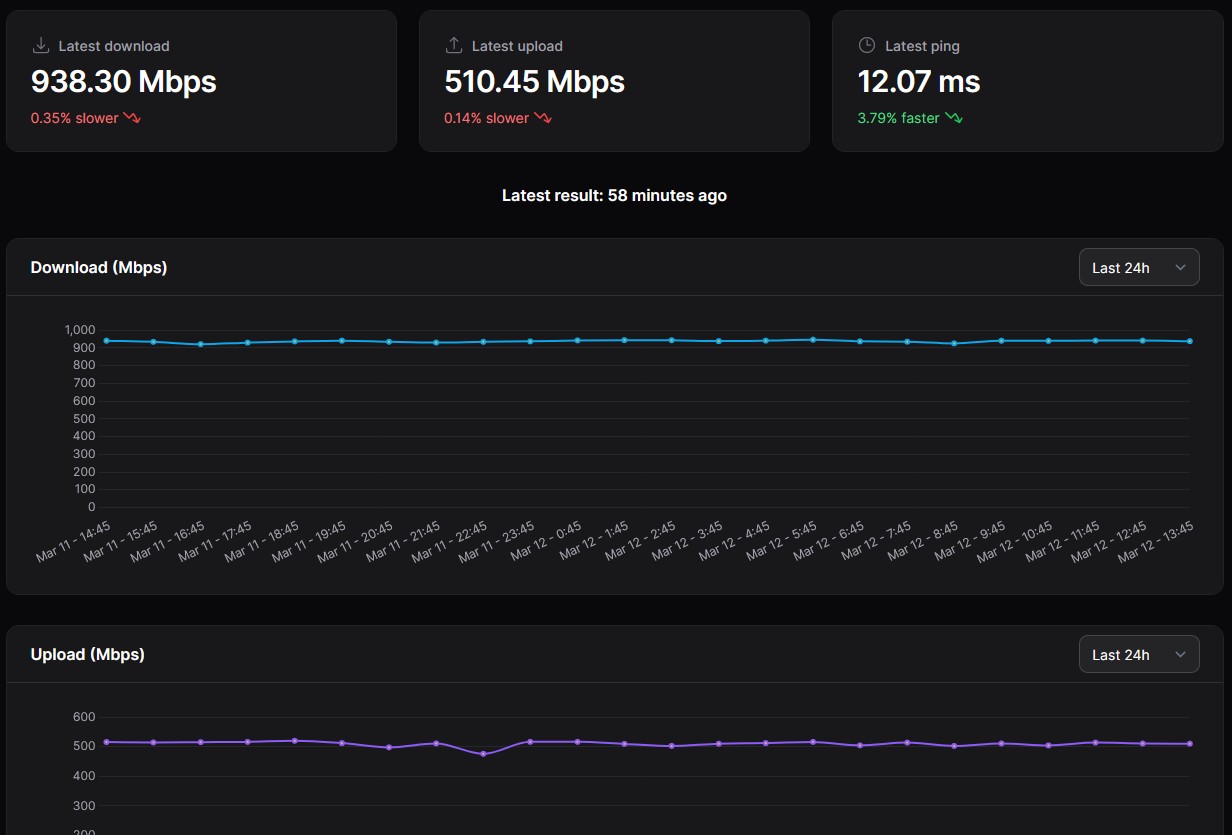
The Fritzbox 7530 is more than capable even on PPPoE to route Gigabit. Have you attempted a Speedtest on another device to confirm this isn't a problem with your device? Tried another browser (eg, Firefox)?


I can confirm that mine is running at Gigabit speeds (Wellington testing to Auckland):


Michael Murphy | https://murfy.nz
Referral Links: Quic Broadband (use R122101E7CV7Q for free setup)

Are you happy with what you get from Geekzone? Please consider supporting us by subscribing.
Opinions are my own and not the views of my employer.


HyperBlade

48 posts

Geek
+1 received by user: 9


#3205699 12-Mar-2024 15:16
Send private message

RunningMan:


Have you checked for updated network drivers? Not what Windows offers, but from the hardware manufacturer. Some of the default ones are OK on local network (as your 105MB/s shows) but are not as reliable with higher latency across the internet.


No recent Fritz OS experience - any QoS or similar activated? That can bog the CPU very easily.


It was running latest drivers, no QoS activated.


michaelmurfy:


The Fritzbox 7530 is more than capable even on PPPoE to route Gigabit. Have you attempted a Speedtest on another device to confirm this isn't a problem with your device? Tried another browser (eg, Firefox)?


I can confirm that mine is running at Gigabit speeds (Wellington testing to Auckland):


Firefox was slower on upload


That was was a really good suggestion (to run on another device) that I really should have worked out myself first... But my main desktop is the fairly beefy machine (12 core, 32gb ram) so it didn't cross my mind that it was the issue.


Run on a windows server which is gets full speed.


So issue is either this machine, or the cable in the wall (as they both go to same switch)


Thanks very much both of you for your advice and helping me narrow down the real cause 


mentalinc
3384 posts

Uber Geek
+1 received by user: 1023

Trusted

  #3205701 12-Mar-2024 15:20
Send private message

So issue is the PC, unlikely to be a cable limiting you to 500mbps.


What network card does it have (or motherboard model)


CPU-z etc will show this info for you


CPU: AMD 5900x | RAM: GSKILL Trident Z Neo RGB F4-3600C16D-32GTZNC-32-GB | MB:  Asus X570-E | GFX: EVGA FTW3 Ultra RTX 3080Ti| Monitor: LG 27GL850-B 2560x1440


Quic: https://account.quic.nz/refer/473833 R473833EQKIBX 


cddt
1965 posts

Uber Geek
+1 received by user: 1904


  #3205703 12-Mar-2024 15:21
Send private message

HyperBlade:


That was was a really good suggestion (to run on another device) that I really should have worked out myself first... But my main desktop is the fairly beefy machine (12 core, 32gb ram) so it didn't cross my mind that it was the issue.


Run on a windows server which is gets full speed.


So issue is either this machine, or the cable in the wall (as they both go to same switch)


Thanks very much both of you for your advice and helping me narrow down the real cause 


Could also be something in the OS install. I've had that problem before - had disabled ACPI for an unrelated problem and spontaeously after an update a year later it started causing problems with the network speed. In which case a fresh OS on a USB drive was able to achieve full network speeds. 


My referral links: BigPipeMercury


HyperBlade

48 posts

Geek
+1 received by user: 9


  #3205711 12-Mar-2024 15:52
Send private message

mentalinc:


So issue is the PC, unlikely to be a cable limiting you to 500mbps.


What network card does it have (or motherboard model)


CPU-z etc will show this info for you


It's a Asus TUF Gaming X570 Plus Wifi with onboard realtek lan 


cddt:


Could also be something in the OS install. I've had that problem before - had disabled ACPI for an unrelated problem and spontaeously after an update a year later it started causing problems with the network speed. In which case a fresh OS on a USB drive was able to achieve full network speeds. 


It's running Windows 11 which was an inplace upgrade from Windows 10.


Also running Sophos Home, tried turning off the web protection, but it made no difference (but not sure how many other hooks they have in to the network stack).


Shop now on Samsung phones, tablets, TVs and more (affiliate link).
michaelmurfy
meow
13579 posts

Uber Geek
+1 received by user: 10910

Moderator
ID Verified
Trusted
Lifetime subscriber

  #3205713 12-Mar-2024 15:55
Send private message

HyperBlade:


Also running Sophos Home, tried turning off the web protection, but it made no difference (but not sure how many other hooks they have in to the network stack).


That'll likely do it.


Strongly recommend against running any third party antivirus / security software. Windows Defender (built in) is plenty.


Michael Murphy | https://murfy.nz
Referral Links: Quic Broadband (use R122101E7CV7Q for free setup)

Are you happy with what you get from Geekzone? Please consider supporting us by subscribing.
Opinions are my own and not the views of my employer.


RunningMan
9184 posts

Uber Geek
+1 received by user: 4834


  #3205714 12-Mar-2024 15:58
Send private message

HyperBlade:


It's a Asus TUF Gaming X570 Plus Wifi with onboard realtek lan 


Tried this?


https://www.geekzone.co.nz/forums.asp?forumid=66&topicid=303455&page_no=1#3035101 


lukesubuntu
5 posts

Wannabe Geek
+1 received by user: 1

ID Verified

  #3205716 12-Mar-2024 16:00
Send private message

HyperBlade:


It's running Windows 11 which was an inplace upgrade from Windows 10.


Also running Sophos Home, tried turning off the web protection, but it made no difference (but not sure how many other hooks they have in to the network stack).


I had similar issue hitting around the 500mbs, i ended disabling everything and ended up finding that Sophos was somehow doing something so i disabled it and just used Microsoft Defender and now i have no issues... could be the same for you.


HyperBlade

48 posts

Geek
+1 received by user: 9


  #3205717 12-Mar-2024 16:11
Send private message

michaelmurfy:


That'll likely do it.


Strongly recommend against running any third party antivirus / security software. Windows Defender (built in) is plenty.


Yeah, I got recommended it by a friend in the know who worked in same sensitive industry i do, looks like it adds an overhead, but isn't the main cause (see below). I have been considering get rid of it, but some of the organisations i deal with need a 3rd party antivirus installed (although that is changing)


RunningMan:


Tried this?


https://www.geekzone.co.nz/forums.asp?forumid=66&topicid=303455&page_no=1#3035101 


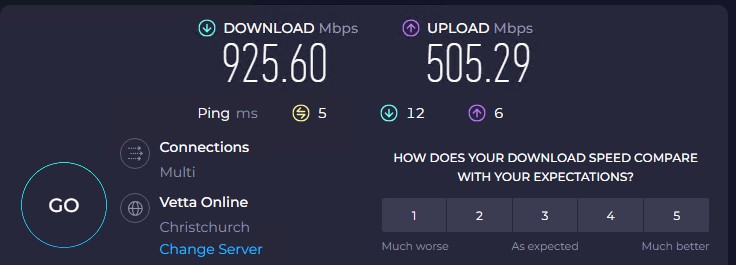
Ran the command (administrator) and rebooted


netsh int tcp set global autotuninglevel=normal


Success!


Then with web protection in Sophos turned off.


I call that a win, thanks both of you for the help, really appreciated.


 1 | 2
Filter this topic showing only the reply marked as answer View this topic in a long page with up to 500 replies per page Create new topic


Geekzone Live »

Try automatic live updates from Geekzone directly in your browser, without refreshing the page, with Geekzone Live now.


Are you subscribed to our RSS feed? You can download the latest headlines and summaries from our stories directly to your computer or smartphone by using a feed reader.