Geekzone: technology news, blogs, forums
Guest
Welcome Guest.
You haven't logged in yet. If you don't have an account you can register now.


cods4

45 posts

Geek
+1 received by user: 7

Trusted

#312069 13-Mar-2024 22:26
Send private message

What am I doing wrong?


I am trying to configure IPV6 on my PFSense Router.


I appear to be getting my /56 subnet, and my LAN clients are getting addresses, as I get 10/10 at test-ipv6.com


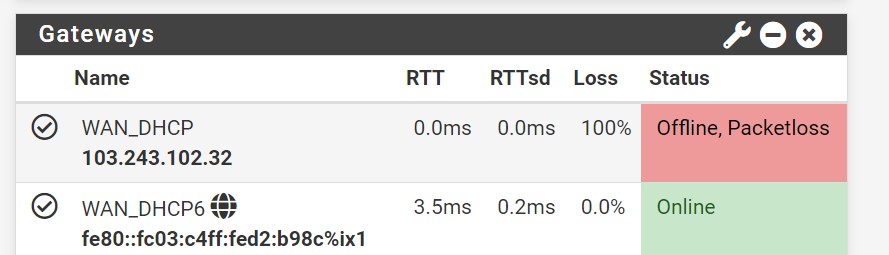
But every time I reboot the router. When it comes back up, I have no IPV4 connectivity, only IPV6.


IPV4 only comes back up when I change any of my WAN gateway settings, i.e changing MTU from empty to 1500 and clicking apply causes the router to connect to IPV4. And then next time I reboot, the same thing happens and it comes right again after changing MTU from 1500 back to empty. I.e the Interfaces/Gateway module needs to be reloaded.


I have not found any configuration that works, other than disabling IPV6 on my WAN interface.


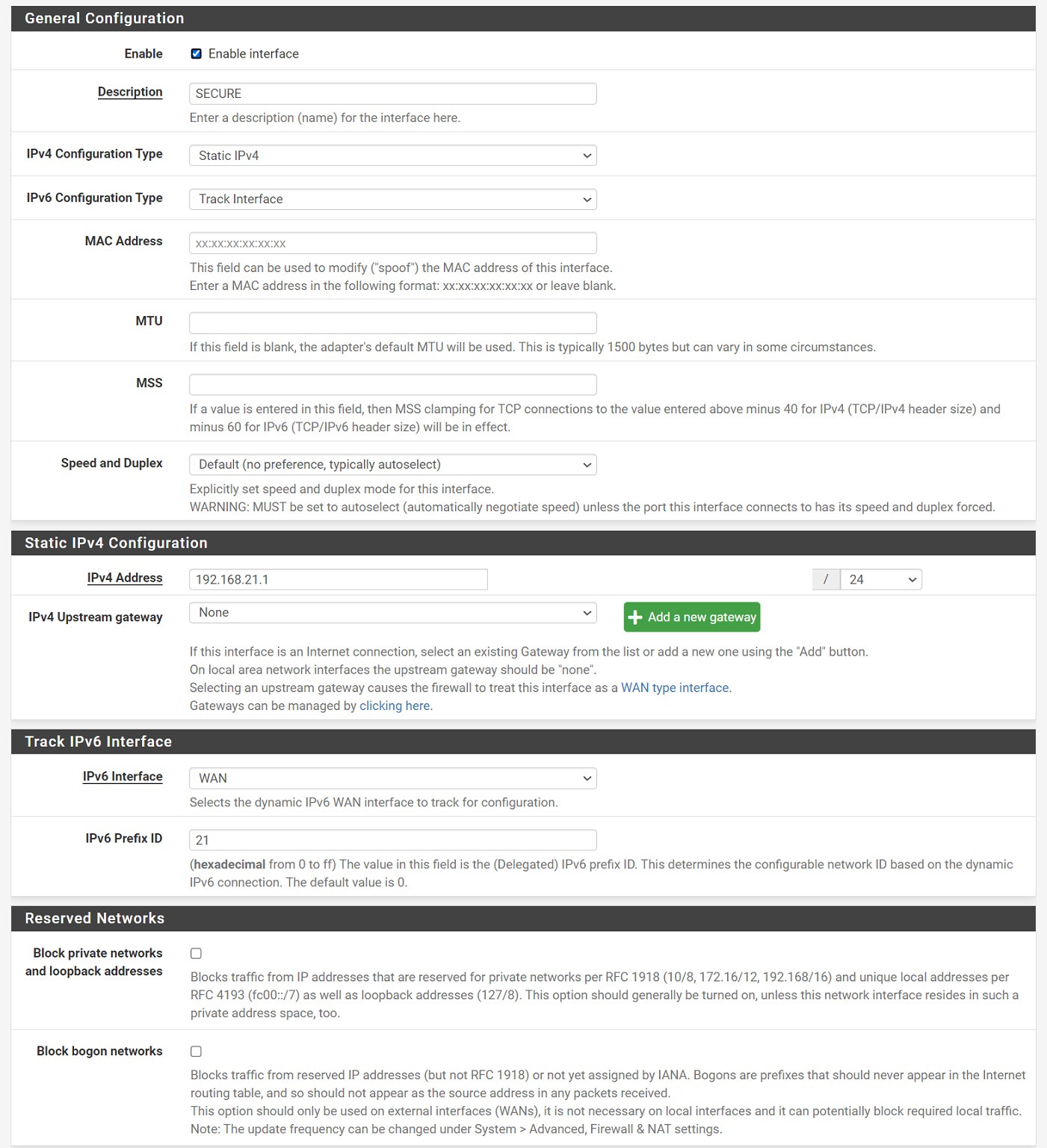
Here are my WAN interface settings.


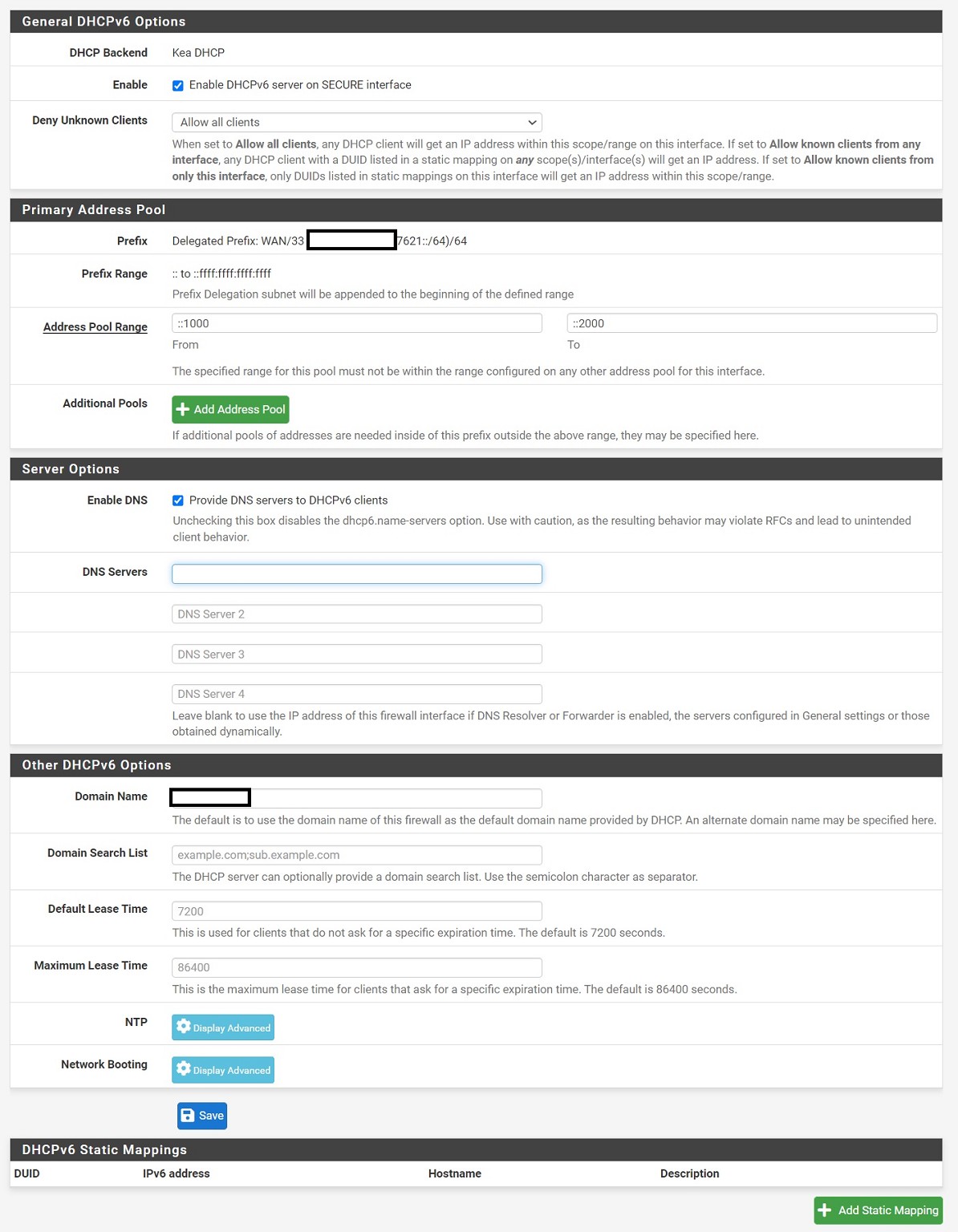
And I have tried a number of different LAN configurations, but currently I have my RA set to Managed mode and my DHCPV6 server configured correctly AFAIK


LAN Interface Config (other LAN networks are the same)


DHCPV6 Config


Any ideas?



Create new topic
mentalinc
3384 posts

Uber Geek
+1 received by user: 1023

Trusted

  #3206207 14-Mar-2024 07:17
Send private message

Mtu is blank on wan in the first config screenshot. try putting 1500 in there and see if you get issues


CPU: AMD 5900x | RAM: GSKILL Trident Z Neo RGB F4-3600C16D-32GTZNC-32-GB | MB:  Asus X570-E | GFX: EVGA FTW3 Ultra RTX 3080Ti| Monitor: LG 27GL850-B 2560x1440


Quic: https://account.quic.nz/refer/473833 R473833EQKIBX 


cods4

45 posts

Geek
+1 received by user: 7

Trusted

  #3206212 14-Mar-2024 07:49
Send private message

I have tried both leaving it blank and setting it at 1500.


The action of changing it from one to the other or back again causes IPV4 connectivity to come back up, but as soon as I reboot again I lose IPV4.


michaelmurfy
meow
13579 posts

Uber Geek
+1 received by user: 10910

Moderator
ID Verified
Trusted
Lifetime subscriber

  #3206236 14-Mar-2024 09:15
Send private message

Do you have a Static IPv4 / IPv6 Subnet?


Do you encounter the same behavior on OPNSense?


Michael Murphy | https://murfy.nz
Referral Links: Quic Broadband (use R122101E7CV7Q for free setup)

Are you happy with what you get from Geekzone? Please consider supporting us by subscribing.
Opinions are my own and not the views of my employer.


cods4

45 posts

Geek
+1 received by user: 7

Trusted

  #3206239 14-Mar-2024 09:22
Send private message

Yes, I have a static IPV4, IPV4 /31 subnet and an IPV6 /56 subnet


I haven't tried opnsense yet, but could spin it up if you think it's worth trying.


SirHumphreyAppleby
2938 posts

Uber Geek
+1 received by user: 1860


  #3206243 14-Mar-2024 09:27
Send private message

1500 is the default MTU, so I'm not surprised it ends up empty after a reload. I think that change is a red herring and it's the interface being reconfigured that is causing the IPv6 to come back up.


I suspect it's the DHCP6 settings you need to alter.


Create new topic


Geekzone Live »

Try automatic live updates from Geekzone directly in your browser, without refreshing the page, with Geekzone Live now.


Are you subscribed to our RSS feed? You can download the latest headlines and summaries from our stories directly to your computer or smartphone by using a feed reader.