Geekzone: technology news, blogs, forums
Guest
Welcome Guest.
You haven't logged in yet. If you don't have an account you can register now.


ToucanSam

25 posts

Geek
+1 received by user: 5


#312414 14-Apr-2024 19:41
Send private message

Hey team,

Have been on Quic for about a week. Setup and signup were great. Getting my own router rolling was super straight forward. Some cool tools/info I was hoping for. Bunch of near features in the dashboard too.

I also have a dedicated IP because I host a few things from home that I access via VPN.

Unfortunately Cloudflare has seem to have decided that my connection is unsafe. Any sites that user Cloudflare I'm unable to log into as the Verifying widget just times out. This actually means I can't even log into Geekzone from home. I've also tried streaming on Twitch for some mates to watch gameplay of some things and get quite a few dropped packets in OBS.

This is all the same hardware that I was previously running on BigPipe with really only the connection details swapped to Quic.

Anyone have any suggestions or tips? I'd love to stay on Quic, but if Cloudflare is going to be blocking me and I can't get any support at all then the girlfriend is definitely not going to approve.


Create new topic
ssamjh
358 posts

Ultimate Geek
+1 received by user: 174

ID Verified
Trusted

  #3218423 14-Apr-2024 19:59
Send private message

What happens if you put your IP into this checker? https://check.spamhaus.org/


It's possible your IP just has a ruined reputation somehow.


Whitianga, Coromandel - Quic Rocket1G - Ref (free setup): R893192EGADLZ


Smokeping: Quic / Voyager / Starlink


Coromandel Webcam Network


michaelmurfy
meow
13579 posts

Uber Geek
+1 received by user: 10910

Moderator
ID Verified
Trusted
Lifetime subscriber

  #3218424 14-Apr-2024 20:00
Send private message

Sounds like to me you’ve got your MTU set incorrectly. This should be 1500.


What router? Also you set up IPv6 also?


Michael Murphy | https://murfy.nz
Referral Links: Quic Broadband (use R122101E7CV7Q for free setup)

Are you happy with what you get from Geekzone? Please consider supporting us by subscribing.
Opinions are my own and not the views of my employer.


ToucanSam

25 posts

Geek
+1 received by user: 5


  #3218431 14-Apr-2024 20:22
Send private message

ssamjh:

What happens if you put your IP into this checker? https://check.spamhaus.org/


It's possible your IP just has a ruined reputation somehow.


"No issues"


michaelmurfy: Sounds like to me you’ve got your MTU set incorrectly. This should be 1500.

What router? Also you set up IPv6 also?


Ahh. It has defaulted back to 1492. I'll give that a shot.

Currently running a Topton x86 with OpenWRT. I have not yet set up proper ipv6.


michaelmurfy
meow
13579 posts

Uber Geek
+1 received by user: 10910

Moderator
ID Verified
Trusted
Lifetime subscriber

  #3218443 14-Apr-2024 21:17
Send private message

Have you also set it up with PPPoE or IPoE?


Michael Murphy | https://murfy.nz
Referral Links: Quic Broadband (use R122101E7CV7Q for free setup)

Are you happy with what you get from Geekzone? Please consider supporting us by subscribing.
Opinions are my own and not the views of my employer.


ToucanSam

25 posts

Geek
+1 received by user: 5


  #3218444 14-Apr-2024 21:20
Send private message

michaelmurfy:

Have you also set it up with PPPoE or IPoE?


PPPoE currently.

michaelmurfy
meow
13579 posts

Uber Geek
+1 received by user: 10910

Moderator
ID Verified
Trusted
Lifetime subscriber

  #3218448 14-Apr-2024 22:06
Send private message

Get yourself set up with IPoE and ensure your MTU is 1500. It’s better for an X86 platform also. 


Also considering you’re running x86 could be worth checking out OPNSense. 


Michael Murphy | https://murfy.nz
Referral Links: Quic Broadband (use R122101E7CV7Q for free setup)

Are you happy with what you get from Geekzone? Please consider supporting us by subscribing.
Opinions are my own and not the views of my employer.


Support Geekzone with one-off or recurring donations Donate via PressPatron.
ToucanSam

25 posts

Geek
+1 received by user: 5


  #3218455 14-Apr-2024 22:34
Send private message

Thank you. I will make those changes.

I used to run pfsense. Tried opnsense for awhile, but I didn't have a feature I wanted back in the day. Now it's probably caught up, but I haven't migrated back because I've been pretty happy.

freitasm
BDFL - Memuneh
80646 posts

Uber Geek
+1 received by user: 41030

Administrator
ID Verified
Trusted
Geekzone
Lifetime subscriber

  #3218456 14-Apr-2024 22:38
Send private message

If you try to access Geekzone and have an error page, please send me a PM with the Ray ID # and I can see why it was challenged. Or email my username @ geekzone.co.nz. 


Referral links: Quic Broadband (free setup code: R587125ERQ6VE) | Samsung | AliExpress | Wise | Sharesies 


Support Geekzone by subscribing (browse ads-free), or making a one-off or recurring donation through PressPatron.


ToucanSam

25 posts

Geek
+1 received by user: 5


  #3218463 14-Apr-2024 23:54
Send private message

Well, I think I solved the logging into Cloudflare thing. I've had an extension installed for ages and it seems to have broken Cloudflare just recently.


Removing it seemed to fix the problem. So no further investigation.


That said...
This was the hint: https://community.cloudflare.com/t/turnstile-gives-failure-error-to-users-with-no-way-to-retry/449787


I've sent the Ray ID via DM just in case you want to see the error message.


Don't waste your time though. I appreciate your responses.


The weird connection issues do in fact persist. I'll change MTU and switch to IPoE some evening this week and do more testing.


ToucanSam

25 posts

Geek
+1 received by user: 5


  #3225353 1-May-2024 23:35
Send private message

@freitasm


Picking this back up. Changing the MTU solved the CloudFlare issues, but streaming on Twitch is still failing pretty hard.


No hardware or software changes (other than the MTU) since switching from BigPipe.


I'm making some general assumptions that it may be a routing issue or ingress/egress somewhere.


I'd love to stay on Quic because everything else is great, but with not even senior support folks to call to help fix the issues... I'm not sure how else to go about solving it.


Any ideas?


michaelmurfy
meow
13579 posts

Uber Geek
+1 received by user: 10910

Moderator
ID Verified
Trusted
Lifetime subscriber

  #3225401 2-May-2024 00:03
Send private message

@ToucanSam I just did a test stream to Twitch and didn't personally have any issues there. No dropped frames and tried both Sydney ingest endpoints via OBS.


This sorta makes me think there is still something on your end somewhere. Did you change over to IPoE (DHCP) as above? I'd say have a go with trying both Sydney ingest endpoints and just seeing if perhaps the other is better: https://help.twitch.tv/s/twitch-ingest-recommendation?language=en_US 


It's hard to pinpoint the issue without further details. I also would recommend perhaps verifying everything with another router or even setting yourself up with OPNSense which is known to work really well (@ssamjh can vouch there).


Michael Murphy | https://murfy.nz
Referral Links: Quic Broadband (use R122101E7CV7Q for free setup)

Are you happy with what you get from Geekzone? Please consider supporting us by subscribing.
Opinions are my own and not the views of my employer.


Move to New Zealand's best fibre broadband service (affiliate link). Free setup code: R587125ERQ6VE. Note that to use Quic Broadband you must be comfortable with configuring your own router.
ToucanSam

25 posts

Geek
+1 received by user: 5


  #3226495 4-May-2024 16:45
Send private message

Alrighty.


I have installed a clean copy of OPNsense and only configured the LAN bridge. Connection is set up with DHCP/IPoE.

OBS is still showing `Dropped Frames (Network)` if I stream at 6000 Kbps CBR. What is your bitrate at @michaelmurfy ?


CPU of router is still well below limits.


There seems to be some pretty bad response times between a couple of hops within Quic.


traceroute to syd02.contribute.live-video.net (103.53.48.136), 30 hops max, 60 byte packets
1  _gateway (10.10.10.1)  4.514 ms  4.729 ms  5.401 ms
2  bng1-akl1.vetta.net (103.243.102.32)  13.109 ms  12.892 ms  13.290 ms
3  xe1-2100-146.pe2-akl1.vetta.net (103.243.102.96)  13.510 ms  14.760 ms  15.109 ms
4  xe1-2100-501.core1-akl2.vetta.net (103.243.102.135)  15.095 ms  14.725 ms  14.711 ms
5  xe2-2700-110.core1-akl1.vetta.net (103.243.102.147)  37.649 ms  38.786 ms  38.547 ms
6  202.77.88.47 (202.77.88.47)  39.870 ms !X * *

traceroute to syd03.contribute.live-video.net (103.53.48.251), 30 hops max, 60 byte packets
1  _gateway (10.10.10.1)  3.925 ms  4.174 ms  5.903 ms
2  bng1-akl1.vetta.net (103.243.102.32)  15.821 ms  16.000 ms  16.207 ms
3  xe1-2100-146.pe2-akl1.vetta.net (103.243.102.96)  16.987 ms  17.394 ms  17.145 ms
4  xe1-2100-501.core1-akl2.vetta.net (103.243.102.135)  17.804 ms  17.567 ms  17.765 ms
5  xe2-2700-120.core1-akl2.vetta.net (103.243.102.149)  40.585 ms  42.151 ms  41.443 ms
6  202.77.88.47 (202.77.88.47)  38.407 ms !X * *


I would be genuinely surprised if my hardware was at fault. Literally nothing changed other than the ISP and the related configuration to connect.


ToucanSam

25 posts

Geek
+1 received by user: 5


  #3226496 4-May-2024 16:51
Send private message

Additional comment... Pinging some local NZ services, my ms responses were always ~2ms for most of NZ.


With Quic it seems like 15-50 is the norm. That is incredibly high.


michaelmurfy
meow
13579 posts

Uber Geek
+1 received by user: 10910

Moderator
ID Verified
Trusted
Lifetime subscriber

  #3226510 4-May-2024 18:38
Send private message

@ToucanSam Considering your gateway is 5ms away I take it you're using WiFi? I'm actually going to say there's likely your problem.


Your Traceroute is looking exactly the same as mine - take it you're in Wellington? Quic/Vetta don't have a Wellington point of presence but it is coming very soon so currently everything goes up to Auckland but this should only be around 12ms away, not 50ms. The response times look fine there (it should be around 32-35ms to Australia but your local network is adding at-least 5ms).


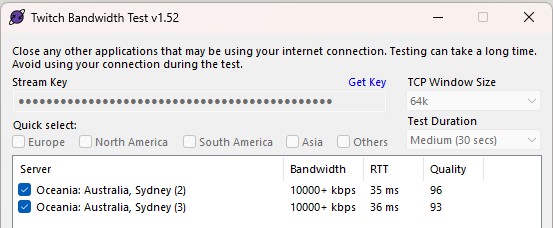
I don't stream to Twitch at all - just did so as a test earlier via the Twitch bandwidth test tool and looking at Twitch Inspector at the same time - no errors or unstable events for me.


And my Traceroute - you can see we're on the same BNG (2nd hop):


traceroute to syd03.contribute.live-video.net (103.53.48.241), 30 hops max, 60 byte packets
 1  router (192.168.2.1)  0.359 ms  0.311 ms  0.298 ms
 2  bng1-akl1.vetta.net (103.243.102.32)  11.451 ms  11.431 ms  11.414 ms
 3  xe1-2100-146.pe2-akl1.vetta.net (103.243.102.96)  11.371 ms  11.341 ms  11.424 ms
 4  xe1-2100-401.core1-akl1.vetta.net (103.243.102.131)  11.627 ms  11.673 ms  15.080 ms
 5  xe2-2700-110.core1-akl1.vetta.net (103.243.102.147)  35.408 ms  34.637 ms  35.316 ms
 6  202.77.88.47 (202.77.88.47)  35.874 ms !X * *


Michael Murphy | https://murfy.nz
Referral Links: Quic Broadband (use R122101E7CV7Q for free setup)

Are you happy with what you get from Geekzone? Please consider supporting us by subscribing.
Opinions are my own and not the views of my employer.


ToucanSam

25 posts

Geek
+1 received by user: 5


  #3226531 4-May-2024 20:28
Send private message

This test was done on Wifi, but it's really not much better. It's still significantly longer than most of the major providers.


The jump between Quic's own nodes from 11ms to 35ms? That's a lot for any internal session.


I've re-signed up for BigPipe. Despite being excited about Quic, I had to do zero troubleshooting with BigPipe.


It's possible that it is in fact the new house, rather than the provider, but the only way to test that is to try something else.


I'm pretty comfortable with my hardware, running on BigPipe for more than 2 years and no issues.


At some point in the future I might try Quic again, but I really did not expect so much trouble getting things running.


It's been a really bad time, as this is affecting a charity fund raising event.


Create new topic


Geekzone Live »

Try automatic live updates from Geekzone directly in your browser, without refreshing the page, with Geekzone Live now.


Are you subscribed to our RSS feed? You can download the latest headlines and summaries from our stories directly to your computer or smartphone by using a feed reader.