Geekzone: technology news, blogs, forums
Guest
Welcome Guest.
You haven't logged in yet. If you don't have an account you can register now.


theviper

45 posts

Geek
+1 received by user: 13


#312428 16-Apr-2024 09:24
Send private message

Hi All,

Hoping this thread serves as useful information for future.

Based on recommendations here I got  GWN router and it's pretty great!


I am using PPOE and happy to stay that way as I'm not on Hyper Fibre and rightly or wrongly I've seen a few posts about some DHCP issues (let me know if I'm being too tin foil hat on that)

One thing I'm not sure about is getting IPV6 working with Quic, would anyone have some configs they can post? 


When I sent it to VLAN port IPv6 Address enabled it gives me the further options around IPV6 address assignment amongst others).
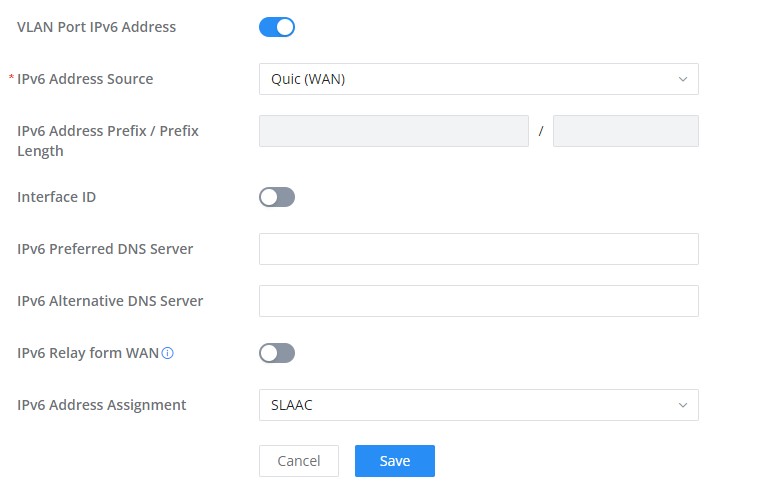
 

IPV6 Section on LAN interface(S)


Create new topic
ssamjh
358 posts

Ultimate Geek
+1 received by user: 174

ID Verified
Trusted

  #3219323 16-Apr-2024 21:37
Send private message

As for DHCP reliability, I've been using it since the beta testing launched and as long as it's configured right it works and is very reliable. There are some routers that are problematic, not sure about Grandstream.


For the actual IPv6 issue, I haven't found anything online, what do you get if you click the dropdown for the IPv6 source? IPv6 is delivered using DHCP-PD, so look for something along that wording.


Whitianga, Coromandel - Quic Rocket1G - Ref (free setup): R893192EGADLZ


Smokeping: Quic / Voyager / Starlink


Coromandel Webcam Network


Create new topic


Geekzone Live »

Try automatic live updates from Geekzone directly in your browser, without refreshing the page, with Geekzone Live now.


Are you subscribed to our RSS feed? You can download the latest headlines and summaries from our stories directly to your computer or smartphone by using a feed reader.