Geekzone: technology news, blogs, forums
Guest
Welcome Guest.
You haven't logged in yet. If you don't have an account you can register now.


itchyfeetleech

7 posts

Wannabe Geek
+1 received by user: 3


#312666 6-May-2024 15:03
Send private message

Hi Geekzone team,


Have just had my connection with Quic go live!


Having a few issues with certain sites taking a long time to load or not loading at all, I suspect it might be an MTU Issue after crawling the forums here and finding similar issues


I see all the setup pages recommend setting MTU to 1500, however my router (RT-AC59U V2) Only allows me to set a maximum MTU of 1492. 


Do I need a new router, or can it be manually overwritten? or ignored completely.


Other troubleshooting I've tried:


  • Connecting to Quic using either DHCP or PPPoE , both the issue still persists.
  • DNS servers ( Automatic ISP , Google ,Cloudflare )


Here's a screenshot of my router setup page


Appreciate any help - :)


Filter this topic showing only the reply marked as answer Create new topic
hsvhel
1273 posts

Uber Geek
+1 received by user: 596

ID Verified

  #3227046 6-May-2024 15:11
Send private message

Mines the same as your


s 1492 max and it's not causing any noticeable issues 


Referral Link Quic


Free Setup use R502152EQH6OK on check out


3l3m3nt
120 posts

Master Geek
+1 received by user: 152

ID Verified
Trusted
Lifetime subscriber

  #3227047 6-May-2024 15:11
Send private message

1492 will work fine - there's no need to raise it to 1500.


Which sites fail to load for you?


Dunedin, NZ
Quic Broadband  | Rocket 1G/1G Hyperfibre (Yes, you read that right!)
Dunedin Live Webcam (4K) | Quic Smokepings


Referral Links:
Quic (use R282731EPGJMG on checkout for free setup, and to help me pay for my fast internet addiction)
Contact Energy (use FRTDD2R for $100 credit)


itchyfeetleech

7 posts

Wannabe Geek
+1 received by user: 3


  #3227050 6-May-2024 15:25
Send private message

3l3m3nt:


1492 will work fine - there's no need to raise it to 1500.


Which sites fail to load for you?


That's good news! my connection is failing intermittently on all sites however some seem to be worse than others,


One example is I can't load store.steampowered.com and if it does load its loading as plain http no stylesheets.


Another example, getting a rocksteady connection to geekzone however pinging google is giving intermittent failures:


michaelmurfy
meow
13579 posts

Uber Geek
+1 received by user: 10910

Moderator
ID Verified
Trusted
Lifetime subscriber

  #3227057 6-May-2024 15:42
Send private message

@itchyfeetleech That's really quite bad. Got another router you can test with?


Also just checking, you don't happen to have a switch between your computer and the router or perhaps using WiFi? I've been pinging your external IP address and it is looking stable at-least externally with 0% packet loss so the problem may be internal for you. As others stated, having a MTU of 1492 should be fine.


Give your router a long-standing ping internally and see if that has issues also.


Michael Murphy | https://murfy.nz
Referral Links: Quic Broadband (use R122101E7CV7Q for free setup)

Are you happy with what you get from Geekzone? Please consider supporting us by subscribing.
Opinions are my own and not the views of my employer.


itchyfeetleech

7 posts

Wannabe Geek
+1 received by user: 3


  #3227060 6-May-2024 15:53
Send private message

michaelmurfy:


@itchyfeetleech That's really quite bad. Got another router you can test with?


Also just checking, you don't happen to have a switch between your computer and the router or perhaps using WiFi? I've been pinging your external IP address and it is looking stable at-least externally with 0% packet loss so the problem may be internal for you. As others stated, having a MTU of 1492 should be fine.


Give your router a long-standing ping internally and see if that has issues also.


Unfortunately, I don't have another router I can test with. (Router was working perfectly on previous 2degrees UFB connection)


Not using any network switch + I'm connected via ethernet, can confirm happening across multiple devices.


Internal ping to router looks O.K


itchyfeetleech

7 posts

Wannabe Geek
+1 received by user: 3


  #3227085 6-May-2024 16:47
Send private message

michaelmurfy:


@itchyfeetleech That's really quite bad. Got another router you can test with?


Also just checking, you don't happen to have a switch between your computer and the router or perhaps using WiFi? I've been pinging your external IP address and it is looking stable at-least externally with 0% packet loss so the problem may be internal for you. As others stated, having a MTU of 1492 should be fine.


Give your router a long-standing ping internally and see if that has issues also.


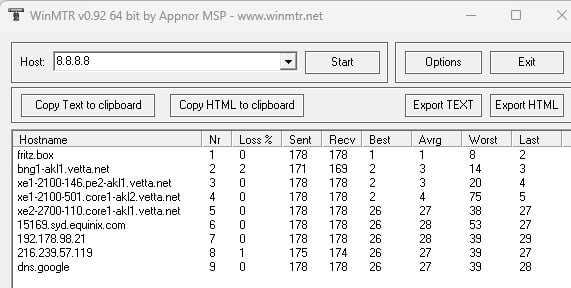
Sorry for double reply - using winmtr it looks like the lost connection is happening outside of my network?


Please correct if wrong but that's my understanding of this:


Want to support Geekzone and browse the site without the ads? Subscribe to Geekzone now (monthly, annual and lifetime options).
itchyfeetleech

7 posts

Wannabe Geek
+1 received by user: 3


  #3227093 6-May-2024 17:19
Send private message

Another update:


Using Cloudflare warp seems to completely fix the issue on my PC.


Anyone have any suggestions for what I could change in router so I don't need to use a VPN or Cloudflare warp to have stable connection? 


michaelmurfy
meow
13579 posts

Uber Geek
+1 received by user: 10910

Moderator
ID Verified
Trusted
Lifetime subscriber

  #3227142 6-May-2024 17:28
Send private message

Can you try running the MTR to 1.1.1.1 and see what you get? (keep this running for a while).


I actually think you should log a fault too. This may not be looked at until tomorrow but it really appears you've done a whole lot of testing to conclude the issue is outside of your network.


Michael Murphy | https://murfy.nz
Referral Links: Quic Broadband (use R122101E7CV7Q for free setup)

Are you happy with what you get from Geekzone? Please consider supporting us by subscribing.
Opinions are my own and not the views of my employer.


dnwright
21 posts

Geek
+1 received by user: 16

Trusted
Subscriber

  #3227151 6-May-2024 18:01
Send private message

itchyfeetleech:


Sorry for double reply - using winmtr it looks like the lost connection is happening outside of my network?


Please correct if wrong but that's my understanding of this:


Just as another data point, I've got the same path to 8.8.8.8 and my packet loss is between 0.7% and 0.3% after 300 packets.


Referral Links: Quic Broadband (use R522387EKKDNO for free setup)


xpd

xpd
Geek of Coastguard
14115 posts

Uber Geek
+1 received by user: 4574

Retired Mod
ID Verified
Trusted
Lifetime subscriber

  #3227154 6-May-2024 18:17
Send private message

For comparison... something funky def going on with your connection.


XPD / Gavin


LinkTree


itchyfeetleech

7 posts

Wannabe Geek
+1 received by user: 3


  #3227155 6-May-2024 18:26
Send private message

michaelmurfy:


Can you try running the MTR to 1.1.1.1 and see what you get? (keep this running for a while).


I actually think you should log a fault too. This may not be looked at until tomorrow but it really appears you've done a whole lot of testing to conclude the issue is outside of your network.


Hi attached is MTR to 1.1.1.1; this connection like the geekzone one does not go down intermittently.


Still think safe to callout fault?


|------------------------------------------------------------------------------------------|
|                                      WinMTR statistics                                   |
|                       Host              -   %  | Sent | Recv | Best | Avrg | Wrst | Last |
|------------------------------------------------|------|------|------|------|------|------|
|                             192.168.1.1 -    0 | 1258 | 1258 |    0 |    0 |  100 |    0 |
|                     bng1-chc2.vetta.net -    0 | 1258 | 1258 |    0 |    1 |   22 |    1 |
|         xe1-2600-218.pe2-chc4.vetta.net -    0 | 1259 | 1259 |    1 |    2 |  101 |    2 |
|                       as13335.chc.ix.nz -    1 | 1254 | 1253 |   17 |   20 |  168 |   17 |
|                         one.one.one.one -    0 | 1258 | 1258 |   15 |   16 |  106 |   16 |
|________________________________________________|______|______|______|______|______|______|


Shop now for Lego sets and other gifts (affiliate link).
itchyfeetleech

7 posts

Wannabe Geek
+1 received by user: 3


  #3227884 8-May-2024 13:12
Send private message

Update!


Issue is now solved 😄


Was not an issue with internal network after all - big thanks to the Quic team getting this all fixed up for me :)


Filter this topic showing only the reply marked as answer Create new topic


Geekzone Live »

Try automatic live updates from Geekzone directly in your browser, without refreshing the page, with Geekzone Live now.


Are you subscribed to our RSS feed? You can download the latest headlines and summaries from our stories directly to your computer or smartphone by using a feed reader.