Geekzone: technology news, blogs, forums
Guest
Welcome Guest.
You haven't logged in yet. If you don't have an account you can register now.


cjkbarnett

37 posts

Geek
+1 received by user: 18


#312784 16-May-2024 21:40
Send private message

Some backstory:


Been chasing an issue on my Emby media server for a while now (5-6 months to be exact), and have recently fixed it. I don't have many external users, but they always complained about buffering, and i couldn't figure it out.


To cut straight to the point - turns out all traffic going out via port 443 was throttled - see below . The top process is Cloudflare tunnels serving my emby server, the NGINX reverse proxy service what is normally serving Embyvia 443. Look at the difference! 


On the other end i am downloading the same file, one accessing it via emby Cloudflare tunnel, and one via NGINX, on a device outside my home network. look at that utilisation difference on the server! 



Now, i am just a hobbyist, and it took me a while to work it out, so bear with, but to me that looks like throttling occuring? The CF tunnel that uses port 7844 is is nearly maxing out my upload speed (peak times on 900/400) while the on "normal" NGINX way of serving my site via Port 443, it struggles to get past 8 - 15 Mbps, even when it's the only service running.
I also used IIS to serve my media server for a while, but that hit the same speeds, so that leads me to believe its a port issue?


Now to my question - does Quic (or any other isp's in nz) throttle bandwidth on certain ports - just seems strange i can achieve full upload line speed now using a tunnel. Has anyone else had any such oddities?


Bonus photo: Top site via 443, bottom via CF tunnels - what a speed difference!


(And apologies if this is the wrong area - just thought it was relevant to my isp, Quic)


Thanks!


[Mod edit (MF): removed some material)


Filter this topic showing only the reply marked as answer Create new topic
michaelmurfy
meow
13579 posts

Uber Geek
+1 received by user: 10910

Moderator
ID Verified
Trusted
Lifetime subscriber

  #3231516 16-May-2024 22:05
Send private message

No. You’ve got a configuration issue somewhere and my pick would be TCP scheduling on Windows.


I strongly recommend using Linux for this task instead of running server processes on Windows. No providers throttle, it is actually harder to throttle than to just open the floodgates and have at it.


Also be very very careful running this via Cloudflare. It’s strictly against their terms of service and they’re quite good at detecting streaming video and putting an end to it.


Michael Murphy | https://murfy.nz
Referral Links: Quic Broadband (use R122101E7CV7Q for free setup)

Are you happy with what you get from Geekzone? Please consider supporting us by subscribing.
Opinions are my own and not the views of my employer.


cjkbarnett

37 posts

Geek
+1 received by user: 18


  #3231522 16-May-2024 22:18
Send private message

Ok thats good to know that no one throttles here - I've heard too many horror stories from people in the USA!

I have spent way longer than I'd like to admit trying to tune all of the network options on Windows and other troubleshooting, and I get great results using speedtest, and have gone as far as reinstalling and rebuilding my server and network setup to no avail.

Port throttling is one less thing to worry about now, onwards with the troubleshooting I guess.

I am aware that it's a breach of their TOS, was just using it for troubleshooting, I think I am on borrowed time with emby via a tunnel.

Appreciate the response as always, thanks!

freitasm
BDFL - Memuneh
80652 posts

Uber Geek
+1 received by user: 41043

Administrator
ID Verified
Trusted
Geekzone
Lifetime subscriber

  #3231527 16-May-2024 22:28
Send private message

cjkbarnett:


I also used IIS to serve my media server for a while, but that hit the same speeds, so that leads me to believe its a port issue?


Or perhaps (as mentioned above) it's a Windows issue - you have two processes on Windows showing this.


You won't be certain unless you test with a Linux machine. But I'd say @michaelmurfy is right on the money.


Referral links: Quic Broadband (free setup code: R587125ERQ6VE) | Samsung | AliExpress | Wise | Sharesies 


Support Geekzone by subscribing (browse ads-free), or making a one-off or recurring donation through PressPatron.


BarTender
3629 posts

Uber Geek
+1 received by user: 2572

ID Verified
Trusted
Lifetime subscriber

  #3231531 16-May-2024 22:41
Send private message

Also if you are bursting over 500mbit which potentially might be happening the Chorus will drop your traffic so you would see retransmission. None of the ISPs throttle upstream as by the time it’s at the place they can throttle it at then the traffic has already gone over the most expensive link.

It will be the box that you are using. As if you used a Linux box and ran an iPerf3 test over TCP you should get just under 500mbit. Probably around 450 or so.

cjkbarnett

37 posts

Geek
+1 received by user: 18


  #3232817 20-May-2024 22:24
Send private message

Just an update re this issue - turns out it was a combination of TCP tuning (Thanks @michaelmurfy and @freitasm for sending me down that deep rabbit hole haha) and poor choice of NIC chipset- realtek rtl8111h. 


Both issues solved, and everything is humming away perfectly at maximum line speed. Appreciate the responses, and especially nice to know no one in nz does and port throttling.


cjkbarnett

37 posts

Geek
+1 received by user: 18


  #3254269 28-Jun-2024 20:54
Send private message

Ok, so it's not the update anyone wanted to hear, but still have issues with upload. I have tried different network cards, OS'es and different ways of exposing my server to the wider world. 
Even bought another router just to verify, still no change. In regards to my last post, it was going fine, for a bit. I think i just got lucky and jumped the gun.


I do not yet have the skills to host on Linux, but that time will come.


Only method that seems to give somewhat decent speeds is via a cloudflare tunnels (Emby can sustain 8-12MB/s remote download from my server). Anything else is slow, Ngnix, IIS, all under <1.5MB/s unfortunately. Lucky for me, Cloudflare seems to have changed their T&C's (bye bye section 2.8), so i will continue to use tunnels to allow remote access for the foreseeable future.


Now i understand this is very likely no longer an ISP issue, i just thought i'd provide another update here, for anyone else coming across this on the internet.


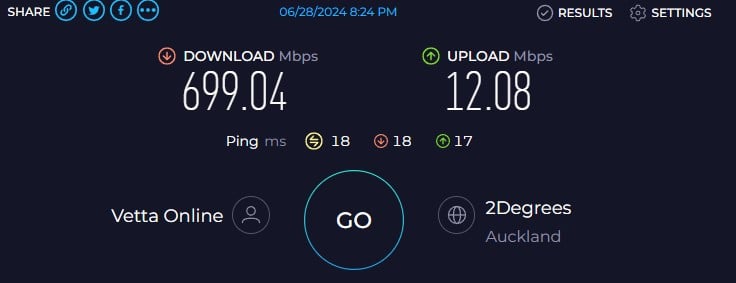
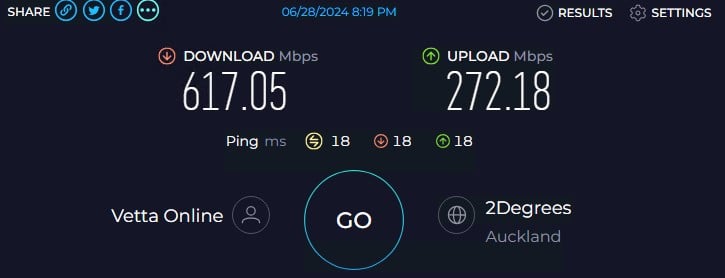
Also another related, admittedly strange issue i cannot solve, i get very average network upload performance on the Windows server 2022 on running on the physical hardware (which Emby is also running on):


But if boot up my Windows 11 VM, on the same machine in hyper-v, i get substantially better results, especially for upload:


Both results are using the same Intel NIC, just a different port (One is for the Host OS, and one for Hyper-V networking), and yes, i've tried to swap them around, and no change.


Mind boggling, and very frustrating, but that's a whole other can of worms, thanks windows...


Shop on-line at New World now for your groceries (affiliate link).
MaxineN
Max
2049 posts

Uber Geek
+1 received by user: 1663

ID Verified
Trusted
Subscriber

  #3254275 28-Jun-2024 21:08
Send private message

Windows just sucks.


And no doubt my 2019 is also affected and I will need to do some tuning with it's Broadcom NICs.


Windows Server 2019 Broadcom nic.


Windows 11 on a Intel i226.


Both to the same 2degrees Auckland server.


I guess I have a maintenance window to plan.


Ramblings from a mysterious lady who's into tech. Warning I may often create zingers.


cjkbarnett

37 posts

Geek
+1 received by user: 18


  #3254277 28-Jun-2024 21:13
Send private message

Wow, that's a massive difference! 


Guess it's time for me to jump over to Proxmox, and then i can have the best of both worlds and virtualize the proper way.


Now the fun of migrating my 12tb of windows storage spaces begins....


michaelmurfy
meow
13579 posts

Uber Geek
+1 received by user: 10910

Moderator
ID Verified
Trusted
Lifetime subscriber

  #3254282 28-Jun-2024 21:59
Send private message

There are some Proxmox helper scripts here too: https://tteck.github.io/Proxmox/ 


Really recommend it. Also once you install run the post install script. But Emby (or rather Jellyfin which appears to be the replacement) is also a one click script to install in its own Linux container. 


Plenty of tutorials online for it all but really, windows just really sucks for high speed networking without tuning.


Michael Murphy | https://murfy.nz
Referral Links: Quic Broadband (use R122101E7CV7Q for free setup)

Are you happy with what you get from Geekzone? Please consider supporting us by subscribing.
Opinions are my own and not the views of my employer.


cjkbarnett

37 posts

Geek
+1 received by user: 18


#3269992 9-Aug-2024 20:03
Send private message

Right, update time, for anyone else coming across this thread in the future (i hate unresolved threads!).


i have FIXED THE ISSUE for good this time 😃


@meow i'm sorry to disappoint, i didn't end up migrating to Proxmox (too big of a learning curve for one weekend lol), but thats still in the pipeline ; )


I fixed it by migrating to Caddy for the reverse proxy service. As simple as that, and wow, what a difference. It's now been two-ish months, and my emby server, running Windows 11 pro for workstations, has been absolutely rock solid in regards to upload / download performance. Easly peaks 25+ MB/s, and will often average around 10 MB/s per remote client depending on connection and i am more than happy with those numbers. 


Also, its stupid simple to set up, less than 10 lines of config in the caddy.file, and half that is just formatting.


Why this works so much better than IIS, Cloudflare Tunnels, NGNIX and the likes, i will never know. But it works, and it works well, and that's all i wanted. 


I have not tested this with windows server 2022 - i will wait for 2025 to release before going back to a server platform, and by then i may have moved to Proxmox entirely anyway.


I hope this helps someone in the future with similar issues, and thanks all for the input!


aj6828
177 posts

Master Geek
+1 received by user: 47

ID Verified
Trusted

  #3270036 10-Aug-2024 01:29
Send private message

also on Windows 11 something that helped me, was Disabling Nagle's Algorithm if it's not for you you can always revert is back.


Disabling Nagle's Algorithm


Open the Registry Editor (regedit) and navigate to:


HKEY_LOCAL_MACHINE\SYSTEM\CurrentControlSet\Services\Tcpip\Parameters\Interfaces


Create a new DWORD value named TcpAckFrequency and set its value to 1.


Exclusive for Geekzone Members!
Dynamic IP & Bring Your Own Device Hyperfibre & Fibre plans & NO Contracts with Hyperline.co.nz powered by ASN 9790 Network


Chrous areas only HYPERLINE.co.nz  


Filter this topic showing only the reply marked as answer Create new topic


Geekzone Live »

Try automatic live updates from Geekzone directly in your browser, without refreshing the page, with Geekzone Live now.


Are you subscribed to our RSS feed? You can download the latest headlines and summaries from our stories directly to your computer or smartphone by using a feed reader.