Geekzone: technology news, blogs, forums
Guest
Welcome Guest.
You haven't logged in yet. If you don't have an account you can register now.


amanzi

Amanzi
1354 posts

Uber Geek
+1 received by user: 331

ID Verified
Trusted
Lifetime subscriber

#321569 29-Aug-2025 16:49
Send private message

I'm only on my second day on Quic and have noticed some issues accessing sites over IPv6. I have a Mikrotik router and followed the advice in this forum to configure it, which seems to be working well. I see the "IPv6" badge on the Geekzone logo, and the test-ipv6.com site gives me a 10/10 score. So I think that all is OK on my side.


But today I noticed two sites that weren't working over IPv6:


Requests fail in Firefox or curl, and this is on multiple machines - macOS and Linux. 


curl https://packages.microsoft.com
curl: (35) Recv failure: Connection reset by peer


If I change my IPv6 config on the clients from "auto" to "link-local only", the sites work fine.


Is this an issue on Quic or something to do with my IPv6 config?


Filter this topic showing only the reply marked as answer Create new topic
jamesrt
1663 posts

Uber Geek
+1 received by user: 941

ID Verified
Trusted
Lifetime subscriber

  #3408637 29-Aug-2025 17:00
Send private message

I'm on Quic, and with my MacOS laptop, both those sites work fine when requested via IPv6:


$ curl -v6 https://packages.microsoft.com/
* Host packages.microsoft.com:443 was resolved.
* IPv6: 2620:1ec:bdf::31
* IPv4: (none)
*   Trying [2620:1ec:bdf::31]:443...
* Connected to packages.microsoft.com (2620:1ec:bdf::31) port 443


$ curl -v6 https://login.karmly.com/
* Host login.karmly.com:443 was resolved.
* IPv6: 2620:1ec:bdf::31
* IPv4: (none)
*   Trying [2620:1ec:bdf::31]:443...
* Connected to login.karmly.com (2620:1ec:bdf::31) port 443


amanzi

Amanzi
1354 posts

Uber Geek
+1 received by user: 331

ID Verified
Trusted
Lifetime subscriber

  #3408642 29-Aug-2025 17:11
Send private message

Thanks for checking. With link-local set on the client it works, but with auto config enabled I get this:


curl -v6 https://packages.microsoft.com/
* Host packages.microsoft.com:443 was resolved.
* IPv6: 2620:1ec:bdf::31
* IPv4: (none)
*   Trying [2620:1ec:bdf::31]:443...
* Connected to packages.microsoft.com (2620:1ec:bdf::31) port 443
* ALPN: curl offers h2,http/1.1
* (304) (OUT), TLS handshake, Client hello (1):
*  CAfile: /etc/ssl/cert.pem
*  CApath: none
* (304) (IN), TLS handshake, Server hello (2):
* (304) (OUT), TLS handshake, Client hello (1):
* Recv failure: Connection reset by peer
* LibreSSL/3.3.6: error:02FFF036:system library:func(4095):Connection reset by peer
* Closing connection
curl: (35) Recv failure: Connection reset by peer


But other sites, like Geekzone, work fine:


curl -v6 https://www.geekzone.co.nz
* Host www.geekzone.co.nz:443 was resolved.
* IPv6: 2606:4700:20::681a:481, 2606:4700:20::681a:581, 2606:4700:20::ac43:4a6c
* IPv4: (none)
*   Trying [2606:4700:20::681a:481]:443...
* Connected to www.geekzone.co.nz (2606:4700:20::681a:481) port 443
* ALPN: curl offers h2,http/1.1
* (304) (OUT), TLS handshake, Client hello (1):
*  CAfile: /etc/ssl/cert.pem
*  CApath: none
* (304) (IN), TLS handshake, Server hello (2):
* (304) (IN), TLS handshake, Unknown (8):
* (304) (IN), TLS handshake, Certificate (11):
* (304) (IN), TLS handshake, CERT verify (15):
* (304) (IN), TLS handshake, Finished (20):
* (304) (OUT), TLS handshake, Finished (20):
* SSL connection using TLSv1.3 / AEAD-CHACHA20-POLY1305-SHA256 / [blank] / UNDEF
* ALPN: server accepted h2
* Server certificate:
*  subject: CN=geekzone.co.nz
*  start date: Aug 16 05:33:48 2025 GMT
*  expire date: Nov 14 06:33:46 2025 GMT
*  subjectAltName: host "www.geekzone.co.nz" matched cert's "*.geekzone.co.nz"
*  issuer: C=US; O=Google Trust Services; CN=WE1
*  SSL certificate verify ok.
* using HTTP/2
* [HTTP/2] [1] OPENED stream for https://www.geekzone.co.nz/
* [HTTP/2] [1] [:method: GET]
* [HTTP/2] [1] [:scheme: https]
* [HTTP/2] [1] [:authority: www.geekzone.co.nz]
* [HTTP/2] [1] [:path: /]
* [HTTP/2] [1] [user-agent: curl/8.7.1]
* [HTTP/2] [1] [accept: */*]
> GET / HTTP/2
> Host: www.geekzone.co.nz
> User-Agent: curl/8.7.1
> Accept: */*
>


freitasm
BDFL - Memuneh
80646 posts

Uber Geek
+1 received by user: 41029

Administrator
ID Verified
Trusted
Geekzone
Lifetime subscriber

  #3408645 29-Aug-2025 17:25
Send private message

What DNS are you using?


Referral links: Quic Broadband (free setup code: R587125ERQ6VE) | Samsung | AliExpress | Wise | Sharesies 


Support Geekzone by subscribing (browse ads-free), or making a one-off or recurring donation through PressPatron.


amanzi

Amanzi
1354 posts

Uber Geek
+1 received by user: 331

ID Verified
Trusted
Lifetime subscriber

  #3408649 29-Aug-2025 17:46
Send private message

freitasm:


What DNS are you using?


I did have Cloudflare configured, but have just switched to the Quic servers and get the same result.


gregb
52 posts

Master Geek
+1 received by user: 13


  #3408652 29-Aug-2025 18:08
Send private message

The same URL 'works for me'. I'm not clear what the issue is; I would check you MTU. If something in your path is breaking ipv6 then path mtu discovery could be a possible explanation. I run a 1500 MTU (even over PPPoE) just to try and reduce these sort of issues. Historically for me path MTU problems start when the first full sized segments are send.


I don't think it is a DNS issue (your resolved ipv6 is the same - [2620:1ec:bdf::31]). I also find IPv6 on geekzone is pretty good (thumbs up to Mauricio), and getting that ipv6 logo is a really simple check for ipv6.


What ICMPv6 are you allowing? Are you filtering ICMPv6 and thus breaking IPv6?


$ curl -v6 https://packages.microsoft.com/
* About to connect() to packages.microsoft.com port 443 (#0)
*   Trying 2620:1ec:bdf::31...
* Connected to packages.microsoft.com (2620:1ec:bdf::31) port 443 (#0)
* Initializing NSS with certpath: sql:/etc/pki/nssdb
*   CAfile: /etc/pki/tls/certs/ca-bundle.crt
  CApath: none
* SSL connection using TLS_ECDHE_RSA_WITH_AES_256_GCM_SHA384
* Server certificate:
*       subject: CN=packages.microsoft.com,O=Microsoft Corporation,L=Redmond,ST=WA,C=US
*       start date: Jun 16 10:07:26 2025 GMT
*       expire date: Dec 13 10:07:26 2025 GMT
*       common name: packages.microsoft.com
*       issuer: CN=Microsoft Azure RSA TLS Issuing CA 03,O=Microsoft Corporation,C=US
> GET / HTTP/1.1
> User-Agent: curl/7.29.0
> Host: packages.microsoft.com
> Accept: /


--


https://account.quic.nz/refer/722087


amanzi

Amanzi
1354 posts

Uber Geek
+1 received by user: 331

ID Verified
Trusted
Lifetime subscriber

  #3408656 29-Aug-2025 18:19
Send private message

gregb:


I would check you MTU. If something in your path is breaking ipv6 then path mtu discovery could be a possible explanation. I run a 1500 MTU (even over PPPoE) just to try and reduce these sort of issues. Historically for me path MTU problems start when the first full sized segments are send.


Ah - interesting.... I haven't configured any specific MTU settings. I'll need to figure out how to do this on my Mikrotik router.


Stream your favourite shows now on Apple TV (affiliate link).
amanzi

Amanzi
1354 posts

Uber Geek
+1 received by user: 331

ID Verified
Trusted
Lifetime subscriber

  #3408669 29-Aug-2025 19:21
Send private message

amanzi:


gregb:


I would check you MTU. If something in your path is breaking ipv6 then path mtu discovery could be a possible explanation. I run a 1500 MTU (even over PPPoE) just to try and reduce these sort of issues. Historically for me path MTU problems start when the first full sized segments are send.


Ah - interesting.... I haven't configured any specific MTU settings. I'll need to figure out how to do this on my Mikrotik router.


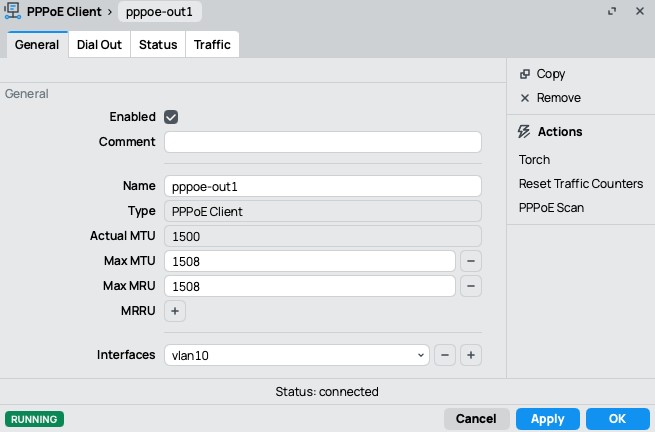
That was it! I set the max MTU and max MRU to 1508 on the PPP connection, and that got the router to use 1500 MTU. This is also mentioned in the Quic docs: https://www.quic.nz/setup/


Those sites are working now!


zespri
424 posts

Ultimate Geek
+1 received by user: 94

Lifetime subscriber

  #3408719 30-Aug-2025 08:56
Send private message

Yeah, I had the same problem, which I solved the same way as you.


Filter this topic showing only the reply marked as answer Create new topic


Geekzone Live »

Try automatic live updates from Geekzone directly in your browser, without refreshing the page, with Geekzone Live now.


Are you subscribed to our RSS feed? You can download the latest headlines and summaries from our stories directly to your computer or smartphone by using a feed reader.