Geekzone: technology news, blogs, forums
Guest
Welcome Guest.
You haven't logged in yet. If you don't have an account you can register now.


Xile

175 posts

Master Geek
+1 received by user: 31

ID Verified

#323791 15-Jan-2026 17:39
Send private message quote this post

I have an untagged DHCP connection and have been trying to setup IPV6, originally with a Google WiFi Pro, but today with a Grandstream GWN7062E.


I had read that the Google WiFi can be a bit flakey with IPV6 hence the attempt with the Grandstream.


So far I have been unsucessful with either device in getting IPV6. I have IPV4 and internet connectivity with both.


The Google WiFi has a very limited UI in regards IPV6, basically on or off. With the Granstream there a few more options. For IPv6 Address Assignment I have tried: Disable, SLAAC, Stateless DHCPv6, Stateful DHCPv6, and IPV6 relay from WAN. But when testing with the likes of test-ipv6.com it comes back with a 0/10 score.


Then looking around the UI on the Grandstream I came across Intelligent Detection which runs various tests of ones setup. On Network activity (which tests network health status (packet loss rate, DNS latency, etc.) it comes back with a 100% packet loss to all the DNS servers for Quic, IPV4 and IPV6.


So is the packet loss in any way causing my inability to get IPV6 or is that a whole separate issue?


Any help appreciated.


Filter this topic showing only the reply marked as answer Create new topic
freitasm
BDFL - Memuneh
80646 posts

Uber Geek
+1 received by user: 41024

Administrator
ID Verified
Trusted
Geekzone
Lifetime subscriber

  #3453390 15-Jan-2026 18:01
Send private message quote this post

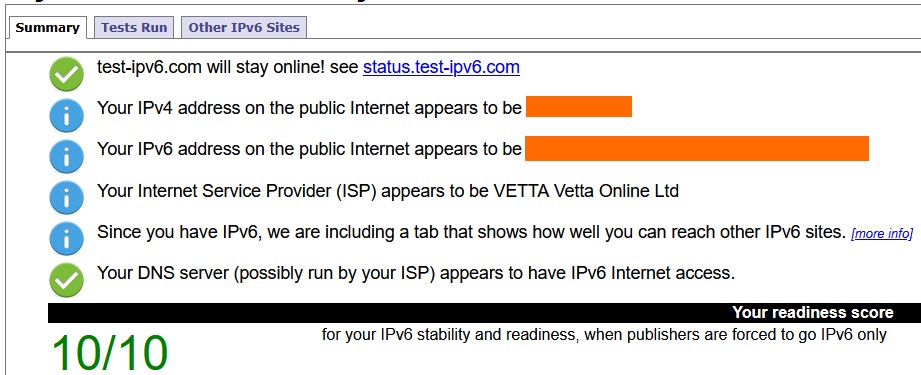
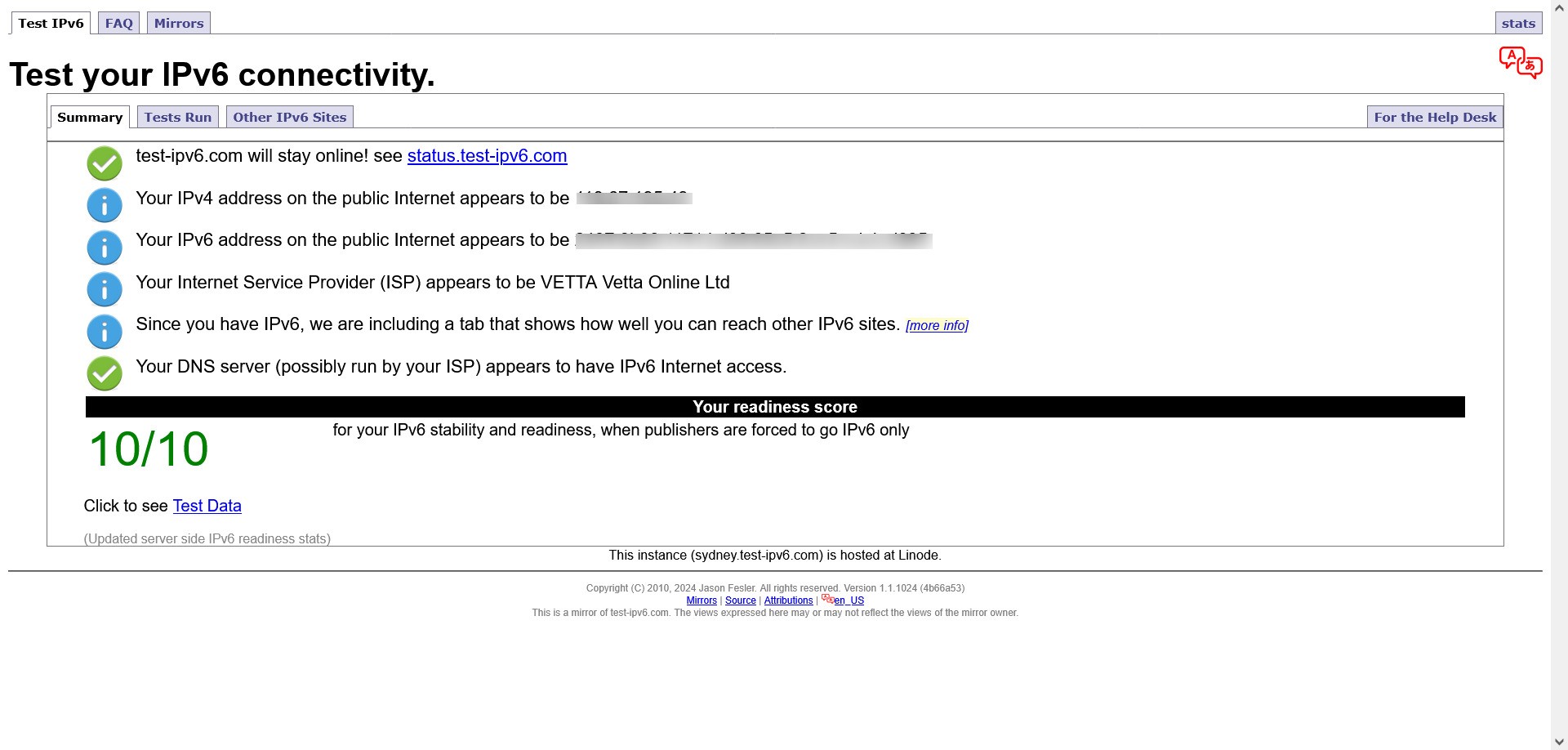
I will leave to others to help here, but I can confirm the IPv6 test page will/should show 10/10 on a Quic/Vetta connection:


Referral links: Quic Broadband (free setup code: R587125ERQ6VE) | Samsung | AliExpress | Wise | Sharesies 


Support Geekzone by subscribing (browse ads-free), or making a one-off or recurring donation through PressPatron.


saf

saf
221 posts

Master Geek
+1 received by user: 533

ID Verified
Trusted
Vetta Group
Subscriber

  #3453422 15-Jan-2026 19:56
Send private message quote this post

Can't comment for the Google WiFi, however the GWN7062E definitely works with IPv6 on DHCP, with the DHCPv6 client configured.


When swapping from the Google WiFi to the Grandstream, if the Google WiFi had an IPv6 lease, it may take some time for this to fully die off, so could be worth leaving the Grandstream in for a day to see how it looks.


The Quic DNS servers don't respond to ICMP, so that's expected behaviour and a red herring.


My views are as unique as a unicorn riding a unicycle. They do not reflect the opinions of my employer, my cat, or the sentient coffee machine in the break room.


fe31nz
1294 posts

Uber Geek
+1 received by user: 423


  #3453506 15-Jan-2026 23:34
Send private message quote this post

Xile:


For IPv6 Address Assignment I have tried: Disable, SLAAC, Stateless DHCPv6, Stateful DHCPv6, and IPV6 relay from WAN.


This is for setting the LAN side IPv6 address assignments.  You should use SLAAC unless you have set up an internal DHCPv6 server on your router or elsewhere on each LAN segment.  With SLAAC, IPv6 address assignments are calculated by the device getting the address, and the device will do a quick check to see if another device is already using the IPv6 address it chose, and if so it will choose another.  For IPv6 to work on your LAN side, the router must be sending out RA (router advertisement) IPv6 packets to tell your devices what IPv6 prefix to use.  You can use a tool like Wireshark to look for these RA packets - if they are not present, then IPv6 can only work with link-local addresses on each LAN segment, and not between segments and not with the wider Internet.  Tell Wireshark to capture ICMPv6 type 134 packets.


I am not familiar with either of your routers, but with Quic on DHCP, you need to set IPv6 on the WAN port to use a DHCPv6-PD connection (PD = prefix delegation), and you will likely need to set the size of the prefix to /56 (the first 56 bits of the IPv6 address).  The router default for the prefix size is often /48 and the connection will not work unless you set it to /56.  With DHCPv6-PD, it can take a while to connect, especially the first time, so it pays to leave it for maybe 10 minutes before deciding it is not working.  If you keep on changing things, it can make DHCPv6-PD connections even slower to connect, as the ISP router you are connecting to does quite long timeouts before restarting the connection process.


Xile

175 posts

Master Geek
+1 received by user: 31

ID Verified

  #3453734 17-Jan-2026 09:50
Send private message quote this post

Thanks for the replies.


Despite following the advice given I have still not been able to get IPV6 working.


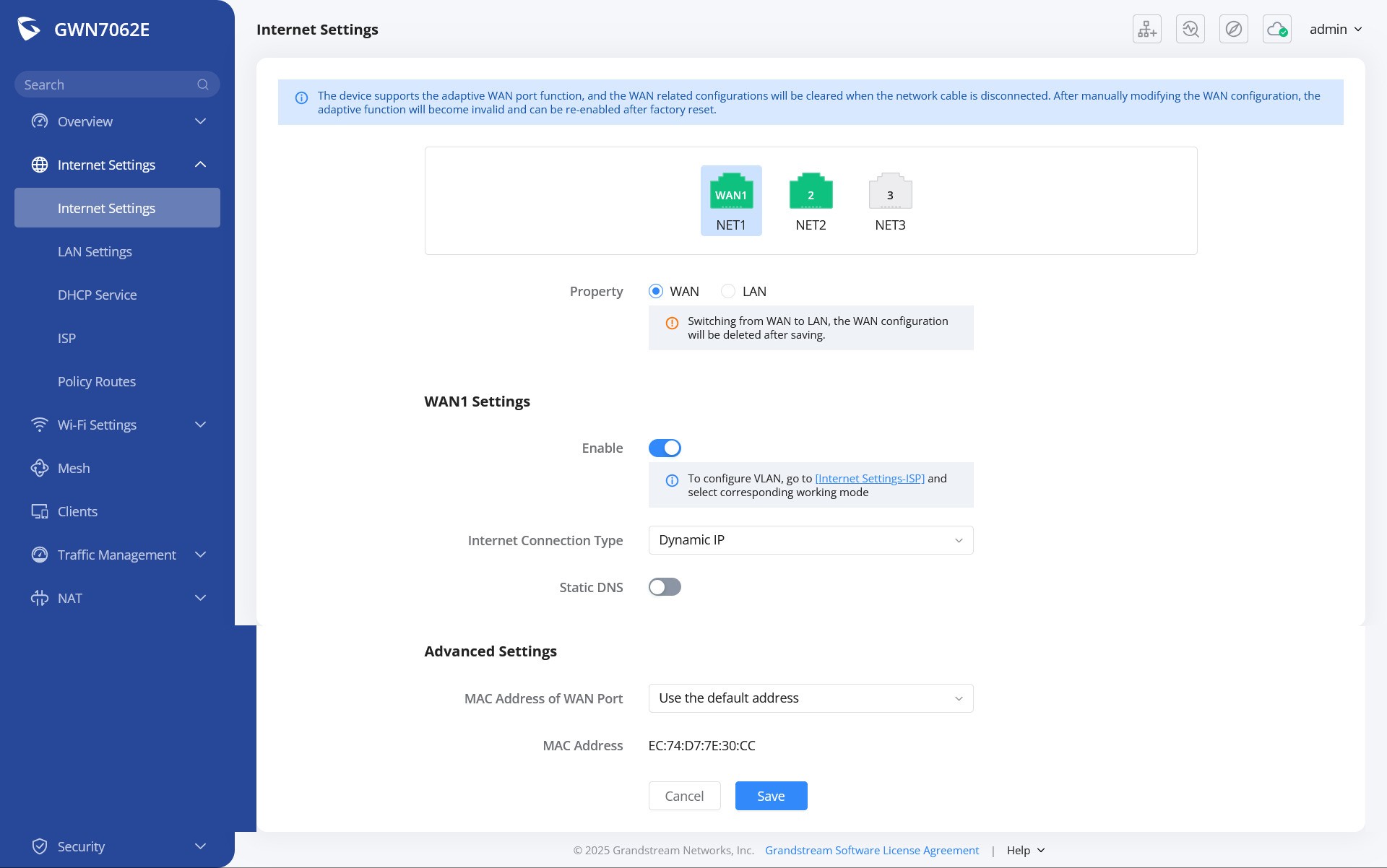
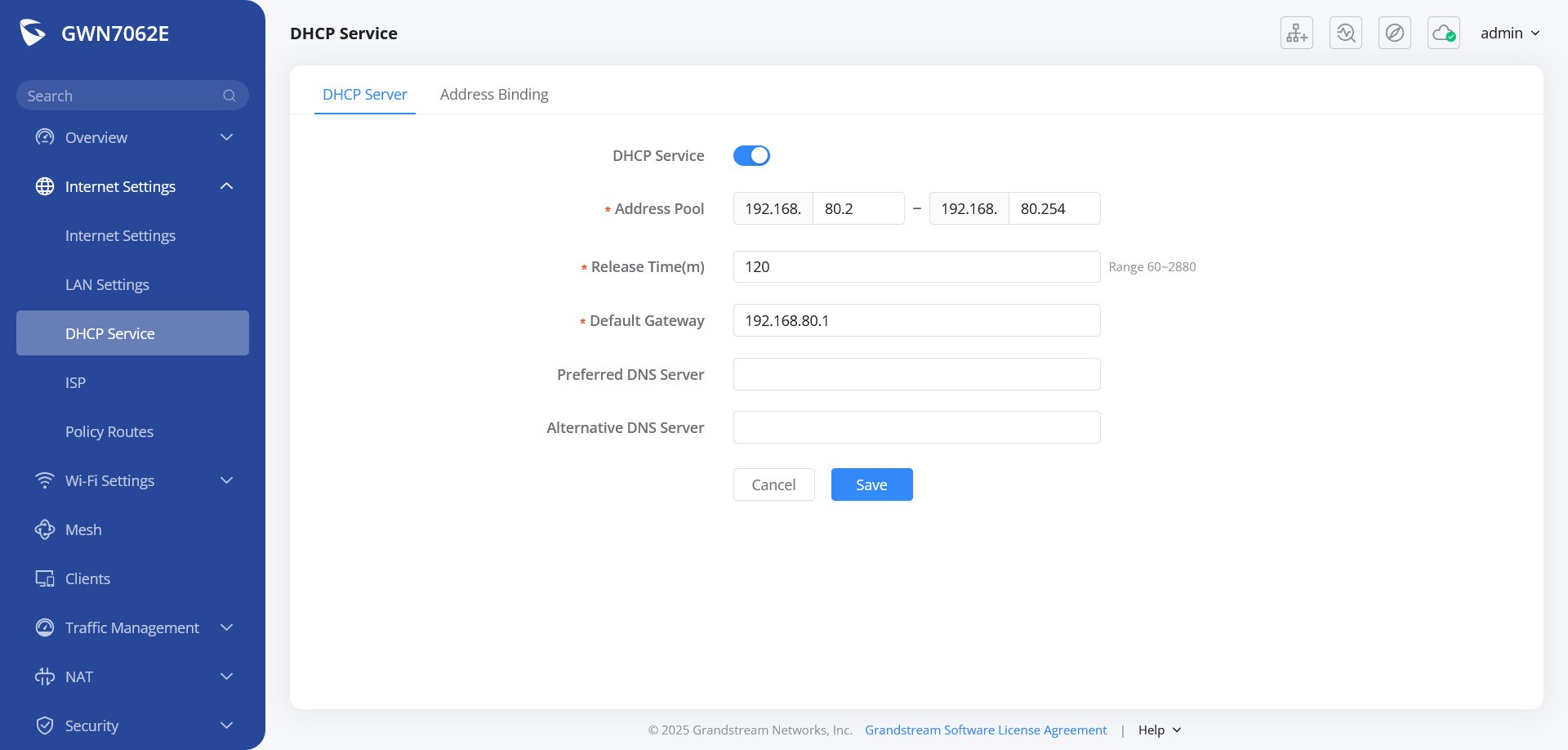
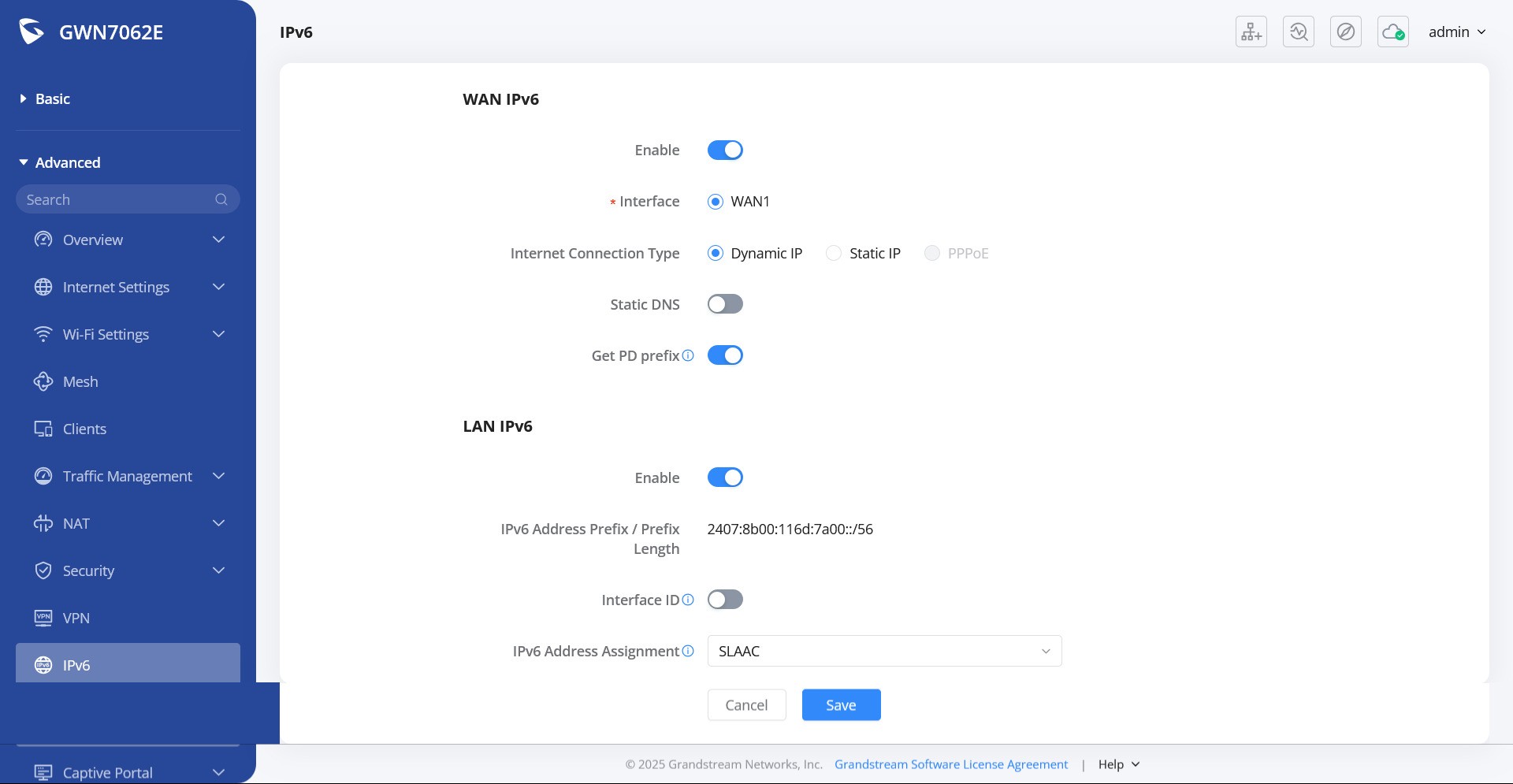
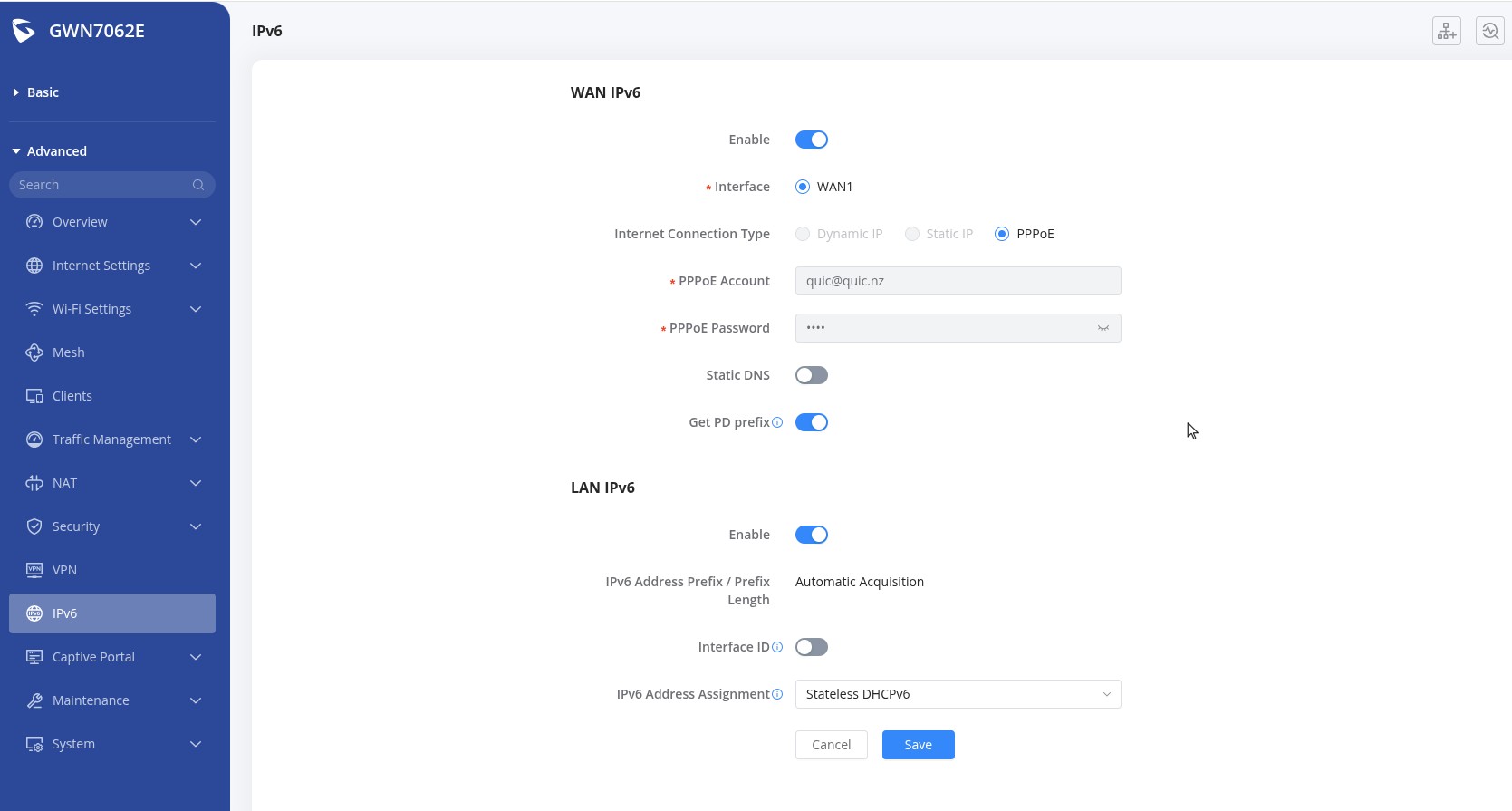
Have attached some setup screen shots if it helps. I've probably got a setting wrong or something simple like that. Hopefully.


RunningMan
9184 posts

Uber Geek
+1 received by user: 4833


  #3453735 17-Jan-2026 09:56
Send private message quote this post

Given Quic supply the GWN7062E, it's gotta work.


https://www.quic.nz/product/gwn7062e-wifi-6-router/ 


Just order your connection untagged, and this little router will automatically connect over DHCP.


This router is out-of-the-box ready to go with Quic, simply connect your advised ONT port into the LAN1 port of the router, connect the included USB-C power adapter, and you’ll be up and running!


Perhaps a factory reset, then connect as above?


farcus
1625 posts

Uber Geek
+1 received by user: 437


  #3453795 17-Jan-2026 13:18
Send private message quote this post

this is what I have for IPv6 (which works)


Shop now at Mighty Ape (affiliate link).
freitasm
BDFL - Memuneh
80646 posts

Uber Geek
+1 received by user: 41024

Administrator
ID Verified
Trusted
Geekzone
Lifetime subscriber

  #3453798 17-Jan-2026 13:21
Send private message quote this post

The DHCP session lasts 22 minutes. If you change from DHCP to PPPoE, keep the router and ONT off for at least 23 minutes for a successful PPPOE connection to happen. It will fail otherwise.


Referral links: Quic Broadband (free setup code: R587125ERQ6VE) | Samsung | AliExpress | Wise | Sharesies 


Support Geekzone by subscribing (browse ads-free), or making a one-off or recurring donation through PressPatron.


Xile

175 posts

Master Geek
+1 received by user: 31

ID Verified

  #3453822 17-Jan-2026 17:03
Send private message quote this post

Thanks everyone. So I changed back to PPoE and now have this:


freitasm
BDFL - Memuneh
80646 posts

Uber Geek
+1 received by user: 41024

Administrator
ID Verified
Trusted
Geekzone
Lifetime subscriber

  #3453823 17-Jan-2026 17:07
Send private message quote this post

Good result.


Referral links: Quic Broadband (free setup code: R587125ERQ6VE) | Samsung | AliExpress | Wise | Sharesies 


Support Geekzone by subscribing (browse ads-free), or making a one-off or recurring donation through PressPatron.


Filter this topic showing only the reply marked as answer Create new topic


Geekzone Live »

Try automatic live updates from Geekzone directly in your browser, without refreshing the page, with Geekzone Live now.


Are you subscribed to our RSS feed? You can download the latest headlines and summaries from our stories directly to your computer or smartphone by using a feed reader.