Geekzone: technology news, blogs, forums
Guest
Welcome Guest.
You haven't logged in yet. If you don't have an account you can register now.


Toastiewarm

63 posts

Master Geek
+1 received by user: 2

ID Verified

#323990 12-Feb-2026 20:57
Send private message quote this post

Hi there, I am after some assistance.


We've recently moved to Quic and I'm trying to get our connection setup with DHCP rather than PPPoE for ease of well life and to see if it would have any boost with with download speeds as the Chorus speedtest is maxing out around 200Mb/s rather than 500Mb/s (both wired and wifi). However for the life of me I can't seem to get it working via DHCP yet PPPoE works fine.


I've changed the authentication setting on the quic portal and it says Connected via DHCP pretty much instantly and the router shows a corresponding IP address however when we try and use any devices connected to the wifi or via an ethernet cable it says no internet and goes no where.


Attached is the internet settings page from the router I am using if people who know way more than me can check if there is there anything glaringly obvious I am missing.
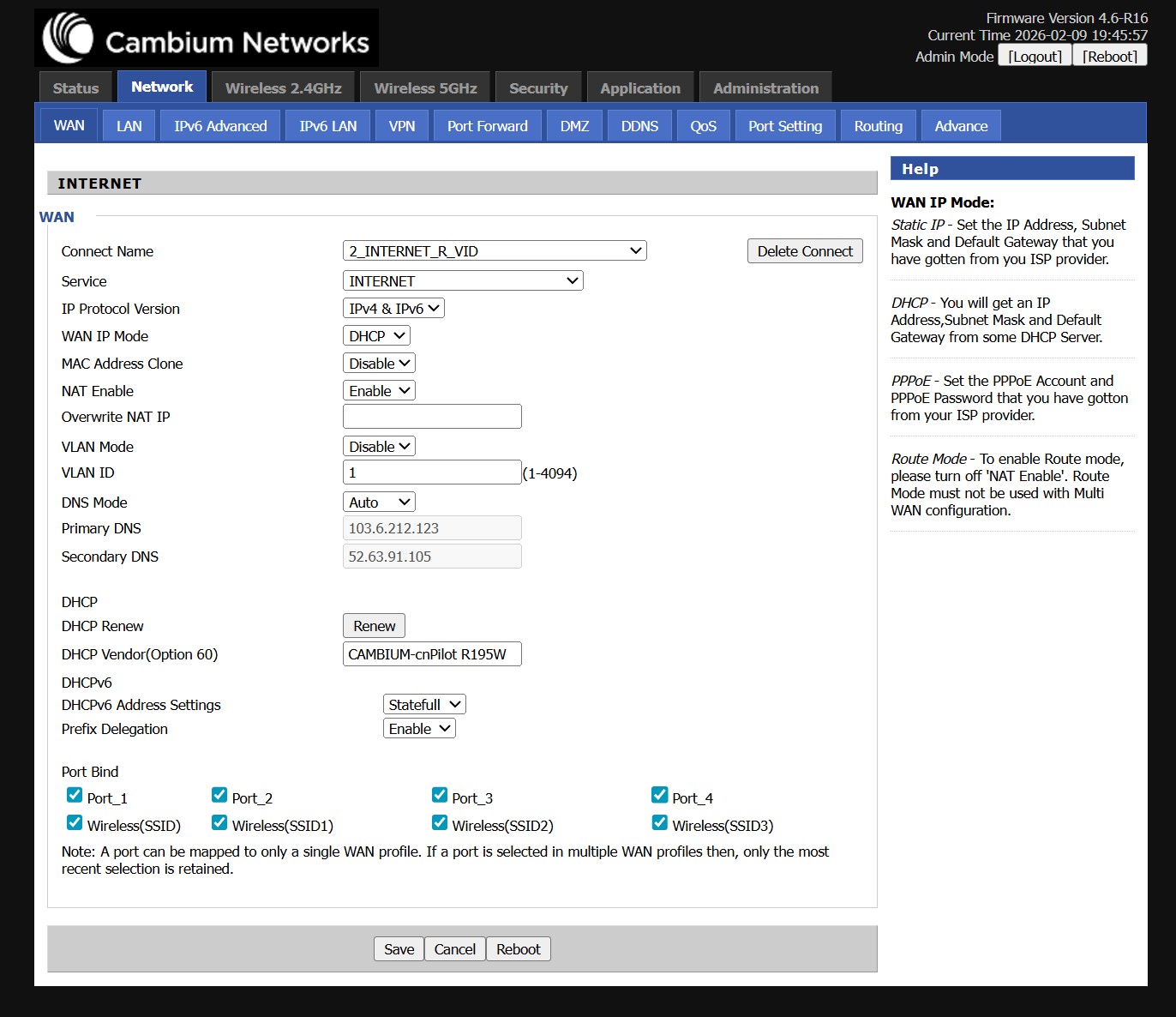


I note that there is no MTU option but I assume that as it works via PPPoE this isn't an issue. I saw on the quic config page that it asks for "IPv6 setup: /56 prefix delivered via DHCPv6-PD" but couldn't see an option for this so just left it as shown.


Any suggestions or do I just have to stick with PPPoE or find a newer router. 


Cheers in advance!


Create new topic
idanoo
22 posts

Geek
+1 received by user: 16

Trusted

  #3461084 12-Feb-2026 21:00
Send private message quote this post

There's a lot of routers out there which don't follow the spec and results in no default gateway set on the WAN interface. It looks like this is what's happening here.
You might be able to add a static default route to the first WAN hop to test - but I'd recommend just leaving it on PPPoE for now.

Do note that you might need to wait 22min before PPPoE will let you connect as the DHCP lease needs to expire!


Referral Links: Quic Broadband (use R19099E37JEK for free setup)


Toastiewarm

63 posts

Master Geek
+1 received by user: 2

ID Verified

  #3461087 12-Feb-2026 21:13
Send private message quote this post

idanoo:


There's a lot of routers out there which don't follow the spec and results in no default gateway set on the WAN interface. It looks like this is what's happening here.
You might be able to add a static default route to the first WAN hop to test - but I'd recommend just leaving it on PPPoE for now.

Do note that you might need to wait 22min before PPPoE will let you connect as the DHCP lease needs to expire!


Oh yes the 20-30min downtime for the dhcp>pppoe transition is frustrating when you try and get dhcp to work and each setting change it tells you to restart the router and then you wait to see if it works and give up after a while and go back to pppoe.


Ah well if my router can't hack it and I really can be bothered I'll upgrade.


michaelmurfy
meow
13579 posts

Uber Geek
+1 received by user: 10910

Moderator
ID Verified
Trusted
Lifetime subscriber

  #3461098 12-Feb-2026 21:57
Send private message quote this post

Toastiewarm: Ah well if my router can't hack it and I really can be bothered I'll upgrade.


Yeah unfortunately this router didn't benchmark too well back in the day. Totally forgot about the DD-WRT inspired theme despite it not being DD-WRT!


But, wee, cheap upgrade for you that is small, and can do Gigabit fine. It is literally plug and play as in it'll work out of the box - https://www.quic.nz/product/gwn7062e-wifi-6-router/ 


Michael Murphy | https://murfy.nz
Referral Links: Quic Broadband (use R122101E7CV7Q for free setup)

Are you happy with what you get from Geekzone? Please consider supporting us by subscribing.
Opinions are my own and not the views of my employer.


nztim
4012 posts

Uber Geek
+1 received by user: 2710

ID Verified
Trusted
TEAMnetwork
Subscriber

  #3461146 13-Feb-2026 08:51
Send private message quote this post

The DHCP Client on your router needs request Option 121 which is called a "Classless Route" this option is not required if you have a dynamic IP only if you have a Static IP so you have a few options if your router does not support Option 121


  • Use PPPoE
  • Ask Quic to assign you a /30 between you and Quic which you will ether need to pay for or politely be told F/O as it is a waste of address space
  • Change your router to one which supports dhcp option 121
  • Go back to a Dynamic IP


Any views expressed on these forums are my own and don't necessarily reflect those of my employer. 


Toastiewarm

63 posts

Master Geek
+1 received by user: 2

ID Verified

  #3461351 13-Feb-2026 21:46
Send private message quote this post

Thanks for the advice, I will source a new router when I get to it, at least I can stop trying to get it to work.


Toastiewarm

63 posts

Master Geek
+1 received by user: 2

ID Verified

  #3461603 15-Feb-2026 10:18
Send private message quote this post

michaelmurfy:


Toastiewarm: Ah well if my router can't hack it and I really can be bothered I'll upgrade.


Yeah unfortunately this router didn't benchmark too well back in the day. Totally forgot about the DD-WRT inspired theme despite it not being DD-WRT!


But, wee, cheap upgrade for you that is small, and can do Gigabit fine. It is literally plug and play as in it'll work out of the box - https://www.quic.nz/product/gwn7062e-wifi-6-router/ 


Thanks for the suggestion, I had been looking at Grandstreams as a replacement option as well.


Would this one also suit? Buy the Grandstream GWN7001 Multi-WAN Gigabit VPN Router 1GbE x6 ( GWN7001 ) online - PBTech.co.nz


I appreciate I don't need dual WAN. The only reason for looking at this model is some IT people from work had some excess Aruba Accesspoints which they have gifted to me so I was going to use those through our house and they run back to a small comms cabinet in the garage which isn't very deep and doesn't have a shelf, so I got looking for something I could easily mount to the back of the cabinet rather than on a shelf.


Cheers,


Shop now for Dyson appliances (affiliate link).
michaelmurfy
meow
13579 posts

Uber Geek
+1 received by user: 10910

Moderator
ID Verified
Trusted
Lifetime subscriber

  #3461614 15-Feb-2026 11:47
Send private message quote this post

Yep that’ll work totally fine!


Michael Murphy | https://murfy.nz
Referral Links: Quic Broadband (use R122101E7CV7Q for free setup)

Are you happy with what you get from Geekzone? Please consider supporting us by subscribing.
Opinions are my own and not the views of my employer.


Create new topic


Geekzone Live »

Try automatic live updates from Geekzone directly in your browser, without refreshing the page, with Geekzone Live now.


Are you subscribed to our RSS feed? You can download the latest headlines and summaries from our stories directly to your computer or smartphone by using a feed reader.