Geekzone: technology news, blogs, forums
Guest
Welcome Guest.
You haven't logged in yet. If you don't have an account you can register now.


Evasive86

2 posts

Wannabe Geek
+1 received by user: 1

ID Verified

#324733 18-May-2026 13:21
Send private message quote this post

Hi,

We're currently looking at moving to Quic from Spark. I'm plenty technical enough to handle router setup etc, so just wanted to ask if there are any gotchas to be aware of.
I remember that when Quic moving to their new infrastructure, there were plenty of reports of issues etc and even now I see some issues being reported (applying a pinch of salt as necessary), so I just wanted to gain a feel for how stable the service is now.

My SO is willing to consider changing (save a few $ in the process), but fire and brimstone may rain should I be judged to have been the root cause of preventable loss of internet connectivity, so I just want to ensure that we're not going to move from something that works (but charges more than enough for the privilage) to something that is dicey.

Auckland Based, on the Chorus network.

Thanks


View this topic in a long page with up to 500 replies per page Create new topic
 1 | 2
hsvhel
1277 posts

Uber Geek
+1 received by user: 598

ID Verified

  #3493389 18-May-2026 13:54
Send private message quote this post

Use them currently, no issues


Could always provision on port two and keep the other as a fail over for a month?


Referral Link Quic


Free Setup use R502152EQH6OK on check out


OldGeek
993 posts

Ultimate Geek
+1 received by user: 410

ID Verified
Lifetime subscriber

  #3493443 18-May-2026 15:37
Send private message quote this post

I am currently in the process of moving to Vetta (Quic's parent and owner) from Quic.  I have had no problems with Quic (moved 18 months ago) until about a month ago and the result is that I consider Vetta to be a better proposition for me now even though it is marginally ($10 per month) more expensive for a 500/100 plan.  Vetta include provision of a router for no charge if you agree to a 1-year contract.

This may sound a bit odd, but I suggest you consider moving to Vetta first because it is very low risk, then if you are happy to take the self-help route you can move to Quic at a later date.


-- 

OldGeek.


michaelmurfy
meow
13666 posts

Uber Geek
+1 received by user: 11075

Moderator
ID Verified
Trusted
Lifetime subscriber

  #3493446 18-May-2026 15:47
Send private message quote this post

Quic / Vetta are the exact same network. Just Quic is self managed but have a pretty good Discord community full of helpful people (including Quic staff) and Vetta has phone support + a free router.

If you're technical then go for the move to Quic. They're pretty good as an ISP and there are no contracts anyway.


Michael Murphy | https://murfy.nz
Referral Links: Quic Broadband (use R122101E7CV7Q for free setup)

Are you happy with what you get from Geekzone? Please consider supporting us by subscribing.
Opinions are my own and not the views of my employer.


zespri
431 posts

Ultimate Geek
+1 received by user: 96

Lifetime subscriber

  #3493535 18-May-2026 20:17
Send private message quote this post

I'm personally not happy with quic. Since I switched from Voyager, I have speed problems, latency problems and disconnects. I wish I have not moved. The family is not happy either as their gaming experience is affected - that is to say it is not just me in the house I'm getting persistent complaints from others too since the move. I'm quite technical have been managing my own mikrotiks for many years, so I thought I'd fit right in, unfortunately what just worked on Voyager does not do the same on Quic.


Why I moved: there was a wave of ISP price increases and Voyager increased before Quic, I did not realise it's industry-wise so I moved. I got the same price increase on Quic a couple of months later. Additionally I wanted IPv6, and did not realise that Voyager has it (did not do my research).


Now I see I had no real reason to move and considering going back.


The biggest complaint right now is huge ping spikes several times a minute with Australia. Has been like this since I switched and never really stopped. Family getting disconnected from online games approximately once an hour (however very irregular) also still happening.


michaelmurfy
meow
13666 posts

Uber Geek
+1 received by user: 11075

Moderator
ID Verified
Trusted
Lifetime subscriber

  #3493539 18-May-2026 20:45
Send private message quote this post

zespri:


I'm personally not happy with quic. Since I switched from Voyager, I have speed problems, latency problems and disconnects. I wish I have not moved.


The biggest complaint right now is huge ping spikes several times a minute with Australia. Has been like this since I switched and never really stopped. Family getting disconnected from online games approximately once an hour (however very irregular) also still happening.


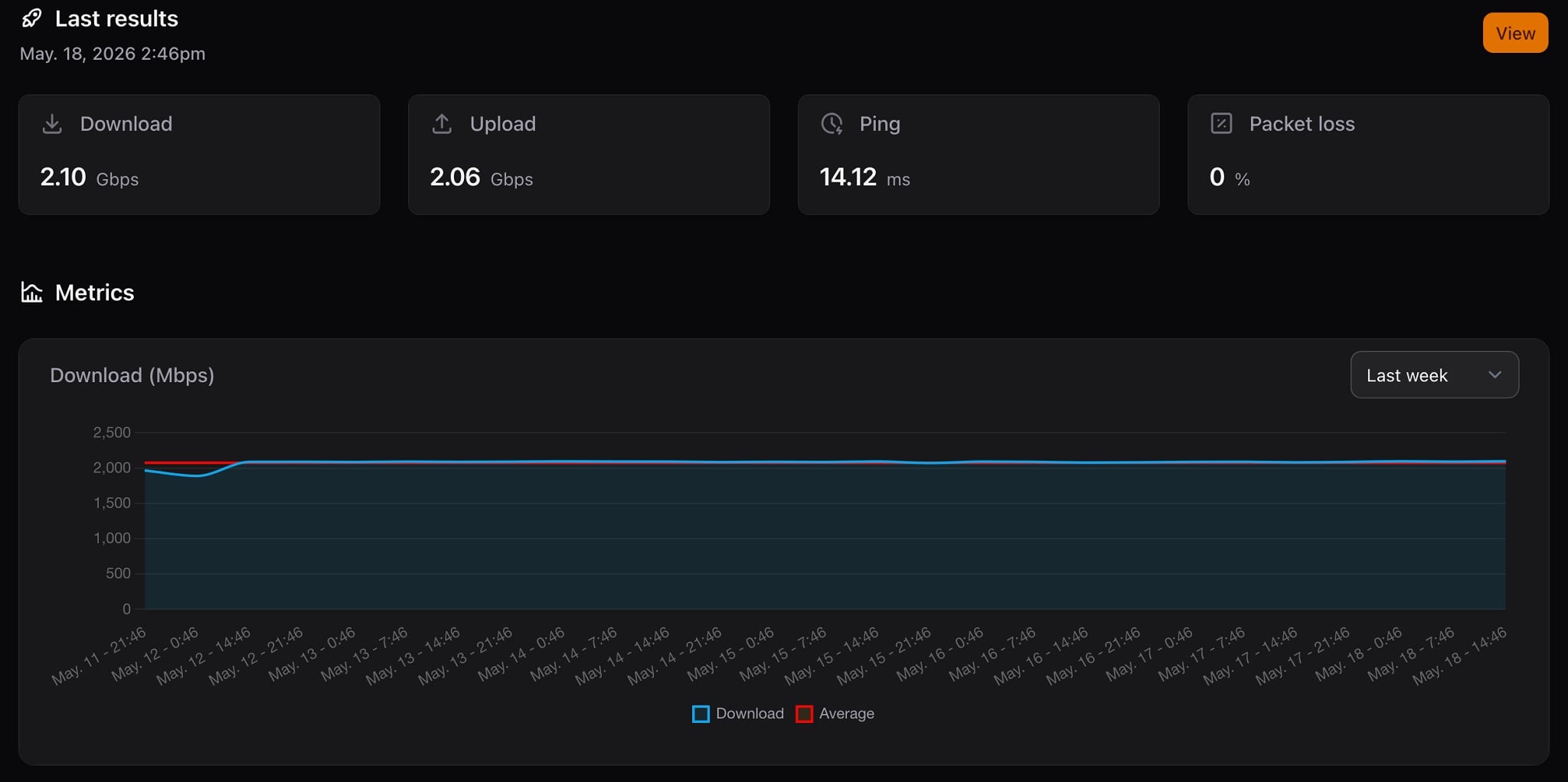
Hmm that simply isn't normal and sounds like you've got something else going on. I'm getting a constant 2Gbit on my 2Gbit Hyperfibre plan (PPPoE on a Mikrotik RB5009), latency is stable and on Usenet I'm able to quite easy get 240MB/s maxing out my connection -


Plus know many gamers using it who don't have issues with latency or rubber banding.


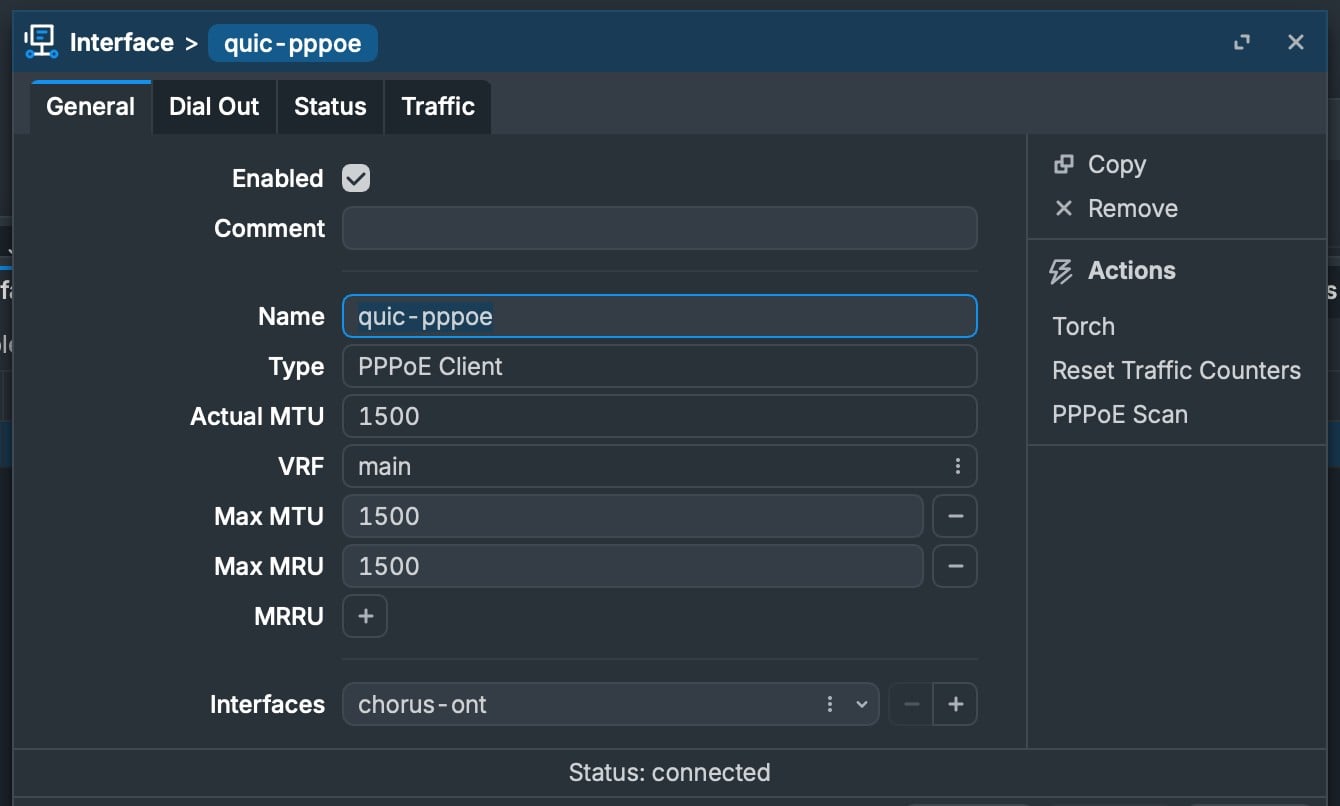
It is worth checking your MTU. I don't think Voyager support a full 1500byte MTU still and is a common problem when people move from them to Quic as this is often overlooked. Quic / Vetta support a full 1500byte MTU. If this is incorrect you'll experience all sorts of weird things:


Michael Murphy | https://murfy.nz
Referral Links: Quic Broadband (use R122101E7CV7Q for free setup)

Are you happy with what you get from Geekzone? Please consider supporting us by subscribing.
Opinions are my own and not the views of my employer.


KiwiSurfer
1761 posts

Uber Geek
+1 received by user: 1023

ID Verified
Lifetime subscriber

  #3493551 18-May-2026 21:51
Send private message quote this post

Ex-Quic customer here, Chorus/Auckland. IPv6 worked great for a couple of months then out of the blue (with no changes to config on my end) IPv6 kept dropping after a day or two needing the connection to be bounced. Continued to have the same issues with IPv6 on two separate routers (the second I bought on advice from Quic discord as they said my original router was crap, and configured as per advice from others with a working IPv6 connection). I tried a number of other things e.g. using PPPoE instead of DHCP (on both router 1 and router 2). Am aware of a few others with same issues including one who gave up and added a script to their router to check/bounce their Quic IPv6 connection hourly as a workaround. Didn't really find Quic discord of any help as various people kept telling me to configure my router different ways but always the same outcome and they all missed the fact I had a working config that I had never changed; and also that two separate routers both with stock IPv6 config had the exact same behavior.


Moved over to 2degrees and IPv6 worked perfectly straight away with stock config without needing me to fiddle with anything. Did have an issue (outbound IPv6 traffic was working fine but nothing was routing back) but a quick DM to a 2degrees person here on GZ and it was all sorted same day.


Yes I'm paying more (the base price higher plus they charge monthly not one-off for static IP) but the QOS is better IMHO. It was nice just configuring a router with default settings, checking it had VLAN10/DHCP enabled, plugging it in and seeing it come to life and weeks/months later it's still online with zero issues.


A shame as I think the concept of a no-frills/self-service ISP is great and I did have a good experience prior to their IPv6 issues.


You're ex-Spark though so you're not using IPv6 so if you do move to Quic maybe easier/safer to just disable IPv6. TBH their IPv4 service is fine and I would probably have stayed if I didn't require IPv6.


Want to support Geekzone and browse the site without the ads? Subscribe to Geekzone now (monthly, annual and lifetime options).
michaelmurfy
meow
13666 posts

Uber Geek
+1 received by user: 11075

Moderator
ID Verified
Trusted
Lifetime subscriber

  #3493559 18-May-2026 22:58
Send private message quote this post

KiwiSurfer: A shame as I think the concept of a no-frills/self-service ISP is great and I did have a good experience prior to their IPv6 issues.


You're ex-Spark though so you're not using IPv6 so if you do move to Quic maybe easier/safer to just disable IPv6. TBH their IPv4 service is fine and I would probably have stayed if I didn't require IPv6.


There has been some recent maintenance that has taken care of quite a few IPv6 edge cases since you left. A few people also found on Mikrotik that if you're using PPPoE and have "Use Interface DUID" enabled on the DHCPv6 client it'll use the non unique DUID of "0x00030001000000000000" which was causing quite a few issues and by unticking this; sorted their IPv6 issues. I'm not aware of anyone using the script you mentioned since this was discovered.


I wouldn't suggest disabling IPv6 if it is available to you as the majority of people don't have issues but you're right in saying it isn't really essential and can go without.


Michael Murphy | https://murfy.nz
Referral Links: Quic Broadband (use R122101E7CV7Q for free setup)

Are you happy with what you get from Geekzone? Please consider supporting us by subscribing.
Opinions are my own and not the views of my employer.


waikariboy
985 posts

Ultimate Geek
+1 received by user: 105

ID Verified
Trusted

  #3493560 18-May-2026 23:41
Send private message quote this post

looking at there 2gbps. just wondering if you have to use there router? or can i use my own?


Balm its gone!


michaelmurfy
meow
13666 posts

Uber Geek
+1 received by user: 11075

Moderator
ID Verified
Trusted
Lifetime subscriber

  #3493561 18-May-2026 23:46
Send private message quote this post

waikariboy: looking at there 2gbps. just wondering if you have to use there router? or can i use my own?


Quic don't provide a router so the only option is to use your own 😊


Michael Murphy | https://murfy.nz
Referral Links: Quic Broadband (use R122101E7CV7Q for free setup)

Are you happy with what you get from Geekzone? Please consider supporting us by subscribing.
Opinions are my own and not the views of my employer.


Wheelbarrow01
1797 posts

Uber Geek
+1 received by user: 2683

Trusted
Chorus

  #3493562 18-May-2026 23:52
Send private message quote this post

I switched our bach over from Skinny to Quic about a year ago. It was very seamless. I was (and still am) using a second hand Spark Smart modem 2.


Quic did a port 2 activation on my ONT, and I literally just moved the LAN cable from one port to the other. I didn't have to do any config - it just worked. 


We've had no connection issues that I am aware of. Given it's a bach, we are of course not there most of the time so it would be difficult to know, but I have never had any issues remoting into the security cameras.


No complaints about Skinny's service, but I wanted to drop down to the 100Mbps plan to save a bit of money whist still retaining the Chorus fibre service, which is of course second to none 😉


The views expressed by me are not necessarily those of my employer Chorus NZ Ltd


nztim
4072 posts

Uber Geek
+1 received by user: 2784

ID Verified
Trusted
TEAMnetwork
Subscriber

  #3493670 19-May-2026 08:40
Send private message quote this post

Used Vetta for a 3 day conference in Timaru with 120+ attendees all connected to a 1gig connection with a Mikrotik router an 2x APs, It didn't miss a beat


Any views expressed on these forums are my own and don't necessarily reflect those of my employer. 


HP


Shop now for HP laptops and other devices (affiliate link).
zespri
431 posts

Ultimate Geek
+1 received by user: 96

Lifetime subscriber

  #3493700 19-May-2026 09:57
Send private message quote this post

michaelmurfy:


I'm getting a constant 2Gbit on my 2Gbit Hyperfibre plan (PPPoE on a Mikrotik RB5009), latency is stable and on Usenet I'm able to quite easy get 240MB/s maxing out my connection -


What software are you using for measurement? What is this picture from? @michaelmurfy


evilonenz
/dev/urandom
294 posts

Ultimate Geek
+1 received by user: 154

ID Verified
Trusted
Lifetime subscriber

  #3493703 19-May-2026 10:11
Send private message quote this post

zespri:


michaelmurfy:


I'm getting a constant 2Gbit on my 2Gbit Hyperfibre plan (PPPoE on a Mikrotik RB5009), latency is stable and on Usenet I'm able to quite easy get 240MB/s maxing out my connection -


What software are you using for measurement? What is this picture from? @michaelmurfy


He is using Speedtest Tracker


Smokeping


Referral Links:


Quic - Use code R536299EPGOCN at checkout for free setup
Contact Energy - Use code FRTQDXB for $100 credit


michaelmurfy
meow
13666 posts

Uber Geek
+1 received by user: 11075

Moderator
ID Verified
Trusted
Lifetime subscriber

  #3493707 19-May-2026 10:44
Send private message quote this post

evilonenz: He is using Speedtest Tracker


If anyone is going to set this up, then pick a random time to run it at (eg :38 of the hour). Don't run it any more than once an hour. I'm just running it every ~12hrs as that is all that is really needed and pin it to a single Speedtest server as each server can perform differently.

On Quic - I'd recommend Vetta or Chorus Fibre Lab.


Michael Murphy | https://murfy.nz
Referral Links: Quic Broadband (use R122101E7CV7Q for free setup)

Are you happy with what you get from Geekzone? Please consider supporting us by subscribing.
Opinions are my own and not the views of my employer.


SirHumphreyAppleby
2962 posts

Uber Geek
+1 received by user: 1888


  #3493708 19-May-2026 10:51
Send private message quote this post

zespri:


I'm personally not happy with quic. Since I switched from Voyager, I have speed problems, latency problems and disconnects. I wish I have not moved. 


Speed seems more variable than with Voyager, even though the Quic network status shows there shouldn't be any congestion.


I was well aware that Quic hadn't put up their prices, and indeed the price did go up in line with expectations a few months after switching. My reason for moving away from Voyager was due to how they managed the price increases and the addition of credit card surcharges (which I consider another price increase). The final straw was Voyager failing to notify me of a significant planned outage - something I expect from a premium service and which Quic has implemented.


Yes, there are a few rough edges, but overall, not enough for me to consider going back to Voyager.


 1 | 2
View this topic in a long page with up to 500 replies per page Create new topic


Geekzone Live »

Try automatic live updates from Geekzone directly in your browser, without refreshing the page, with Geekzone Live now.


Are you subscribed to our RSS feed? You can download the latest headlines and summaries from our stories directly to your computer or smartphone by using a feed reader.