Geekzone: technology news, blogs, forums
Guest
Welcome Guest.
You haven't logged in yet. If you don't have an account you can register now.


Benji77

3 posts

Wannabe Geek
+1 received by user: 1


#324780 25-May-2026 18:54
Send private message quote this post

Hi Team, 

I've just switched to Quic and having some trouble getting intenet. 

I believe im 'connected' to them. I've got an IP and im getting their DNS servers. 


When looking at the FAQ I see "i have a dhcp lease but no connectivity" and they suggest 'If you are experiencing this, we recommend installing a manual static default route pointing to your connected interface.'  I kind of know what a static route is, but unsure of what i should be putting in. 

I'm running Netgear Orbi RBR350 (have satellite but leaving offline till I can get one working). I checked static route and not seeing anything there. I've tried to add something but it hasn't worked. 
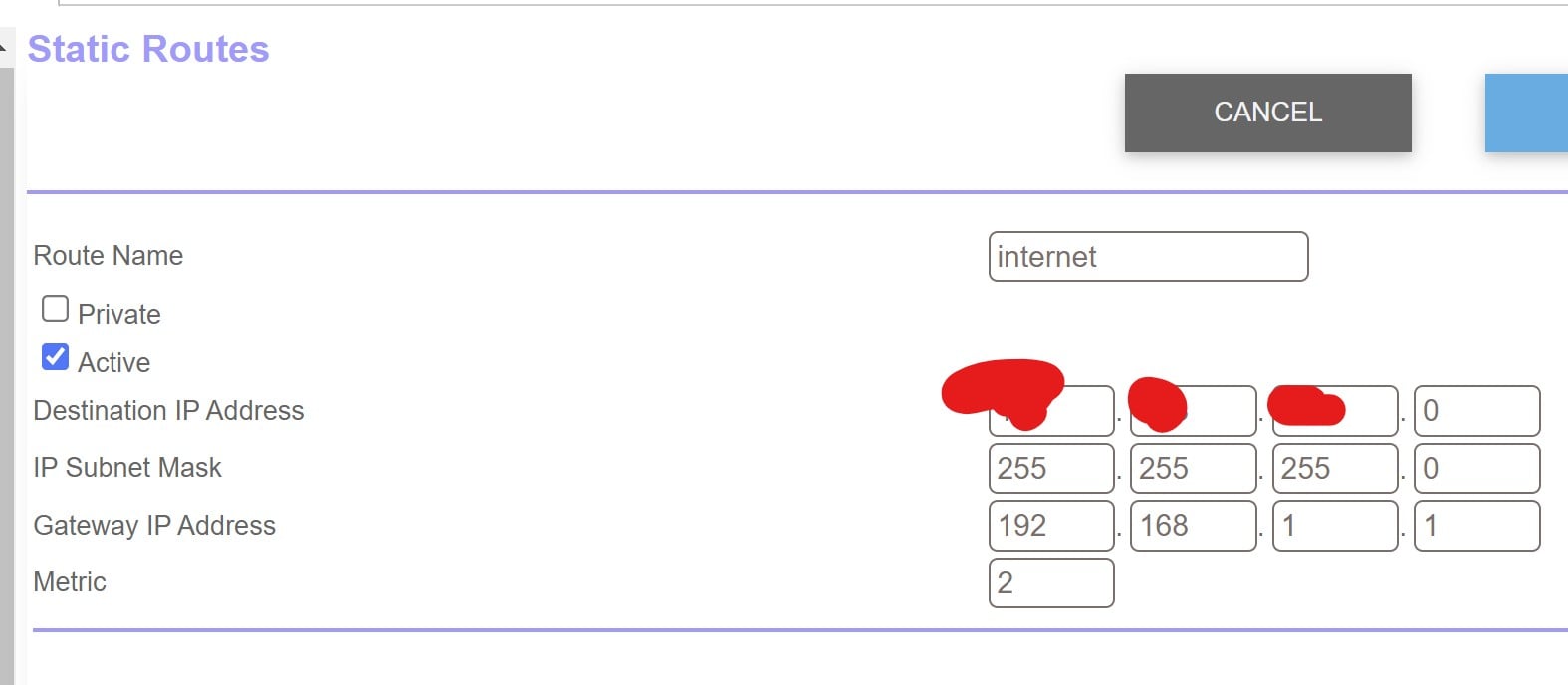


(sorry blanked out numbers wasn't sure if they were only me or only quic)


Quic website tells me I have a connection so feel it must be something my end? Hoping its just the static route?



Thanks. Hopefully I've given you enought 


Filter this topic showing only the reply marked as answer Create new topic
ssamjh
360 posts

Ultimate Geek
+1 received by user: 176

ID Verified
Trusted

  #3495228 25-May-2026 19:13
Send private message quote this post

It would be a static route to the default gateway you're connected to. However in this case, I'd just recommend using PPPoE instead. You'll have to wait around 25~ minutes for the DHCP lease to expire but after that configure up with PPPoE and you should be golden.


IPoE (DHCP) is good but PPPoE "just works".


Whitianga, Coromandel - Quic Rocket1G - Ref (free setup): R893192EGADLZ


Smokeping: Quic / Voyager / Starlink


Coromandel Webcam Network


Benji77

3 posts

Wannabe Geek
+1 received by user: 1


  #3495229 25-May-2026 19:16
Send private message quote this post

Thanks! Will give that a hoon. 

I think i stopped tring to use PPPoE because i wasn't waiting the 25mins 😅


Benji77

3 posts

Wannabe Geek
+1 received by user: 1


  #3495234 25-May-2026 19:57
Send private message quote this post

PPPoE "just works"! Thanks Sam. I'm up and runnings. 


nztim
4072 posts

Uber Geek
+1 received by user: 2784

ID Verified
Trusted
TEAMnetwork
Subscriber

  #3495341 25-May-2026 22:14
Send private message quote this post

Using DHCP requires your router to support classless routes, not all (mainly really cheap consumer grade stuff) routers support this, if your router doesn't you are stuck on PPPoE


Any views expressed on these forums are my own and don't necessarily reflect those of my employer. 


Filter this topic showing only the reply marked as answer Create new topic


Geekzone Live »

Try automatic live updates from Geekzone directly in your browser, without refreshing the page, with Geekzone Live now.


Are you subscribed to our RSS feed? You can download the latest headlines and summaries from our stories directly to your computer or smartphone by using a feed reader.
