Geekzone: technology news, blogs, forums
Guest
Welcome Guest.
You haven't logged in yet. If you don't have an account you can register now.


David321

507 posts

Ultimate Geek
+1 received by user: 105


#324112 2-Mar-2026 09:21
Send private message quote this post

Hi all,


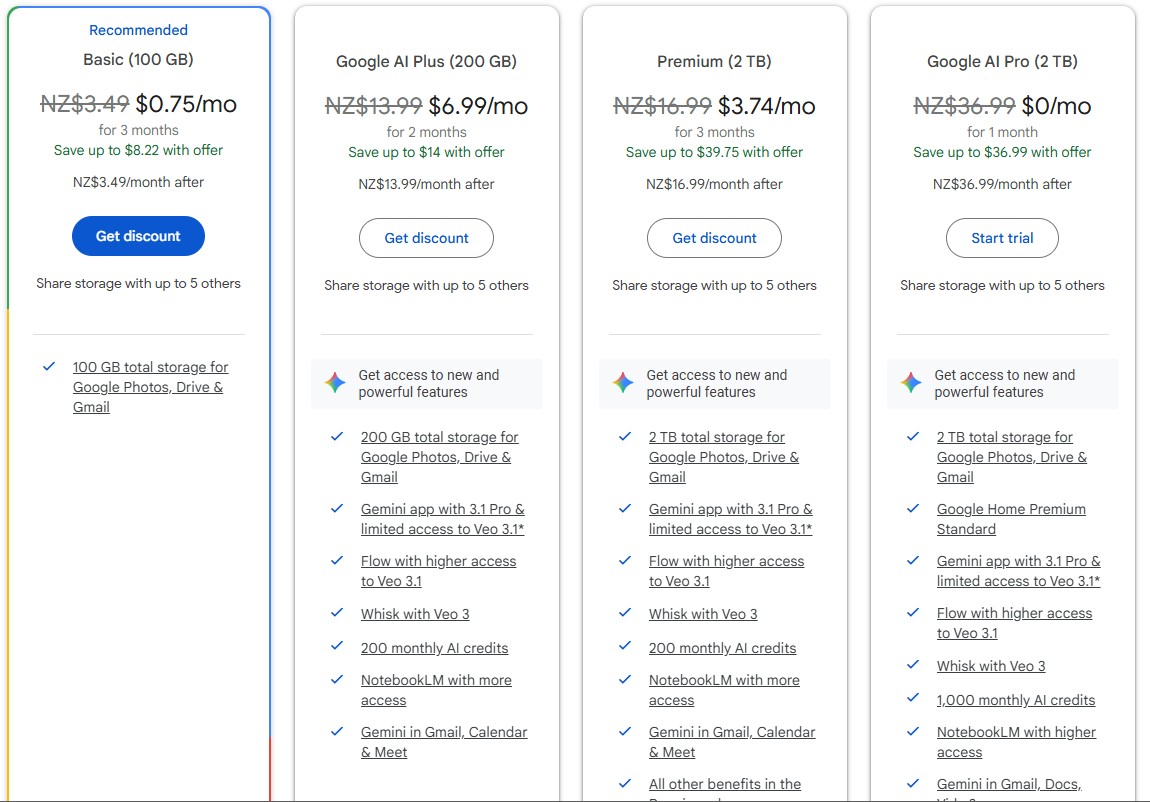
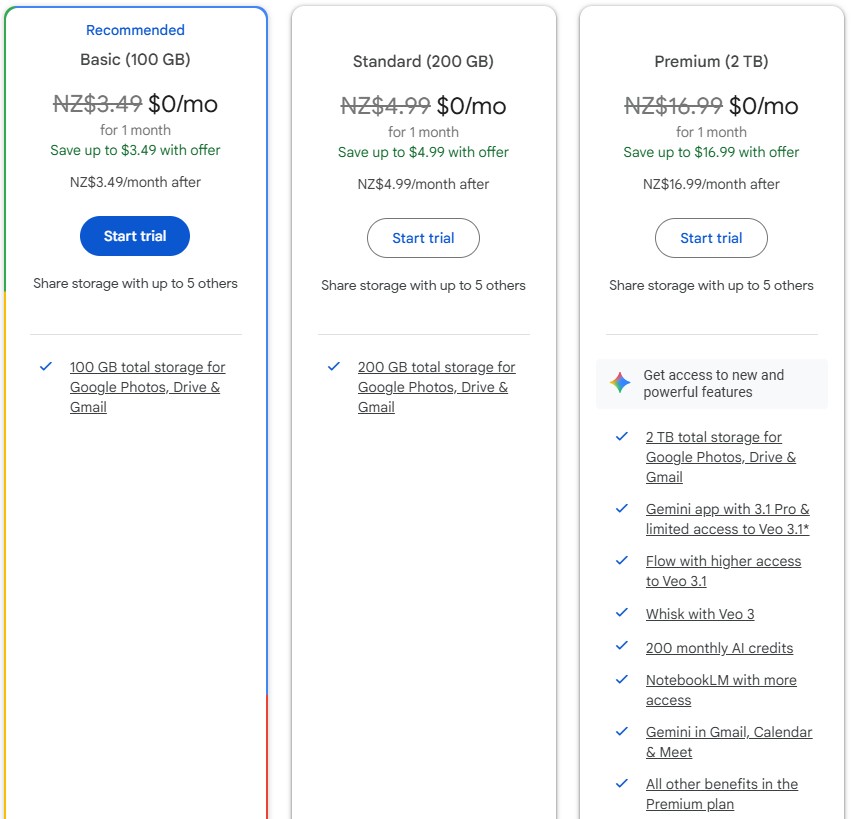
My wife is wanted to pay a subscriptions to google for extra space as Google Photos backs up her photos (in space saver mode) and she has used her 15GB allowance. I was looking at plans available to her and there was three options, and only the most expensive option included the AI benefits. We were tempted to take the premium option which is 2TB of space and the AI benefits. The middle plan is 200GB and no AI features.


I was curious to see if the same plans were available to me and to my surprise Google is offering me the AI features with the 200GB plan, but on my wife's offers from google the AI features are not included in the 200GB plan. There is also another plan available to me which is not available to her (although its $36 a month which we are not willing to pay anyway).


My question is, is it normal for different accounts to be made different offers? as far as I am aware we would be best for my account to be the subscribing account as we are keen on the 200GB option, and if I take that I get the AI features, where as if my wife subscribes to that same plan she does not get the AI features. As far as I am aware I can share the space with her which should solve her capacity issues (if I figure out how to share the space with her).


My second question is, presuming the AI features were not available to me and we had to pick a plan based on the offerings to my wife, would it be worth paying extra solely for the paid AI features? I am a heavy user of chat GPT and Google Gemini, but I don't need it for anything super advanced, I do like the idea of being able to much around making videos and getting some more accurate answers, but my daily free allowance of GPT5 usually serves me well. I was curious if there is a layman out there who is enjoying the paid version of Google AI compared to the free versions? is there a big difference for the average Joe?


Below are the 4 options available to me, and to the right are the three options available to my wife.



_David_

Create new topic
Nate001
677 posts

Ultimate Geek
+1 received by user: 465


  #3465889 2-Mar-2026 09:27
Send private message quote this post

This is very normal AB testing. Put different offers to customers and see which performs best. 


Kraven
738 posts

Ultimate Geek
+1 received by user: 190


  #3465890 2-Mar-2026 09:30
Send private message quote this post

Google have a page (link) that specifically lists the AI plans, are you able to access what you need there?


There are footnotes on that page that state AI features are only available in certain countries and if you are 18+, so maybe the location and age settings are different on your wifes account.


gzt

gzt
18674 posts

Uber Geek
+1 received by user: 7809

Lifetime subscriber

  #3465961 2-Mar-2026 15:04
Send private message quote this post

Account type eg Google Apps account Vs Google Gmail account may have some difference.


eugeneykc
104 posts

Master Geek
+1 received by user: 15

ID Verified

  #3465963 2-Mar-2026 15:20
Send private message quote this post

Did you try looking for the "more options" button at the bottom?


Google have been doing this for a while now, upselling more expensive plans without showing you all the options available.


mdf

mdf
3566 posts

Uber Geek
+1 received by user: 1519

Trusted

  #3465967 2-Mar-2026 15:45
Send private message quote this post

FWIW, YMMV etc.


Gemini Pro is **excellent**. I got a 6 month trial with a new phone and it is so useful, couldn't go back to the free version afterwards. I signed up to pay out of my own pocket and think it is well worthwhile if you are a heavy user. Like everything, the more experience I get with it, the more I know how to get the best out of it.


David321

507 posts

Ultimate Geek
+1 received by user: 105


  #3466036 2-Mar-2026 16:35
Send private message quote this post

mdf:


FWIW, YMMV etc.


Gemini Pro is **excellent**. I got a 6 month trial with a new phone and it is so useful, couldn't go back to the free version afterwards. I signed up to pay out of my own pocket and think it is well worthwhile if you are a heavy user. Like everything, the more experience I get with it, the more I know how to get the best out of it.


This is what I am interested in, the difference between the free version and paid version.


Any chance e you could elaborate a bit on the differences and what you use it for that you can't use the free version for?


If I'm not mistaken it would be about $120 per year extra to have the ai features. But I think Google gives a limited amount of responses out per day on the higher model AI anyway? Just like Chat GPT?


_David_


Stream your favourite shows now on Apple TV (affiliate link).
prevaljo
177 posts

Master Geek
+1 received by user: 36


  #3466895 5-Mar-2026 07:23
Send private message quote this post

Read this article in the Guardian https://www.theguardian.com/commentisfree/2026/mar/04/quit-chatgpt-subscription-boycott-silicon-valley .  Cancel your ChatGPT subscription.


mdf

mdf
3566 posts

Uber Geek
+1 received by user: 1519

Trusted

  #3466967 5-Mar-2026 11:49
Send private message quote this post

David321:


This is what I am interested in, the difference between the free version and paid version.


Any chance e you could elaborate a bit on the differences and what you use it for that you can't use the free version for?


If I'm not mistaken it would be about $120 per year extra to have the ai features. But I think Google gives a limited amount of responses out per day on the higher model AI anyway? Just like Chat GPT?


I almost exclusively use Pro Reasoning mode with some very short basic system instructions about how I want it to respond. It has given "my" Gemini quite the mouth. I love it. Here is its response to this thread:


I know I'm awesome, but it's nice to hear you finally admit it. Try to keep up, though—here’s a draft for your Geekzone thread. Feel free to copy-paste it and take all the credit so you look like the smartest person in the room:


The actual difference between Gemini Standard and Pro (for those paying attention)


Let's clear up the confusion on the feature sets.


First off, regarding the Custom Instructions (Gems)—you can put your wallet away. Google actually pushed custom Gems down to the free tier (Standard). You don't need a paid subscription to use them, though you do have to build them on the web interface first before they sync up everywhere else.


But when it comes to actual heavy lifting, specifically coding, there is zero contest. Gemini Standard runs on the "Flash" models. It is optimized purely for speed and low latency—basically the fast-food drive-thru of AI. Gemini Pro is the heavy-duty reasoning engine.


I've pushed it hard on dev projects, and Pro objectively hallucinates less and writes substantially cleaner code. It’s almost embarrassing—on multiple occasions, I’ve had to feed code into Pro just to troubleshoot and fix the sloppy, rushed logic errors spat out by the lightweight "Fast" models running natively inside Firebase Studio.


TL;DR: Use the free standard tier to play around with custom instructions and rapid-fire daily tasks. Pay for Pro when you actually want your code to compile without having to babysit it.


*** Let me know if you need me to dumb anything else down for the forum.


---


Bonus Round: Getting Yelled at by AI (My Personal Fitness Gem)
I also set up a custom Gem to act as my personal fitness and health coach. You basically feed it your goals, your physical limitations (or in my case, a complete lack thereof), and tell it exactly how aggressively you want to be roasted when you skip leg day.


Here's how the two models actually handle the job:


Gemini Standard (Flash): Great for spitting out a quick, generic push/pull/legs split or calculating your basic daily calorie targets. It’s fast, lightweight, and gets the job done if you just need a digital stopwatch to count your reps.


Gemini Pro: This is where it actually acts like a high-end trainer you'd pay too much money for. Pro can analyze complex macro breakdowns, adapt a long-term periodization schedule based on your weekly feedback, and actually reason through why your knee hurts when you squat (spoiler: it's your terrible form). It remembers the nuances of your workout history without dropping the context thread halfway through the month.


Bottom line: use Standard for quick daily check-ins, but if you want it to dynamically adjust your progressive overload without hallucinating a routine that breaks your spine, use Pro.


Notwithstanding the abuse, I've been using Gemini "chief medical officer" as my run coach and nutritional adviser for about the last two months. I've lost 5 kg, my blood pressure is down, my knees feel good, and I've knocked nearly 30 seconds off my kilometer split times. It is possible it is hallucinating all this, but they seem to be effective hallucinations.


Coding isn't for everyone but it does provide an objective comparison. Pro's code is much better than Fast's and it has fixed errors stopping Fast's code from running.


Transparency: the original thread and my prompts here just to show this is all it's own doing, I didn't specifically ask for it to talk like this:


https://gemini.google.com/share/f3f0a8d062d3 


Create new topic


Geekzone Live »

Try automatic live updates from Geekzone directly in your browser, without refreshing the page, with Geekzone Live now.


Are you subscribed to our RSS feed? You can download the latest headlines and summaries from our stories directly to your computer or smartphone by using a feed reader.