Geekzone: technology news, blogs, forums
Guest
Welcome Guest.
You haven't logged in yet. If you don't have an account you can register now.


View this topic in a long page with up to 500 replies per page Create new topic
1 | 2 
wratterus
1687 posts

Uber Geek
+1 received by user: 678


  #2520844 10-Jul-2020 16:11
Send private message

I've not read the whole thread in detail, but didn't see if this has been checked specifically - have you confirmed if the Intel audio driver is actually installed? 


It should look like the below image in your device manager. 
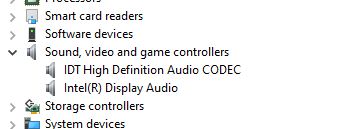


If it's got a Q45 chipset then it's pretty old - what actually is the computer? Is it a brand name machine? 


What do you see in the audio area in MSINFO32? The below image is from a 2nd gen Dell laptop to give you an idea. 


Click to see full size


jonathan18

7415 posts

Uber Geek
+1 received by user: 2850

ID Verified
Trusted

  #2520847 10-Jul-2020 16:18
Send private message

Sorry, not at work now so can't check the model number but, yep, it's an old computer! (One unused on our classified network that they requisitioned for internet use.)


Equally, I can't recall exactly what shows under the 'sound, video and games controllers', but there certainly aren't two listed; I'll check and report back on Monday re exactly what is listed, and the model number of the computer.


K8Toledo
1018 posts

Uber Geek
+1 received by user: 311


  #2520865 10-Jul-2020 17:06
Send private message

wratterus:


I've not read the whole thread in detail, but didn't see if this has been checked specifically - have you confirmed if the Intel audio driver is actually installed? 


It should look like the below image in your device manager. 


If it's got a Q45 chipset then it's pretty old - what actually is the computer? Is it a brand name machine? 


What do you see in the audio area in MSINFO32? The below image is from a 2nd gen Dell laptop to give you an idea. 


Click to see full size


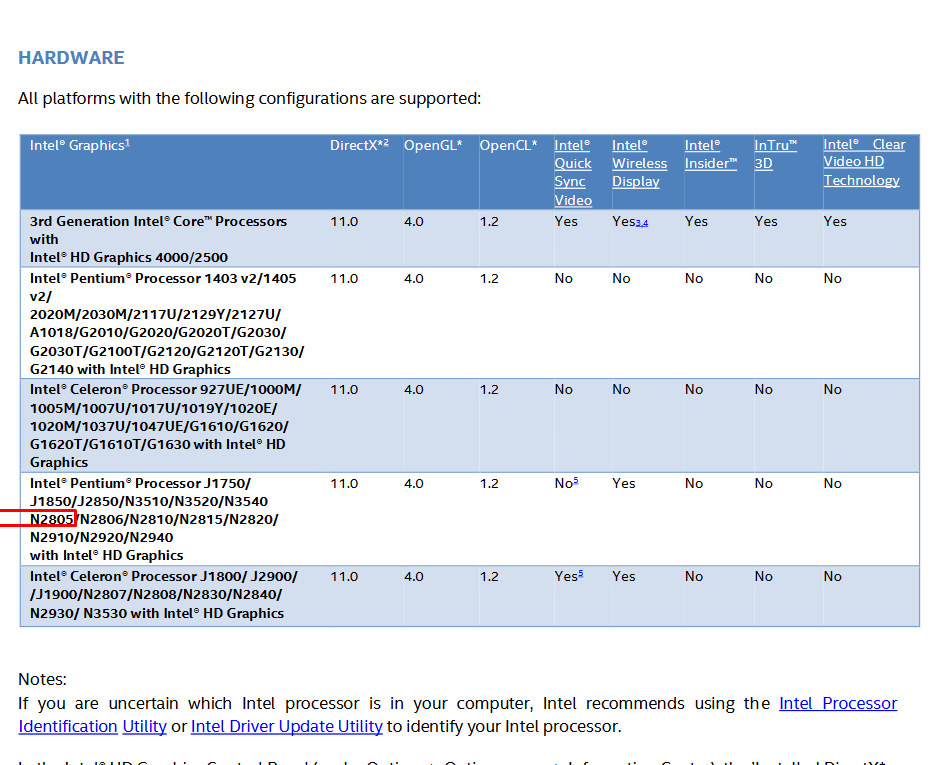
Hey, I didn't see your screenshot earlier. Looks like a Pentium 2805


Here is the latest driver package for that system,


https://downloadcenter.intel.com/download/29473/Intel-Graphics-Driver-for-Windows-15-33-?v=t


Oblivian
7345 posts

Uber Geek
+1 received by user: 2117

ID Verified

  #2520882 10-Jul-2020 17:43
Send private message

K8Toledo:


You've replied to a different Poster than the one with the issue. That's not the OPs hardware


He was just supplying screenshots outlaying what I described earlier to check for.


rhy7s
673 posts

Ultimate Geek
+1 received by user: 147


  #2520920 10-Jul-2020 19:25
Send private message

Not all DisplayPort output devices have audio capability. I've got plenty of old corporate PCs that are video only. I'd also recommend some powered speakers.

K8Toledo
1018 posts

Uber Geek
+1 received by user: 311


  #2520966 10-Jul-2020 22:31
Send private message

Oblivian:


K8Toledo:


You've replied to a different Poster than the one with the issue. That's not the OPs hardware


He was just supplying screenshots outlaying what I described earlier to check for.


Oops - result of not reading the thread properly. :)


BTW, OP stated in PM his adapter is Display Port - DVI, which won't help.


Stream your favourite shows now on Apple TV (affiliate link).
Rikkitic
Awrrr
19071 posts

Uber Geek
+1 received by user: 16317

Lifetime subscriber

  #2521008 11-Jul-2020 09:34
Send private message

When I decided to use a big TV as a monitor, I just got some cheap graphics cards with HDMI for my DVI desktops. It has worked fine for a long time. Unless your computer is a laptop, this might be worth considering. Such cards are not expensive if you get them second-hand. I bought a couple here on GZ.


Plesse igmore amd axxept applogies in adbance fir anu typos


jonathan18

7415 posts

Uber Geek
+1 received by user: 2850

ID Verified
Trusted

  #2521039 11-Jul-2020 11:23
Send private message

Rikkitic:

When I decided to use a big TV as a monitor, I just got some cheap graphics cards with HDMI for my DVI desktops. It has worked fine for a long time. Unless your computer is a laptop, this might be worth considering. Such cards are not expensive if you get them second-hand. I bought a couple here on GZ.


Yeah, if it was a personal device I'd be happy to do something like this, but it's a work computer - and large government departments' IT teams don't like workers fiddling with equipment at the best of times!

It didn't help that we were left to set everything up, so I doubt they'd have thought through the whole process of making sure the necessary drivers were loaded, correct cables provided etc. That's why I just went off to NL to buy the cable, as it's just way quicker to sort it out oneself...

1 | 2 
View this topic in a long page with up to 500 replies per page Create new topic


Geekzone Live »

Try automatic live updates from Geekzone directly in your browser, without refreshing the page, with Geekzone Live now.


Are you subscribed to our RSS feed? You can download the latest headlines and summaries from our stories directly to your computer or smartphone by using a feed reader.