Geekzone: technology news, blogs, forums
Guest
Welcome Guest.
You haven't logged in yet. If you don't have an account you can register now.


jonathan18

7415 posts

Uber Geek
+1 received by user: 2850

ID Verified
Trusted

#272681 9-Jul-2020 09:37
Send private message

So my work unit has purchased a TV so as to be able to use for presentations, MS Teams etc; we have a computer attached to it via the only video digital out it has - DisplayPort, for which I purchased a DisplayPort to HDMI cable. Video works fine, but there's no audio.


We don't care too much about quality (TV speakers and all!) so even running analogue audio between the TV and computer would be fine, but I can't find any way on the TV (a basic but new Samsung LCD) to assign the single analogue audio input to a different digital video input, like one could do on a receiver.


So does anyone have any ideas as to what could be causing this problem, and if there any solutions that don't require the use of our IT department? (which provided a DVI cable with a DisplayPort adapter, so not even capable of plugging in!)


I've got no way to test the DisplayPort/HDMI cable on another device to see if it does indeed carry audio (eg my own monitors have HDMI in but have no speakers), but I assume they'd not produce a cable that only carried video...


I understand that DisplayPort can carry audio, but there's no indication in Windows' audio settings its actually outputting it in this case; could it be that the IT team haven't enabled it, the driver needs updating, or simply this model of computer (it ain't new!) doesn't support audio over DisplayPort?


Thanks for any ideas.


View this topic in a long page with up to 500 replies per page Create new topic
 1 | 2
Oblivian
7345 posts

Uber Geek
+1 received by user: 2117

ID Verified

  #2519855 9-Jul-2020 10:08
Send private message

As daft as it may sound, check device manager. There should be 2 drivers. Can't recall if both fall in the audio or video section.


An Intel(R) Display Audio (really audio) looking video device, and whatever it really has


I've had similar cases where yep, it needed the Intel HD Video(really audio) driver updated so it could use it when the external video was kicked in as an audio output device option. Apparently earlier editions where it was v1 spec didn't include it. Or they get disabled/hidden in the classic audio device menu and need to be put back to enabled.


Run msinfo32 or similar and see if you can work out the core chipset. Soon find if it supported it or not, was only later generation Intels that started to. Else they needed to be offloaded to external graphics card


Rikkitic
Awrrr
19063 posts

Uber Geek
+1 received by user: 16302

Lifetime subscriber

  #2519857 9-Jul-2020 10:11
Send private message

Check the audio playback configuration in Windows. That is where this kind of issue usually resides. Try the different options available to see if any produce sound.


Plesse igmore amd axxept applogies in adbance fir anu typos


ShinyChrome
1603 posts

Uber Geek
+1 received by user: 686

ID Verified
Trusted

  #2519913 9-Jul-2020 11:11
Send private message

Probably a bit late for this, but if you use Win-10 based computers, I would ditch the cables and look into a wireless casting device. We use these at work; a bit more expensive than a cable, but that shiz just works for everyone and no dossing about.


jonathan18

7415 posts

Uber Geek
+1 received by user: 2850

ID Verified
Trusted

  #2519965 9-Jul-2020 11:24
Send private message

Thanks for the ideas. Looked into the device manager, and yeah I’d read the audio in this context should show under video, but under display adapters there’s just a single listing. (Assume display adapters is where I should be looking?)


Device manager and msinfo report it as a q45/q43 express chipset (do I need more detail than that?). Searching that I cam across this (someone else with exactly the same issue), which I read as acknowledging it will output audio over DisplayPort, but Intel saying an ‘active’ converter was required.


https://community.intel.com/t5/Graphics/Can-t-get-displayport-to-output-audio-to-HDMI-Q45-Q43-Express/td-p/285487?profile.language=en


I imagine my cable, sourced from NL, is just passive! So would it be worth trying something like this along with an HDMI cable?


https://www.pbtech.co.nz/product/ADPJ5C3158/J5create-JDA158-DisplayPort-to-4K-60Hz-HDMI-Active?gclid=Cj0KCQjw3ZX4BRDmARIsAFYh7ZLvMhbe7_v8lWc0edhJzB4364BChdGRX_2e9VtO8NsTLTNaGNi-CSsaAgFBEALw_wcB


Thanks for further ideas...


jonathan18

7415 posts

Uber Geek
+1 received by user: 2850

ID Verified
Trusted

  #2519973 9-Jul-2020 11:32
Send private message

ShinyChrome:


Probably a bit late for this, but if you use Win-10 based computers, I would ditch the cables and look into a wireless casting device. We use these at work; a bit more expensive than a cable, but that shiz just works for everyone and no dossing about.


Thanks for the idea... the problem I see is that the PC they’ve given us has no WiFi capability (I had asked for this but...), which I assume we’d need to be able to use it? 

The TV is on a stand, with a bracket holding the two computers directly below the screen so the idea is for it to be a standalone system. (Our work computers don’t have direct access to the internet.)


trig42
5889 posts

Uber Geek
+1 received by user: 2094

ID Verified

  #2519974 9-Jul-2020 11:36
Send private message

Just get some cheap PC speakers and plug em into the computer.


Shop now for Dyson appliances (affiliate link).
ShinyChrome
1603 posts

Uber Geek
+1 received by user: 686

ID Verified
Trusted

  #2520003 9-Jul-2020 12:24
Send private message

jonathan18:


Thanks for the idea... the problem I see is that the PC they’ve given us has no WiFi capability (I had asked for this but...), which I assume we’d need to be able to use it? 


Ah, yes that's definitely a hitch for wireless casting haha. As you where!


jonathan18

7415 posts

Uber Geek
+1 received by user: 2850

ID Verified
Trusted

  #2520006 9-Jul-2020 12:31
Send private message

trig42:


Just get some cheap PC speakers and plug em into the computer.


Yep, that’s the current (and ideally temporary) solution, but they’re borrowed from another unit. My completist nature makes me want to solve this problem if at all possible, and an active adapter is still going to be cheaper than speakers (if that indeed is the problem.)


That said, anyone have an recommendations for such speakers that are cheap but also produce a decent and loud enough sound to fill a moderately-sized room? 


MikeAqua
8024 posts

Uber Geek
+1 received by user: 3817


  #2520077 9-Jul-2020 13:23
Send private message

I've had a laptop with the dreaded DP connection (and one with mDP too!)


DP to HDMI cable has always done the trick, but you have to go into audio devices (just search sound in settings) and control where the sound is going.


Mike


sqishy
530 posts

Ultimate Geek
+1 received by user: 193


  #2520084 9-Jul-2020 13:44
Send private message

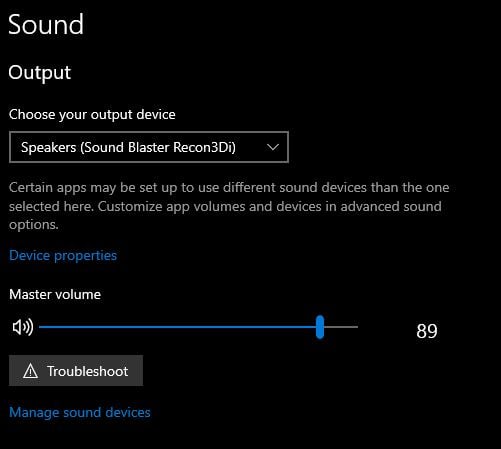
To start assume on W10 can you right click the speaker in bottom right corner. Select 'Open Sound Settings'.


In the 'Choose your output Device' drop down what options can you see there?


jarledb
Webhead
3319 posts

Uber Geek
+1 received by user: 1983

Moderator
ID Verified
Trusted
Lifetime subscriber

  #2520094 9-Jul-2020 14:14
Send private message

jonathan18:


That said, anyone have an recommendations for such speakers that are cheap but also produce a decent and loud enough sound to fill a moderately-sized room? 


You should look at Logitech speakers. I see you can get a pair from $35 and up at PBtech (and probably most any other computer store).


Jarle Dahl Bergersen | Referral Links: Want $50 off when you join Octopus Energy? Use this referral code
Are you happy with what you get from Geekzone? Please consider supporting us by making a donation or subscribing.


HP


Shop now for HP laptops and other devices (affiliate link).
jonathan18

7415 posts

Uber Geek
+1 received by user: 2850

ID Verified
Trusted

  #2520131 9-Jul-2020 15:01
Send private message

I've re-checked all sound options (yep it's running Win 10 Enterprise), and the only audio outputs showing are the 3.5mm analogue ports (front and back), ie no option to select audio over DP.

I imagine it comes back to the lack of the necessary driver or perhaps an out of date driver, and/or the lack of an active converter. To check whether it's a driver issue I'll need to contact the IT team, so that's the next step.

Thanks for all the help so far!

K8Toledo
1018 posts

Uber Geek
+1 received by user: 311


  #2520760 10-Jul-2020 13:44
Send private message

jonathan18:


Thanks for the ideas. Looked into the device manager, and yeah I’d read the audio in this context should show under video, but under display adapters there’s just a single listing. (Assume display adapters is where I should be looking?)


Device manager and msinfo report it as a q45/q43 express chipset (do I need more detail than that?). Searching that I cam across this (someone else with exactly the same issue), which I read as acknowledging it will output audio over DisplayPort, but Intel saying an ‘active’ converter was required.


https://community.intel.com/t5/Graphics/Can-t-get-displayport-to-output-audio-to-HDMI-Q45-Q43-Express/td-p/285487?profile.language=en


I imagine my cable, sourced from NL, is just passive! So would it be worth trying something like this along with an HDMI cable?


https://www.pbtech.co.nz/product/ADPJ5C3158/J5create-JDA158-DisplayPort-to-4K-60Hz-HDMI-Active?gclid=Cj0KCQjw3ZX4BRDmARIsAFYh7ZLvMhbe7_v8lWc0edhJzB4364BChdGRX_2e9VtO8NsTLTNaGNi-CSsaAgFBEALw_wcB


Thanks for further ideas...


You'll need to do one or more of the following: change the OS default sound device, select the output device in the application, or install the graphics drivers. 


I've got a Q45 on the shelf behind me, I'll check & brb.


What is the software you're running?


sqishy
530 posts

Ultimate Geek
+1 received by user: 193


  #2520826 10-Jul-2020 15:37
Send private message

jonathan18: I've re-checked all sound options (yep it's running Win 10 Enterprise), and the only audio outputs showing are the 3.5mm analogue ports (front and back), ie no option to select audio over DP.

I imagine it comes back to the lack of the necessary driver or perhaps an out of date driver, and/or the lack of an active converter. To check whether it's a driver issue I'll need to contact the IT team, so that's the next step.

Thanks for all the help so far!


Hi, I don't think you did what I said, you need to see sound output options:


jonathan18

7415 posts

Uber Geek
+1 received by user: 2850

ID Verified
Trusted

  #2520842 10-Jul-2020 16:07
Send private message

Yep, I certainly did check that; the only option from that menu, as in every place I looked, is the analogue audio out.  


 1 | 2
View this topic in a long page with up to 500 replies per page Create new topic


Geekzone Live »

Try automatic live updates from Geekzone directly in your browser, without refreshing the page, with Geekzone Live now.


Are you subscribed to our RSS feed? You can download the latest headlines and summaries from our stories directly to your computer or smartphone by using a feed reader.