Geekzone: technology news, blogs, forums
Guest
Welcome Guest.
You haven't logged in yet. If you don't have an account you can register now.


jackk

53 posts

Master Geek


#104047 13-Jun-2012 22:07
Send private message

Hi all,

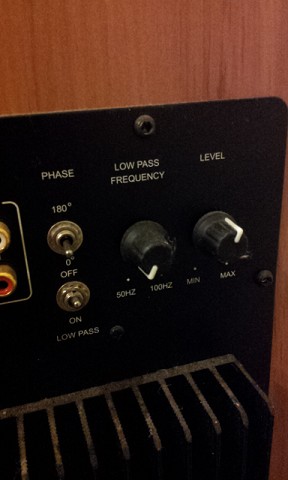
I don't know much about sound system so just need some help here. I inherited the setup from the previous home owner, we have a Denon AVR-3803 receiver and a Image subwoofer AVS100.2. When playing a movie off my pc (optical out to the receiver), the sub will turn itself off whenever there's no "bass"  in the movie. Did some research and I believe it's because the sub is not getting any input so it turn itself off. it will come back on by itself when there's bass. Any idea how to change the settings so the sub will always be on? Because as it turn itself off, it will make a "clicking" sound which is quite annoying.

Cheers
Jack

View this topic in a long page with up to 500 replies per page Create new topic
 1 | 2
ArcticSilver
731 posts

Ultimate Geek
+1 received by user: 148


  #640453 13-Jun-2012 22:42
Send private message

There should be a switch on the back of the subwoofer that turns this feature on or off.

The name varies between sub's, so I couldnt tell you exactly what it will say.


The idea behind it is when you are not using your stereo your subwoofer's amp will turn off automatically to save power, rather than going all the time.


timmmay
20858 posts

Uber Geek
+1 received by user: 5350

Trusted
Lifetime subscriber

  #640536 14-Jun-2012 09:24
Send private message

Just turn the feature off. I use a jarcar device that turns off power to my whole AV system once it's turned off, saved me $200 per year in power across two TVs and cost only $30 each.

Jaxson
8172 posts

Uber Geek
+1 received by user: 1332

Trusted

  #640539 14-Jun-2012 09:29
Send private message

Yeah it's a common problem that during quiet periods of the movie the sub will turn off. Therefore it's not on at the time it's actually needed, and comes on a second or two after the explosion etc.

as above, Just switch the feature off at the back and manually turn the unit on when you want to use it.


grolschie
911 posts

Ultimate Geek
+1 received by user: 159


  #640605 14-Jun-2012 11:23

timmmay: Just turn the feature off. I use a jarcar device that turns off power to my whole AV system once it's turned off, saved me $200 per year in power across two TVs and cost only $30 each.


What is this device please?

timmmay
20858 posts

Uber Geek
+1 received by user: 5350

Trusted
Lifetime subscriber

  #640607 14-Jun-2012 11:26
Send private message

See this thread

http://www.geekzone.co.nz/forums.asp?forumid=141&topicid=98889&page_no=1

It references this

https://sites.google.com/site/ema1powermeter/standby-killer-vampire-eliminator-sockets

Which comes down to this

http://jaycar.co.nz/productView.asp?ID=MS6146

grolschie
911 posts

Ultimate Geek
+1 received by user: 159


  #640608 14-Jun-2012 11:28

Thank you very much. :-)


Shop now at Mighty Ape (affiliate link).
timmmay
20858 posts

Uber Geek
+1 received by user: 5350

Trusted
Lifetime subscriber

  #640611 14-Jun-2012 11:32
Send private message

Welcome :) I just programmed it to accept a "tv volume up" command from my harmony remote to turn the power to the AV systems on. The system draws 50W while off. My power bill does seem lower, but winter, but that could be the newer model heat pump or something else I've done saving money, but every bit helps.

grolschie
911 posts

Ultimate Geek
+1 received by user: 159


  #640615 14-Jun-2012 11:36

Cool. I was wondering about Harmony remotes. Does it work well with the one touch activity feature?

timmmay
20858 posts

Uber Geek
+1 received by user: 5350

Trusted
Lifetime subscriber

  #640617 14-Jun-2012 11:37
Send private message

Yep. I'm not sure I'd bother with the touch screen model, I rarely use it, but the harmony remotes are great. They make it much easier to turn a whole system on, one remote instead of four, easier for me and makes it possible for the gf to manage it. Women seem confused by multiple remotes.

grolschie
911 posts

Ultimate Geek
+1 received by user: 159


  #640620 14-Jun-2012 11:42

Last question. So does one need to adjust the programming of the Harmony remote's One Touch activities when using this device? i.e give it a command to turn it on, before turning on the devices, etc? Sorry, for taking this off-topic. :-)

timmmay
20858 posts

Uber Geek
+1 received by user: 5350

Trusted
Lifetime subscriber

  #640621 14-Jun-2012 11:46
Send private message

You pair the devices, kindof. It keeps watch for an IR command, any command you like, and when it sees it turns on the power. It can't be the TV power command as the power doesn't come on fast enough. I just added a "volume up" step and told the device to watch for that.

Once load falls below a level it helps you set the power turns off. It's really easy, I may not have explained it well. The single small page manual describes it quite well.

HP


Shop now for HP laptops and other devices (affiliate link).
grolschie
911 posts

Ultimate Geek
+1 received by user: 159


  #640622 14-Jun-2012 11:50

Brilliant. It sounds really handy. Thanks for this. :-)

jackk

53 posts

Master Geek


  #640995 14-Jun-2012 21:03
Send private message

Thanks all for the reply.

These are the switches that I have at the back of the sub. is it one of these? Cheers!
sub

Jaxson
8172 posts

Uber Geek
+1 received by user: 1332

Trusted

  #640999 14-Jun-2012 21:13
Send private message

Nope.

It is none of those sorry.

Nety
2584 posts

Uber Geek
+1 received by user: 5

Retired Mod
Trusted
Lifetime subscriber

  #641101 15-Jun-2012 06:44
Send private message

See if you can find a manual online or failing that contact the manufacturer. I found my sub used the same power on or "off" and as everyone else has said it is a feature that just does not work, your better to do it yourself.


Media centre PC - Case Silverstone LC16M with 2 X 80mm AcoustiFan DustPROOF, MOBO Gigabyte MA785GT-UD3H, CPU AMD X2 240 under volted, RAM 4 Gig DDR3 1033, HDD 120Gig System/512Gig data, Tuners 2 X Hauppauge HVR-3000, 1 X HVR-2200, Video Palit GT 220, Sound Realtek 886A HD (onboard), Optical LiteOn DH-401S Blue-ray using TotalMedia Theatre Power Corsair VX Series, 450W ATX PSU OS Windows 7 x64

 1 | 2
View this topic in a long page with up to 500 replies per page Create new topic


Geekzone Live »

Try automatic live updates from Geekzone directly in your browser, without refreshing the page, with Geekzone Live now.


Are you subscribed to our RSS feed? You can download the latest headlines and summaries from our stories directly to your computer or smartphone by using a feed reader.