Geekzone: technology news, blogs, forums
Guest
Welcome Guest.
You haven't logged in yet. If you don't have an account you can register now.


alisam

878 posts

Ultimate Geek
+1 received by user: 83


#208915 5-Mar-2017 07:27
Send private message

Needing to replace 2 TiVo's (as discussed in the TiVo forum).


I have been looking around because I am trying to avoid the Panasonic choices for recording NZ FreeView TV. I don't need a Blu Ray player/recorder and my Panasonic box is (for me) absolute rubbish and randomly drops a TV series from recording. There are other issues.


Unfortunately, for me, I have no experience with HTPC and an currently using FireTV's and a Roku for streaming Netflix, Lightbox etc. Nevertheless, I can read instructions.


The biggest obstacle is the WAF. We use Harmony remotes to make it easier.


The HDHomeRun Connect appears to do what I want since:


1) I use Plex (free version at present). Quite happy to use something else or pay for Plex.


2) I have a Synology DS216Play NAS for storage.


3) Since it is on the home network, I 'should' be able to watch recorded TV on any of the TV's in the house. I use powerline and am on Spark VDSL.


Now, again I refer to my limited knowledge.


Is the HDHomeRun Connect solution a 'starter'?



PC: Dell Inspiron 16 5640 (Windows 11 Home), Dell Inspiron 7591 2n1 (Windows 11 Pro), HP ProBook 470G1 (Windows 10 Pro), Intel NUC7I5BNH (Zorin)
Net: Grandstream 1 x GWN7062 Router, 1 x GWN7665 Access Point
Storage: Synology DS216play NAS, 2 x 6TB
Media: 3 x Amazon FireTV. Echo, Dot, Spot
TV: 2 x Samsung H6400 55" LED TV, Panasonic TH-P50G10Z 50" Plasma TV
Mobile: Samsung Galaxy A52 5G
Wearable: Gear S3 Frontier


Create new topic
fearandloathing
537 posts

Ultimate Geek
+1 received by user: 206

ID Verified
Lifetime subscriber

  #1730551 5-Mar-2017 20:54
Send private message

I been using HD homerun which is working well for me.  I tried Plex DVR, which does not seem to be there yet with the EPG, although I do use PLEX generally.  Don’t get a plex pass just for the DVR, at least not yet.


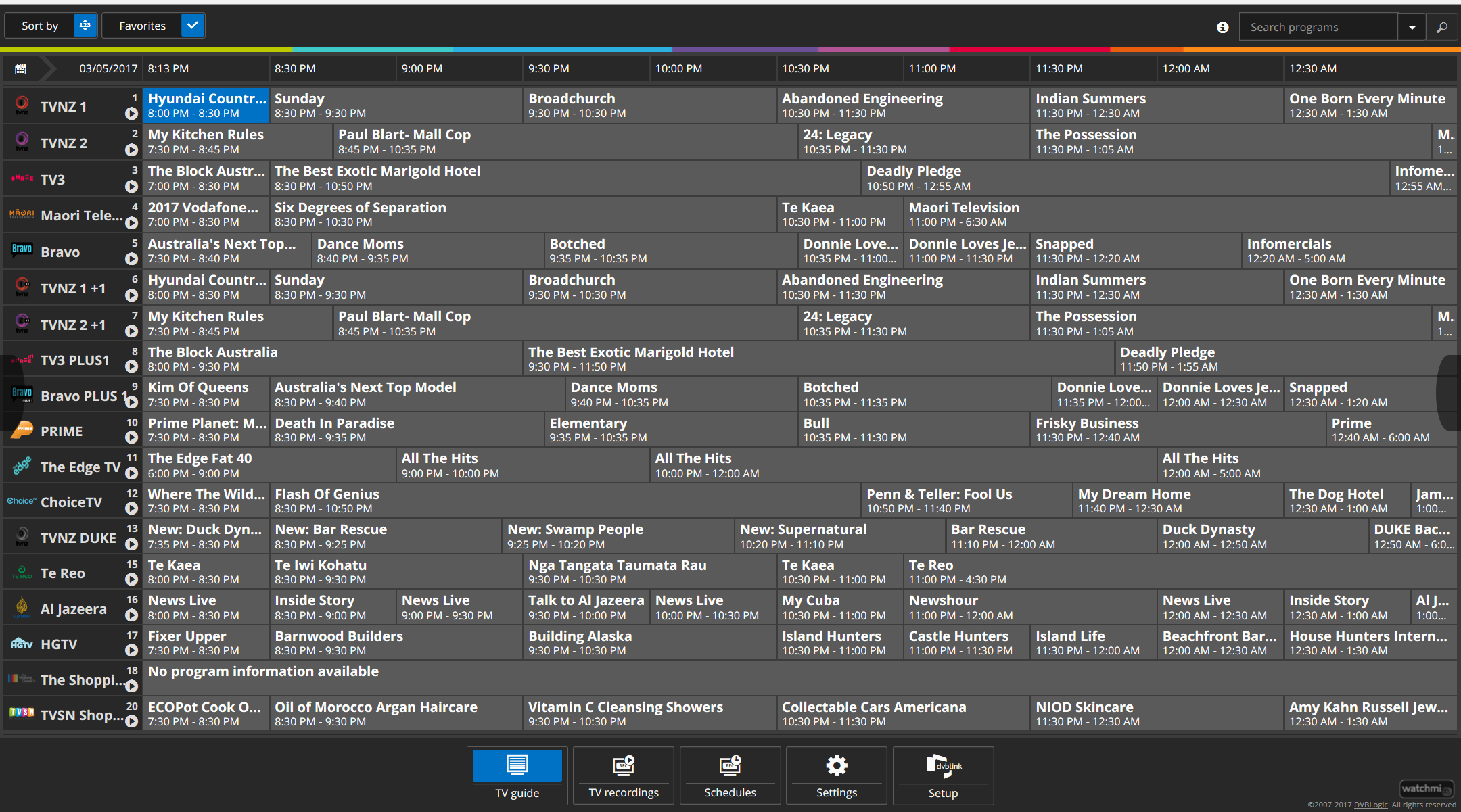
I’ve been using DVBLink which is working well, it uses the OTA EPG data, so need to source EPG data.


Click to see full size


DVBLink is running on a Synology DS916+. DVBLink does have a 30-day trial, so you can try before you buy.  When recording series where episodes are repeated throughout the week, you get duplicates.  I suspect this is based on a lack of information in the EPG.


Got the HD Homerun connect from Amazon UK, comes with a UK power adapter, you will need a travel adapter or replace the power supply.  I use a travel adapter.


I get good quality recordings, but I do have solid Freeview reception.


I’m using the Apple TV client for viewing recorded content, OK but not great.


There are plenty apps for various devices that will connect to the HD Homerun Connect.  DVBLink has some native apps.  You can connect via VLC on your PC.


alisam

878 posts

Ultimate Geek
+1 received by user: 83


  #1731126 6-Mar-2017 18:30
Send private message

Thank you for the information


At present, I want to find out whether recording and playback is at 1080i (max) or at 1080p (max).


SiliconDust says 1080p, but another site selling HDHomeRun in NZ say 1080i.


(again, I may not be understanding the specifications).


PC: Dell Inspiron 16 5640 (Windows 11 Home), Dell Inspiron 7591 2n1 (Windows 11 Pro), HP ProBook 470G1 (Windows 10 Pro), Intel NUC7I5BNH (Zorin)
Net: Grandstream 1 x GWN7062 Router, 1 x GWN7665 Access Point
Storage: Synology DS216play NAS, 2 x 6TB
Media: 3 x Amazon FireTV. Echo, Dot, Spot
TV: 2 x Samsung H6400 55" LED TV, Panasonic TH-P50G10Z 50" Plasma TV
Mobile: Samsung Galaxy A52 5G
Wearable: Gear S3 Frontier


Spyware
3818 posts

Uber Geek
+1 received by user: 1366

Lifetime subscriber

  #1731129 6-Mar-2017 18:45
Send private message

DVB-T transmission is 1080i.


Spark Max Fibre using Mikrotik CCR1009-8G-1S-1S+, CRS125-24G-1S, Unifi UAP, U6-Pro, UAP-AC-M-Pro, Apple TV 4K (2022), Apple TV 4K (2017), iPad Air 1st gen, iPad Air 4th gen, iPhone 13, SkyNZ3151 (the white box). If it doesn't move then it's data cabled.


fearandloathing
537 posts

Ultimate Geek
+1 received by user: 206

ID Verified
Lifetime subscriber

  #1732144 6-Mar-2017 20:38
Send private message

It will only record HD broadcasts in 1080i, it wont upscale at all.


alisam

878 posts

Ultimate Geek
+1 received by user: 83


  #1732154 6-Mar-2017 20:55
Send private message

fearandloathing:


It will only record HD broadcasts in 1080i, it wont upscale at all.


Can you tell me what the Tivo typically records at?


Why does the SiliconDust website mention 1080p. Is it just because 1080i is the best we can get in NZ from free to air TV?


Edit> This reply may have answered my question. "DVB-T transmission is 1080i."


PC: Dell Inspiron 16 5640 (Windows 11 Home), Dell Inspiron 7591 2n1 (Windows 11 Pro), HP ProBook 470G1 (Windows 10 Pro), Intel NUC7I5BNH (Zorin)
Net: Grandstream 1 x GWN7062 Router, 1 x GWN7665 Access Point
Storage: Synology DS216play NAS, 2 x 6TB
Media: 3 x Amazon FireTV. Echo, Dot, Spot
TV: 2 x Samsung H6400 55" LED TV, Panasonic TH-P50G10Z 50" Plasma TV
Mobile: Samsung Galaxy A52 5G
Wearable: Gear S3 Frontier


Spyware
3818 posts

Uber Geek
+1 received by user: 1366

Lifetime subscriber

  #1732156 6-Mar-2017 20:57
Send private message

TiVo records the transport stream which is 1080i or 576i.


Spark Max Fibre using Mikrotik CCR1009-8G-1S-1S+, CRS125-24G-1S, Unifi UAP, U6-Pro, UAP-AC-M-Pro, Apple TV 4K (2022), Apple TV 4K (2017), iPad Air 1st gen, iPad Air 4th gen, iPhone 13, SkyNZ3151 (the white box). If it doesn't move then it's data cabled.


Shop now for Lenovo laptops and other devices (affiliate link).
alisam

878 posts

Ultimate Geek
+1 received by user: 83


  #1732157 6-Mar-2017 21:08
Send private message

One of my initial questions was:


Is the HDHomeRun Connect solution a 'starter'?


for replacing a TiVo.


Any thoughts?


Any other boxes in the market place being used for the same purpose that you would recommend?


PC: Dell Inspiron 16 5640 (Windows 11 Home), Dell Inspiron 7591 2n1 (Windows 11 Pro), HP ProBook 470G1 (Windows 10 Pro), Intel NUC7I5BNH (Zorin)
Net: Grandstream 1 x GWN7062 Router, 1 x GWN7665 Access Point
Storage: Synology DS216play NAS, 2 x 6TB
Media: 3 x Amazon FireTV. Echo, Dot, Spot
TV: 2 x Samsung H6400 55" LED TV, Panasonic TH-P50G10Z 50" Plasma TV
Mobile: Samsung Galaxy A52 5G
Wearable: Gear S3 Frontier


fearandloathing
537 posts

Ultimate Geek
+1 received by user: 206

ID Verified
Lifetime subscriber

  #1732158 6-Mar-2017 21:14
Send private message

Spyware:


TiVo records the transport stream which is 1080i or 576i.


The HDHomeRun is no different then.


Click to see full size


fearandloathing
537 posts

Ultimate Geek
+1 received by user: 206

ID Verified
Lifetime subscriber

  #1732163 6-Mar-2017 21:33
Send private message

alisam:


One of my initial questions was:


Is the HDHomeRun Connect solution a 'starter'?


for replacing a TiVo.


Any thoughts?


Not used a tivo. HDHomeRun Connect is a network based tuner only, it wont record on it's own.


It meets my needs in conjunction with DVBLink, but I came from nothing.  I have no comparison to the Tivo.


stocksp
721 posts

Ultimate Geek
+1 received by user: 355

ID Verified
Lifetime subscriber

  #1732198 7-Mar-2017 06:53
Send private message

I replaced my TiVo with it last year, in conjunction with DVBlink and Apple TV 4 as per the above post. I'm using a Mac mini as file server .

Works well for me.

As noted above , plex is not there yet because of the poor EPG.

nickrout
221 posts

Master Geek
+1 received by user: 38


  #1732208 7-Mar-2017 08:07
Send private message

HDHomerun will work with most PVR software, certainly TVHeadend and Mythtv.


You can't record 1080p if 1080i is being broadcast.


The HD Homerun is available locally from nicegear.co.nz (no personal connection).


Shop now for Lego sets and other gifts (affiliate link).
reven
3748 posts

Uber Geek
+1 received by user: 874

Trusted

  #1732210 7-Mar-2017 08:15
Send private message

buy one locally from nicegear.co.nz.  great site, quick service.


rb99
3505 posts

Uber Geek
+1 received by user: 1830

Lifetime subscriber

  #1732291 7-Mar-2017 09:43
Send private message

Another alternative for software might be Emby. Believe they have versions for various servers and talk to HDHomeruns pretty well.


You will have to pay for it (like Plex I think) but you can pay for a month or two to try it out, think its US$5pm.


Only have DVB-S here so con't really comment about the Homerun as such (Emby works for DVB-S for me though I don't actually record  very much).


“The modern conservative is engaged in one of man's oldest exercises in moral philosophy; that is, the search for a superior moral justification for selfishness.” -John Kenneth Galbraith


rb99


waldoverkill
69 posts

Master Geek
+1 received by user: 1


  #1732745 7-Mar-2017 21:14
Send private message

I am using Emby also. I paid 100 for a lifetime licence. You can pay 5/month or 50/year (All USD)


I use it for all media throughout the house on a PC, a Android TV box, an Roku3, and iPads.


The TV recording works with a HD Homerun (new versions) and I use EPG grabber to get the guide. It is not as slick as Media Center was but is still functional.


Emby runs as a server either on its own hardware or it can run in the background on your media player (PC, LINUX etc).


WAF is is great and not too hard to set up.


Create new topic


Geekzone Live »

Try automatic live updates from Geekzone directly in your browser, without refreshing the page, with Geekzone Live now.


Are you subscribed to our RSS feed? You can download the latest headlines and summaries from our stories directly to your computer or smartphone by using a feed reader.