Geekzone: technology news, blogs, forums
Guest
Welcome Guest.
You haven't logged in yet. If you don't have an account you can register now.


mixja

23 posts

Geek


#21389 24-Apr-2008 22:18
Send private message

** DISCLAIMER **
The information contained in this post requires a valid Sky subscription with working Sky card. This post does not nor does it intend to show you how to illegally receive Sky TV content without a valid subscription.


What do you need?

Hardware/Software required:
- Windows XP/Vista
- DVB-S Tuner and appropriate drivers
- Smart Card reader capable of Serial Port emulation with Phoenix 3.680MHz operation
- Media Center software with MDAPI support (e.g. DVBViewer, MyTheatre, AltDVB, WatchTVPro)
- NDSCam version 0.0.0.5 (freeware - note version 0.0.0.6 does not work with my setup)
- SkyTV NZ Card with current subscription


Hardware/Software this procedure was tested on:
- Windows Vista Premium 32-bit
- FireDTV DVB-S Firewire External Tuner (See http://www.digital-everywhere.com)
- FireDTV BDA 32-bit driver version 4.8
- Infinity USB Smart Card Programmer (See http://www.infinityusb.com/default.asp?show=productsdetail&ProductID=11)
- Infinity USB Unlimited Software version 2.70 (driver version 3.1.0.0)
- MDWrapper.dll version 1.27 (Download here)
- MyTheatre version 3.38 (See http://www.dvbcore.com - trial version here)
- NDSCam version 0.0.0.5 (Download here)


Instructions

1. Connect/Install your DVB-S Tuner and Media Center software.
2. Ensure you can obtain a full channel list of both Sky and Freeview programs via your DVB-S Tuner and Media Center software.
3. Verify you can successfully receive video and audio for Freeview channels
4. Connect/Install your USB Smart Card reader
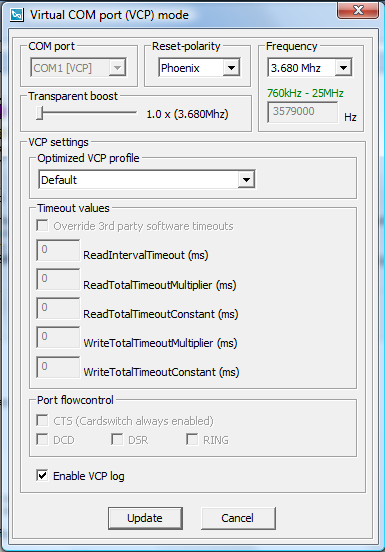
5. Configure your Smart Card reader for serial emulation using the following settings:
- COM Port - make a note of this, it is required for your NDSCam configuration later on
- Reset-Polarity - Phoenix
- Frequency - 3.680MHz
- Transparent Boost - 1x

The following picture shows the settings for an Infinity USB Smart Card Reader:

6. Configure your Media Center software to support NDSCam as follows:

DVBViewer:
1. SoftCSA is required. Place SoftCSA.dll and SoftCSA.ini files into the Plugins folder and NDSCam files into the MDPlugins folder.
2. Place FFDecsa.dll, CSA.dll, MakroCSA.dll into the DVBViewer folder.
3. I suggest you to set packet size to 184 for petter performance.

AltDVB:
1. Place NDSCam.dll and NDSCam.ini file into the Plugins folder.
2. Edit NDSCam.ini file.
3. I suggest you to set packet size to 184 for petter performance.


MyTheatre:
1. MDWrapper is required. Place MDWrapper.dll into the \Plugin folder and NDSCam files into the \MDPlugins folder (this folder needs to be manually created).
2. Edit NDSCam.ini file.
3. I suggest you to set packet size to 184 for petter performance (from MDWrapper menu).


WatchTVPro:
1. Place NDSCam.dll, NDSCam.ini and NDSCam.cache file into the Plugins folder.
2. Unpack the Firmware_for_WTVP.zip file and relplace your old Boot folder with this new one.
3. Edit NDSCam.ini file.
4. Set DO_TT_TRICK value from NDSCam.ini file to 1.

7. Configure the NDSCam.ini file - the only settings you need to change are:

- [SETUP] -> ACTIVE = 1 (this will enable NDSCam on startup by default)
- [COM] -> COM=
- [CARD] -> Type = 3

8. Insert your Sky card into the Smart card reader

9. Fire up your Media Center software - select a Sky TV Channel from your channel list - previously, you would not be able to decode the Sky TV Channels, now if everything is working OK, you should be decoding SkyTV as shown below!


On MyTheatre, if everything is configured correctly, you should see an MD API Wrapper option in Main Menu -> Plug-ins.


Selecting this option opens the MD Wrapper dialog box, in which you should see an NDSCam menu. From the NDSCam menu you can start/stop NDSCam, monitor NDSCam and configure settings.

View this topic in a long page with up to 500 replies per page Create new topic
 1 | 2
mattie47
79 posts

Master Geek
+1 received by user: 1


  #126237 24-Apr-2008 23:11
Send private message

Dude you should prob black out your sky digi card details as this guy has done: http://119.224.6.119/sky/nds.JPG as what you have there identifys you personally (only sky would know). I don't really know much but someone MAY be able to use your details from there (doubt it but may) on a fake card. Good tutorial btw. I wonder how long it will be before people are emulating sky digi cards. Also I know that someone else who is doing what you are doing had to put their smart card into their decoder every week or two as the card expired once and they had to ring up sky to get it reactivated.


Media centre PC - Case Silverstone LC17 case with 430w PSU, MOBOAsus P5VD2-MX, CPU Intel 2.8Ghz Dual Core RAM 2 Gig, HDD 600gb WD Sata II, Tuners Hauppauge HVR-3000,  Play TV BT878 UHF/VHF, Video Asus 9400GT Silent,  OS Windows 7 Pro
Main PC - Case Raidmax Ninja Black, MOBO Asus P6T, CPU ,Intel i7 930 RAM 6 Gig, HDD X3 Seagate 1tb , Tuner Skystar 2 DVB-S, Video NVIDIA 9600GT OC Edition,  OS Windows 7 Pro


sub

sub
358 posts

Ultimate Geek
+1 received by user: 35


  #126248 25-Apr-2008 04:21
Send private message

- SkyTV NZ Card with current subscription
Does it work with both types of smardcard we have here in New Zealand? ie, the common gold one that most people have, and the blue one that comes with mysky and some of the new silver pace decoders?

Most of the third party CAMs etc seem to only work with the blue one. It'd be nice if this also works with the common gold one.

willnz
573 posts

Ultimate Geek
+1 received by user: 3

Trusted

  #126251 25-Apr-2008 06:10
Send private message

Excellent how-to. Not sure if this is in breach of SKY's terms and conditions or not, but I think it's fair to say that it probably is regardless of the fact you're still giving them their money...

I'll certainly be using the info in this guide, though! :)


paulspain
417 posts

Ultimate Geek
+1 received by user: 25

Trusted
Lifetime subscriber

  #126254 25-Apr-2008 07:23
Send private message

Great tutorial, thanks Mixja. Now I just have to find the time to get the bits required and give it a go :)


Paul Spain
Founder: Gorilla Technology, NZ Tech Podcast


CYaBro
4708 posts

Uber Geek
+1 received by user: 1182

ID Verified
Trusted

  #126258 25-Apr-2008 07:46
Send private message

Does this mean that you can record one channel and watch or record another like MySky?
Or do you need a MySky subscription/smart card to be able to do that?


Opinions are my own and not the views of my employer.


willnz
573 posts

Ultimate Geek
+1 received by user: 3

Trusted

  #126259 25-Apr-2008 08:03
Send private message

No, you don't need a MySky subscription. If you had multiple tuners, I can't see any reason why the single smart card reader wouldn't work on both/all of them, enabling you to watch/record multiple channels at once. I don't think you can do it with just a single tuner, though.     


Shop on-line at New World now for your groceries (affiliate link).
eXDee
4033 posts

Uber Geek
+1 received by user: 1070

Trusted

  #126319 25-Apr-2008 14:59
Send private message

Wow, awesome.

I assume your card dictates what channels you can and cant watch? eg if you havent subscribed to the rubgy channel, you cant watch it through this?

mixja

23 posts

Geek


  #126321 25-Apr-2008 15:59
Send private message

CYaBro: Does this mean that you can record one channel and watch or record another like MySky?
Or do you need a MySky subscription/smart card to be able to do that?


Unfortunately I only have a single tuner, so can't test this.  I can't see why it wouldn't work with a dual tuner - after all, dual tuner cards with CI slots only typically have a single CI slot don't they?

willnz
573 posts

Ultimate Geek
+1 received by user: 3

Trusted

  #126322 25-Apr-2008 16:02
Send private message

mixja, where did you get your FireDTV?

mixja

23 posts

Geek


  #126347 25-Apr-2008 19:04
Send private message

sub:
- SkyTV NZ Card with current subscription
Does it work with both types of smardcard we have here in New Zealand? ie, the common gold one that most people have, and the blue one that comes with mysky and some of the new silver pace decoders?

Most of the third party CAMs etc seem to only work with the blue one. It'd be nice if this also works with the common gold one.


I have both types of cards, seems only the Rev 3 cards (new Blue cards) work.  I tested the older Gold card with both NDSCam 0.0.0.5 and 0.0.0.6 and a number of different settings (had to manually specify box ID, then gave CA error)


eXDee: Wow, awesome.

I assume your card dictates what channels you can and cant watch? eg if you havent subscribed to the rubgy channel, you cant watch it through this?


Correct - Playboy was the first channel I tried - Wink - but NDSCam monitor reported my card did not include subscription to that channel...


willnz: mixja, where did you get your FireDTV?


I got it a while ago through the UK distributors of FireDTV (used to be www.firedtv.com) - I think you can now buy it from anywhere in the world through the Digital Everywhere shop - http://www.digital-everywhere.com/shop.

There is now a DVB-S2 model (see here), BTW the FireDTV DVB-S2 also now works with EyeTV software for a another 60 Euros (see here)...

willnz
573 posts

Ultimate Geek
+1 received by user: 3

Trusted

  #126350 25-Apr-2008 19:35
Send private message

Digital Everywhere seems to only ship within Europe when I tried to order the DVB-S2 unit... have now placed an order through kustompcs (the UK store) - who happily ship to NZ Cool


Shop now for Dyson appliances (affiliate link).
richms
29098 posts

Uber Geek
+1 received by user: 10208

Trusted
Lifetime subscriber

  #126387 25-Apr-2008 22:03
Send private message

Can things be run thru the cam on playback rather then recording, or else can things be decrypted in greater then realtime after recording to disk?


Richard rich.ms

mcraenz
1140 posts

Uber Geek
+1 received by user: 222


  #126388 25-Apr-2008 22:13
Send private message

Nice! Do you need to put your card back in the decoder every week or so to stop it being de-activated.


Help me build a better way of doing politics in Aotearoa New Zealand


eXDee
4033 posts

Uber Geek
+1 received by user: 1070

Trusted

  #126401 26-Apr-2008 00:16
Send private message

Damn, we have one of the older black pace boxes, and the card in it is the original from when we first got sky digital (within 6months of launch)
I assume it wont work?

Also would this work with mediaportal?

mcraenz
1140 posts

Uber Geek
+1 received by user: 222


  #126403 26-Apr-2008 00:43
Send private message

It won't "officially" work with MediaPortalTVServer But I belive there are ways to use soft cams. Just don't discuss it on the MP forums the admins might just hang,draw and quarter you!


Help me build a better way of doing politics in Aotearoa New Zealand


 1 | 2
View this topic in a long page with up to 500 replies per page Create new topic


Geekzone Live »

Try automatic live updates from Geekzone directly in your browser, without refreshing the page, with Geekzone Live now.


Are you subscribed to our RSS feed? You can download the latest headlines and summaries from our stories directly to your computer or smartphone by using a feed reader.
