Geekzone: technology news, blogs, forums
Guest
Welcome Guest.
You haven't logged in yet. If you don't have an account you can register now.


nzlittleman

6 posts

Wannabe Geek


#242092 10-Oct-2018 13:51
Send private message

Kia ora,


Since changing from Trustpower to Spark, I'm unable to get my IOS devices working with Plex Media Server (running on Win10).


I've been trying a few things, including setting up a port forward for 32400. But my IOS devices just say offline. If I run Plex through the web browser on my PC server, it works.


Win10 Server - on Ethernet


IOS on wireless.


I was on Spark years ago and remember this issue but can't remember the solution.


I also run the app RemoteMouse - this also seems to have stopped working since switching routers.


Help much appreciated.


Create new topic
michaelmurfy
meow
13579 posts

Uber Geek
+1 received by user: 10910

Moderator
ID Verified
Trusted
Lifetime subscriber

  #2105611 10-Oct-2018 14:16
Send private message

Windows Firewall blocking the connection?


Michael Murphy | https://murfy.nz
Referral Links: Quic Broadband (use R122101E7CV7Q for free setup)

Are you happy with what you get from Geekzone? Please consider supporting us by subscribing.
Opinions are my own and not the views of my employer.


nzlittleman

6 posts

Wannabe Geek


  #2105638 10-Oct-2018 14:50
Send private message

michaelmurfy:


Windows Firewall blocking the connection?


Nice call, turned off the Firewall and it worked so I setup a firewall rule to allow the Plex port.


I had to turn off 'block all incoming connections...' on the Public Network Settings. Not sure if this is good practice or not but wouldn't work otherwise.


nzlittleman

6 posts

Wannabe Geek


  #2106986 12-Oct-2018 19:48
Send private message

Worked for the first day but now doesn’t.

Not sure what’s so different between the Trustpower and Spark routers. Something I’m missing -any ideas.


andrewNZ
2487 posts

Uber Geek
+1 received by user: 1461
Inactive user


  #2107038 12-Oct-2018 22:21
Send private message

Tell windows it's a private network.

nzlittleman

6 posts

Wannabe Geek


  #2107238 13-Oct-2018 12:54
Send private message

andrewNZ: Tell windows it's a private network.


Thanks, that worked to start with but then stopped working. Wish I could change back to my Trustpower router.

michaelmurfy
meow
13579 posts

Uber Geek
+1 received by user: 10910

Moderator
ID Verified
Trusted
Lifetime subscriber

  #2107241 13-Oct-2018 13:01
Send private message

nzlittleman:
andrewNZ: Tell windows it's a private network.


Thanks, that worked to start with but then stopped working. Wish I could change back to my Trustpower router.


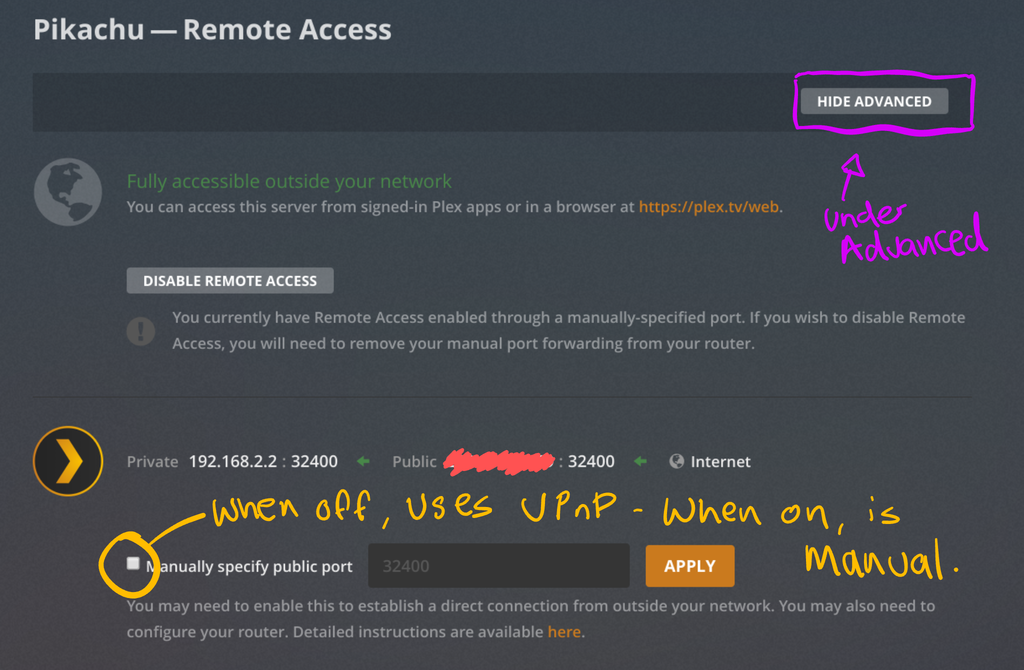
It is not the router that is causing it - it is Windows. Windows sees a network change and engages the firewall. The best way to get Plex to work is to just use UPnP like so:


Michael Murphy | https://murfy.nz
Referral Links: Quic Broadband (use R122101E7CV7Q for free setup)

Are you happy with what you get from Geekzone? Please consider supporting us by subscribing.
Opinions are my own and not the views of my employer.


Shop now on Samsung phones, tablets, TVs and more (affiliate link).
nzlittleman

6 posts

Wannabe Geek


  #2107258 13-Oct-2018 13:51
Send private message

Thanks Meow. Those settings were already there.


I found an article about using a higher IP. I was using 192.168.1.65 so changed this to .10


This seems to have worked without changing any other settings. Appreciate the help everyone.


Create new topic


Geekzone Live »

Try automatic live updates from Geekzone directly in your browser, without refreshing the page, with Geekzone Live now.


Are you subscribed to our RSS feed? You can download the latest headlines and summaries from our stories directly to your computer or smartphone by using a feed reader.