Geekzone: technology news, blogs, forums
Guest
Welcome Guest.
You haven't logged in yet. If you don't have an account you can register now.


Paul1977

5171 posts

Uber Geek
+1 received by user: 2192


#262013 30-Dec-2019 09:15
Send private message

This is probably the wrong forum, but my question doesn't belong exclusively in the Freeview or Sky forums as it concerns both.


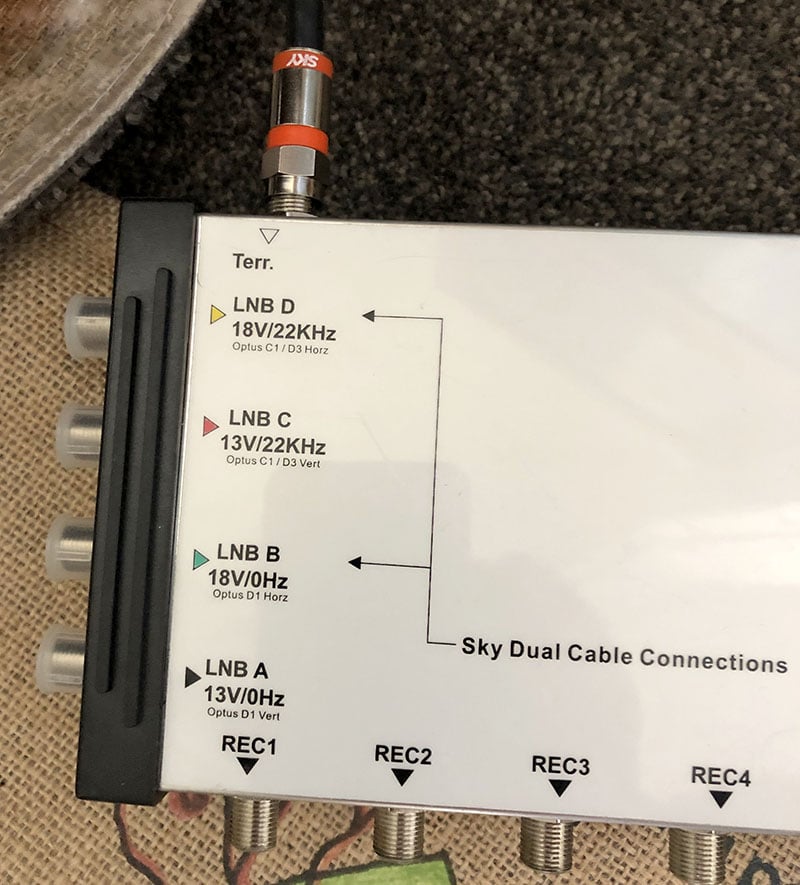
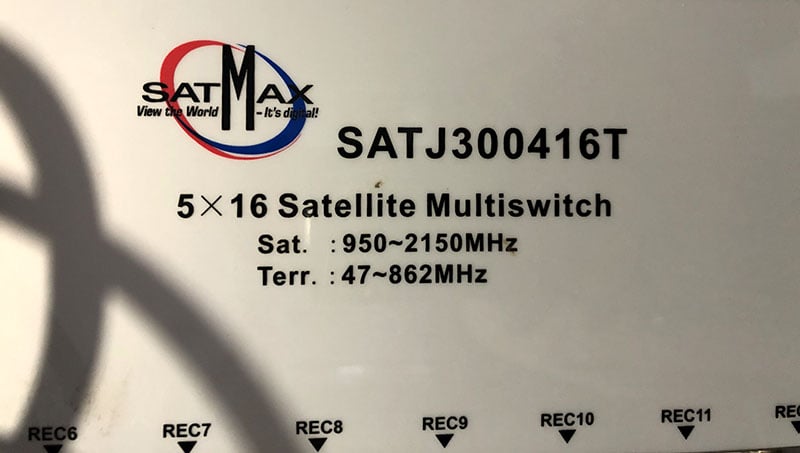
I'm trying to figure out if I can get both Freeview and Sky working through an old SatMax SATJ300416T multiswitch. SatMax is no longer in business, so I can't ask them.


Getting Freeview is no problem, I just connect the UHF antenna feed into the "Terr" input, but I'm not sure about the Satellite inputs as there are 4 of them. I'm not sure which one to use, or if the multiswitch can even be used for Sky and Freeview at the same time.


There are 2 sky decoders that we'd like to connect, as well as some Freeview TVs in other rooms.


Any help would be appreciated.


Click to enlarge

Click to see full size


Click to enlarge


Click to see full size


 Home:                                                           Work:
Home Work


Create new topic
darkasdes2
448 posts

Ultimate Geek
+1 received by user: 83


  #2382738 30-Dec-2019 09:22
Send private message

I would try plugging in the sky dish if there is only one cable into LNB B and then try LNB D if that doesn't work.


You also may need to use a diplexer where the sky boxes are being used to help split the Sat feed.


http://www.freeviewshop.co.nz/satellite-terrestrial-diplexer-p-57.html


cyril7
9073 posts

Uber Geek
+1 received by user: 2499

ID Verified
Trusted
Subscriber

  #2382740 30-Dec-2019 09:28
Send private message

Hi, so essentially just plug the Sat dish feed into the LNB B feed, and all receivers and decoders into the RecX outputs, and obviously the UHF antenna into the Terr input.


Ideally you should use a diplexer at each TV and STB.


Cyril


SATTV
1670 posts

Uber Geek
+1 received by user: 657

ID Verified

  #2382748 30-Dec-2019 09:37
Send private message

cyril7:


Hi, so essentially just plug the Sat dish feed into the LNB B feed, and all receivers and decoders into the RecX outputs, and obviously the UHF antenna into the Terr input.


Ideally you should use a diplexer at each TV and STB.


Cyril


I am not sure if a diplexer is needed at the other end, I have seen many MATV installations that have one outlet per room and if you connect the TV you get freeview and if you connect a STB you get satellite.


John


I know enough to be dangerous


cyril7
9073 posts

Uber Geek
+1 received by user: 2499

ID Verified
Trusted
Subscriber

  #2382753 30-Dec-2019 09:49
Send private message

Hi, yes you can do away with the diplexer, it will work, however you are at the mercy of the terminating device's input return loss in the band its not using to be good, if not you may cause undesired network issues, hence I prefer to use a diplexer, and ideally terminate any unterminated outlets.


Cyril


Paul1977

5171 posts

Uber Geek
+1 received by user: 2192


  #2382775 30-Dec-2019 10:14
Send private message

Thanks guys, I forgot to mention that there are 2 Sky cables. They are labelled “Dish 1” and “Dish 2”. Both cables work, but I don’t know if there are coming from two separate dishes, or both coming from one.


Edit: Added missing number "2".


fearandloathing
537 posts

Ultimate Geek
+1 received by user: 206

ID Verified
Lifetime subscriber

  #2382822 30-Dec-2019 10:34
Send private message

I have a matchmaster multiswitch with one sat input and one terrestrial input. I can receive Sky on the stb and Freeview satellite on my Panasonic tv.


Shop now for Lego sets and other gifts (affiliate link).
Paul1977

5171 posts

Uber Geek
+1 received by user: 2192


  #2382823 30-Dec-2019 10:39
Send private message

fearandloathing: I have a matchmaster multiswitch with one sat input and one terrestrial input. I can receive Sky on the stb and Freeview satellite on my Panasonic tv.


@fearandloathing how do you have them connected? I.e. do you just have one coax port on the wall? How do you connect both devices?


fearandloathing
537 posts

Ultimate Geek
+1 received by user: 206

ID Verified
Lifetime subscriber

  #2382829 30-Dec-2019 10:54
Send private message

Paul1977:


@fearandloathing how do you have them connected? I.e. do you just have one coax port on the wall? How do you connect both devices?


This


Click to see full size


and


Click to see full size


Create new topic


Geekzone Live »

Try automatic live updates from Geekzone directly in your browser, without refreshing the page, with Geekzone Live now.


Are you subscribed to our RSS feed? You can download the latest headlines and summaries from our stories directly to your computer or smartphone by using a feed reader.