Geekzone: technology news, blogs, forums
Guest
Welcome Guest.
You haven't logged in yet. If you don't have an account you can register now.


stuartjmz

228 posts

Master Geek
+1 received by user: 9


#289414 4-Sep-2021 09:24
Send private message

I hope this is the right forum to ask this in, if not, sincere apologies. We just bought a Philips 55PUT8215, our first new TV in around 7 years, and so the first with Chromecast built-in. When I open Google Home on my phone, it does not see the TV, even though I have confirmed that both the phone and the TV are on the same WiFi network. What am I doing wrong? 


Filter this topic showing only the reply marked as answer Create new topic
freitasm
BDFL - Memuneh
80646 posts

Uber Geek
+1 received by user: 41029

Administrator
ID Verified
Trusted
Geekzone
Lifetime subscriber

  #2771939 4-Sep-2021 09:39
Send private message

Some routers may block communications between devices in same LAN or between wired and WiFi devices. Usually there is an option to disable this.

First we would need to know more about your network and the router.


Referral links: Quic Broadband (free setup code: R587125ERQ6VE) | Samsung | AliExpress | Wise | Sharesies 


Support Geekzone by subscribing (browse ads-free), or making a one-off or recurring donation through PressPatron.


gregmcc
2173 posts

Uber Geek
+1 received by user: 836

ID Verified
Trusted
Lifetime subscriber

  #2772003 4-Sep-2021 11:21
Send private message

Is the TV actually on when you are using google home to search for the TV? the chromecast part of the TV may only have power on when the TV is on.


stuartjmz

228 posts

Master Geek
+1 received by user: 9


  #2772121 4-Sep-2021 15:58
Send private message

Thanks for the responses, I'll try to reply as best I can:


First, the easy one - the TV is on when trying to cast. Neither of my neurons is quite THAT sluggish, yet 🙂


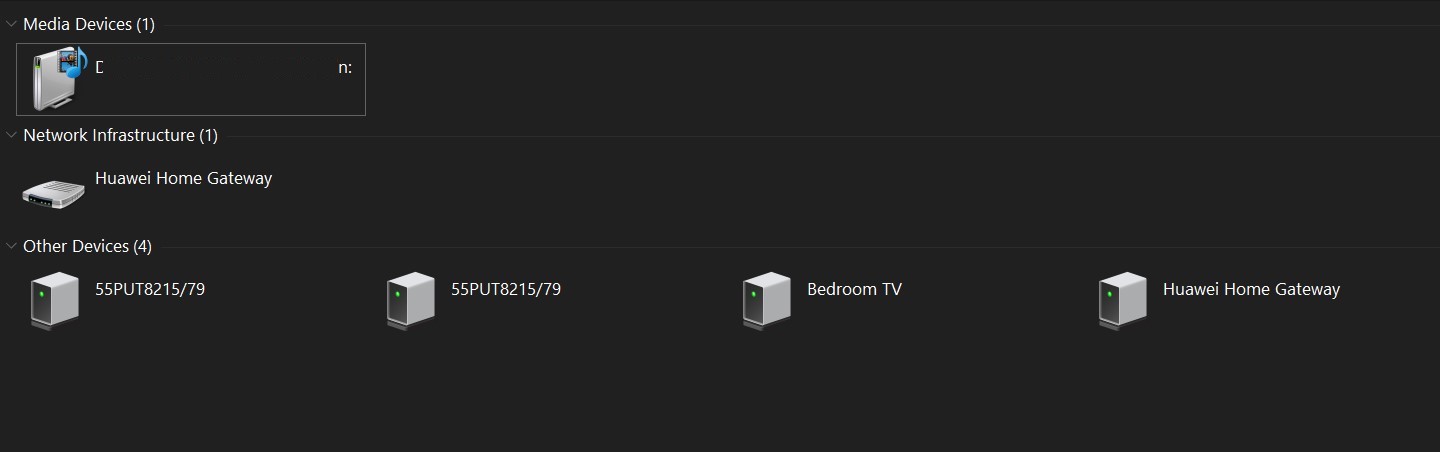
Second, the network. The TV has disappeared from the Network listing in My PC. The screenshot shows the physical Chromecast attached to our Bedroom TV, but yesterday, it was showing our TV as well, which has now disappeared. 


stuartjmz

228 posts

Master Geek
+1 received by user: 9


  #2781783 21-Sep-2021 17:12
Send private message

Just updating this because the problem persists even though the TV is now showing up on my PC's "Network" tab - twice, for some reason. 


gregmcc
2173 posts

Uber Geek
+1 received by user: 836

ID Verified
Trusted
Lifetime subscriber

  #2781789 21-Sep-2021 17:26
Send private message

I think the best start would be going in to your router web interface (as this controls all the connections) and see what you can see there for the connected devices.


Looking at what your PC can see on the network is not the right approach.


Jase2985
13730 posts

Uber Geek
+1 received by user: 6202

ID Verified
Lifetime subscriber

  #2782359 22-Sep-2021 20:13
Send private message

my LG Tv used to show up in google home, but after a software update we now have to open the streaming setting on the tv, enter an 8 digit code to connect then we can cast, its a right PITA. i just moved the garage chromecast back inside


Shop now on Samsung phones, tablets, TVs and more (affiliate link).
stuartjmz

228 posts

Master Geek
+1 received by user: 9


  #2782364 22-Sep-2021 20:45
Send private message

Thanks to all for your help. Logging in to the router admin page was confusing - the landing page said "8 devices connected to WLAN" but clicking on that brought up a list of around 25 devices,  many of which I did not recognise at all. As our Wifi Password is a randomly generated 12-character string, it seems most likely they're remnants of logins from visitors. I too have decided to go old school and just use the physical chromecast


Filter this topic showing only the reply marked as answer Create new topic


Geekzone Live »

Try automatic live updates from Geekzone directly in your browser, without refreshing the page, with Geekzone Live now.


Are you subscribed to our RSS feed? You can download the latest headlines and summaries from our stories directly to your computer or smartphone by using a feed reader.