Geekzone: technology news, blogs, forums
Guest
Welcome Guest.
You haven't logged in yet. If you don't have an account you can register now.


Nety

2584 posts

Uber Geek
+1 received by user: 5

Retired Mod
Trusted
Lifetime subscriber

#54750 21-Dec-2009 14:46
Send private message

We have telstra digital STB which I feed into the media centre via the s-video connection. The TV gets feed via the composite out on the STB (yuck!) However the sound volume is significantly lower via the 2200 then it is for the freeview channels which causes constant volume changes when swapping between freeview and Telstra channels.

I had a search but cannot find any way to change the line in volume in Windows 7. The STB volume is set to max. The volume is also a lot quieter different between the input from the STB to the AV and the input from STB - MC - AV.





Media centre PC - Case Silverstone LC16M with 2 X 80mm AcoustiFan DustPROOF, MOBO Gigabyte MA785GT-UD3H, CPU AMD X2 240 under volted, RAM 4 Gig DDR3 1033, HDD 120Gig System/512Gig data, Tuners 2 X Hauppauge HVR-3000, 1 X HVR-2200, Video Palit GT 220, Sound Realtek 886A HD (onboard), Optical LiteOn DH-401S Blue-ray using TotalMedia Theatre Power Corsair VX Series, 450W ATX PSU OS Windows 7 x64

Create new topic
mattyboy2
84 posts

Master Geek


  #284530 22-Dec-2009 08:50
Send private message

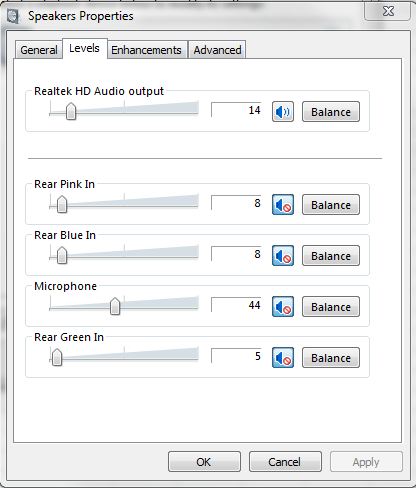
In Windows, right click on the speaker icon in your system tray (next to the clock) and choose playback devices.

Click on Speakers and choose Properties


Go to Levels tab

There should be an entry for Line in there.


-Matt


HTPC OS: Win 7 64bit running Media Center | CPU: Core 2 Duo E7500 | RAM: 4Gb | Motherboard: Asus P5Q-EM | Video: ATI Radeon 4650 slimline + onboard Intel G45 (disabled) | TV Card: Hauppauge 2200 | HDD: WD Green 1 Tb | Case: Antec Minuet 350
Laptop HP mini 311 (ION Chipset) running Win 7 32 bit


Nety

2584 posts

Uber Geek
+1 received by user: 5

Retired Mod
Trusted
Lifetime subscriber

  #284547 22-Dec-2009 10:07
Send private message

I will check but as you can see in your screenshot that is for the sound card. The line in is via the 2200 not the sound card.

Will get back if that works though.


Media centre PC - Case Silverstone LC16M with 2 X 80mm AcoustiFan DustPROOF, MOBO Gigabyte MA785GT-UD3H, CPU AMD X2 240 under volted, RAM 4 Gig DDR3 1033, HDD 120Gig System/512Gig data, Tuners 2 X Hauppauge HVR-3000, 1 X HVR-2200, Video Palit GT 220, Sound Realtek 886A HD (onboard), Optical LiteOn DH-401S Blue-ray using TotalMedia Theatre Power Corsair VX Series, 450W ATX PSU OS Windows 7 x64

mattyboy2
84 posts

Master Geek


  #284708 22-Dec-2009 21:09
Send private message

Ah ok, my bad. I thought the line in was going into your sound card.


HTPC OS: Win 7 64bit running Media Center | CPU: Core 2 Duo E7500 | RAM: 4Gb | Motherboard: Asus P5Q-EM | Video: ATI Radeon 4650 slimline + onboard Intel G45 (disabled) | TV Card: Hauppauge 2200 | HDD: WD Green 1 Tb | Case: Antec Minuet 350
Laptop HP mini 311 (ION Chipset) running Win 7 32 bit


eXDee
4033 posts

Uber Geek
+1 received by user: 1070

Trusted

  #284718 22-Dec-2009 21:42
Send private message

Im 90% sure its not shown as a standard sound device, its all input via the TV card component of the HVR-2200.
In mediaportal you can add volume boosting per channel im pretty sure but if you're using WMC then i have no idea.

Create new topic


Geekzone Live »

Try automatic live updates from Geekzone directly in your browser, without refreshing the page, with Geekzone Live now.


Are you subscribed to our RSS feed? You can download the latest headlines and summaries from our stories directly to your computer or smartphone by using a feed reader.