Geekzone: technology news, blogs, forums
Guest
Welcome Guest.
You haven't logged in yet. If you don't have an account you can register now.


ZollyMonsta

3009 posts

Uber Geek
+1 received by user: 379

ID Verified
Trusted

#60630 29-Apr-2010 08:01
Send private message

Just a question really.  Maybe a silly question (?!)

My HTPC is set up to 1920x1080 @ 50hz however it doesn't fill the entire screen.  Video card is ATI.
Had this before and have to actually zoom the screen via the ATI software to fill the black space around the edge on the screen.

I would have thought that outputting this resolution would fill the entire screen on an HD panel?

TV is a Samsung Series 7.


View this topic in a long page with up to 500 replies per page Create new topic
 1 | 2
sbiddle
30853 posts

Uber Geek
+1 received by user: 9996

Retired Mod
Trusted
Biddle Corp
Lifetime subscriber

  #324519 29-Apr-2010 08:05
Send private message

Try 60Hz and see if that solves the issue.


RustyGonad
495 posts

Ultimate Geek

Trusted

  #324522 29-Apr-2010 08:14
Send private message

Check the TV is set to "Just Scan" in the aspect ratio menu. This will stop the Samsung doing any overscan adjustments.

ZollyMonsta

3009 posts

Uber Geek
+1 received by user: 379

ID Verified
Trusted

  #324562 29-Apr-2010 09:47
Send private message

Cool.. will try tonight. Thanks.


ToPGuNZ
Topgunz
399 posts

Ultimate Geek
+1 received by user: 142

Lifetime subscriber

  #324576 29-Apr-2010 10:03
Send private message

Hi ZollyMonsta,

I had a similar problem.
http://www.geekzone.co.nz/forums.asp?forumid=50&topicid=60156

I changed cable from HDMI to DVI which fixed it for me. Others have turned off the overscan feature as mentioend by RustyGonad.

fahrenheit
757 posts

Ultimate Geek
+1 received by user: 33


  #324628 29-Apr-2010 11:42
Send private message

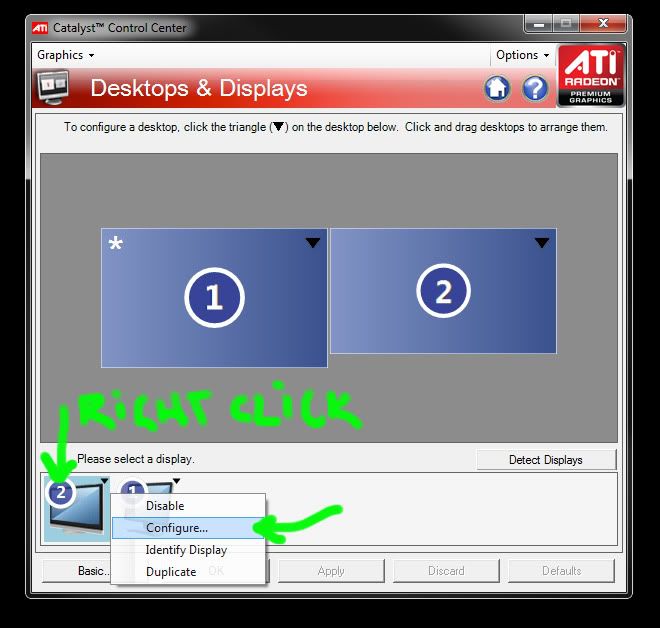
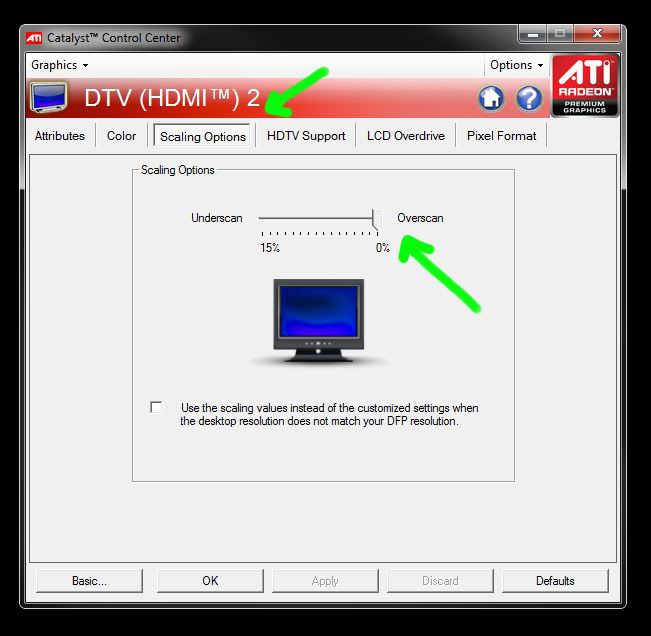
In CCC, right click the TV's icon and choose 'Configure'. Go to the 'Scaling Options' tab and set overscan to zero.

You will need to do this for every refresh rate that you plan on using.

JonnyCam
644 posts

Ultimate Geek
+1 received by user: 52

ID Verified

  #324643 29-Apr-2010 12:07
Send private message

The Just Scan option should give you that right result.
I had mine on 60Hz, and the only options were 16:9 / 4:3, but once I changed to 50Hz I could set it to just scan.

I find that 50Hz gives a slightly worse picture on desktop / internet explorer on my Samsung plasma. Video is fine, just not sure why it's different.


Shop now at Mighty Ape (affiliate link).
Satch
1985 posts

Uber Geek
+1 received by user: 259


  #324660 29-Apr-2010 12:35
Send private message

Does anyone know if I can do this with my 5 year old Sony LCD?  I have a hell of a time trying to get the resolution right on that...

ZollyMonsta

3009 posts

Uber Geek
+1 received by user: 379

ID Verified
Trusted

  #324670 29-Apr-2010 12:52
Send private message

fahrenheit: In CCC, right click the TV's icon and choose 'Configure'. Go to the 'Scaling Options' tab and set overscan to zero.

You will need to do this for every refresh rate that you plan on using.


CCC?


Check out my LPFM Radio Station at www.thecheese.co.nz - Now on iHeart Radio, TuneIn and Radio Garden


As per the usual std disclaimer.. "All thoughts typed here are my own."


ZollyMonsta

3009 posts

Uber Geek
+1 received by user: 379

ID Verified
Trusted

  #324671 29-Apr-2010 12:53
Send private message

JonnyCam: The Just Scan option should give you that right result.
I had mine on 60Hz, and the only options were 16:9 / 4:3, but once I changed to 50Hz I could set it to just scan.

I find that 50Hz gives a slightly worse picture on desktop / internet explorer on my Samsung plasma. Video is fine, just not sure why it's different.


Yep I noticed this when I was running WIndows 7 RC.  Seems to be the norm.  TV content is 50hz.
Changing to 60hz makes video (incl bluray) look soft.


Check out my LPFM Radio Station at www.thecheese.co.nz - Now on iHeart Radio, TuneIn and Radio Garden


As per the usual std disclaimer.. "All thoughts typed here are my own."


fahrenheit
757 posts

Ultimate Geek
+1 received by user: 33


  #324672 29-Apr-2010 12:55
Send private message

ZollyMonsta:
fahrenheit: In CCC, right click the TV's icon and choose 'Configure'. Go to the 'Scaling Options' tab and set overscan to zero.

You will need to do this for every refresh rate that you plan on using.


CCC?


Sorry, Catalyst Control Center.

ZollyMonsta

3009 posts

Uber Geek
+1 received by user: 379

ID Verified
Trusted

  #325070 30-Apr-2010 07:51
Send private message

Last night I installed the latest ATI Radeon drivers for my card.

Tried both 50hz and 60hz, both have same result with a black border around the entire picture. My Samsung is one of the newer model 7's and doesn't have 'Just Scan' but has 'Screen Fit' choosing this however has no effect.

I did have the same issue when running windows 7 RC with the supplied video card drivers that came with video card. There was however an option to zoom out the picture, which then filled the screen. So maybe I'll just have to go back to that.

But it irks me (and I can't see why) it won't display 1920x1080 at full screen on the tv!


Move to New Zealand's best fibre broadband service (affiliate link). Free setup code: R587125ERQ6VE. Note that to use Quic Broadband you must be comfortable with configuring your own router.

dan

dan
1134 posts

Uber Geek
+1 received by user: 105

Lifetime subscriber

  #325094 30-Apr-2010 09:02
Send private message

i just had this problem, i bought a new 1080p TV, the ati card was set to the correct resolution yet it didnt fill up the entire screen, just about 90%. tried various drivers and settings, could make it go full with tweaking but really shouldnt have to do that, i also noticed it was sluggish rendering some menus at 1080p

decided to put in a nvidia card GT220 card and worked straight away, perfectly.


fahrenheit
757 posts

Ultimate Geek
+1 received by user: 33


  #325124 30-Apr-2010 09:37
Send private message

Were my instructions really that hard to follow?


Brunzy
2019 posts

Uber Geek
+1 received by user: 241

Trusted

  #325216 30-Apr-2010 12:02
Send private message

Are you connected to HDMI 2 ?

GBristow
178 posts

Master Geek
+1 received by user: 7


  #325244 30-Apr-2010 13:18
Send private message

A lot of Samsungs have a 1:1 pixel setting. Turn that on [or off] and you should see it fit the entire screen, provided your card is configured correctly.

 1 | 2
View this topic in a long page with up to 500 replies per page Create new topic


Geekzone Live »

Try automatic live updates from Geekzone directly in your browser, without refreshing the page, with Geekzone Live now.


Are you subscribed to our RSS feed? You can download the latest headlines and summaries from our stories directly to your computer or smartphone by using a feed reader.