Geekzone: technology news, blogs, forums
Guest
Welcome Guest.
You haven't logged in yet. If you don't have an account you can register now.


gumdigger

429 posts

Ultimate Geek
+1 received by user: 3


#75058 12-Jan-2011 09:03
Send private message

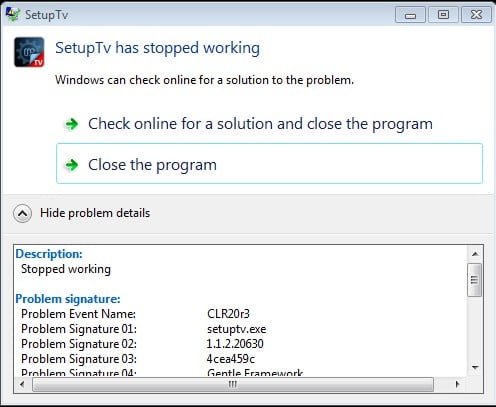
getting "Setuptv has stopped working error"


when i double click on open tv-server configuration icon.

I previously had windowsxp pro 32bit, but thought of upgrading to 7 64bit. before i installed MP 1.1.2 on the fresh install of 7 x64, I installed HDpack2.6, applied about 150mb worth of windows updates, installed latest nvidia drivers, HVR-2200 latest drivers (8901).

Create new topic
thorax
75 posts

Master Geek
+1 received by user: 1


  #426399 12-Jan-2011 09:19
Send private message

Can you see if the tvservice is running as windows service?

Im guessing it was working before but now its broken?

Also, you have got .net2.0 installed?  (win7 includes this)


gumdigger

429 posts

Ultimate Geek
+1 received by user: 3


  #426401 12-Jan-2011 09:23
Send private message

thorax: Can you see if the tvservice is running as windows service?

Im guessing it was working before but now its broken?


no its not running. got this error since i installed MP

gumdigger

429 posts

Ultimate Geek
+1 received by user: 3


  #426407 12-Jan-2011 09:27
Send private message

gumdigger:
thorax: Can you see if the tvservice is running as windows service?

Im guessing it was working before but now its broken?


no its not running. got this error since i installed MP


**Although in services.msc tvservice is set to AUTO and status shows that its started.


thorax
75 posts

Master Geek
+1 received by user: 1


  #426408 12-Jan-2011 09:30
Send private message

Maybe try to stop it and then run the tvserver config, it should try and start it automatically.

Did you go through the whole SQL server setup?

gumdigger

429 posts

Ultimate Geek
+1 received by user: 3


  #426409 12-Jan-2011 09:35
Send private message

thorax: Maybe try to stop it and then run the tvserver config, it should try and start it automatically?


stopped the service and click on tvserver config -  said the service not runng do you want to start, after clicking yes the same error prompted.

thorax:Did you go through the whole SQL server setup?


no after the setup i went straight to tvserver config and it kept giving me this error, so could go through SQL server setup, unless there is another way?


thorax
75 posts

Master Geek
+1 received by user: 1


  #426411 12-Jan-2011 09:39
Send private message

Im pretty sure you need some SQL running for database.

How did you install, did you click the single-seat option from setup?

I had to install SQL server 2008

http://wiki.team-mediaportal.com/1_MEDIAPORTAL_1/15_Customization/001_TV-Server/SQL-Server/Install_SQL_Server_2008


just a thought, are you running with admin priv etc, UAC off.


edit - scratch that - mediaportal comes with mysql install right?


Shop on-line at New World now for your groceries (affiliate link).
valtam
396 posts

Ultimate Geek
+1 received by user: 2


  #426429 12-Jan-2011 10:11
Send private message

Have you 'googled' the error? http://www.google.co.nz/#hl=en&source=hp&biw=1440&bih=674&q=mediaportal+clr20r3+error&aq=1v&aqi=g-v2&aql=&oq=mediaportal+CLR20&gs_rfai=&fp=a4c645b7a56afab6 might be a good place to work through ;)


Support a locally made Linux based Operating System, try Linux Lite.
Download Linux Lite

gumdigger

429 posts

Ultimate Geek
+1 received by user: 3


  #426479 12-Jan-2011 12:17
Send private message

thorax: Im pretty sure you need some SQL running for database.

How did you install, did you click the single-seat option from setup?

I had to install SQL server 2008

http://wiki.team-mediaportal.com/1_MEDIAPORTAL_1/15_Customization/001_TV-Server/SQL-Server/Install_SQL_Server_2008


just a thought, are you running with admin priv etc, UAC off.


edit - scratch that - mediaportal comes with mysql install right?


Since there was no MP installed before, I started with fresh install with one click option. setup downloaded sql and installed it.

I think i managed to fix the problem now. I uinstalled just the tvserver and installed the latest version again. however during the setup same error came up. so i uninstalled it and installed 1.1.1 tv server, which installed ok and allowed me to enter tvserver config. then i updated to the new version 1.1.2 which installed fine. works fine now.

Another issue bugging me now is how to turn off the WMC that keeps launching as im using MCE remote control mapping on my harmony. i was looking to disable ehtry from msconfig but cant find it?

valtam
396 posts

Ultimate Geek
+1 received by user: 2


  #426493 12-Jan-2011 12:46
Send private message


Support a locally made Linux based Operating System, try Linux Lite.
Download Linux Lite

gumdigger

429 posts

Ultimate Geek
+1 received by user: 3


  #426514 12-Jan-2011 13:25
Send private message

valtam: http://mymce.wordpress.com/2009/09/14/how-to-disable-windows-media-center-in-windows-seven/ yay google


doing this will disable MS DTV-DVD codec that i can use in MP, so i just rename ehtray.exe in the ehome directory.


thorax
75 posts

Master Geek
+1 received by user: 1


  #426520 12-Jan-2011 13:53
Send private message

gumdigger:
valtam: http://mymce.wordpress.com/2009/09/14/how-to-disable-windows-media-center-in-windows-seven/ yay google


doing this will disable MS DTV-DVD codec that i can use in MP, so i just rename ehtray.exe in the ehome directory.


There is a setting in the mediaportal config (not tvserver) that you can enable it will take care of MC for you.


Shop on-line at New World now for your groceries (affiliate link).
gumdigger

429 posts

Ultimate Geek
+1 received by user: 3


  #426550 12-Jan-2011 15:21
Send private message

Ohk. So that codec will remain even if i remove wmc?

thorax
75 posts

Master Geek
+1 received by user: 1


  #426616 12-Jan-2011 19:20
Send private message

gumdigger: Ohk. So that codec will remain even if i remove wmc?


You don't actually remove it the above applys a group policy software restriction so that you cant launch it, but all the files remain and that codec will stay registered.


You could also rename the exe, but there are some other services running too which you can just disable manually, but I like to be lazy and let media portal do all the work.

Create new topic


Geekzone Live »

Try automatic live updates from Geekzone directly in your browser, without refreshing the page, with Geekzone Live now.


Are you subscribed to our RSS feed? You can download the latest headlines and summaries from our stories directly to your computer or smartphone by using a feed reader.