Geekzone: technology news, blogs, forums
Guest
Welcome Guest.
You haven't logged in yet. If you don't have an account you can register now.


Twista

12 posts

Geek


#77694 20-Feb-2011 22:16
Send private message

Hi,

Ive been using WinTV 7 for watching TV latley with my hvr-3000 TV card.

I want to switch to Mediaportal to do streaming use plugins ect.  But the EPG grabber is not working.

Ive been sifting though pages and pages of forums and posts on here regarding things working then not, and things working with some things and well, but other things not ... hmmmmm

Im quite lost!

I used to use media Portal with a working xml file from here somewhere?! (I think something like raven xml)
It was an easy process.

It seems things have changed ALOT since then.

My question is:   Is there a' simple'  EPG grabber for MediaPortal anymore.

 
Im not completely noob at EPG but what ive been reading seems abit extreme!! (is that the only way now)


Is the EPG Collector V030000 Install.msi the only way?


Thanks.

Create new topic
dale77
298 posts

Ultimate Geek


  #441788 21-Feb-2011 00:07
Send private message

I think it is the best way. Just schedule it in windows to run, creating the xml file that you have specified in mediaportal, map the channels in mp to the xml channels. Done! I think.


HTPC: Antec Fusion 430, Intel i3, Gigabyte 1050, Corsair 4x1Gb,   Hauppauge WinTv, Logitech z-5500, Logitech Harmony 525, Yamaha Rx-v6a, Samsung KS8000 4k, Windows 10, Mediaportal 1.30, BLU-RAY: Panasonic UB820


Twista

12 posts

Geek


  #441790 21-Feb-2011 00:22
Send private message

Thanks Dale77,

I have it working now though, through Mediaportal by itself!
With out all the fuss of going through that major process!  man!

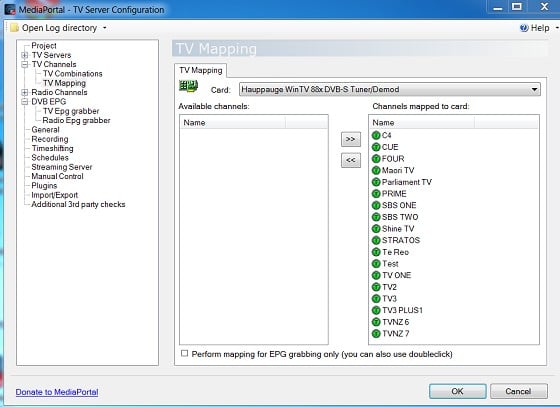
All I done was: Ticked mapping for EPG .... ' box


Then:


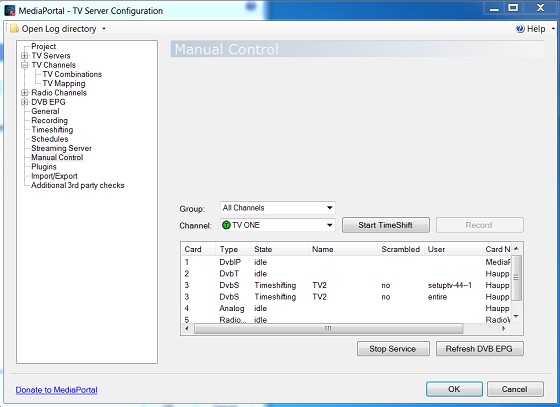
Pressed: Refresh DVB EPG

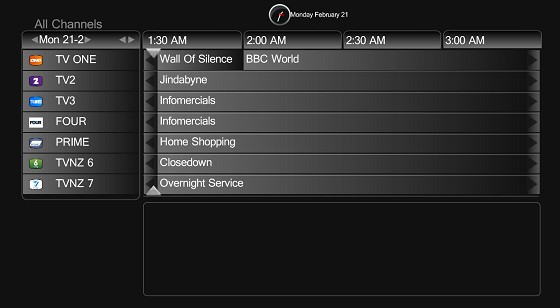
In the Manual Control panel, opened TV in MediaPortal and its updating now, and working correctly by showing correct shows playing.

Thanks for your input tho.


Twista

12 posts

Geek


  #441793 21-Feb-2011 01:47
Send private message


freitasm
BDFL - Memuneh
80652 posts

Uber Geek
+1 received by user: 41045

Administrator
ID Verified
Trusted
Geekzone
Lifetime subscriber

  #441875 21-Feb-2011 11:54
Send private message

This will work. You only really need EPG Collector if you are using DVB-T instead.


Referral links: Quic Broadband (free setup code: R587125ERQ6VE) | Samsung | AliExpress | Wise | Sharesies 


Support Geekzone by subscribing (browse ads-free), or making a one-off or recurring donation through PressPatron.


Twista

12 posts

Geek


  #441956 21-Feb-2011 15:32
Send private message

freitasm: This will work. You only really need EPG Collector if you are using DVB-T instead.


ahh ok. Thanks for that info it will come in handy sometime soon when I goto DVB-T

mm1352000
1149 posts

Uber Geek
+1 received by user: 95
Inactive user


  #442028 21-Feb-2011 17:49
Send private message

If it works for you then great, but to be honest I'd recommend you use the EPG Collector. The number of threads on the forum that seem to relate to the EPG grabber is really astounding. Issues I know of with it include:

- doesn't support MHEG 5 or OpenTV yet
- allocation of tuners is not threadsafe
- unicode characters not supported
- EPG grabbing straight after resume from sleep can be problematic

Create new topic


Geekzone Live »

Try automatic live updates from Geekzone directly in your browser, without refreshing the page, with Geekzone Live now.


Are you subscribed to our RSS feed? You can download the latest headlines and summaries from our stories directly to your computer or smartphone by using a feed reader.