Geekzone: technology news, blogs, forums
Guest
Welcome Guest.
You haven't logged in yet. If you don't have an account you can register now.


kiwifidget

"Cookie"
3667 posts

Uber Geek
+1 received by user: 1989

Lifetime subscriber

#198900 27-Jul-2016 18:55
Send private message

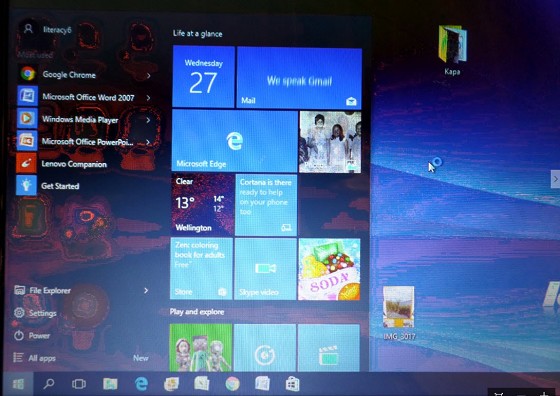
One of our beloved but aged Lenovo G570 laptops has got a "funny screen".


Everything is readable but the colours are all over the place, and there are swirly sort of patterns which should not be there.


An external VGA connected monitor displays perfectly.


A local laptop repairer (who kindly donated the M2.5x8mm screws requested in a previous post) reckoned it was a driver issue.


Uninstalling and reinstalling the driver made no difference.


Replacing the missing 6 screws also made no difference.


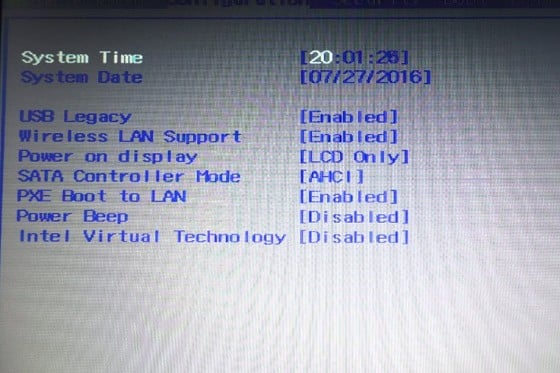
But upon reflection, I can state that the display looks odd in BIOS during bootup as well.


So that would rule out drivers and point to hardware, yes or no?



Delete cookies?! Are you insane?!


Create new topic
RunningMan
9329 posts

Uber Geek
+1 received by user: 4968


  #1599659 27-Jul-2016 18:56
Send private message

Photo?


kiwifidget

"Cookie"
3667 posts

Uber Geek
+1 received by user: 1989

Lifetime subscriber

  #1599660 27-Jul-2016 18:58
Send private message

RunningMan:


Photo?


After dinner I will take a photo, though photos of laptop screens look odd anyway.


Delete cookies?! Are you insane?!


tardtasticx
3085 posts

Uber Geek
+1 received by user: 483


  #1599676 27-Jul-2016 19:29
Send private message

I'd say definitely yes to being hardware if the BIOS is showing the same issue. 


It could be something super simple like a loose cable but laptops would be tricky to troubleshoot in that sense since you probably don't have a spare compatible display to rig up and test it with. 


kiwifidget

"Cookie"
3667 posts

Uber Geek
+1 received by user: 1989

Lifetime subscriber

  #1599726 27-Jul-2016 20:27
Send private message

OK, I have to retract an earlier statement.


It actually looks OK once you hit F2 and go into BIOS settings.


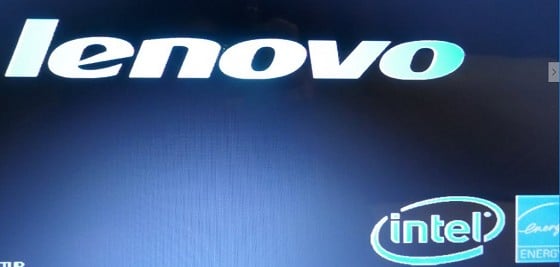
But the initial startup logo


and Windows desktop look odd.


Delete cookies?! Are you insane?!


tardtasticx
3085 posts

Uber Geek
+1 received by user: 483


  #1599728 27-Jul-2016 20:30
Send private message

What happens if you start in Safe Mode, or boot from some super super basic linux distro? I'm not 100% sure but I don't think this should be happening on the boot screen (where it shows Lenovo) if it were a driver issue, as that part of the boot process is still before the OS is even loaded. 


Possibly because the BIOS screen has a very basic colour scheme the distortion issue isn't obvious there?


kiwifidget

"Cookie"
3667 posts

Uber Geek
+1 received by user: 1989

Lifetime subscriber

  #1599745 27-Jul-2016 21:21
Send private message

Safe mode is affected by the issue.


I dont have another OS to boot from.


So starting to look a lot like a hardware issue.


Delete cookies?! Are you insane?!


Want to support Geekzone and browse the site without the ads? Subscribe to Geekzone now (monthly, annual and lifetime options).
blakamin
4431 posts

Uber Geek
+1 received by user: 1306
Inactive user


  #1599760 27-Jul-2016 22:08
Send private message

Daughters laptop had the same issue. Then it started to come up with IRQ(?) errors at boot! In our case, video hardware is dying.


coffeebaron
6319 posts

Uber Geek
+1 received by user: 3581

Trusted
Lifetime subscriber

  #1599761 27-Jul-2016 22:11
Send private message

Can sometimes be bad memory modules.


Rural IT and Broadband support.


Broadband troubleshooting and master filter installs.
Starlink installer - one month free: https://www.starlink.com/?referral=RC-32845-88860-71 
Wi-Fi and networking
Cel-Fi supply and installer - boost your mobile phone coverage legally


Need help in Auckland, Waikato or BoP? Click my email button, or email me direct: [my user name] at geekzonemail dot com


blakamin
4431 posts

Uber Geek
+1 received by user: 1306
Inactive user


  #1599774 27-Jul-2016 22:17
Send private message

coffeebaron: Can sometimes be bad memory modules.


Good point! (Though in my case that was one one of the things I tried... swapped with another laptop and it made no difference, and memory was fine in the other.)


richms
29252 posts

Uber Geek
+1 received by user: 10361

Trusted
Lifetime subscriber

  #1599844 27-Jul-2016 22:57
Send private message

Had weird colours as the flex thru the hinge was on its way out on an old laptop. Not worth fixing as it was 5 years old when it failed so it ended up stuck somewhere as a computer to RDP into to do things.


Richard rich.ms

lNomNoml
1909 posts

Uber Geek
+1 received by user: 523

ID Verified

  #1599935 28-Jul-2016 01:06
Send private message

Either screen or GPU (if it has a dedicated GPU that is), more likely the screen.


They go for about $110 on trademe, make sure the one you get is the correct one in terms of part number.


Shop now for Dell laptops and other devices (affiliate link).
JayADee
2258 posts

Uber Geek
+1 received by user: 503


  #1600006 28-Jul-2016 08:56
Send private message

My guess is the same as richms's.

dimsim
871 posts

Ultimate Geek
+1 received by user: 151

Trusted
Lifetime subscriber

  #1600035 28-Jul-2016 09:50
Send private message

The distortion/artefacts look organic to me


Have you tried http://www.passmark.com/products/monitortest.htm


Download and boot from an Win7/8 PE boot disk or an Ubuntu live disk and see if the problem still exists.


Does adjusting the angle of the screen help or worsen the problem? (dodgy cable)


1101
3145 posts

Uber Geek
+1 received by user: 1149


  #1602876 2-Aug-2016 13:16
Send private message

kiwifidget:


An external VGA connected monitor displays perfectly.


so it will be the display panel (or the cable)
It wont be a driver, RAM or anything else if its OK on an external monitor.


The backlight looks full on it the middle, or is that just the camera flash ?


Create new topic


Geekzone Live »

Try automatic live updates from Geekzone directly in your browser, without refreshing the page, with Geekzone Live now.


Are you subscribed to our RSS feed? You can download the latest headlines and summaries from our stories directly to your computer or smartphone by using a feed reader.