
Geekzone: technology news, blogs, forums
Guest
Welcome Guest.
You haven't logged in yet. If you don't have an account you can register now.


View this topic in a long page with up to 500 replies per page Create new topic
1 | 2 | 3
phrunt
147 posts

Master Geek
+1 received by user: 9


  #3487963 6-May-2026 07:51
Send private message quote this post

I may have found a solution, not guaranteed yet but it's been a couple of days with heavy battery usage and it's not frozen.  Basically, I've been charging to full, then running off battery until it shuts down flat, done this about 6 times now and no freezing, I'll keep doing it over the next week to be sure its fixed.


Enable Modern Standby:

Open Command Prompt as administrator 

Enter the following command to delete the registry entry that disables Modern Standby: reg delete "HKLM\System\CurrentControlSet\Control\Power" /v PlatformAoAcOverride /f
Restart Your Computer


Go to command prompt as administrator again, and type powercfg.exe /hibernate off


Restart computer again.


Then go to the power profile, Control Panel\All Control Panel Items\Power Options\Edit Plan Settings


Change advanced power settings


Under critical battery action on battery change from Hibernate to shutdown.


All done.


This should hopefully resolve the problem, it seems Windows 11 may think the laptop supports the old s3 sleep states, and it appears it doesn't, it only supports the s0 modern standby so if s3 is enabled it appears to lock up on battery trying to use s3 sleep features.
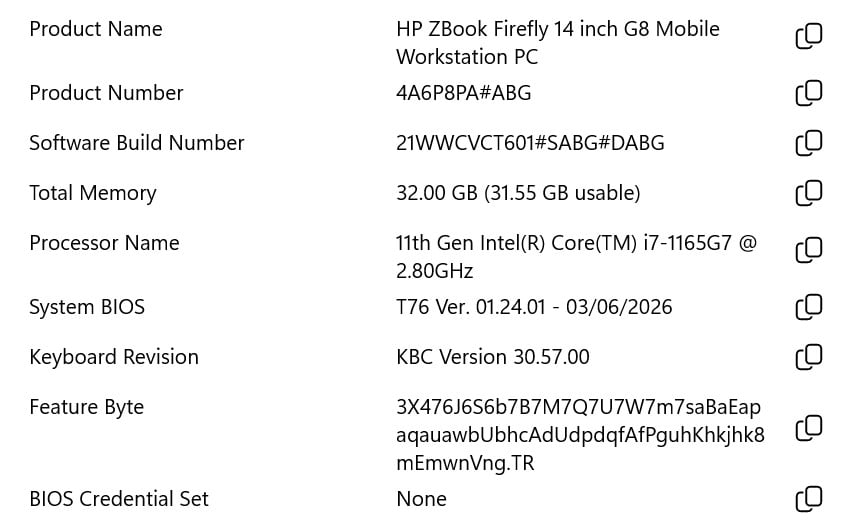


phrunt
147 posts

Master Geek
+1 received by user: 9


  #3488495 7-May-2026 16:14
Send private message quote this post

Reporting in, still no freeze, been running it all day every day on battery until flat then on cord until charged and all good, if it lasts until Sunday doing this, I'm very confident it's fixed, at this stage it's looking very likely as I'm sure it would have frozen at least once by now.


It would be a shame to write it off, you have to sell a kidney to get this much ram in a laptop these days.


sqishy
542 posts

Ultimate Geek
+1 received by user: 197


  #3488648 8-May-2026 11:16
Send private message quote this post

I have bought over 60 x HP G8's they were great at the time, developers loved them. Then came G9 and G10 and all of a sudden I have out of box failures, HP techs in replacing mobos, about 30% error rate. HP said never heard of this issue. Then came the G11 and all of a sudden the devices became more reliable. 


phrunt
147 posts

Master Geek
+1 received by user: 9


  #3488664 8-May-2026 11:34
Send private message quote this post

Were the G8's a problem for you, or just the 9 and 10's? 


Andib
1403 posts

Uber Geek
+1 received by user: 980

ID Verified
Trusted

  #3488667 8-May-2026 11:41
Send private message quote this post

sqishy:


I have bought over 60 x HP G8's they were great at the time, developers loved them. Then came G9 and G10 and all of a sudden I have out of box failures, HP techs in replacing mobos, about 30% error rate. HP said never heard of this issue. Then came the G11 and all of a sudden the devices became more reliable. 


The G9/10s were developed during the covid supply constraints so had (allegedly) lower tier parts used as they couldn't source the same parts that previously were reserved for ZBooks & higher end Elitebooks


<# 
       .DISCLAIMER
       Anything I post is my own and not the views of my past/present/future employer.
#>


sqishy
542 posts

Ultimate Geek
+1 received by user: 197


  #3488756 8-May-2026 15:07
Send private message quote this post

phrunt:


Were the G8's a problem for you, or just the 9 and 10's? 


G8's were always 100% fine just G9 G10 issues with mobos, fail to start, USB ports etc....G11 were back and great :) 


Shop on-line at New World now for your groceries (affiliate link).
Brend

105 posts

Master Geek
+1 received by user: 22


  #3489125 9-May-2026 12:37
Send private message quote this post

phrunt:


Enable Modern Standby:

Open Command Prompt as administrator 

Enter the following command to delete the registry entry that disables Modern Standby: reg delete "HKLM\System\CurrentControlSet\Control\Power" /v PlatformAoAcOverride /f
Restart Your Computer


Go to command prompt as administrator again, and type powercfg.exe /hibernate off


Restart computer again.


Then go to the power profile, Control Panel\All Control Panel Items\Power Options\Edit Plan Settings


Change advanced power settings


Under critical battery action on battery change from Hibernate to shutdown.


I couldn't do this: Enter the following command to delete the registry entry that disables Modern Standby: reg delete "HKLM\System\CurrentControlSet\Control\Power" /v PlatformAoAcOverride /f
Restart Your Computer


I ran CMD as admin and this is the error: ERROR: The system was unable to find the specified registry key or value.


I did the rest ... but still no joy ... 


I am the reason idiot's guides exist


phrunt
147 posts

Master Geek
+1 received by user: 9


  #3489193 9-May-2026 14:32
Send private message quote this post

If the key doesn't exist it wasn't your problem, that means your Widnows 11 isn't using S3 standby and is already using modern standby.  Damn that's a shame.  Still all good on my end.


phrunt
147 posts

Master Geek
+1 received by user: 9


  #3490109 12-May-2026 12:13
Send private message quote this post

Brend:


I couldn't do this: Enter the following command to delete the registry entry that disables Modern Standby: reg delete "HKLM\System\CurrentControlSet\Control\Power" /v PlatformAoAcOverride /f
Restart Your Computer


I ran CMD as admin and this is the error: ERROR: The system was unable to find the specified registry key or value.


I did the rest ... but still no joy ... 


Out of interest, is your Zbook running the USB C Charger or the traditional style, I plugged a USB one into my Notebook and the freezing problem returned and was far more severe, I plugged the traditional one back in and it works fine and haven''t had a freeze again in a few days, looks like it maybe a combination of things causing it which is why its been so hard for me to nail down as I use a mix of the chargers.


Brend

105 posts

Master Geek
+1 received by user: 22


  #3490122 12-May-2026 13:17
Send private message quote this post

phrunt:


Out of interest, is your Zbook running the USB C Charger or the traditional style, I plugged a USB one into my Notebook and the freezing problem returned and was far more severe, I plugged the traditional one back in and it works fine and haven''t had a freeze again in a few days, looks like it maybe a combination of things causing it which is why its been so hard for me to nail down as I use a mix of the chargers.


I have not tried a USB charger at all. I only use a barrel charger OEM.


I am the reason idiot's guides exist


phrunt
147 posts

Master Geek
+1 received by user: 9


  #3490157 12-May-2026 16:01
Send private message quote this post

Brend:


phrunt:


Out of interest, is your Zbook running the USB C Charger or the traditional style, I plugged a USB one into my Notebook and the freezing problem returned and was far more severe, I plugged the traditional one back in and it works fine and haven''t had a freeze again in a few days, looks like it maybe a combination of things causing it which is why its been so hard for me to nail down as I use a mix of the chargers.


I have not tried a USB charger at all. I only use a barrel charger OEM.


I will keep you updated, might be another possible solution.  I'm still in the testing phase.


Support Geekzone with one-off or recurring donations Donate via PressPatron.
phrunt
147 posts

Master Geek
+1 received by user: 9


  #3494799 22-May-2026 16:24
Send private message quote this post

Still going strong, not a freeze since I did the registry tweaks and changed my power cable.  I'm back using the new battery that I got off Trademe that I suspect is aftermarket too so the battery was never the cause of the issue.  The genuine battery doesn't hold near the charge of the Trademe one.


Brend

105 posts

Master Geek
+1 received by user: 22


  #3494802 22-May-2026 16:43
Send private message quote this post

phrunt:


Still going strong, not a freeze since I did the registry tweaks and changed my power cable.  I'm back using the new battery that I got off Trademe that I suspect is aftermarket too so the battery was never the cause of the issue.  The genuine battery doesn't hold near the charge of the Trademe one.


Nice! Glad you are sorted. I'll keep using mine like a desktop - plugged in all the time. We don't move it around, so it's okay. 


I am the reason idiot's guides exist


phrunt
147 posts

Master Geek
+1 received by user: 9


  #3495675 27-May-2026 07:35
Send private message quote this post

Brend:


phrunt:


Still going strong, not a freeze since I did the registry tweaks and changed my power cable.  I'm back using the new battery that I got off Trademe that I suspect is aftermarket too so the battery was never the cause of the issue.  The genuine battery doesn't hold near the charge of the Trademe one.


Nice! Glad you are sorted. I'll keep using mine like a desktop - plugged in all the time. We don't move it around, so it's okay. 


Mines still good, not a freeze since, I noticed a new firmware came out today, and in the changelog it has an update associated with the USB-C power, this could resolve my problem with the USB-C power cord, although I'm not going to try it, I'll leave the traditional cord plugged in, at least I've never had a freeze since.    It's been some time now when it was freezing every few days.


Brend

105 posts

Master Geek
+1 received by user: 22


#3499097 1-Jun-2026 14:06
Send private message quote this post

phrunt:


Mines still good, not a freeze since, I noticed a new firmware came out today, and in the changelog it has an update associated with the USB-C power, this could resolve my problem with the USB-C power cord, although I'm not going to try it, I'll leave the traditional cord plugged in, at least I've never had a freeze since.    It's been some time now when it was freezing every few days.


Happy you are sorted @phrunt. I think mine is completely beyond the point where any potential fix is possible. 


Wifey unplugged it when finished work (as she normally does because ... battery). Next day plugged in and pressed the on button ... nothing nada zip! So I got hold of it, tried the same without success and then opened it up. Disassembled some parts, cleaned it out, checked the power supply port (didn't know what I was looking for and put it all back together again - no spares (happy about that at least 😂).


Everytime I plug the charger in, the power led comes but it won't start up. So I lost interest. 


4 days later (this morning), I plugged it in, switched it on and used some 4 letter words. Did the firmware update and ... well, I'll never know if it works because the moment I unplug the power supply it dies. So be it! I might have neglected plugging the battery in properly, but at this point, I don't care. It doesn't want to do updates properly, so all we will do now is make sure the data syncs properly to the NAS every time she works on (if it wants to play along). 


So ... I am already thinking what I can salvage from this laptop when it hits that point where it refuses to do anything.


I am the reason idiot's guides exist


1 | 2 | 3
View this topic in a long page with up to 500 replies per page Create new topic


Geekzone Live »

Try automatic live updates from Geekzone directly in your browser, without refreshing the page, with Geekzone Live now.


Are you subscribed to our RSS feed? You can download the latest headlines and summaries from our stories directly to your computer or smartphone by using a feed reader.