Geekzone: technology news, blogs, forums
Guest
Welcome Guest.
You haven't logged in yet. If you don't have an account you can register now.


merlinz

41 posts

Geek


#107433 11-Aug-2012 15:13
Send private message

Lenovo and some other computer manufacturers have started using a 4-pole 3.5mm combo audio socket for microphone and stereo headphones, evidently the same pinout (TRRS?) as used for original and 3G iPhone, Blackberry and some other smartphones.

Having had a hard time finding a PC headset I like, I want to stick with it and thus need to adapt from its conventional 3.5mm stereo plugs to the combo plug. There's a ready made solution here but of course they won't ship to NZ. Has anyone found an NZ source of this sort of adapter?


Create new topic
KevinL
656 posts

Ultimate Geek
+1 received by user: 20

Trusted


merlinz

41 posts

Geek


  #671071 11-Aug-2012 16:03
Send private message

Thank you, that at least would solve the problem if it turns out not to be available locally. I would have thought a lot of people would hit the same problem in NZ so it seems bizarre that it should be so hard to find...

richms
29098 posts

Uber Geek
+1 received by user: 10209

Trusted
Lifetime subscriber

  #671075 11-Aug-2012 16:06
Send private message

So bring heaps in and trademe them?


Richard rich.ms


SCUBADOO
206 posts

Master Geek
+1 received by user: 65


  #671081 11-Aug-2012 16:22
Send private message

FWIW

I had exactly the same issue with my acer A200 tablet and wanted a headset for privacy and Skype.

If you are prepared to use a soldering iron it is very easy.

e.g. My path:

Headset $22

Socket $6

Wiring


It is working perfectly for me.


merlinz

41 posts

Geek


  #671136 11-Aug-2012 19:41
Send private message

SCUBADOO: FWIW

I had exactly the same issue with my acer A200 tablet and wanted a headset for privacy and Skype.

If you are prepared to use a soldering iron it is very easy.

e.g. My path:

Headset $22

Socket $6

Wiring


It is working perfectly for me.


I was prepared to do just that - figured I could chop the connectors off the headset and put exactly that Jaycar plug on. I actually bought that plug earlier today, but it doesn't look very user-friendly for soldering (there are no holes for the wires, so there's no mechanical connection, hence everything depends on the solder), and if I make a hash of it, the headset becomes unusable too. So I thought I'd ask here before starting to wreck things...

richms
29098 posts

Uber Geek
+1 received by user: 10209

Trusted
Lifetime subscriber

  #671138 11-Aug-2012 19:44
Send private message

Headset wires are a prick to solder since they are individually insulated, which you have to burn off.

Once you have it all soldered and working fill the plug up to the inside end of the strain relief with hot glue.


Richard rich.ms


Shop now for Lenovo laptops and other devices (affiliate link).
merlinz

41 posts

Geek


  #671323 12-Aug-2012 10:45
Send private message

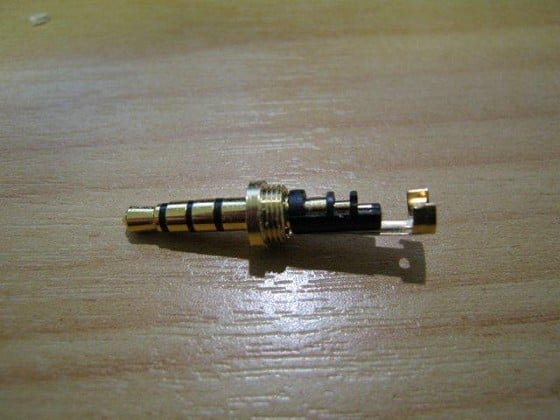
An update: I made up an adapter (4-pole plug to 2 3.5mm stereo sockets) using the Jaycar plug (see pic). At least this way I can use the headset on another PC. One issue with the plug design is that the ground connection has to be soldered on at the connection closest to the tip, so the ground needs to be insulated to avoid shorting on the other two connections it passes. I ended up using a light 3-core unshielded cable chopped off cheap stereo headphones. It works OK, though I was concerned about robustness, so I have filled the plug body up with rapid epoxy glue.


richms
29098 posts

Uber Geek
+1 received by user: 10209

Trusted
Lifetime subscriber

  #671532 12-Aug-2012 19:04
Send private message

Yeah, huge issue with using a normal plug with phone headsets since some einstein there decided to use the sleeve for a signal and one of the rings as ground. Means you cant really use a nice metal bodied plug either since its a huge area to pick noise up.

The guy that decided on the pin layout needs a punch to the back of the head.


Richard rich.ms

Create new topic


Geekzone Live »

Try automatic live updates from Geekzone directly in your browser, without refreshing the page, with Geekzone Live now.


Are you subscribed to our RSS feed? You can download the latest headlines and summaries from our stories directly to your computer or smartphone by using a feed reader.