Geekzone: technology news, blogs, forums
Guest
Welcome Guest.
You haven't logged in yet. If you don't have an account you can register now.


tardtasticx

3084 posts

Uber Geek
+1 received by user: 483


#196583 5-Jun-2016 15:19
Send private message

Hi all, 


I picked up a ex-lease laptop for what I think is a pretty good deal. When purchasing it I asked if it had an SSD built in the sales rep said no, just a 320GB HDD. I purchased an SSD at the same time so I could swap that out the second I got home. 


Well I get home and install this new SSD (120GB Apacer Panther for less than $60 at PB!), I started the PC back up again and it was booting into Windows 7 Pro right away which I thought was odd since last time I checked SSDs don't come with that pre-installed. Looked through Computer Management and saw the following:
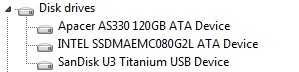


(The last drive is a USB one I have only just plugged in).


My question is though, which of the two SSDs is a better performer? I'd imagine the MSATA but I've never used a computer with one built in before so I'm not 100% sure on that. Can anyone shed some light on this? I'm planning to upgrade this thing to Windows 10 so I'd like to install that on the drive that'd be fastest. 


Cheers!


Filter this topic showing only the reply marked as answer Create new topic
Dynamic
4015 posts

Uber Geek
+1 received by user: 1851

ID Verified
Trusted
Lifetime subscriber

  #1566063 5-Jun-2016 15:43
Send private message

Use the free version of HDTune for performance test. Also you can take the new SSD back if you like because they gave you bad advice.


“Don't believe anything you read on the net. Except this. Well, including this, I suppose.” Douglas Adams


Jase2985
13730 posts

Uber Geek
+1 received by user: 6202

ID Verified
Lifetime subscriber

  #1566069 5-Jun-2016 16:04
Send private message

the apacer will be faster as its SATA3 where as the intel is only SATA3 but specs say its only the 3.0gb/s interface


the specs on the apacer have it being about 2.5x faster read and over 5x faster write


but that assumes your laptop can handle SATA3 and make use of the extra speed available.


Filter this topic showing only the reply marked as answer Create new topic


Geekzone Live »

Try automatic live updates from Geekzone directly in your browser, without refreshing the page, with Geekzone Live now.


Are you subscribed to our RSS feed? You can download the latest headlines and summaries from our stories directly to your computer or smartphone by using a feed reader.
