Geekzone: technology news, blogs, forums
Guest
Welcome Guest.
You haven't logged in yet. If you don't have an account you can register now.


Stephendnz

51 posts

Master Geek
+1 received by user: 10


#289315 27-Aug-2021 23:33
Send private message

Can anyone help me with this issue please..


Every now and then.. sometimes too often.. I hear a dialling sound in the background on my laptop..  Its like some program is trying to connect to somewhere.. after the dialling sound there's a sound like you'd get when calling a disconnected number.. 


I have tried looking in the task manager to see if I can see some unknown program calling.. but don't see anything..


Any suggestion?? 


I fear one day it will actually make a connection.. and I and all my data with be sucked into the matrix...


Cheers


Using a Toshiba laptop with Windows 10.


:-) 


View this topic in a long page with up to 500 replies per page Create new topic
 1 | 2 | 3
Linux
12173 posts

Uber Geek
+1 received by user: 8469

Trusted
Lifetime subscriber

  #2767896 28-Aug-2021 03:38
Send private message

How could it make a connection?


richms
29098 posts

Uber Geek
+1 received by user: 10208

Trusted
Lifetime subscriber

  #2767897 28-Aug-2021 03:48
Send private message

The last time I had to help someone with weird noises on their laptop it was a facebook tab ringing with a messenger call. There shouldnt be anything making outgoing calls in any voip app without you doing something,


If you can get the volume mixer open (right click on the speaker in the tray and choose volume mixer) it will show you what app is making sounds at that time.


Richard rich.ms

snnet
1413 posts

Uber Geek
+1 received by user: 556


  #2767903 28-Aug-2021 06:36
Send private message

are you sure it's not a neighbor's loud phone or something? I swear sometimes I hear things that sound like they're outside my home but there's nothing there when I look, I live at least 30m from any other house but I think it must come thru something common like stormwater pipes (there's a pit on my driveway) or bounce off other objects


Goosey
3014 posts

Uber Geek
+1 received by user: 867

Subscriber

  #2767920 28-Aug-2021 08:23
Send private message

By chance has anyone pranked you set and swapped out one of the sound files (.wav) for a prompt/alert?  i.e. check out windows sounds...(or whatever it is called these days).


Classic prank. 


Behodar
11094 posts

Uber Geek
+1 received by user: 6071

Trusted
Lifetime subscriber

  #2767921 28-Aug-2021 08:30
Send private message

Goosey:


i.e. check out windows sounds...(or whatever it is called these days).


If that's even reliable any more. I've set my work PC to "no sounds" and it still makes noises every now and then.


wellygary
8810 posts

Uber Geek
+1 received by user: 5287


  #2767924 28-Aug-2021 08:43
Send private message

So your laptop is plugged into the ptsn network and actually has a modem??? ....


Shop on-line at New World now for your groceries (affiliate link).
cyril7
9073 posts

Uber Geek
+1 received by user: 2499

ID Verified
Trusted
Subscriber

  #2767926 28-Aug-2021 08:51
Send private message

Computers have not commonly had analog modems for near on 15years, if not more. So how old is this laptop?

Does not add up.

Cyril

xpd

xpd
Geek of Coastguard
14115 posts

Uber Geek
+1 received by user: 4574

Retired Mod
ID Verified
Trusted
Lifetime subscriber

  #2767927 28-Aug-2021 08:54
Send private message

wellygary: So your laptop is plugged into the ptsn network and actually has a modem??? ....


This..... not seen a modem in a laptop for ages now thinking about it :D


So yeah, its a sound / app causing it. Go through your installed programs and remove anything from a 3rd party that you dont use.


XPD / Gavin


LinkTree


Rickles
3107 posts

Uber Geek
+1 received by user: 445

Trusted

  #2767937 28-Aug-2021 09:35
Send private message

E.T. living in your attic?


Batman
Mad Scientist
30012 posts

Uber Geek
+1 received by user: 6217

Trusted
Lifetime subscriber

  #2767981 28-Aug-2021 11:10
Send private message

it's called coil whine


nothing to worry about


Batman
Mad Scientist
30012 posts

Uber Geek
+1 received by user: 6217

Trusted
Lifetime subscriber

  #2767984 28-Aug-2021 11:15
Send private message

Rickles:


E.T. living in your attic?


they used to put small people into TVs to talk to you, sing to you and entertain you.


nowadays they have nano ETs inside your computer to do just that.


if you have an ET in your attic it's just visiting his cousin locked up in your phone.


Shop now on AliExpress (affiliate link).
Stephendnz

51 posts

Master Geek
+1 received by user: 10


  #2768220 28-Aug-2021 23:36
Send private message

Thanks for all the great feedback.. and the interesting suppositions.. 


A couple of things.. Pranked.. No.. No one else has access to this laptop.. 


ET's, brother.. No!!


An interesting twist to this mystery.. and I have to confess I had not noticed before given the proximity of both is.. That the sounds are actually coming form the speakers of a separate Compaq monitor which I have connected via a VGA cable.. It's to ancient to have an HDMI.. the bizarre thing is though, that the sound is still coming even if I don't have the separate audio cable connected to it.. 


Is my computer old enough to have a modem.. Probably yes.. Manf yr about 2010 so i guess as far as having a modem.. I guess would that be my Standard Modem Over Bluetooth.. I found that in task manager.. and checked the View Log.. immediately after I hear the dialling sound again.. and listed below is what the Log showed. Can anyone make any sense of that?? 


LOG


08-28-2021 23:20:19.244 - File: C:\WINDOWS\system32\tapisrv.dll, Version 10.0.19041   
08-28-2021 23:20:19.244 - File: C:\WINDOWS\system32\unimdm.tsp, Version 10.0.19041   
08-28-2021 23:20:19.244 - File: C:\WINDOWS\system32\unimdmat.dll, Version 10.0.19041   
08-28-2021 23:20:19.244 - File: C:\WINDOWS\system32\uniplat.dll, Version 10.0.19041   
08-28-2021 23:20:19.260 - File: C:\WINDOWS\system32\drivers\modem.sys, Version 10.0.19041   
08-28-2021 23:20:19.260 - File: C:\WINDOWS\system32\modemui.dll, Version 10.0.19041   
08-28-2021 23:20:19.260 - File: C:\WINDOWS\system32\mdminst.dll, Version 10.0.19041   
08-28-2021 23:20:19.260 - Modem type: Standard Modem over Bluetooth link
08-28-2021 23:20:19.260 - Modem inf path: mdmbtmdm.inf
08-28-2021 23:20:19.260 - Modem inf section: GenericCellPhone
08-28-2021 23:20:19.260 - Matching hardware ID: bthenum\{00001103-0000-1000-8000-00805f9b34fb}
08-28-2021 23:20:24.420 - Opening the modem device failed with error 00000079


Oh and is definitely a dialling sound (as opposed to a Coil Whine) follows by a number disconnected sound.. 


My concern is not so much the noise as.. "Is there a virus that is trying to connect me to somewhere for nefarious purposes.. :-) 


Cheers for all your help fellas. 


freitasm
BDFL - Memuneh
80646 posts

Uber Geek
+1 received by user: 41030

Administrator
ID Verified
Trusted
Geekzone
Lifetime subscriber

  #2768224 29-Aug-2021 00:23
Send private message

Is your computer actually paired to a mobile? Is the mobile in question turned on and nearby? Any good reason to have it paired at all?


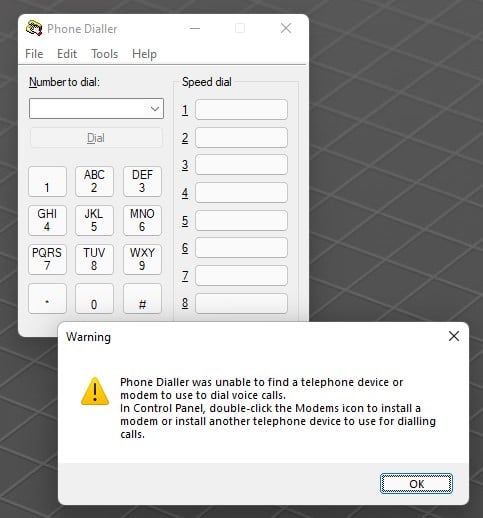
If you press Windows Key + R and enter dialer, do you see this?


(Dialer is still there, even in Windows 11)


Referral links: Quic Broadband (free setup code: R587125ERQ6VE) | Samsung | AliExpress | Wise | Sharesies 


Support Geekzone by subscribing (browse ads-free), or making a one-off or recurring donation through PressPatron.


Stephendnz

51 posts

Master Geek
+1 received by user: 10


  #2768231 29-Aug-2021 00:39
Send private message

Hi Memuneh,


Yes I do have that dialler /.. but never used it.. And there were no preset numbers in there or any in the drop down.. I do have the MS Your Phone app on my phone.. but have never set it up.. and no set up on my Laptop that i know of..


The noise just happened again.. here's the log.. vCan you see what it is in there that is instigating the calling.. Is it a virus?? 


08-29-2021 00:33:30.987 - File: C:\WINDOWS\system32\tapisrv.dll, Version 10.0.19041   
08-29-2021 00:33:30.987 - File: C:\WINDOWS\system32\unimdm.tsp, Version 10.0.19041   
08-29-2021 00:33:30.987 - File: C:\WINDOWS\system32\unimdmat.dll, Version 10.0.19041   
08-29-2021 00:33:30.987 - File: C:\WINDOWS\system32\uniplat.dll, Version 10.0.19041   
08-29-2021 00:33:31.003 - File: C:\WINDOWS\system32\drivers\modem.sys, Version 10.0.19041   
08-29-2021 00:33:31.003 - File: C:\WINDOWS\system32\modemui.dll, Version 10.0.19041   
08-29-2021 00:33:31.003 - File: C:\WINDOWS\system32\mdminst.dll, Version 10.0.19041   
08-29-2021 00:33:31.003 - Modem type: Standard Modem over Bluetooth link
08-29-2021 00:33:31.003 - Modem inf path: mdmbtmdm.inf
08-29-2021 00:33:31.003 - Modem inf section: GenericCellPhone
08-29-2021 00:33:31.003 - Matching hardware ID: bthenum\{00001103-0000-1000-8000-00805f9b34fb}
08-29-2021 00:33:36.164 - Opening the modem device failed with error 00000079


Kind regards


Stephen


freitasm
BDFL - Memuneh
80646 posts

Uber Geek
+1 received by user: 41030

Administrator
ID Verified
Trusted
Geekzone
Lifetime subscriber

  #2768232 29-Aug-2021 00:41
Send private message

Again... Do you have a Bluetooth phone paired with your computer?


Referral links: Quic Broadband (free setup code: R587125ERQ6VE) | Samsung | AliExpress | Wise | Sharesies 


Support Geekzone by subscribing (browse ads-free), or making a one-off or recurring donation through PressPatron.


 1 | 2 | 3
View this topic in a long page with up to 500 replies per page Create new topic


Geekzone Live »

Try automatic live updates from Geekzone directly in your browser, without refreshing the page, with Geekzone Live now.


Are you subscribed to our RSS feed? You can download the latest headlines and summaries from our stories directly to your computer or smartphone by using a feed reader.