Geekzone: technology news, blogs, forums
Guest
Welcome Guest.
You haven't logged in yet. If you don't have an account you can register now.


duckDecoy

946 posts

Ultimate Geek
+1 received by user: 432

Subscriber

#289377 2-Sep-2021 13:29
Send private message

I have an ASUS FX502 GL502VML laptop.  Running windows 10 pro. 


If I leave the laptop it goes to sleep (I think this is the term), the screen goes black.  When i hit a key or wiggle the mouse the screen goes first a light black for a few seconds (so the screen is definitely doing something) and then the login screen appears.


Lately, and its getting more and more common, the screen goes to the light black bit but never ever carries on to the login screen.  The lights on the keyboard are on, the fan is going, I can see the battery and HD lights etc, but it never ever comes back to the login screen and I have to reboot.


Can anyone give me pointers as to what to look into?  I'm not hugely techy.  I've tried googling but haven't come up with much, but I am probably not using the correct terms.


Thanks


Create new topic
thenine
37 posts

Geek
+1 received by user: 12


  #2775884 10-Sep-2021 10:28
Send private message

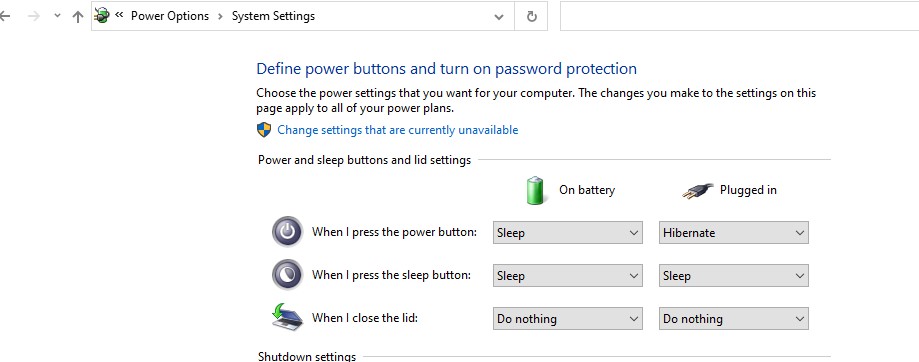
Sounds like it might be in hibernation mode? If you touch the on button does it boot to the login screen straight away? 


Check the power settings and check. If it is then you can just change it. 


Or you can check the bios. 


Oblivian
7345 posts

Uber Geek
+1 received by user: 2117

ID Verified

  #2775889 10-Sep-2021 10:42
Send private message

'Modern Standby' has bugs like this


Has tendency to power stuff down to bare minimal for faster appearing running windows/startup


With the downside, lots of things don't recover and just crash.


https://www.asus.com/me-en/support/FAQ/1035447/ 


timmmay
20858 posts

Uber Geek
+1 received by user: 5350

Trusted
Lifetime subscriber

  #2775897 10-Sep-2021 10:57
Send private message

Have you tried turning it off then on again? ;) Or a Windows reinstall? Or just disabling sleep mode.


Create new topic


Geekzone Live »

Try automatic live updates from Geekzone directly in your browser, without refreshing the page, with Geekzone Live now.


Are you subscribed to our RSS feed? You can download the latest headlines and summaries from our stories directly to your computer or smartphone by using a feed reader.