Geekzone: technology news, blogs, forums
Guest
Welcome Guest.
You haven't logged in yet. If you don't have an account you can register now.


badjer27

11 posts

Geek


#290159 24-Oct-2021 22:59
Send private message

I have a Dell XPS 15 9560 64 Bit laptop running Windows 10 Pro
It runs beautifully and has no problems except for a problem with the microphone - it's not working. (Realtek Audio, according to the Settings)
I've been right through all the relevant settings regarding the microphone (Language, Speech etc.) and I can't find anything to account for this, and I can't see anything relevant on the 'net, (so far) and I'm baffled.
Am I just missing something obvious (or has the microphone contracted the Covid virus?)
Anyone have any ideas/suggestions? 


Create new topic


sparkz25
750 posts

Ultimate Geek
+1 received by user: 284
Inactive user


  #2800525 24-Oct-2021 23:29
Send private message

Check that its not a application permission or that the mic is disabled.


Right click on the start menu then click on settings,


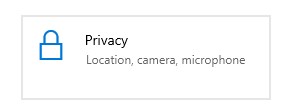
Click on privacy,


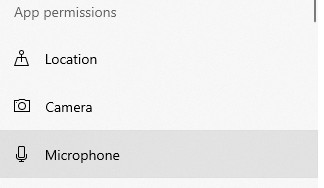
Then click on


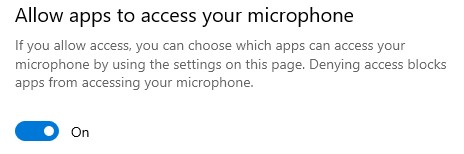
You may need to flick the switch to turn the mic on or chose the apps that can have access to the mic.


scuwp
3927 posts

Uber Geek
+1 received by user: 2510


  #2800528 24-Oct-2021 23:57
Send private message

Does the sound input work if you plug in headphones with a mic?


Lazy is such an ugly word, I prefer to call it selective participation


badjer27

11 posts

Geek


  #2800531 25-Oct-2021 00:41
Send private message

Yes, I've tried all the suggestions there.


Linux
12173 posts

Uber Geek
+1 received by user: 8468

Trusted
Lifetime subscriber

  #2800534 25-Oct-2021 05:23
Send private message

badjer27:


Yes, I've tried all the suggestions there.


The Mic sounds like it is faulty then


surfisup1000
5288 posts

Uber Geek
+1 received by user: 2159


  #2800607 25-Oct-2021 09:33
Send private message

Has it ever worked to your knowledge?


Stream your favourite shows now on Apple TV (affiliate link).
TheMaskedOnion
51 posts

Master Geek
+1 received by user: 4


  #2800611 25-Oct-2021 09:38
Send private message

Have you tried using a Ubuntu live USB to see if the microphone is working?


If still not working then is your laptop still under warranty?


MadEngineer
4591 posts

Uber Geek
+1 received by user: 2570

Trusted

  #2800679 25-Oct-2021 11:34
Send private message

I had similar with someone’s work laptop. Mic was actually working as the sound level bar in the Control Panel setting was showing activity, but apps wouldn’t get any audio. Confirmed mic permissions even turning that off and on to test if the software was using it.

I didn’t spend too long on it but download new drivers for it. IIRC Dell doesn’t offer an update utility - you have to find and select the driver yourself.


You're not on Atlantis anymore, Duncan Idaho.

Create new topic


Geekzone Live »

Try automatic live updates from Geekzone directly in your browser, without refreshing the page, with Geekzone Live now.


Are you subscribed to our RSS feed? You can download the latest headlines and summaries from our stories directly to your computer or smartphone by using a feed reader.