Geekzone: technology news, blogs, forums
Guest
Welcome Guest.
You haven't logged in yet. If you don't have an account you can register now.


paulchinnz

Circumspice
796 posts

Ultimate Geek
+1 received by user: 223

Trusted
Lifetime subscriber

#312116 19-Mar-2024 07:45
Send private message

This is about an almost $4k laptop purchased in Oct 2022 from Dell's online store. This is how the battery has been used: because it's mostly (>95%) used docked, it's been configured through Dell's power management software accordingly (the setting is called something like "always connected to power"), the Windows setting for low battery action at 20% is to hibernate (i.e. battery hasn't gone much below 20% while in use) and it doesn't spend more than 24 hours away from being connected to power. 


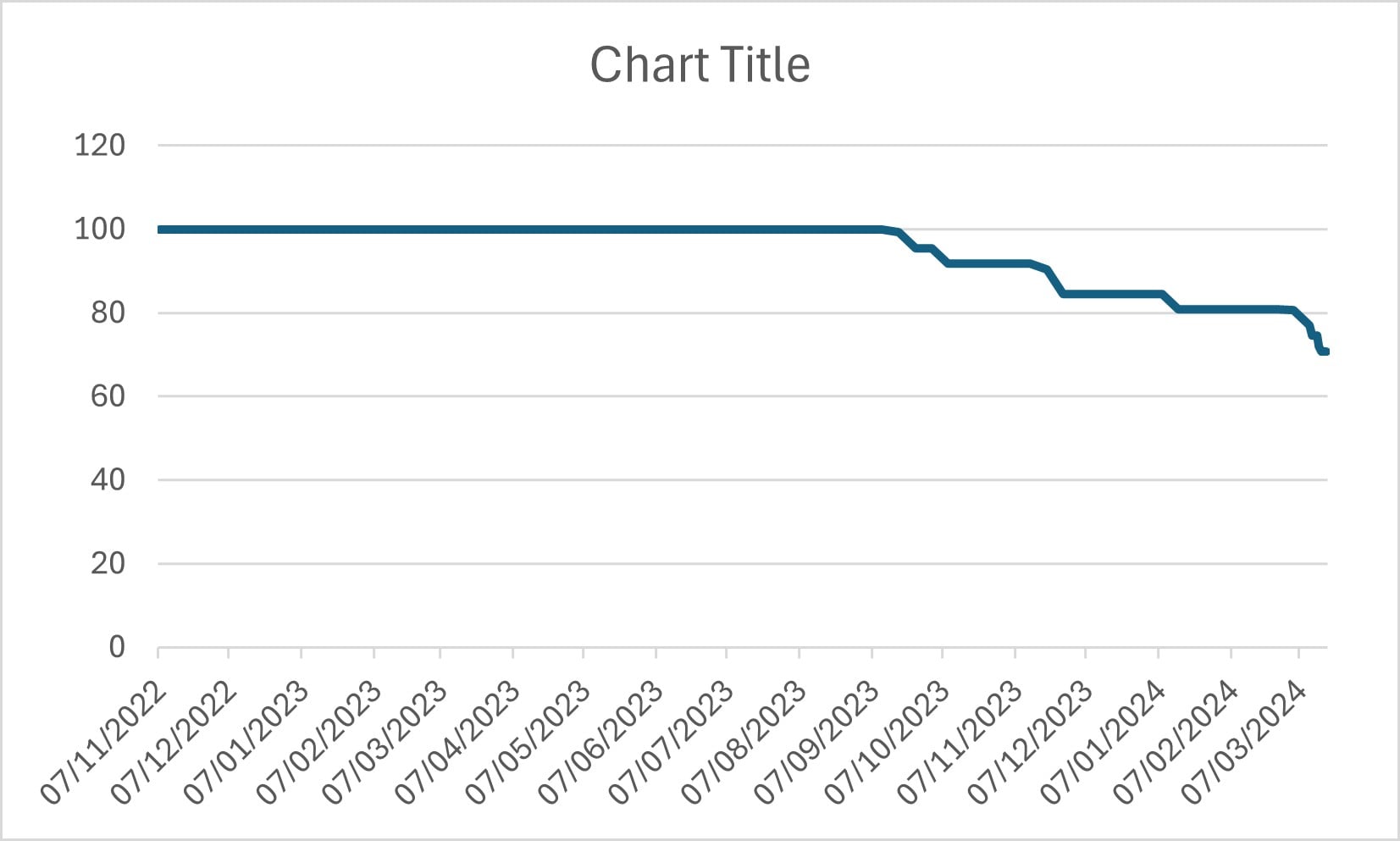
Despite this, 15 months later, it's down to 70% of original battery capacity (based on HWiNFO and also current experience of it compared to when it was new).


It'd be interesting to hear views about whether this is normal but at bad end, or abnormally bad i.e. faulty battery.


Regardless, the crux of the question: could this be covered by CGA?


View this topic in a long page with up to 500 replies per page Create new topic
 1 | 2
CYaBro
4708 posts

Uber Geek
+1 received by user: 1182

ID Verified
Trusted

  #3207813 19-Mar-2024 07:52
Send private message

Probably the question is whether it was used mainly for business purposes or not.
Not many people would buy a $4k laptop and dock to use for checking Facebook.
Business use isn’t covered by the CGA.


Opinions are my own and not the views of my employer.


paulchinnz

Circumspice
796 posts

Ultimate Geek
+1 received by user: 223

Trusted
Lifetime subscriber

  #3207818 19-Mar-2024 08:09
Send private message

Good point. No commercial business involved in purchase or use.


It's been exclusively used for personal use.


alasta
6888 posts

Uber Geek
+1 received by user: 3362

Trusted
Subscriber

  #3207829 19-Mar-2024 08:49
Send private message

For what it's worth my Macbook Pro purchased exactly two years ago is showing 100% battery health, so something doesn't sound right with your system. 


mentalinc
3384 posts

Uber Geek
+1 received by user: 1023

Trusted

  #3207836 19-Mar-2024 09:01
Send private message


  1. Open the Start menu, then search for Command Prompt 
  2. Run Command Prompt in administrator mode 
  3. Type powercfg /batteryreport /output “C:\battery_report.html” and press enter
  4. Navigate to the “C:\battery_report.html” file on your C drive
  5. Click the html link to view the battery report


See if that provides more insight


CPU: AMD 5900x | RAM: GSKILL Trident Z Neo RGB F4-3600C16D-32GTZNC-32-GB | MB:  Asus X570-E | GFX: EVGA FTW3 Ultra RTX 3080Ti| Monitor: LG 27GL850-B 2560x1440


Quic: https://account.quic.nz/refer/473833 R473833EQKIBX 


SirHumphreyAppleby
2938 posts

Uber Geek
+1 received by user: 1860


  #3207840 19-Mar-2024 09:08
Send private message

CYaBro: Probably the question is whether it was used mainly for business purposes or not.
...
Business use isn’t covered by the CGA.


The CGA applies to goods and services that are ordinarily used for domestic purposes.


In the case of business to business transactions, they must explicitly opt out of the CGA. If that hasn't occurred, the CGA still applies.


RunningMan
9184 posts

Uber Geek
+1 received by user: 4834


  #3208127 19-Mar-2024 18:34
Send private message

CYaBro: 
Business use isn’t covered by the CGA.


That's not actually what the act says, but there is an option to contract out of it for businesses.


As for battery, keeping it sitting on power (charging) all the time is about the worst thing possible for it. Being at a high state of charge leads to chemical breakdown of the battery and early failure. I don't know if the power management option you used is supposed to mitigate this by keeping the charge lower, but something to consider.


This is about EV batteries, but same concept


Shop now at Mighty Ape (affiliate link).
RunningMan
9184 posts

Uber Geek
+1 received by user: 4834


  #3208157 19-Mar-2024 20:03
Send private message

Hmm, embedded video got lost.


paulchinnz

Circumspice
796 posts

Ultimate Geek
+1 received by user: 223

Trusted
Lifetime subscriber

  #3208163 19-Mar-2024 20:22
Send private message

Thanks @runningman, yes have have owned an EV since 2016, there is something different about laptop batteries. This laptop isn't the first Dell in my family to be largely connected to power - the previous one still has >80% battery after ~6 years. 


@mentalinc that batteryreport is cool. I've plotted the output below.


KevlarCoated
23 posts

Geek
+1 received by user: 6

ID Verified

  #3213241 2-Apr-2024 14:29
Send private message

Industry standard for phones (and Id expect a laptop to be better) is >80% original capacity after 2 years. Pretty much every cell phone manufacturer does accelerated life testing to 1000cycles to test this. 


While the cause may well be constant over charging which is arguably a user fault most cell phones manage this by just not using 100% of cell capacity so 100% isn't actually 100% cell charge and there's no good reason a laptop shouldn't do this since it's reasonable to expect people to still be using them in 5+ years time so they should be choosing their battery cells and configuring them with that in mind (even though it reduces the advertised spec of battery life to begin with)


I'd say you have a pretty decent argument for the CGA that the battery has degraded substantially more than could be reasonably expected.


SirisLeOsiris
13 posts

Geek
+1 received by user: 14


  #3213286 2-Apr-2024 17:39
Send private message

While 80% might be expected of a battery that is normally used / cycled after 2 years, a battery that is left at 100% for almost all its life (or 0%) will degrade much faster.


They actually need to charge and discharge stock batteries if they sit too long and you want to store them at between 30 and 70% optimally if not being used.


They also do tend to degrade faster once it starts going downhill too.


None of the manufacturers except cover batteries outside of the first year, unless it is a total failure (Not detected at all, or puffed up) and even then it's not automatic.


They will all claim it is a consumable item expected to degrade and wear out over time.


You might be able to get it covered but it will be a fight, on a case by case basis.


I've worked with Dynabook/Toshiba, Dell, HP, Lenovo, Acer, Asus and Apple and only Apple cover them because it's less hassle for them and their part is so integrated :P


Batman
Mad Scientist
30012 posts

Uber Geek
+1 received by user: 6217

Trusted
Lifetime subscriber

  #3213477 3-Apr-2024 09:27
Send private message

paulchinnz:

This is about an almost $4k laptop purchased in Oct 2022 from Dell's online store. This is how the battery has been used: because it's mostly (>95%) used docked, it's been configured through Dell's power management software accordingly (the setting is called something like "always connected to power"), the Windows setting for low battery action at 20% is to hibernate (i.e. battery hasn't gone much below 20% while in use) and it doesn't spend more than 24 hours away from being connected to power. 


Despite this, 15 months later, it's down to 70% of original battery capacity (based on HWiNFO and also current experience of it compared to when it was new).


It'd be interesting to hear views about whether this is normal but at bad end, or abnormally bad i.e. faulty battery.


Regardless, the crux of the question: could this be covered by CGA?



If a lithium ion battery is plugged in it will charge to 100% and keep charging to 100% and when the battery gets hot because it's in a laptop the combination of the two factors will cook ie degrade the battery very quickly.

You can't control the heat but you can set the bios to not charge above X %

Having had many devices in Dell laptops the option of telling the firmware that you're plugged in does very little to protect the battery. They are more concerned that your device dies prematurely so you buy another one after the warranty ends.


Shop now for Dyson appliances (affiliate link).
1101
3141 posts

Uber Geek
+1 received by user: 1143


  #3214343 4-Apr-2024 22:27
Send private message

letting the ball cell voltage get too low is what ruins a lithium batts lifespan
Letting the batt get too hot is what ruins a batts lifespan


Charging to 100% : the batt management circuit will stop the charge at 100% (or slightly less) 
There is no overcharging . 100% charge isnt what destroys batts .


If you push any batt too hard ,constantly down to near min voltage, of course it wont last.
Some batts do just fail though /loose capacity , even if not abused . 

It could be argued thats just the nature of the beast . Any type of rechargeable batt can have a shorter than expected lifespan. 
Its sort of expected that they have limited life . They start to degrade after day 1 .


SomeoneSomewhere
1882 posts

Uber Geek
+1 received by user: 1086

Lifetime subscriber

  #3214346 4-Apr-2024 22:43
Send private message

RunningMan:


CYaBro: 
Business use isn’t covered by the CGA.


That's not actually what the act says, but there is an option to contract out of it for businesses.


As for battery, keeping it sitting on power (charging) all the time is about the worst thing possible for it. Being at a high state of charge leads to chemical breakdown of the battery and early failure. I don't know if the power management option you used is supposed to mitigate this by keeping the charge lower, but something to consider.


This is about EV batteries, but same concept


Specifically, to contract out of the CGA, there must be an agreement in writing and the buyer must be 'in trade'.


Slapping standard T&Cs on the back of a packing slip/invoice is going to meet the bar.


andrew75
150 posts

Master Geek
+1 received by user: 80

ID Verified

  #3214359 5-Apr-2024 07:04
Send private message

Not sure about Dell but many manufacturers have a bios or setting or application to set the max battery charge to say 70-80% if the laptop is used in dock mode most of the time. Limits the degradation caused by the battery in a constant state of 100% charge.


Batman
Mad Scientist
30012 posts

Uber Geek
+1 received by user: 6217

Trusted
Lifetime subscriber

  #3214360 5-Apr-2024 07:14
Send private message

1101:


Charging to 100% : ... 100% charge isnt what destroys batts .


with all due respect that is not correct at all specifically with Li ion


Li ion is so special that just by looking at it, it is already degrading by itself. Then there are things that accelerate that process. Combine them and you have a dying battery. It's worse than toilet paper. Consider li ion battery a self wearing item.

 1 | 2
View this topic in a long page with up to 500 replies per page Create new topic


Geekzone Live »

Try automatic live updates from Geekzone directly in your browser, without refreshing the page, with Geekzone Live now.


Are you subscribed to our RSS feed? You can download the latest headlines and summaries from our stories directly to your computer or smartphone by using a feed reader.