Geekzone: technology news, blogs, forums
Guest
Welcome Guest.
You haven't logged in yet. If you don't have an account you can register now.


Bazil

81 posts

Master Geek
+1 received by user: 33


#277111 26-Sep-2020 12:28
Send private message

I recently received my Pixel 4A (imported via Amazon), am very happy with the phone. I am with Spark and while the Pixel 4A specifications indicate VoLTE is built into the phone there is no option in the phone settings to toggle it on with Spark. I assume that is because Spark have not enabled it. Well aware that its not a Spark supported phone, but hey lets do it for science! It really is an outstanding phone.


Short of rooting the phone and forcing it on (which I am comfortable doing, just means factory resetting the phone and dealing with SafetyNet shenanigans) any other way of getting VoLTE turned on?


Create new topic
timmmay
20859 posts

Uber Geek
+1 received by user: 5350

Trusted
Lifetime subscriber

  #2574646 26-Sep-2020 12:55
Send private message

Interested for Vodafone too (on corporate plan).


gajan
307 posts

Ultimate Geek
+1 received by user: 215

Trusted
Spark NZ
Lifetime subscriber

  #2574650 26-Sep-2020 13:17
Send private message

Frustrating I know, but unless the handset manufacturers enables the VoLTE configuration for the specific operator, you'll usually have limited/no success.


Some handsets may 'sort of' work if VoLTE is enabled (via rooting/config overrides), but it's no guarantee that everything about voice calling will work - including but not limited to SMS, 111 Calling, Conference Calling, Call service settings - these are typically 'configured' as part of the onboarding process between handset manufacturer and operator.


My comments and remarks are not necessarily of my employer.


hio77
'That VDSL Cat'
13036 posts

Uber Geek
+1 received by user: 3896

ID Verified
Trusted
Lizard Networks
Subscriber

  #2574743 26-Sep-2020 19:21
Send private message

gajan:

Frustrating I know, but unless the handset manufacturers enables the VoLTE configuration for the specific operator, you'll usually have limited/no success.


Some handsets may 'sort of' work if VoLTE is enabled (via rooting/config overrides), but it's no guarantee that everything about voice calling will work - including but not limited to SMS, 111 Calling, Conference Calling, Call service settings - these are typically 'configured' as part of the onboarding process between handset manufacturer and operator.


A hiden secret phone importers don't like to share.

If only providers stocked better models than just the top 3 🙄


#include <std_disclaimer>


Any comments made are personal opinion and do not reflect directly on the position my current or past employers may have. 


ztytian
31 posts

Geek
+1 received by user: 22


  #2574744 26-Sep-2020 19:23
Send private message

I have Spark & VF VoLTE working on my Pixel 2 XL


Look for one of those VoLTE profile Magisk modules on XDA. I think you should be able to use profiles from devices with similar SoCs


I'm using the profile from Nokia 7.1, it seems to knock 3-CA off the table (Nokia 7.1's only capable of 2-CA), but I don't live anywhere close to places with 3-CA coverage.


hio77
'That VDSL Cat'
13036 posts

Uber Geek
+1 received by user: 3896

ID Verified
Trusted
Lizard Networks
Subscriber

  #2574755 26-Sep-2020 20:01
Send private message

ztytian:

I have Spark & VF VoLTE working on my Pixel 2 XL


Look for one of those VoLTE profile Magisk modules on XDA. I think you should be able to use profiles from devices with similar SoCs


I'm using the profile from Nokia 7.1, it seems to knock 3-CA off the table (Nokia 7.1's only capable of 2-CA), but I don't live anywhere close to places with 3-CA coverage.


Could be worse.... Could be a first party hauwei mate 20 which only is setup for 2x2 2CA... Should a gone to PB ;)


#include <std_disclaimer>


Any comments made are personal opinion and do not reflect directly on the position my current or past employers may have. 


Bazil

81 posts

Master Geek
+1 received by user: 33


  #2687323 6-Apr-2021 16:30
Send private message

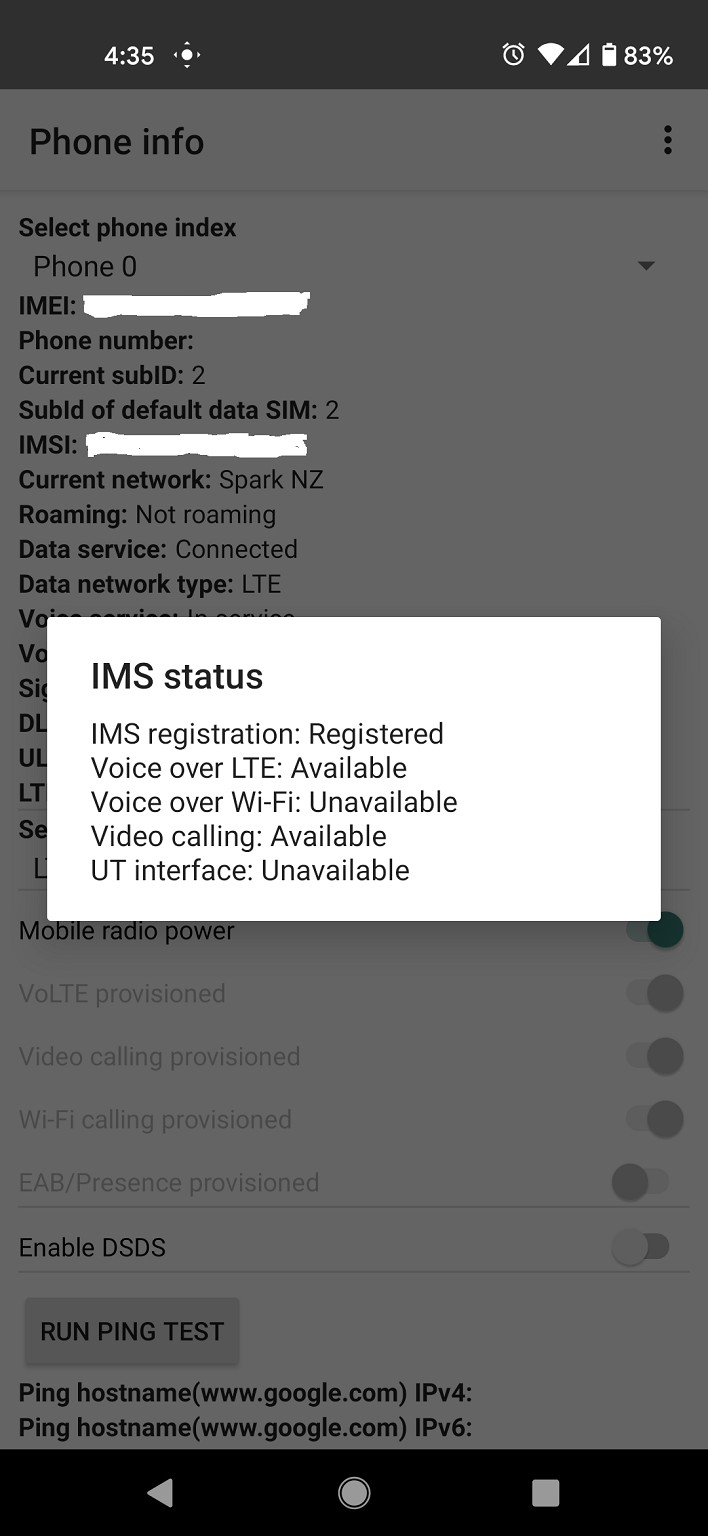
Slight necro, but can confirm that the Pixel 4a works perfectly with Spark VoLTE. 


Click to see full size


Happy to write up a small guide if requested but be warned the steps are not for the faint of heart.


Shop on-line at New World now for your groceries (affiliate link).
MaxineN
Max
2056 posts

Uber Geek
+1 received by user: 1675

ID Verified
Trusted
Subscriber

  #2687362 6-Apr-2021 17:41
Send private message

That's super exciting!


Now you need to grab a Vodafone Sim and test if it works on VF as well!


I'm curious on the guide and so will @swjang


Ramblings from a mysterious lady who's into tech. Warning I may often create zingers.


Bazil

81 posts

Master Geek
+1 received by user: 33


  #2687964 7-Apr-2021 17:12
Send private message

Ok, as requested here is the (not so short) guide to setting up the Pixel 4a with Spark VoLTE.


This guide I have taken/slightly adapted from here. All credit for the hard work on Kars88’s part putting that guide together.


First a disclaimer: I have carried out these steps on my phone and it worked fine. A misstep may mean you will need to wipe and reinstall your phone. At worst it may mean a brick. I take all care but no responsibility. Remember to back up!


Take care that you are carrying this out on the Pixel 4a, NOT the Pixel 4a 5G. It may work but again no guarantees. The reason is the mbn file I have obtained is relevant to the 4a not the 4a 5g which uses a different SoC.


Your phone must be rooted, via Magisk. If you do not know what rooting means or are not prepared to do this then stop here. This process is not for you. 


If you decide to proceed and root I will not go into how here, there are plenty of guides out there, I recommend starting on XDA.


Once your phone is rooted with Magisk you will need the following Magisk module:


https://github.com/ender-zhao/Pixel-5-operator-network-unlock Yes it says Pixel 5, don’t worry it works. Install this Magisk module and reboot phone.


Once done then get:


Qualcomm USB driver. Install this.
Google USB driver. Install this.
An ADB & Fastboot program (you’ll need this for the rooting process anyways). I use Minimal ADB and Fastboot.
Android Platform tools (Install this and make sure you have inserted the directory for this into your PATH environment variable)
EFS Tools Modded. Extract this into a directory (from example EfsTools-0.13), then download the below and extract into the same directory (EfsTools-0.13):
mcfg_autoselect_by_ui
The following file. Take care you get the relevant one for your mobile network. This file I pulled from recent firmware for the Oppo Reno 2 which uses the same SoC.: 
Spark
2 Degrees


I have not been able to obtain the relevant mbn file for Vodafone, sorry. I will update this post should I find what I need.


Place the downloaded mcfg_sw.mbn file into the above EFSTools directory (for example EfsTools-0.13).


Enable USB Debugging on your phone and connect phone to PC via USB cable.


Open ADB on your PC and enter the below commands line by line exactly as shown in the order shown. Best to copy/paste so there is no mistakes.:


adb shell
su
resetprop ro.bootmode usbradio
resetprop ro.build.type userdebug
setprop sys.usb.config diag,diag_mdm,adb
diag_mdlog


A couple of screens of information will scroll by then the process will seem to hang. At this point press CTRL-C on your PC.


At this point on your PHONE go into settings > Connected devices > USB Preferences and change Use USB for to File Transfer/Android Auto or File Transfer whichever is available.


On your PC open a command prompt window in the EfsTools directory. Run the following commands one by one exactly as written. Best to copy paste.


EfsTools.exe writeFile -i mcfg_autoselect_by_uim -o /nv/item_files/mcfg/mcfg_autoselect_by_uim
EfsTools.exe writeFile -i mcfg_autoselect_by_uim -o /nv/item_files/mcfg/mcfg_autoselect_by_uim -s 1


EfsTools.exe uploadDirectory -i mcfg_sw.mbn -o / -v
EfsTools.exe uploadDirectory -i mcfg_sw.mbn -o / -s 1


Once  done, check your VoLTE is working by going into your phones dialler and entering the following code: *#*#4636#*#* select Phone Information, tap  the 3 dots at the top right hand corner and select “IMS status”. IMS Registration should be Registered and Voice over LTE should be Available.


Thats it!


Bazil

81 posts

Master Geek
+1 received by user: 33


  #2687991 7-Apr-2021 18:24
Send private message

Sorry, one (not sure if critical) step - contact Spark Mobile (I just did it via the online chat system) and request that VoLTE be turned on for the relevant mobile phone number.


swjang
9 posts

Wannabe Geek
+1 received by user: 3


  #2697925 26-Apr-2021 00:19
Send private message

Bazil:


Ok, as requested here is the (not so short) guide to setting up the Pixel 4a with Spark VoLTE.


Hey thanks for this. It works on my Pixel 5 but when I restart my phone, I lose IMS registration and I have to do it all over again. 


Create new topic


Geekzone Live »

Try automatic live updates from Geekzone directly in your browser, without refreshing the page, with Geekzone Live now.


Are you subscribed to our RSS feed? You can download the latest headlines and summaries from our stories directly to your computer or smartphone by using a feed reader.